What a Translated Research Paper PDF Looks Like: BERT & DPO Tested
 Equalang
In brief
See page-by-page translation results on the BERT and DPO papers, including two-column layouts, tables, when to enable formula optimization, and exact credit costs.
Keywords: academic paper PDF translation; translate research paper keep layout; PDF formula translation; bilingual PDF paper reading; Zotero PDF translation
Copying a two-column PDF into a chat window or running a browser page translator on a paper usually ends the same way: left and right columns merge into broken sentences, table numbers drift out of their columns, and inline math turns into a string of stray letters and subscripts. When you have a reading list of twenty papers to get through, spending half an hour fixing line breaks before you can even read the method section defeats the purpose of translating it in the first place.
Depending on how you read, you have a few ways to handle this. If you can read most of the text in the original language and only get stuck on dense paragraphs, a Zotero selection translator or a browser extension works well without touching the PDF layout. If you prefer an open-source, self-hosted setup and are comfortable configuring API keys and local environments, tools like PDFMathTranslate can rebuild translated PDFs on your own machine. And if you want to upload a paper in the browser or directly from Zotero and get a layout-preserved PDF back without maintaining local scripts, below we demonstrate how Equalang document translation handles real papers—including where it works cleanly and where you need to adjust a setting.
One frustration with paid PDF translators is not knowing whether the output will be readable before spending credits. On October 26, 2026, our team ran two widely read open-access papers from English into Simplified Chinese to show what the translated pages actually look like: the 16-page BERT paper from NAACL 2019 (two columns, dense benchmark tables) and the 27-page DPO paper from arXiv (single column, heavy on derivations and inline math). Here is a page-by-page look at the results, when to turn on formula optimization, and how to check the exact cost before you start.
Two-column layout and benchmark tables: the 16-page BERT paper
Conference papers in computer science and engineering almost always use a tight two-column layout with footnotes, clickable citation links, and multi-column comparison tables. For the BERT paper (Devlin et al., NAACL 2019, 16 pages), we ran the translation with formula optimization turned off. The job was quoted and charged at 179.09 credits and finished in about 3 minutes.
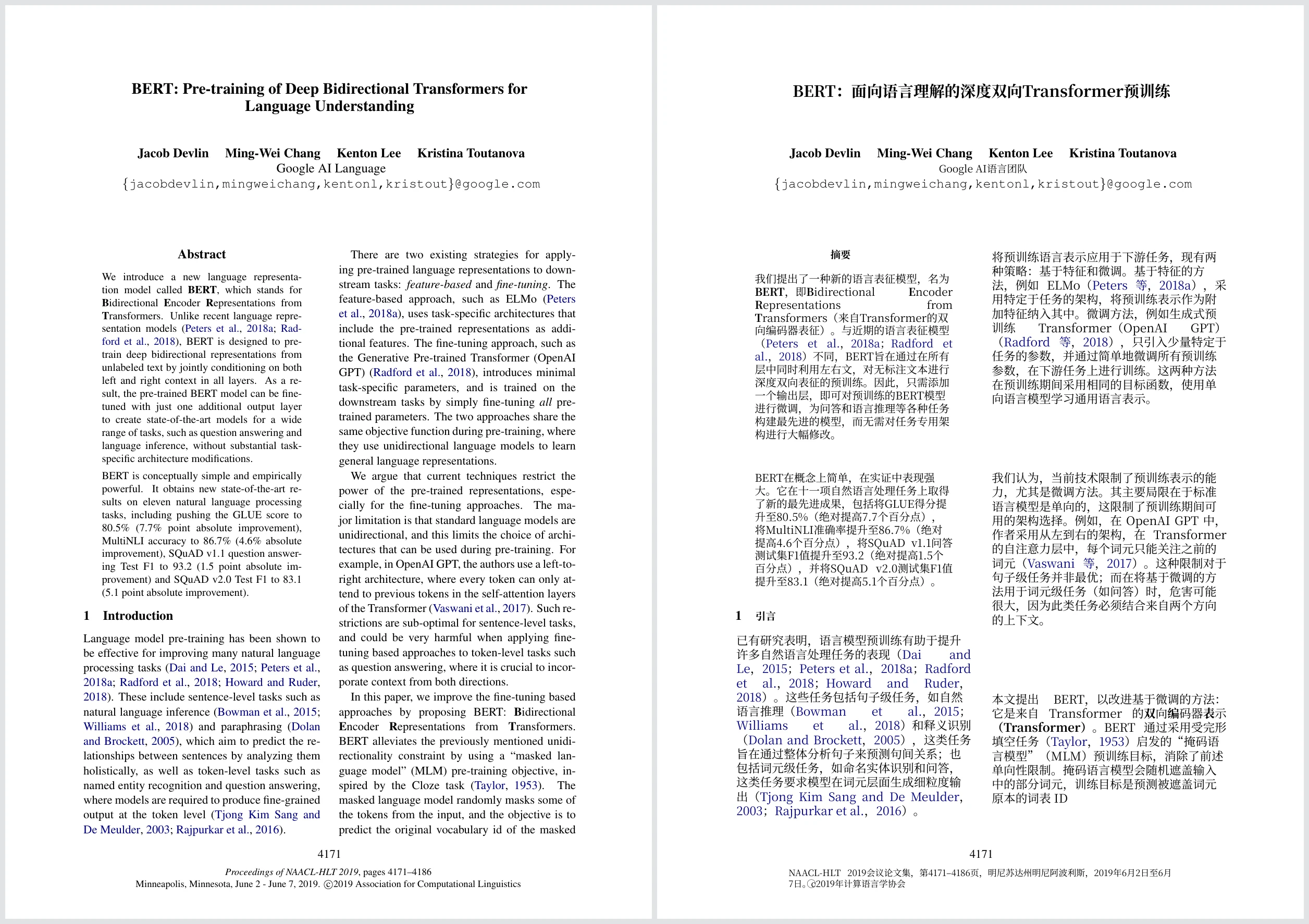
On page 1, the structural bones of the paper hold up well:
- Columns and hierarchy: The title, author list, section numbering, page numbers, and the conference footer at the bottom stay in their original positions. Cross-column sentences are stitched together before translation rather than cut off mid-thought.
- Clickable links: In-text citation links keep their blue highlight and remain clickable, so jumping to the reference list still works as expected.
- Minor spacing shift: Because Chinese characters are more compact than English words, the vertical gap between the end of the abstract and the start of the main body grew slightly larger than in the original PDF.
Experimental tables are another common failure point when translating papers. In BERT's Table 1 (the GLUE benchmark results), losing column alignment or accidentally altering a decimal makes the table useless for literature review.

In the translated Table 1, every number and every bolded best score stays identical to the source. Only the surrounding text—the table caption, column headers, and row labels such as the baseline group headings—is translated. You can read the experimental setup and row descriptions in your target language while trusting that the reported metrics have not been touched.
More broadly, if your daily workflow centers on reading PDFs for literature review, see our guide on how to translate academic paper PDFs while keeping layouts readable.
When to turn on formula optimization: BERT vs. the 27-page DPO paper
Why did we run BERT with formula optimization off, and what happens to math when you leave that switch off? Looking at Section 4.2 of the BERT paper, the image below shows the same section with formula optimization turned on, while the result with it turned off is described in the text below.
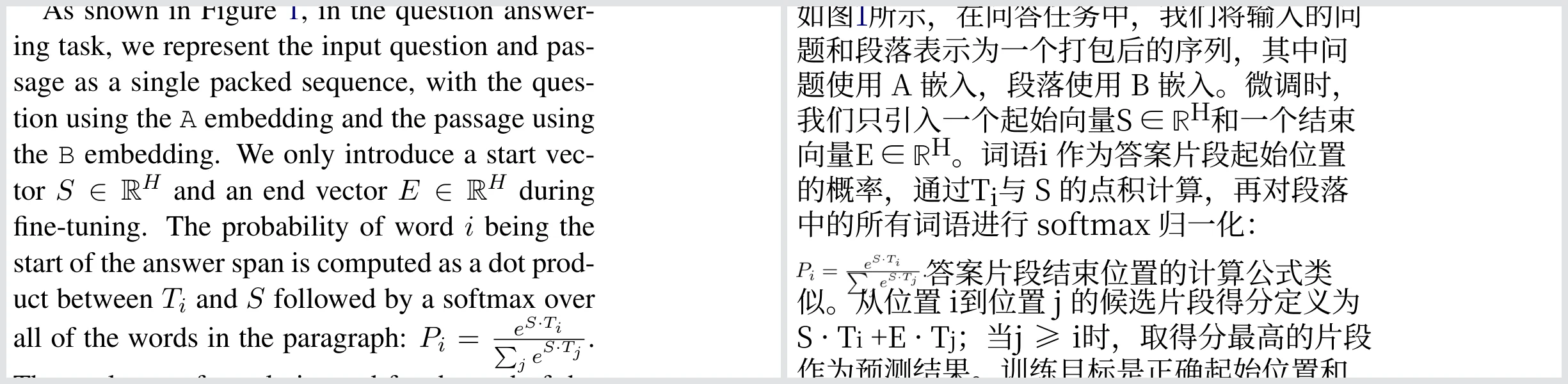
In the right column of page 6, BERT defines the probability of token i being the start of the answer span using an inline fraction: P_i = e^{S·T_i} / Σ_j e^{S·T_j}. With formula optimization turned off, that inline expression was flattened into a single line of plain text (Pi =eS·TiPj es · Tj), losing both the fraction bar and summation subscripts. In the 2026-11-06 rerun of a four-page excerpt (pages 1, 3, 6 and 7) with formula optimization turned on, the translated paragraph restores the fraction with its bar and sub/superscripts, preserves the superscripts in S ∈ ℝ^H and E ∈ ℝ^H, and sets the fraction slightly smaller than the body text immediately before the sentence on the end position formula.
That is the exact trade-off the formula optimization switch is built for. Turning it on adds 10 credits per page, so you do not need it on prose-heavy humanities or qualitative social science papers. However, when a paper weaves fractions, subscripts, and loss terms directly into paragraphs, turning it on makes a clear difference.
To show what formula optimization does on a math-heavy paper, we ran the 27-page DPO paper (Rafailov et al., arXiv 2305.18290) with formula optimization turned on. The base translation was 258.33 credits, plus 270 credits for formula optimization (10 credits × 27 pages), totaling 528.33 credits. The job took about 16.5 minutes.
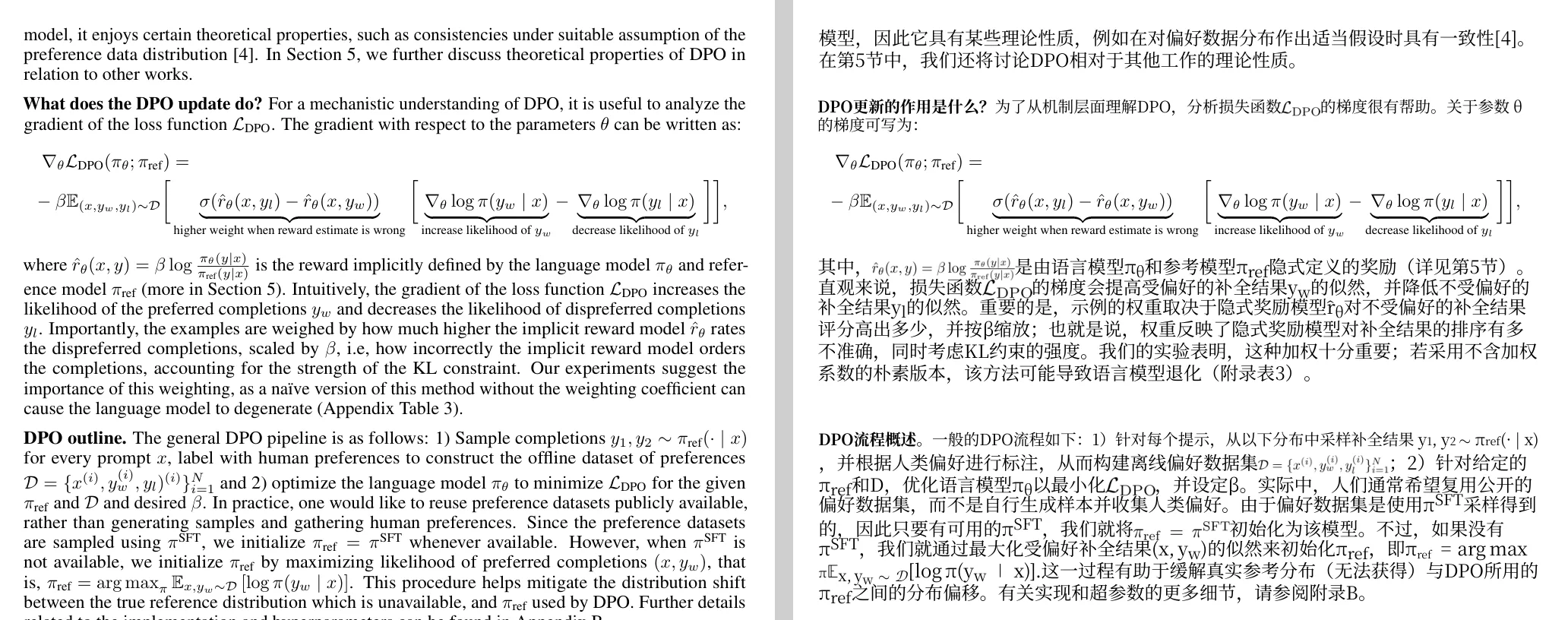
Looking at page 5 of the DPO translation shows both what formula optimization preserves and its current limits:
- Display equations stay intact: The multi-part gradient of the DPO loss function is kept whole, including the underbraces. Note that the short explanatory notes underneath the braces remain in the original English rather than being translated.
- Inline math stays readable: Inline expressions such as
r̂_θ(x, y) = β log ...and inline fractions inside the paragraph are preserved as clean mathematical notation instead of collapsing into garbled characters. - Slightly tight line spacing: Around a few paragraphs that pack several inline formulas close together, the vertical spacing between lines gets a bit cramped, though the text and symbols remain legible.
In short: if a paper only has a few standalone numbered equations and you are comfortable glancing at the original page for inline notation, leaving formula optimization off saves 10 credits per page and finishes faster. If the core contribution lives in inline derivations, probability distributions, or notation-dense paragraphs, turn formula optimization on. You can read more about handling equations in our post on translating AI papers with complex formulas.
How to read the bilingual PDF side by side
Every document translation job returns two downloadable PDFs:
- Translated PDF: Has the exact same page count as the original (16 pages for BERT, 27 pages for DPO), ready to read straight through or share with colleagues who prefer a clean single-language copy.
- Bilingual PDF: Interleaves each original page with its translated page—page 1 is the original, page 2 is the translation of page 1, and so on (32 pages in total for BERT).
If you open the bilingual PDF in a single-page vertical scroll view, you have to scroll up and down to compare a chart or check an English term. A much faster way to read it:
- In the web workspace: Right after a job finishes on the website, open it in the translation workspace. It places the original PDF on the left and the translated PDF on the right with synced scrolling, so you can verify equations or terminology before downloading.
- In Zotero or your local PDF reader: When opening a downloaded bilingual PDF in Zotero's built-in reader, click View → Odd Spreads (two-page tiled view starting on an odd page). Because every odd page is the original and every even page is its translation, every two-page spread lines up the source page on the left and the translated page on the right.
If you manage your literature in Zotero, the Equalang Zotero plugin lets you right-click any PDF attachment to start a translation, choose whether to attach the bilingual PDF, the translated-only PDF, or both directly under the item, and sync them across your devices. For a broader comparison of reading workflows, see how to choose translation tools for reading academic papers and reading research papers when English is not your first language.
How to check the exact cost before you start
You never have to guess how many credits a paper will take. Whether you upload a file on the Document Translation page or right-click an attachment in the Zotero plugin, the system calculates and displays the exact page count, the credit quote, and your current balance before the job starts:
- Text volume + optional add-on: Base credits depend on the amount of text in the document (calculated by tokens, where 1,000 tokens is roughly 750 English words or 1,000 Chinese/Japanese/Korean characters). Turning on formula optimization adds a flat 10 credits per page.
- Real examples as a reference: Based on the Equalang pricing baseline where the smallest credit pack is $10 for 10,000 credits (and larger packs cost less per 10,000 credits), the 16-page BERT paper without formula optimization took 179.09 credits (under $0.18 at the base rate), while the 27-page DPO paper with formula optimization on took 528.33 credits (about $0.53 at the base rate).
- No charge for cancelled or failed jobs: The website and the Zotero plugin share the same account and credit balance. If you see the quote and decide to cancel before starting, or if a job ever fails to complete, no credits are deducted.
Note that the two examples above are born-digital PDFs exported from LaTeX; translation time and layout fidelity vary with document length, formatting complexity, and whether a PDF contains watermarks or scanned images. Before translating a long thesis or a 40-page preprint, check the pre-job quote window and decide whether the paper's inline math calls for formula optimization—that single toggle is usually the biggest factor in both final credit cost and equation readability.
Sources
- Devlin, J., Chang, M.-W., Lee, K., & Toutanova, K. (2019). BERT: Pre-training of Deep Bidirectional Transformers for Language Understanding. Proceedings of NAACL-HLT 2019, 4171–4186. Licensed under CC BY 4.0. https://aclanthology.org/N19-1423/
- Rafailov, R., Sharma, A., Mitchell, E., Ermon, S., Manning, C. D., & Finn, C. (2023). Direct Preference Optimization: Your Language Model is Secretly a Reward Model. arXiv:2305.18290 (CC BY 4.0). https://arxiv.org/abs/2305.18290