Translating Academic PDFs: Layouts, Figures, and Tables
 Equalang
In brief
Sharing English papers with Chinese collaborators requires preserving figures and tables. Here is a practical look at reading academic PDFs with real samples.
Keywords: academic paper translation, academic PDF translation, figure and table translation, literature reading, Equalang document translation
In international academic collaborations, researchers and project leads often need to share English-language journal articles and technical reports with Chinese collaborators, graduate students, or clinical partners. Providing an accurate, layout-preserving Chinese translation substantially accelerates literature onboarding and joint research discussions. However, academic PDFs present distinct hurdles: manual copy-pasting breaks logical reading continuity, while automated tools often disrupt diagram placements or scramble dense data tables.
The primary value of document translation is to provide natural, accessible text while maintaining the visual coordinates of the original document, allowing readers to readily verify details against the source. Below, we examine two real English-to-Chinese translation samples—a technical report featuring a complex system architecture diagram and a clinical oncology study containing a comprehensive patient baseline table—to evaluate how document translation assists literature review. (All full-page and full-table figures can be clicked to view at full resolution.)
Preserving Mixed Layouts: A Full Technical Report Page
Modern preprints and technical reports frequently integrate multi-component system diagrams, detailed captions, bulleted feature lists, and explanatory body text on a single page. In this single-column technical layout, if a translation tool scatters the relative positions of visual assets and text, readers struggle to connect narrative explanations with the corresponding diagram modules.
We evaluated page 6 of the DeepSeek-V4 Technical Report. The upper half features a prominent multi-module system architecture diagram with an explanatory caption beneath, directly followed by bulleted items and structured body paragraphs:
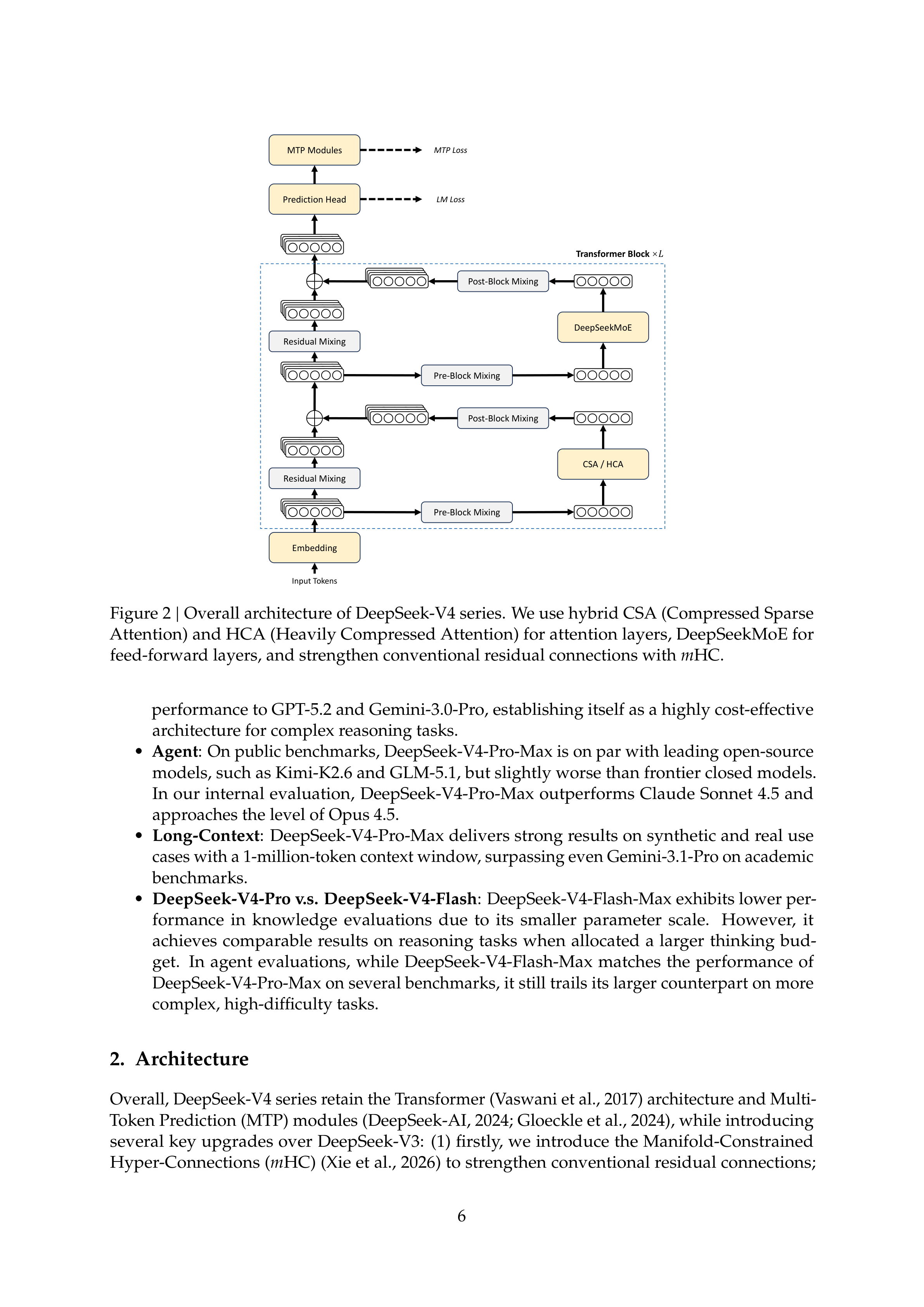
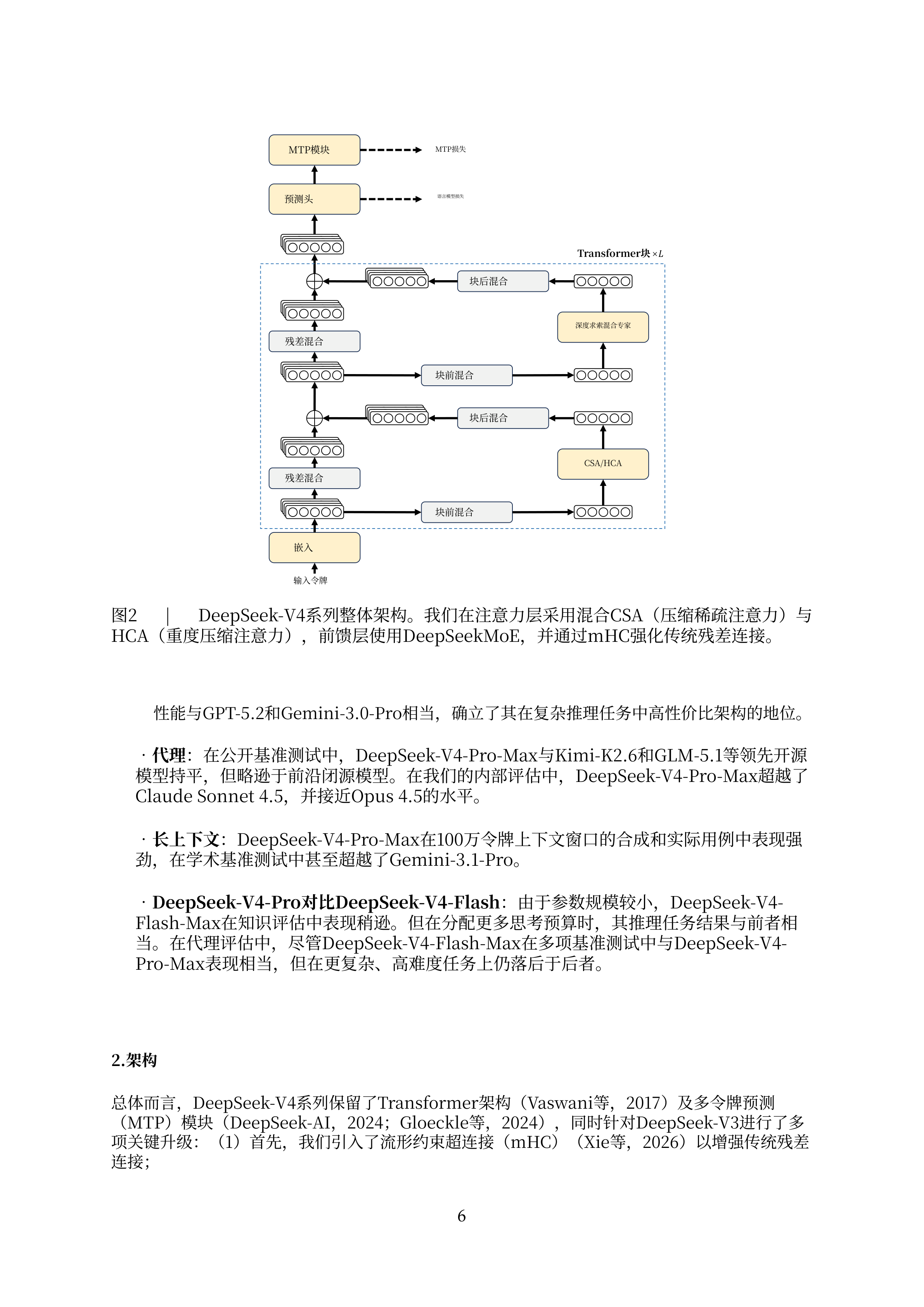
Comparing the source document with the Equalang translation:
- Stable visual relationships: The architecture diagram remains intact at the top of the page, while the caption is translated directly underneath without overlapping graphics or displacing surrounding elements.
- Clear typographical hierarchy: The bulleted items and paragraph margins below maintain their original structure, allowing readers to transition seamlessly from reviewing the visual architecture to reading the technical description.
Tabular Data and Specialized Terminology: Examining Table 1
When moving from conceptual diagrams to empirical data, scientific tables impose even stricter layout requirements. We examined the complete patient baseline table (Table 1) on page 5 of a clinical oncology study published in BMC Cancer (Junji Koyama et al., 2024, on survival prediction in advanced non-small cell lung cancer).
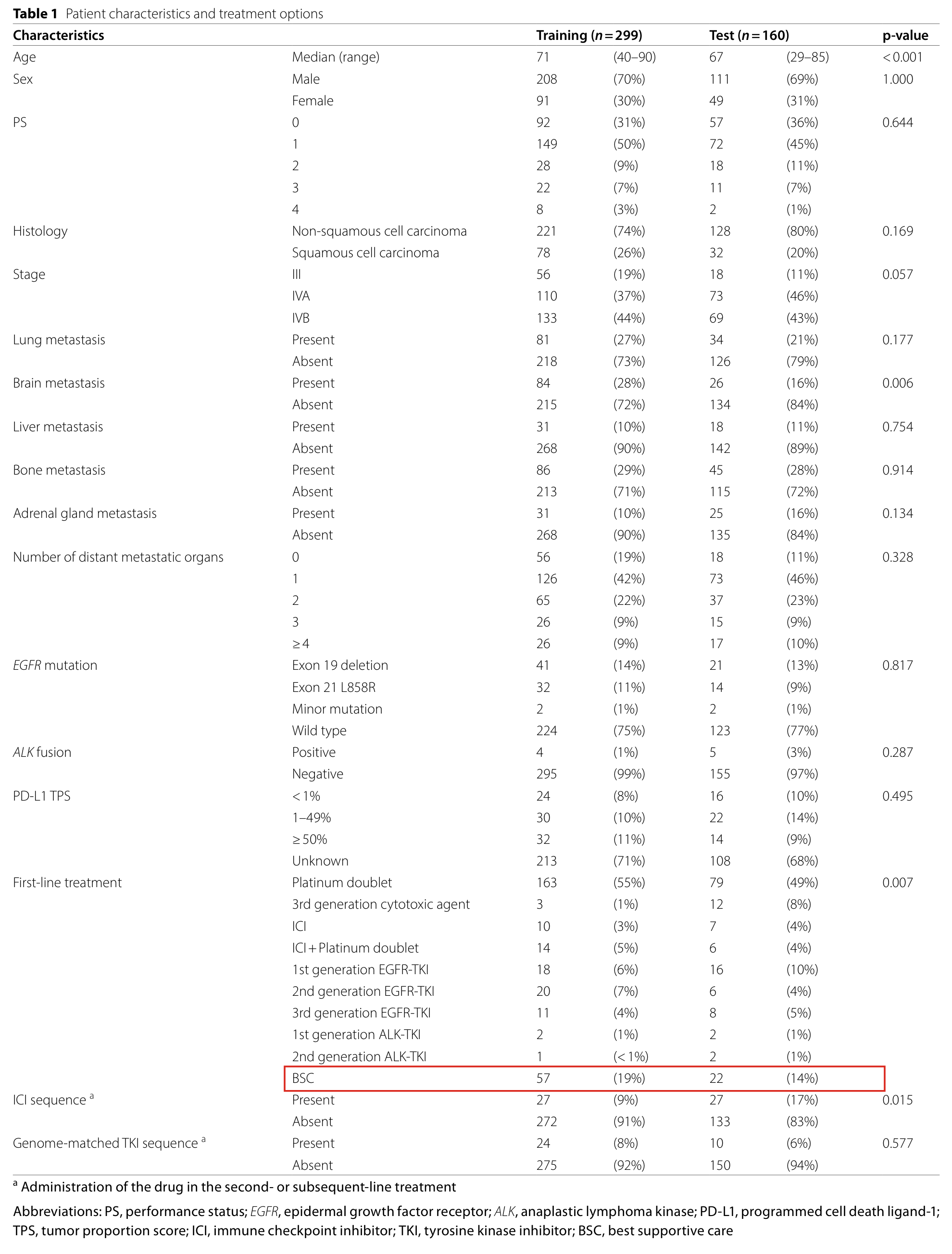
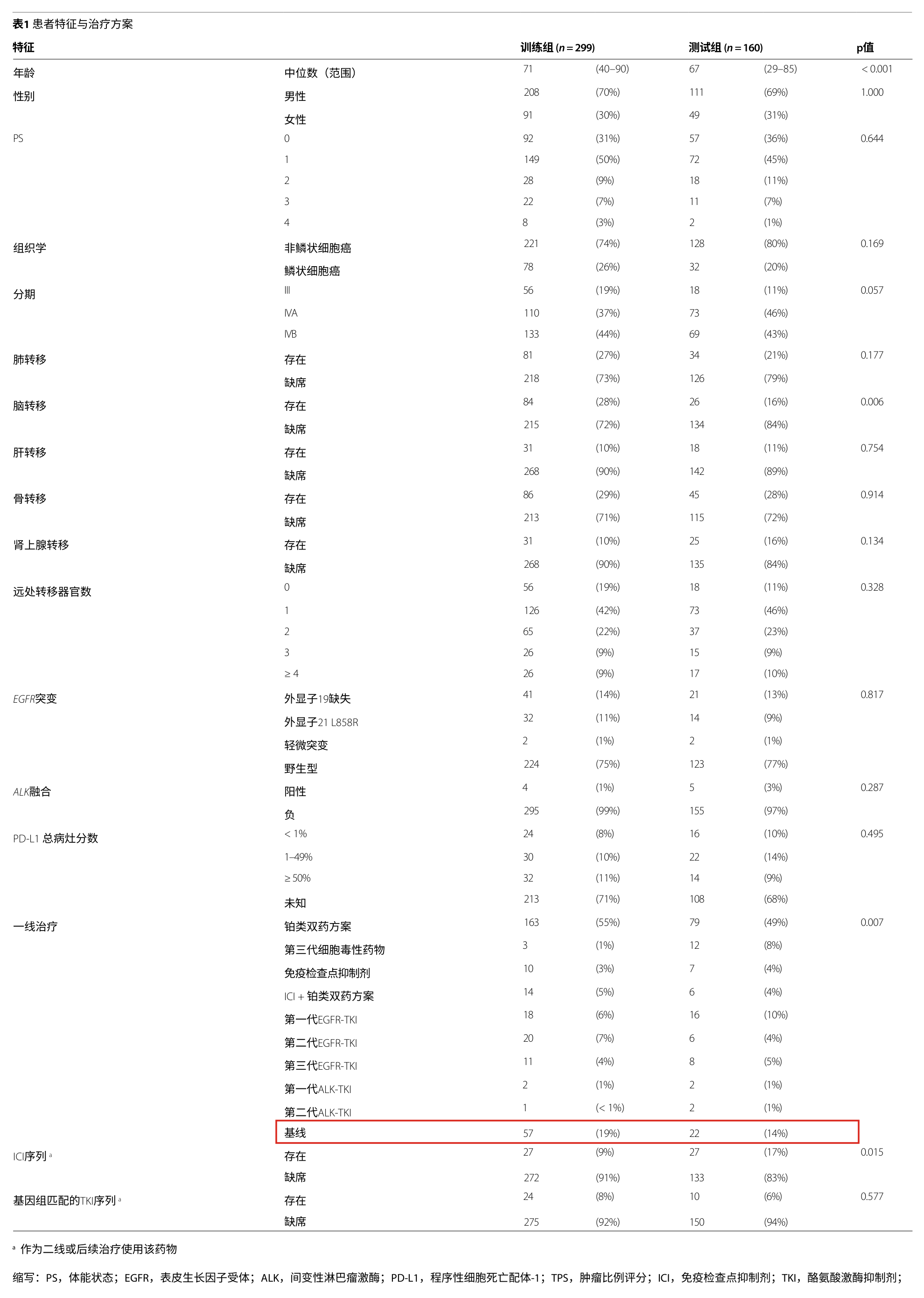
In this complete table, the headers divide subjects into a Training cohort and a Test cohort. In the age row, the median values are 71 (40–90) and 67 (29–85), respectively, and the significance value p < 0.001 remains aligned in place, allowing readers to verify reported age differences directly.
A key test of domain accuracy appears in the specialized abbreviations. Within the First-line treatment category, one row is abbreviated as "BSC", followed by patient counts of 57 (19%) and 22 (14%). In the footnote at the bottom of the table, the authors clarify: "BSC, best supportive care". Below, we examine full-table excerpts from each tool, with the BSC row highlighted by a red rectangle.
Source Baseline and Competing Tools
The original publication displays a structured tabular matrix with clear explanatory footnotes:
In the DeepL translation sample, Table 1 appears on page 5, where the red-boxed BSC row is translated as "基线" (Baseline), which diverges from the clinical context of first-line treatments. To provide a balanced assessment, DeepL's table footnotes carried over to page 6, where the footnote definition for BSC was translated correctly as "最佳支持治疗" (best supportive care):

In the Google Translate sample, the red-boxed BSC row is translated as "布里斯托尔" (Bristol), which diverges from the clinical treatment category. However, at the bottom of the very same table, Google Translate correctly renders the footnote definition as "最佳支持治疗" (best supportive care). This internal inconsistency between the table row and its corresponding footnote demonstrates how isolated table cells can drift from local annotations:
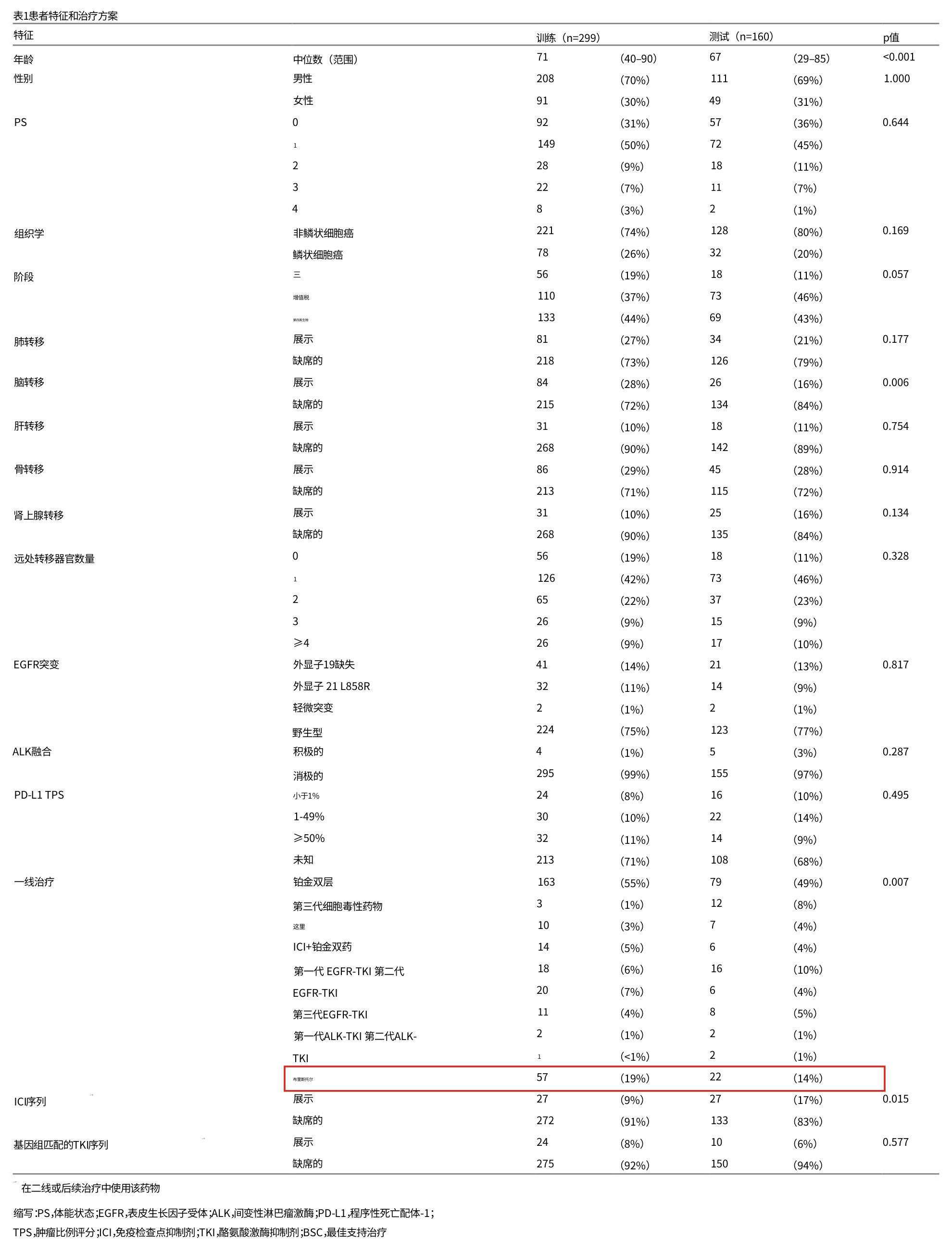
In the Immersive Translate sample (cropped from the Chinese side of its dual-language layout), the table row retains the Latin acronym "BSC", while the footnote provides the Chinese explanation. In academic literature, retaining widely used Latin acronyms is an accepted and reasonable approach that enables researchers to cross-check primary terminology directly:
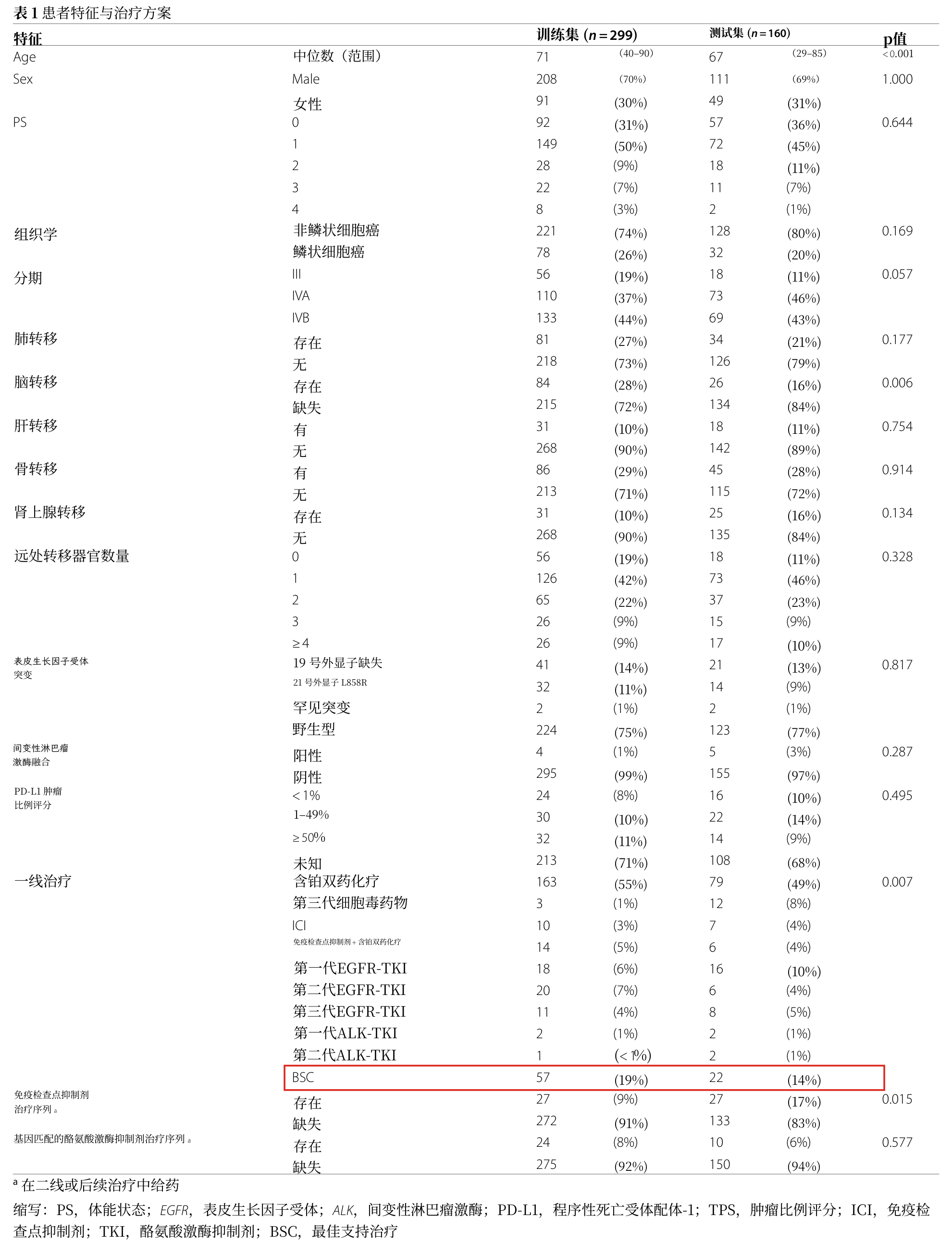
Equalang Tabular Performance
In the Equalang translation sample, the red-boxed row translates directly as "最佳支持治疗" (best supportive care), maintaining terminology consistent with the translated footnotes below:
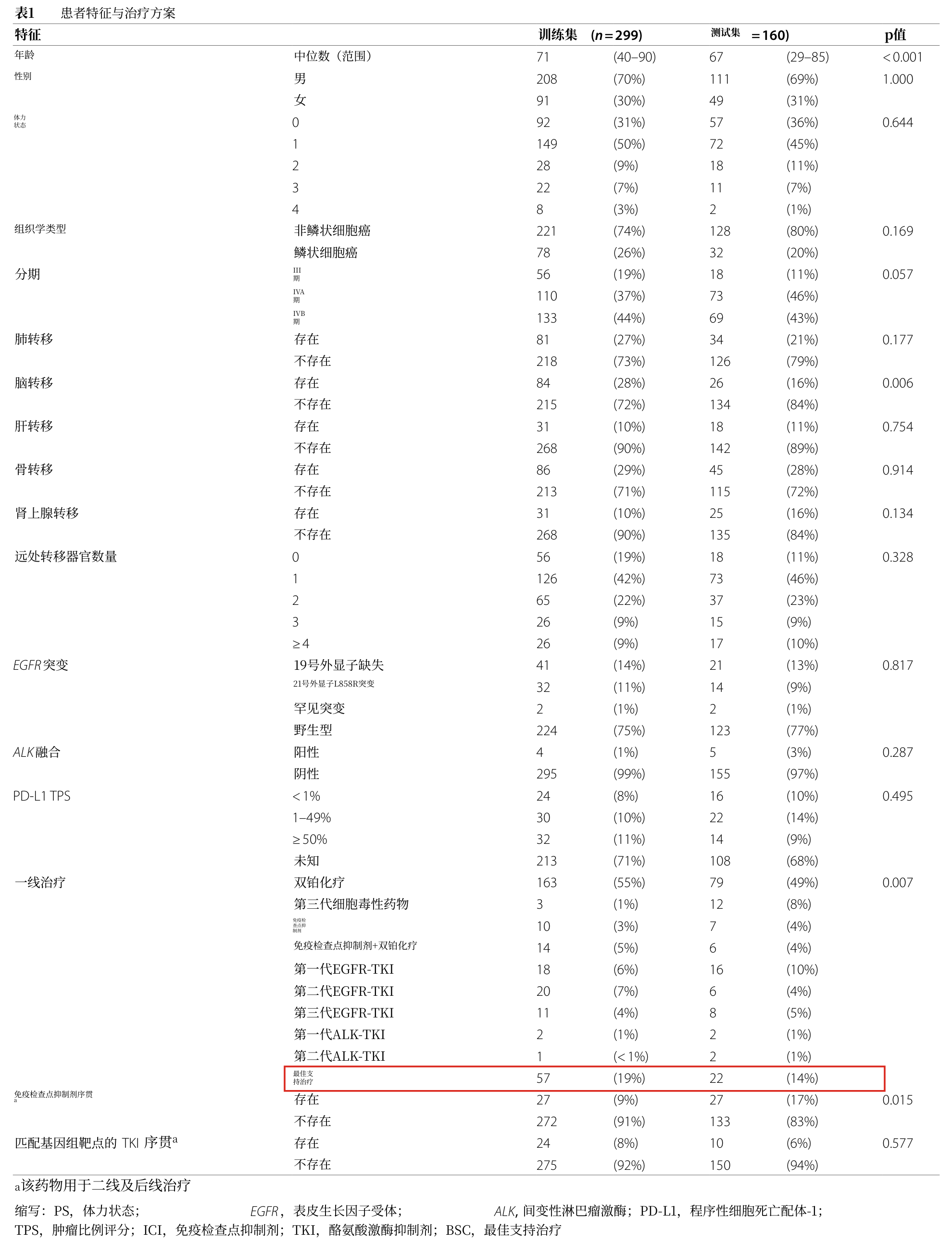
In the examined sections of this sample, key figures including the age distributions and the BSC treatment counts remain securely under their respective column headers, presenting the clinical category directly without requiring readers to flip back and forth to interpret ambiguous rows.
An Efficient Literature Review Workflow
Translating academic literature with Equalang follows a straightforward sequence:
- Log in and upload: Log in to the Equalang Document Translation portal and drop the paper PDF into the upload area.
- Select language and begin: Set the target language (such as Simplified Chinese) and launch the task.
- Download and verify: Download the resulting translated PDF once processing finishes.
When reviewing rigorous scientific literature, we recommend a split-screen setup on a single display:
- Open the translated Chinese PDF on one side of the screen to quickly scan introductions, understand experimental setups, and absorb overarching findings;
- Keep the original English paper open on the other side. Whenever evaluating specific statistical metrics, mathematical formulations, or domain-specific abbreviations, glance across to the source text for immediate confirmation.
This workflow eliminates manual copy-pasting while preserving the precision required for rigorous scientific analysis.
Sources
- DeepSeek-AI. (2026). DeepSeek-V4 Technical Report. arXiv:2606.19348.
- Koyama, J., et al. (2024). Artificial intelligence-based personalized survival prediction using clinical and radiomics features in patients with advanced non-small cell lung cancer. BMC Cancer, 24:1417. https://doi.org/10.1186/s12885-024-13190-w
- Equalang Document Translation: https://equalang.com/documents
- Equalang Official Homepage: https://equalang.com/