How to Translate a Note or Letter You Can’t Read
 Equalang
In brief
Found an unfamiliar note or foreign letter? Learn how photo translation helps you read printed documents in place and where handwriting reaches its limits.
Keywords: photo translation; translate foreign letters; translate notes; in-place translation; official letter translation
Finding a slip of paper tucked under your windshield wiper, opening a formal envelope from a landlord or municipal agency, or uncovering an old family letter in an unfamiliar language brings an immediate sense of urgency. The first reflex is often frustration: you cannot easily type special accents, Cyrillic, Kanji, or Arabic characters into a standard translation box. If the note concerns a parking disagreement, a lease requirement, or a payment demand, the worry of missing a strict deadline only adds to the stress.
Why typing is the wrong first step
When you are holding a physical piece of paper, transcribing characters by hand is slow and prone to errors. A single missed accent mark or misidentified letter can distort the meaning of a sentence or lead to dead ends. Furthermore, letters and official forms rely heavily on spatial layout: sender information sits at the top, filing deadlines appear near the margin, and payment figures sit in tables. Converting the page into a wall of unformatted text strips away that context.
Instead of typing, the most practical approach is visual translation: capturing the page with a camera and using optical recognition and translation models to view the translated text directly where it was written.
Translating in place with a photo
Equalang's photo translation tool is designed to preserve the original visual structure of physical documents. When you photograph a document or upload an image, the translated text appears directly over the original position, allowing you to compare the translated lines against the source image side by side.
Seeing text in its original layout helps you instantly distinguish between a formal notice, a polite request, or an informational update. You can immediately see whether a number corresponds to an invoice total, an apartment number, or a phone contact.
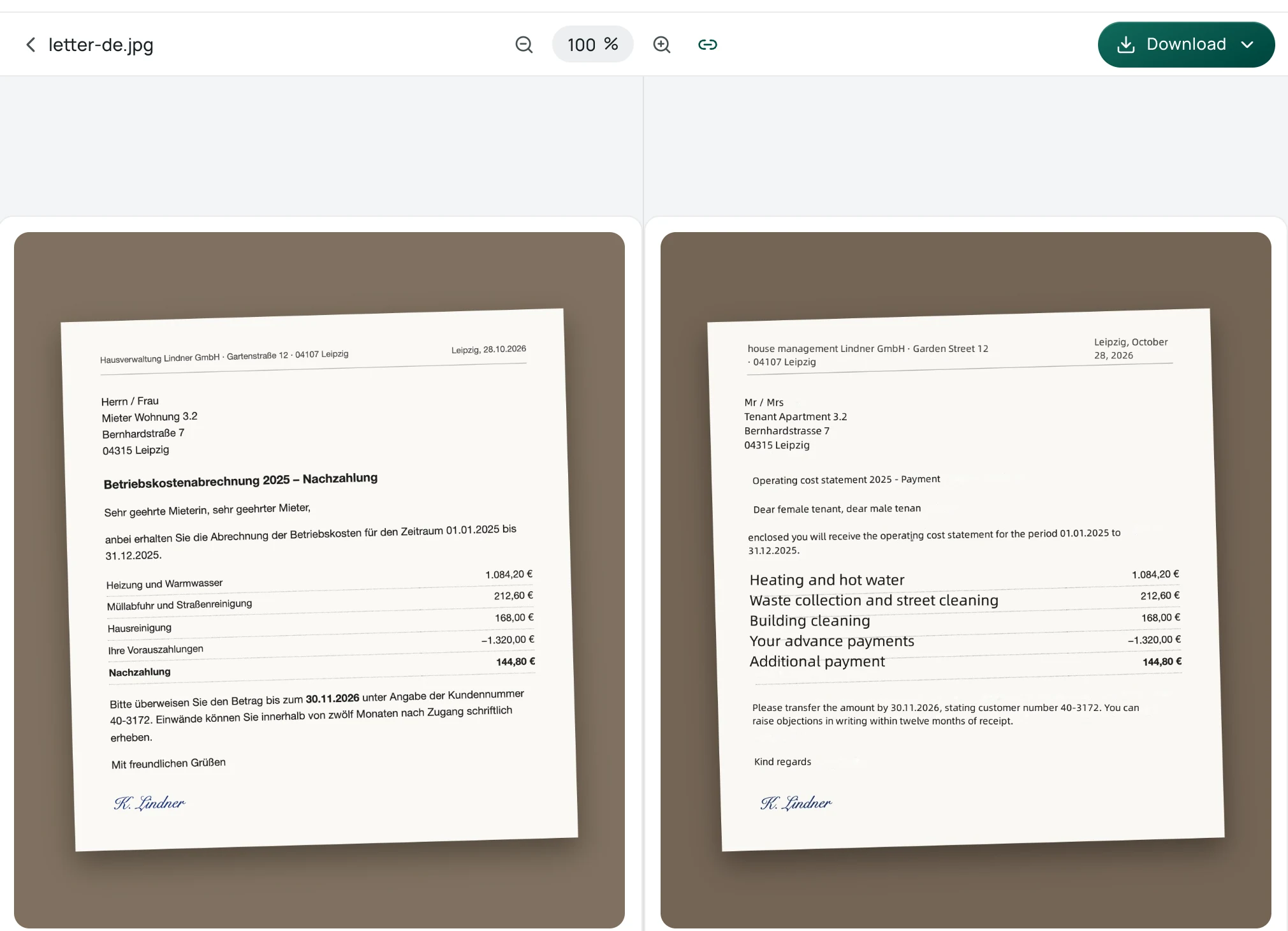
In the example above, a photo of a German property manager's operating cost statement is translated into English on the Equalang result page. On the right, the translated text replaces the German in place: the headline reads "Operating cost statement 2025 - Payment", line items like heating and hot water, waste collection, and building cleaning remain aligned with their amounts, and the payment deadline and customer number are clearly readable. This in-place presentation makes it easy to verify that each translated line matches the original row.
What to do with official letters and legal notices
When the document in your hands comes from a government office, a housing management company, a utility provider, or a court, an automated photo translation should be treated as a triage tool rather than a final legal verdict.
Use the initial translation to isolate three critical items:
- Dates and deadlines: Look for submission windows, reply dates, or payment due dates.
- Reference numbers: Locate case numbers, customer IDs, or administrative file codes (Aktenzeichen in German mail or reference codes on tax forms).
- Amounts due: Verify whether a figure represents a charge, an adjustment, or an informational balance.
Because automated translation can occasionally misinterpret nuanced legal clauses or regional administrative phrasing, you should never make binding legal or financial decisions based entirely on an automated scan. If a letter demands payment, threatens legal action, or sets a strict response window, take the document and its reference numbers to a native speaker, a tenant advisory association, or a certified translator.
For specific regional guidance, our team has documented how to navigate formal correspondence in specific contexts:
- If you are dealing with German administrative mail, see our guide to handling official German letters.
- If you are sorting out municipal or rental paperwork in Japan, consult our guide to Japanese administrative and lease forms.
- If you encounter notices or street signs while traveling abroad, explore our photo translation tips for travel.
Honest limits on handwriting and faint text
While modern optical translation handles crisp, printed text reliably, handwritten notes require realistic expectations:
- Casual handwriting: Quick scribbles left on a car or an envelope often lack standard letterforms. Photo translation models may misinterpret overlapping strokes, omit words, or substitute similar-looking printed letters.
- Historic cursive: Old family letters written in traditional cursive scripts (such as German Kurrent, Sütterlin, or rapid vintage cursive) should be expected to fail with standard automated OCR. These scripts require specialized paleographic transcription.
- Low contrast and faint ink: Pencil notes, faded receipts, or writing on colored and textured paper can cause detection models to miss entire sentences.
To give photo translation the best chance of working, lay the note completely flat on an even surface, ensure balanced, glare-free lighting, and take the picture directly from above. If the resulting translation contains broken sentences or obvious misreadings, refer back to the original image to verify individual numbers, names, or addresses before taking any action.