Best Immersive Translate Alternatives for Web & Video
 Equalang
In brief
Compare top Immersive Translate alternatives for bilingual web reading, YouTube subtitles, and PDF files, from open-source tools to pay-as-you-go options.
Keywords: immersive translate alternative; bilingual web translation; dual subtitles extension; read frog; trancy; equalang
The best alternative to Immersive Translate depends directly on the feature you want to replace:
- For an open-source, bring-your-own-key extension: Read Frog (GPL-3.0, 10,390 GitHub stars) translates web pages and video subtitles (YouTube, Netflix, X) using your own API keys when translating with AI models.
- For video-first language learning and dual subtitles: Trancy (supporting YouTube, Netflix, Disney+, Coursera, and more) and Language Reactor offer bilingual subtitles paired with vocabulary banking.
- For pay-as-you-go translation without monthly subscriptions: Equalang (/extension) provides inline bilingual web reading and recorded video subtitles in desktop Chrome, Edge, and Firefox, drawing from a non-expiring credit pool that connects to its document workspace (/documents).
- For built-in or neural full-page translation: Chrome's native translation replaces full-page text for free without bilingual display, while DeepL Pro ($8.74/month billed annually) provides neural full-page web translation.
Why Readers Look for Immersive Translate Alternatives
Immersive Translate built a substantial audience (3,000,000 Chrome Web Store users, 4.6/5 rating across 3.2K reviews as of October 2026; 111,338 daily users on Firefox Add-ons) by inserting bilingual translations directly beneath foreign paragraphs. However, users frequently search for alternatives due to several structural trade-offs:
- Recurring Subscription Overhead: While basic translation using general models (such as GLM-4 Flash or HY-MT) remains free under reasonable daily request limits, advanced models (DeepSeek V4.1 Flash, Gemini 3 Flash, GPT-6 Luna, DeepL Pro) require a Pro subscription at $6.99/month ($83.92/year promotional price). Renewal jumps to $119.88/year in the second year, or $239.88/year for the Max tier.
- Feature Paywalls on Video and Layouts: Generating subtitles for videos that lack original tracks is capped at 1,000 minutes per month on Pro and Max plans. Subtitle export (SRT/ASS), PDF Pro, and cloud sync settings are restricted to paid tiers.
- Desire for Open Source and Privacy: Readers handling sensitive research or internal documentation often look for open-source alternatives where they can audit network traffic and bring their own API keys without vendor routing.
- Platform Discrepancies: Vendor documentation for Immersive Translate lists conflicting figures on video coverage on the same page (stating 60+, 100+, and 160+ streaming platforms).
1. Read Frog: Best Open-Source Alternative with BYOK
If your goal is to replicate inline bilingual translation without paying a platform subscription, Read Frog is the most direct open-source alternative.
- Open-Source Foundations: Licensed under GPL-3.0 with 10,390 GitHub stars (release v1.59.1 in November 2026), Read Frog allows users to inspect the codebase and configure custom AI translation endpoints.
- Bilingual Web and Subtitles: On the Chrome Web Store (60,000 users, 4.8/5 across 129 ratings), it provides bilingual web reading and supports subtitles on YouTube (including Shorts and embedded players), Netflix, and X.
- Language Learning: Includes built-in word selection and flashcard review.
The Trade-Off: Read Frog is designed for users comfortable managing their own API keys. You must provide your own API keys when translating with AI models. If an upstream API changes or experiences downtime, troubleshooting falls on you.
2. Trancy & Language Reactor: Best for Video Language Learning
If you primarily used Immersive Translate to watch foreign streaming platforms with dual subtitles, dedicated language-learning extensions offer deeper playback and study workflows.
Trancy (Chrome, Edge, Firefox, Safari)
Trancy focuses on contextual language acquisition across YouTube, Netflix, Disney+, HBO, TED, Coursera, and Udemy (300,000 Chrome Web Store users, 4.3/5 across 2.8K ratings; 5,638 daily Firefox users).
- Free Tier Capabilities: Offers smart video bilingual subtitles, unlimited word and sentence translation using Google's engine, and web translation. Free usage caps sentence bookmarking at 50, word bookmarking at 100, and PDF translation at 50 pages per month.
- Paid Subscriptions: During promotional sales, Premium costs $2.27/month ($27.30/year) for up to 40 video transcriptions per day and 2,000 PDF pages per month. Premium + Advanced AI costs $5.72/month ($68.64/year) for 20 million monthly tokens across models like DeepSeek V4.1 Flash, Claude Haiku 4.5, and Gemini 3 Flash.
Language Reactor (Chrome)
With 2,000,000 users on the Chrome Web Store (3.9/5 rating), Language Reactor remains a standard for dual subtitles on Netflix and YouTube.
- Core Strengths: Side-by-side subtitle panels, keyboard-driven navigation (jump sentence-by-sentence), and popup word definitions.
- Pricing: Basic dual subtitles are free. Pro costs $5.95/month ($13.95 for 3 months, $39.95/year) to save phrases and access machine translation for non-native subtitle tracks.
The Trade-Off: Both tools prioritize video and vocabulary decks. They are not built for full-document formatting, engineering drawings, or multi-sheet spreadsheets.
3. Equalang: Best Pay-As-You-Go Alternative for Web, Videos, and Files
For readers who translate irregularly, monthly subscriptions often lead to wasted spend during low-use months. Equalang (/extension) approaches bilingual browsing through a pay-as-you-go model where purchased credits never expire.
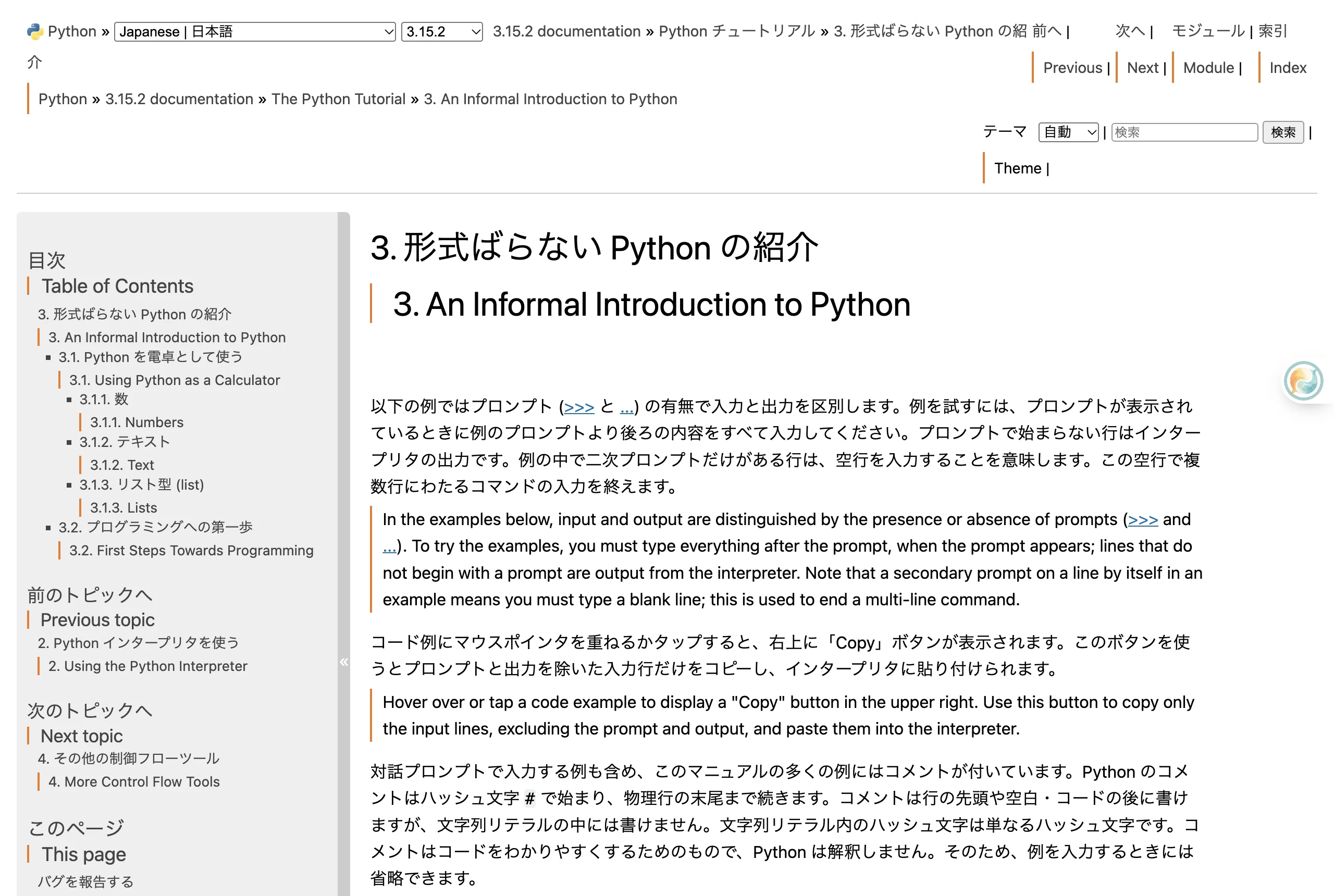
Inline Bilingual Web Reading
Once enabled in Chrome, Edge, or Firefox, Equalang inserts translated text directly beneath each original paragraph on foreign web pages, preserving original hyperlinks and structural layout. Clicking the extension icon toggles the page back to the original text.
Dual Subtitles on Recorded Videos
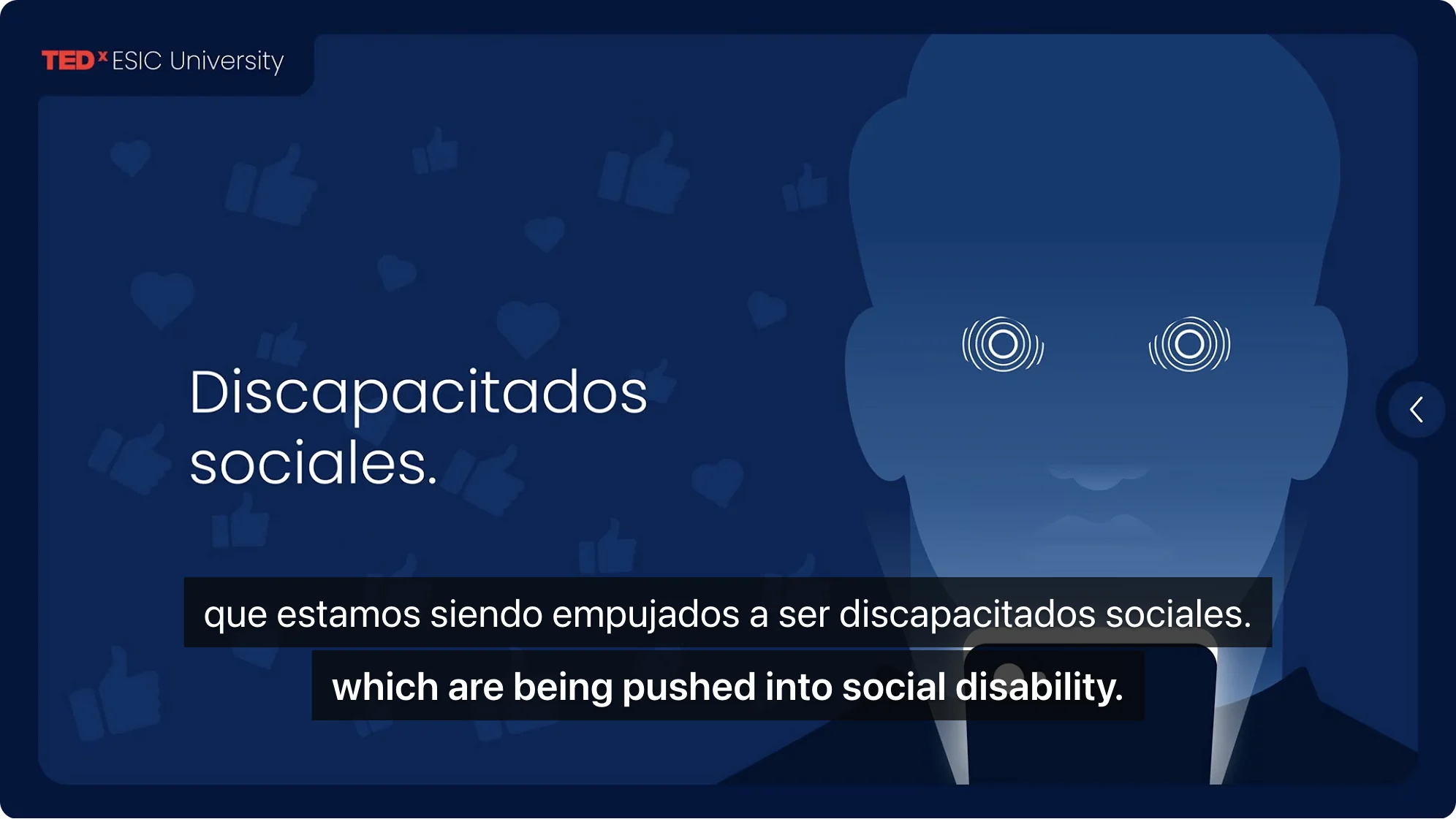
On recorded videos across supported platforms—including YouTube, Netflix, TikTok, and Bilibili—the extension presents bilingual subtitles with the original spoken language above and the translation below. When a recorded video lacks an existing subtitle track, speech recognition can generate captions directly on supported platforms.
Unified Credit Balance Across Formats
Unlike tools that charge separate fees for web extensions and file processing, Equalang shares a single credit balance across the extension and its web tools:
- Web Pages and Videos: Pay only for the text or audio processed.
- Full Documents: When you need to translate complex files while keeping page layouts, formulas, and tables intact, files can be processed in the Equalang document workspace (/documents), supporting PDF, DOCX, PPTX, XLSX, and EPUB.
- Registration: New accounts receive 200 free credits to test web and video translation before purchasing credits.
The Trade-Off: Equalang is a paid pay-as-you-go tool rather than an ad-supported free utility. Its browser extension supports desktop Chrome, Edge, and Firefox (with macOS Safari available as a temporary local installation); mobile Safari on iPhone or iPad is not supported as an extension. Real-time speech translation currently provides stable subtitles on recorded replays and supported video streams, without guaranteeing coverage across all unverified live streams.
4. DeepL & Google Translate: Best for Native or Neural Full-Page Translation
If you do not strictly require bilingual sentence-by-sentence display and want pure translation speed or established neural quality, traditional extensions remain viable.
DeepL Extension (Chrome, Edge, Firefox)
DeepL's extension (4,000,000 Chrome Web Store users, 4.5/5 rating across 12.7K reviews) provides industry-standard phrasing.
- Free Functionality: Translates highlighted text selections and images captured via screenshot.
- Full-Page Paywall: Full-page web translation is exclusively restricted to DeepL Pro subscribers ($8.74/month billed annually or $10.49 monthly). Free users cannot translate whole pages in one click.
Google Translate & Chrome Native Translation
Google Translate holds 39,000,000 users on the Chrome Web Store (3.0/5 rating).
- Extension Scope: Google updated the extension (v2.14+) to remove full-page translation entirely, limiting the extension strictly to text selection translation.
- Chrome Native Translation: Full-page translation is now built directly into the Chrome browser. Right-clicking anywhere on a page and selecting "Translate to [Language]" replaces foreign text in place. It is completely free and fast, though it does not offer a side-by-side bilingual view to verify original wording.
Decision Checklist: Which Alternative Fits Your Workflow?
To select the right tool, identify where your reading friction actually occurs:
- If you want complete code transparency and have your own API keys: Choose Read Frog. It is free, open source (GPL-3.0), and covers both web pages and YouTube/Netflix subtitles.
- If your primary goal is language learning through streaming video: Choose Trancy (broader streaming support including Coursera and Disney+) or Language Reactor (keyboard navigation on Netflix).
- If you want inline bilingual browsing, recorded video subtitles, and document translation without recurring monthly fees: Use Equalang (/extension) for its non-expiring credit pool and unified document translation workspace.
- If you only need quick, free reading without comparing against original sentences: Use Chrome's native page translation.
- If text fluency on isolated passages is your sole priority: Use the free DeepL extension for selection translation, upgrading to Pro only if you require full-page replacement.
For more details on dual-language web and video workflows, explore our guides on reading foreign websites bilingually, setting up YouTube bilingual subtitles, and translating complex PDF documents.
Sources
- Immersive Translate Official Site & Pricing: https://immersivetranslate.com/en/pricing/
- Immersive Translate Download Page: https://immersivetranslate.com/en/download/
- Immersive Translate AI Video Translator: https://immersivetranslate.com/en/video/ai-video-translator/
- Immersive Translate on Chrome Web Store: https://chromewebstore.google.com/detail/bpoadfkcbjbfhfodiogcnhhhpibjhbnh
- Immersive Translate on Firefox Add-ons: https://addons.mozilla.org/en-US/firefox/addon/immersive-translate/
- Read Frog GitHub Repository: https://github.com/mengxi-ream/read-frog
- Read Frog on Chrome Web Store: https://chromewebstore.google.com/detail/modkelfkcfjpgbfmnbnllalkiogfofhb
- Trancy Official Site & Pricing: https://www.trancy.org/pricing
- Trancy on Chrome Web Store: https://chromewebstore.google.com/detail/mjdbhokoopacimoekfgkcoogikbfgngb
- Trancy on Firefox Add-ons: https://addons.mozilla.org/en-US/firefox/addon/trancyfordesktop/
- Language Reactor on Chrome Web Store: https://chromewebstore.google.com/detail/language-reactor/hoombieeljmmljlkjmnheibnpciblicm
- DeepL Browser Extensions Support: https://support.deepl.com/hc/en-us/articles/4407580229522-Translate-with-the-browser-extensions
- DeepL Pro Pricing: https://www.deepl.com/en/pro
- DeepL on Chrome Web Store: https://chromewebstore.google.com/detail/cofdbpoegempjloogbagkncekinflcnj
- Google Translate on Chrome Web Store: https://chromewebstore.google.com/detail/aapbdbdomjkkjkaonfhkkikfgjllcleb
- Chrome Help (Change Chrome languages and translate web pages): https://support.google.com/chrome/answer/173424
- Equalang Browser Extension: https://equalang.com/extension
- Equalang Documents Workspace: https://equalang.com/documents
- Equalang Pricing & Privacy: https://equalang.com/pricing ; https://equalang.com/legal/privacy