How to Call a Client Who Speaks a Different Language
 Equalang
In brief
Need to call an overseas client or supplier with no shared language? Here is how to run a translated browser call with dual transcripts and clear prep.
Keywords: multilingual calls; cross-border client communication; translated phone call; language barrier; export supplier call
When you are working as a freelancer or running a small export business, there is a recurring friction point in cross-border communication: email is safe and documentable, but it is too slow when an urgent delivery date or specification change needs a quick answer. Yet hopping on a call feels intimidating when you and your counterpart share no common language.
Hiring a professional human interpreter for a fifteen-minute sync is difficult to justify on a tight budget and hard to schedule on short notice. On the other hand, trying to guess through a call in broken English often backfires. One misheard batch size, currency unit, or delivery deadline can lead to expensive remakes and delayed shipments.
Traditional Workarounds and Their Limits
Most small operations rely on a handful of familiar workarounds, each with clear trade-offs:
- Asynchronous email and chat: Managing asynchronous email correspondence or messaging with standard translation tools gives both parties a reliable paper trail. However, when time is critical, waiting twelve to twenty-four hours across time zones for a single clarification can stall production schedules.
- Professional interpreters: Dedicated interpreters are indispensable for formal legal contracts, court hearings, and large corporate events. But for a short operational check—such as confirming packaging dimensions or dye lot availability—the minimum hourly booking rates and scheduling overhead are disproportionate.
- Muddling through a shared lingua franca: When both sides attempt to communicate in a second language they are not fully comfortable with, nuance is lost. Numbers like "fifteen" and "fifty" are easily confused over audio, and regional date conventions (such as DD/MM versus MM/DD) frequently cause errors.
Running a Direct Translated Call in the Browser
Below, we’ll show how this works using Equalang. The aim is to remove the friction of downloads, account creation, and language gaps on short, targeted business calls.
The workflow consists of five straightforward steps:
- Create the call session: The host selects the two languages for the conversation, enters their display name, and generates a shareable web link.
- Invite the other party without sign-up: You send the link via your usual messaging channel or email. The client or supplier taps the link to join directly inside their phone, tablet, or desktop web browser. They do not need to register an account or install any software.
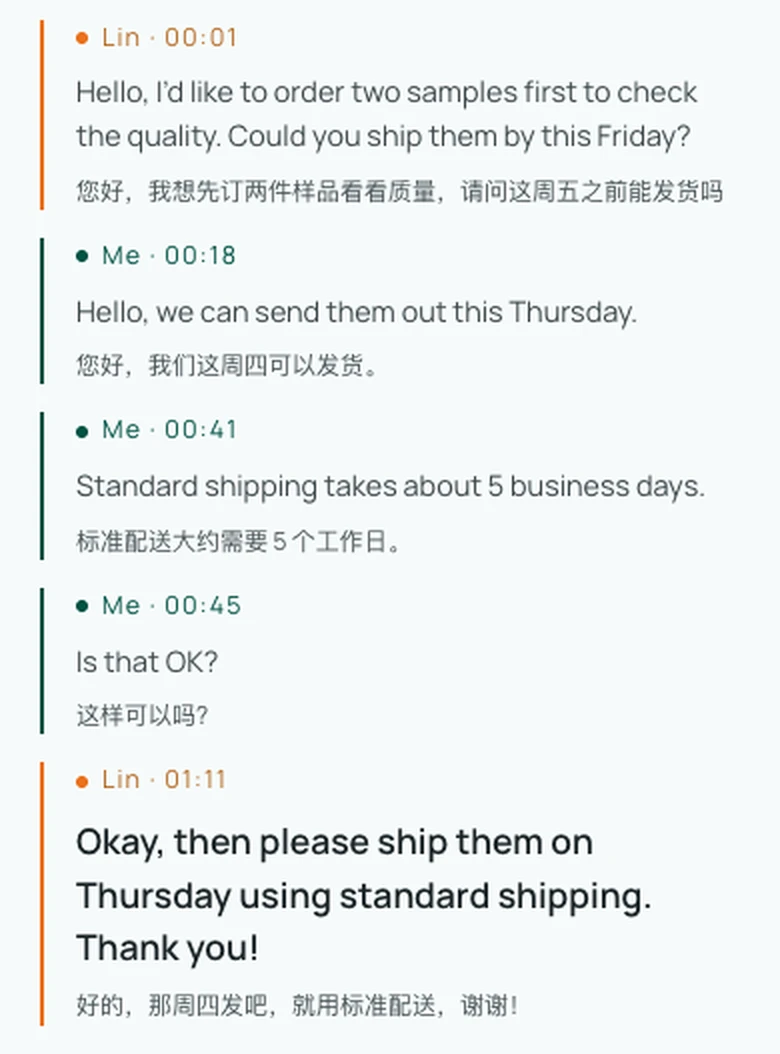
- Speak in native languages: Once the host approves the guest's entry, each person speaks in their native tongue. By default, both parties hear the translation read aloud (which can be turned off at any time) and see live dual-language subtitles on screen.
- Transparent credit billing: The call credits are covered entirely by the host who generated the link; the invited party joins and participates without paying or signing up.
- Real-time verification: A live transcript displays each sentence in the speaker's language alongside the translation, allowing both sides to visually verify what was just said.
Practical Preparation to Prevent Misunderstandings
Even with live speech translation, cross-language calls require deliberate communication hygiene. A few simple habits will keep the conversation focused:
- Send an agenda before dialing: Share a two- or three-bullet outline of what needs deciding before starting the call so your client or supplier knows what to expect.
- Put numbers, dates, and specifications in writing: Spoken numbers are the most vulnerable element in international calls. Specify units (metric vs. imperial), currency codes, and exact calendar dates in writing or point to them on screen during the call.
- Speak in concise, complete sentences: Avoid long, rambling compound clauses, local idioms, or industry slang. Speaking at a steady, natural pace gives speech recognition the best context to work with.
- Send an immediate post-call summary: As soon as you hang up, export the bilingual transcript and send a short recap message outlining agreed quantities, action items, and next milestones.
Technical Boundaries and Honest Limits
To set proper expectations, several technical factors should be kept in mind:
- Browser link, not a telephone number: This operates entirely over internet audio via web browsers. It does not connect to traditional cellular networks or dial landline telephone numbers, so a stable Wi-Fi or mobile data connection is required.
- Pacing and latency: Equalang provides standard and low-latency processing modes, but it is not zero-latency. Pausing a moment after speaking allows the speech to process and the audio translation to finish, preventing participants from talking over each other.
- How audio billing works: Credits are billed strictly on audio sent for recognition. Turning off or muting your microphone stops transmission and avoids billing. For continuous speech, audio is partitioned into slightly overlapping segments to ensure complete phrase recognition, and these overlap portions are counted.
- Retention and privacy: Session transcripts and temporary audio data are retained for 14 days following the call and then removed. You can export your records during this window or request manual deletion of submitted data at any time. User inputs and translations are not used to train AI models.
For teams building regular international relationships, combining web-link-based multilingual calls with structured methods for communicating smoothly with overseas partners makes bridging the language gap predictable and manageable.