Translate and Reply to Foreign Pre-Arrival Emails
 Equalang
In brief
Learn how to use Equalang Text Translation to read a foreign B&B email and translate your own reply.
Keywords: email translation; reply to foreign emails; travel communication; multilingual correspondence
When traveling abroad, you may receive a pre-arrival email from your booked B&B or hotel written in a foreign language. These messages often contain essential details like reception hours, check-in instructions, or time restrictions. Missing these details can complicate your arrival, and asking the host for late check-in arrangements can be difficult if you don't speak their language.
You can use Equalang's text translation to read the incoming email and translate your own reply into their language.
Step 1: Read the Foreign Email
Imagine you receive this French notification from a host in Paris:
Bonjour, nous avons hâte de vous accueillir demain. Veuillez noter que notre réception ferme à 20h00. Si vous prévoyez d'arriver plus tard, merci de nous prévenir à l'avance afin que nous puissions laisser la clé dans la boîte à clé. Le petit-déjeuner est servi de 7h00 à 9h00. À très bientôt !
You can log in to Equalang Translation, paste this message into the source box, set the target language to "English", and click translate. If you're unsure which language it is, you can leave the source as "Any language", and the system will recognize it.
In the result area, you can read the English translation:
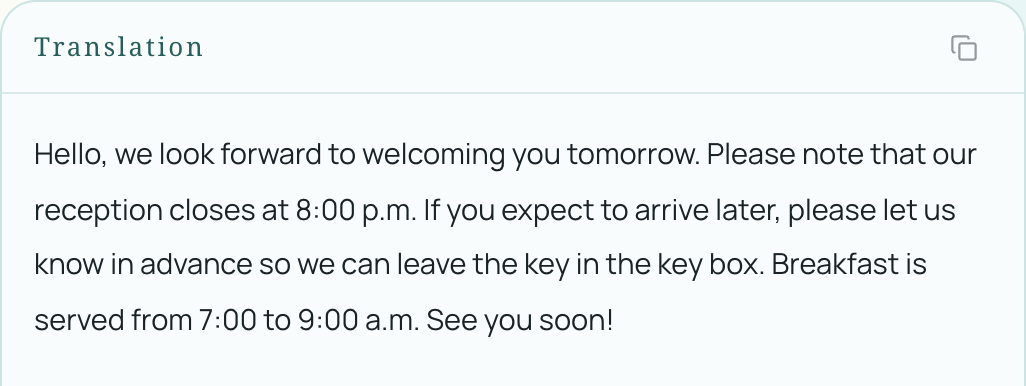
From this translation, you can capture the specific requirements:
- The reception closes at 8:00 p.m.
- If you expect to arrive later, you must let them know in advance so they can leave the key in a lockbox.
- Breakfast is served from 7:00 to 9:00 a.m.
If your flight lands in the evening and you don't expect to reach the B&B until around 9:00 p.m., you will need to reply to the host, explaining your schedule and asking for the lockbox code.
Step 2: Write Your Reply, Translate it Back
Now you can write your response in English.
On the Equalang translation page, if you previously set the source language specifically to "French", simply click the swap languages button in the middle. If you used the "Any language" option in the first step, the swap button will be disabled; you need to manually select "French" as the source language first before swapping.
Then, replace the text in the English box with the reply you wrote:
Hello! We expect to arrive around 9 PM tomorrow. Please leave the key in the lockbox and send us the code. Thank you so much!
Click translate, and Equalang will translate your text into French:
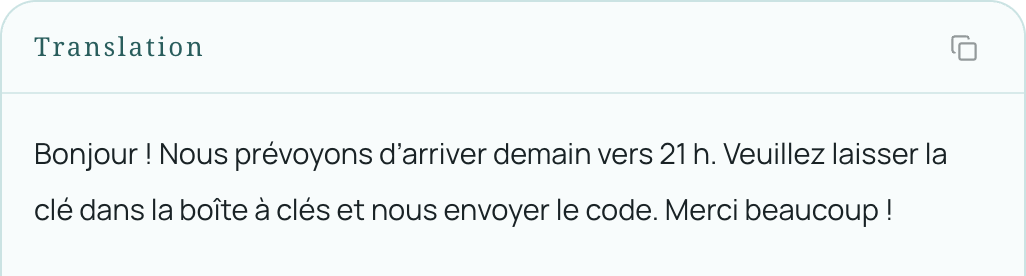
Finally, click the result area's copy button, paste the French text back into your email app, and send it to your host. After that, you just need to wait for their reply with the lockbox code, and you're good to go.
Confirming your accommodation details before traveling abroad can save you a lot of trouble. The next time you encounter a foreign notification, you can use Equalang to understand the requirements, explain your situation, and start your journey with peace of mind.