Calling an Overseas Host? Send a Web Link for Real-Time Translated Voice Calls
 Equalang
In brief
Struggling with language barriers when contacting an international host? Send a web link for instant, no-install cross-language voice calls with real-time audio and rolling transcripts.
Keywords: cross-language call translation, contact overseas host, real-time voice translation link, no-install call translation

Whether navigating independent international travel, managing a rental abroad, or coordinating cross-border operations, unexpected logistics emergencies can be stressful:
You arrive outside a vacation rental late at night and cannot find the smart lockbox, desperately needing to contact your local host right away. International voice roaming is expensive, but for many, the bigger challenge is spoken language anxiety. Dialing in and trying to process rapid-fire speech or unfamiliar local accents under pressure frequently leads to costly miscommunications and wasted time.
Falling back to email often means waiting two or three days for a response—far too slow for time-sensitive emergencies. Meanwhile, asking an overseas host or foreign support agent to install an unfamiliar third-party messaging app almost always meets immediate resistance.
The most practical way to bridge remote cross-border communication is not forcing the other party to download specialized software. Instead, you send a direct web link: the other person opens it directly in their mobile or desktop browser to join, both parties speak comfortably in their native languages, hear real-time synthesized speech translation, and follow synchronized rolling transcripts directly on screen.
1. Why Traditional Remote Communication Fails Under Pressure
When resolving urgent international inquiries, standard communication channels typically come with major structural drawbacks:
- International toll calls are expensive and offer zero visual verification: Voice-only calls are unforgiving when accents differ. When spelling out alphanumeric booking references (PNR), lockbox entry codes, street addresses, or passport numbers, slight pronunciation differences easily lead to errors, leaving no written record to reference later.
- App-installation friction is prohibitively high: Overseas hosts, property managers, and institutional staff prioritize standard protocols and personal privacy. They will rarely download an unfamiliar app, register an account, and complete phone verification just to take a single guest or customer call.
- Conventional translation utilities cannot handle remote audio: Most existing simultaneous interpretation tools require both participants to share a single physical phone in person. They cannot bridge two-way live audio across continents like a true phone call.
Effective cross-border communication requires zero onboarding friction and bidirectional clarity: providing a universal web link that bypasses installation hurdles, combined with simultaneous audio and text streams that eliminate ambiguity.
2. Core Capabilities Required for Web Link Call Translation
To make remote multilingual voice calls genuinely effective in practical workflows, a tool needs three essential capabilities:
- Browser-based link distribution with no installation or registration for the recipient: The caller generates a dedicated call link and sends it via email, SMS, WhatsApp, or chat. The recipient opens it in any standard mobile or desktop browser to connect immediately—no app download, account signup, or extension needed.
- Bidirectional speech-to-speech translation with natural voice synthesis: During the call, as you speak your native language, the recipient's device immediately plays spoken translation in their language. When they reply in theirs (such as English, Japanese, Spanish, or French), you hear clear speech in yours, providing a seamless conversational flow.
- Synchronized rolling bilingual transcripts with exportable logs: Alongside audio playback, the interface generates real-time, side-by-side text transcripts for both speakers. Key numbers, dates, and names remain visible at a glance, and a full bilingual transcript can be exported immediately after hanging up as written documentation.
3. How to Make a Translated Cross-Border Call with Equalang in Three Steps
To address international travel and cross-border communication needs, our team developed Equalang Translated Call, providing browser-based real-time voice translation via simple web links.
The entire process takes just three steps:
Step 1: Open the Web Portal, Configure Languages, and Generate an Invite Link
Open the Equalang Call Translation portal in any desktop or mobile browser.
Sign in, choose the spoken languages for both participants (for example, setting your language to English and the recipient's language to Spanish, French, Japanese, or Chinese), enter display names for each person, and click to generate the invitation link.
Step 2: Share the Link via Email, Chat, or SMS
The system generates a unique call link along with pre-composed invitation text in the recipient's language (e.g., the English text includes "Open the link to join:" and "Please join within 10 minutes; the link works once.").
Copy the link directly into an Airbnb message thread, an email to your overseas host or vendor, or an SMS text. The recipient taps the link, enters their name in their mobile browser, and requests to join. Once the caller clicks "Allow" on screen, the call connects. All call credit costs are covered entirely by the host who initiated the call; the recipient pays nothing.
Step 3: Speak Naturally While Verifying Numbers and Terms on Screen
Once connected, both sides converse naturally just as they would on any standard voice call.
The caller's screen displays a live, chronological dual-language dialogue feed:
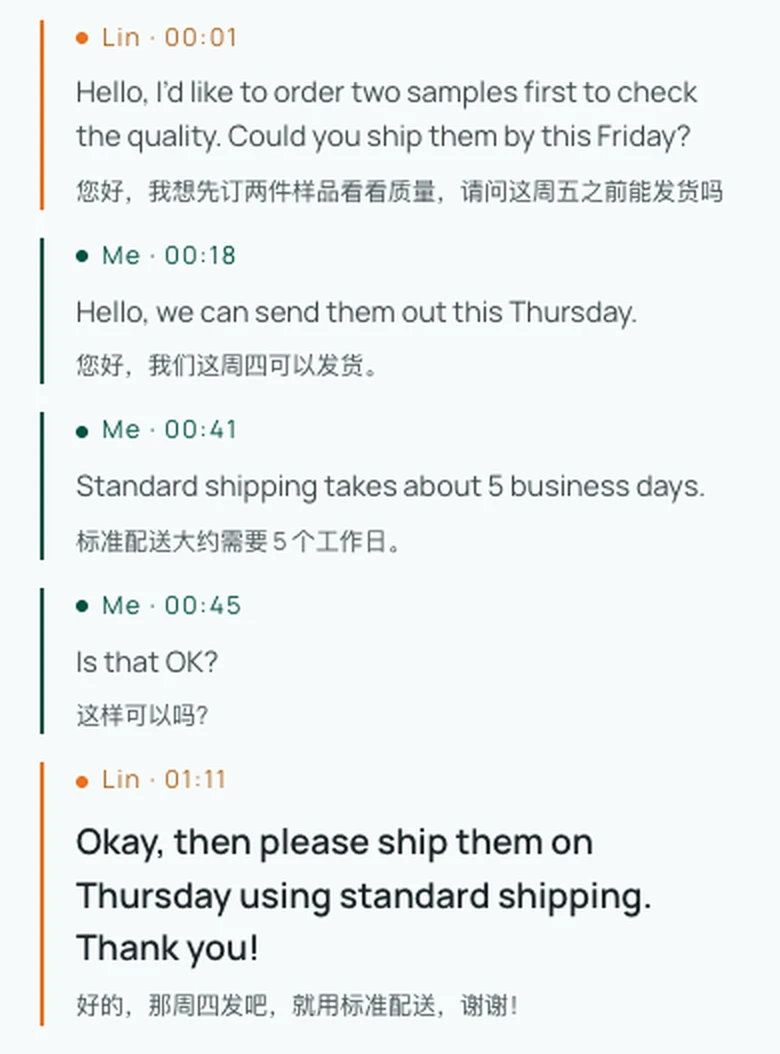
During the conversation, the Chinese spoken by yourself and the foreign language spoken by the other party are transcribed in real time and corresponding translations are generated. By default, voice playback reads the translation aloud to each other; if you are in a quiet environment, you can also mute it at any time with a single tap to view only the subtitle text.
4. Four Practical Tips for Frictionless Remote Translated Calls
When speaking with international hosts or property managers, keep these practical practices in mind:
- Always double-check critical numbers against the rolling text: When confirming smart lockbox codes, the last four digits of payment cards, flight rebooking numbers, or refund sums, don't rely on spoken audio alone. Glance at the on-screen text to ensure every digit and spelling matches exactly.
- Prepare key identifiers in advance: Before dialing, copy essential details—such as your passport name spelling, Booking Reference (PNR), reservation confirmation number, or order ID—into your notes app. If you need to spell them out during the call, you can read them clearly and verify them against the screen.
- Ensure a stable network and keep the browser active: Because web calls rely on real-time WebRTC audio protocols, use a reliable Wi-Fi or cellular data connection. Keep your mobile browser active in the foreground throughout the call to prevent mobile operating systems from suspending background audio when the screen locks.
- Export and archive the call transcript upon disconnecting: When the conversation concludes, tap "Export Transcript" to download a complete, timestamped bilingual text log. If refund disputes or deposit disagreements arise later, this detailed written transcript serves as an objective reference of what was agreed upon.
You do not need expensive international calling plans or cumbersome app downloads to bridge communication across borders. With a lightweight web link, language barriers dissolve into effortless conversations—giving you the confidence to resolve urgent travel snags and handle cross-border business directly.
Sources
- Equalang Translated Call Portal: https://equalang.com/call
- W3C WebRTC Real-Time Communication Specification: https://www.w3.org/TR/webrtc/
- International Air Transport Association (IATA) Passenger Rebooking and Service Standards: https://www.iata.org/en/programs/passenger/