Zotero Translation Plugins: 4 Options Compared, Plus a Test on the BERT Paper
 Equalang
In brief
A practical comparison of Translate for Zotero, Zotero PDF2zh, Immersive Translate, and Equalang, plus a test on the BERT paper for layout, links, and formulas.
Keywords: Zotero translation plugins; Zotero translate PDF; Zotero bilingual paper; Translate for Zotero; pdf2zh
Reading Academic Papers in Zotero: Which Translation Plugin Fits Your Workflow?
Navigating academic papers in foreign languages is a familiar challenge for researchers. Dense two-column layouts, domain-specific terminology, intricate inline mathematical formulas, and cross-reference citations frequently break when passed through generic machine translation tools. In Zotero, having an integrated translation plugin can save hours of manual copying and pasting.
However, the available translation tools in the Zotero ecosystem take fundamentally different approaches. Some focus strictly on popup sentence translation and annotation comments; others execute local command-line pipelines to generate full bilingual documents; and others rely on cloud engines to translate files directly within the library. Choosing the wrong plugin often leads to frustration with broken layouts or tedious setup steps.
Here is the short verdict based on distinct research needs:
- For inline word lookup, title and abstract previews, or writing annotation comments: Choose Translate for Zotero.
- For full bilingual PDFs running locally with zero software costs (and you are comfortable setting up Python): Choose Zotero PDF2zh (PDFMathTranslate).
- For cloud-powered bilingual PDFs if you already have an active Pro membership: Choose the Immersive Translate Zotero Plugin.
- For zero-configuration full bilingual PDFs inside Zotero, or translating Word, PowerPoint, and Excel attachments: Choose the Equalang Zotero Plugin.
Feature Comparison: The 4 Plugins at a Glance
The following table compares the four tools based on their public specifications as of 2026-11-20:
In-Depth Analysis of Each Plugin
Translate for Zotero: Mature Selection and Metadata Translation
Translate for Zotero (windingwind/zotero-pdf-translate on GitHub) is one of the most widely used extensions in the Zotero community. It is licensed under AGPL-3.0 with approximately 12,300 GitHub stars. Its README badge indicates compatibility with Zotero 7 and 8, with the latest stable release being v2.4.8 (dated 2026-10-03).
Key Strengths:
- Seamless Reader Integration: Selecting text in the built-in reader (PDF, EPUB, or web snapshots) displays the translation in a popup bubble and the item pane. You can add the translation directly into an annotation comment with one click.
- Extensive Service Compatibility: Supports over 20 translation backends. Google Translate is provided by default, while commercial engines can be configured with your own API keys.
- Metadata and Comparison Tools: Translates item titles and abstracts via the right-click menu, offers a dedicated dictionary for individual words, and includes an independent window to compare translation outputs side by side.
Limitations: Translate for Zotero does not produce translated or bilingual PDF documents. For researchers who want to sit down and read an entire 15-page paper continuously in a bilingual layout, selecting text paragraph by paragraph remains necessary.
Zotero PDF2zh: Local Open-Source Engine with Formula Retention
Zotero PDF2zh (guaguastandup/zotero-pdf2zh, ~8,400 stars, AGPL-3.0) integrates the open-source document translation engine PDFMathTranslate (PDFMathTranslate/PDFMathTranslate, ~38,500 stars) directly into Zotero. Its badges list support across Zotero 7, 8, 9, and 10.
Key Strengths:
- Mathematical Formulas and Layout: PDFMathTranslate keeps formulas and layout.
- Local Execution and Zero Expense: pdf2zh runs locally, but with online services like Bing, text is sent to that service (translating offline requires setting up a local model yourself). When paired with its built-in free engines (such as Bing), full-document translation incurs zero software expense.
- Bilingual Outputs: Produces both a translated-only PDF and a dual-language document attached back to the Zotero item.
Limitations and Setup Overhead: According to its README, installation requires technical setup. Users must have a working Python environment, install package managers like uv or conda, clone repository files, run a background server locally, and then configure ports and engines within Zotero. Additionally, a project notice dated 2026-08-19 states that the plugin is currently undergoing a major rebuild.
Immersive Translate Zotero Plugin: Cloud-Based Bilingual Layout
Known for its popular web bilingual extension, Immersive Translate also provides an official Zotero plugin (https://immersivetranslate.com/zh-Hans/zotero-translator/). It relies on the BabelDOC document engine to convert full PDFs into bilingual versions directly in Zotero.
Key Strengths:
- Bilingual PDF: Based on BabelDOC, generates bilingual side-by-side PDFs.
- Multiple Model Choices: Allows users to select from various cloud-hosted AI models.
Limitations and Clarifications:
- Subscription Required for Full Documents: While the plugin itself is open source (AGPL-3.0) and the FAQ states support for Zotero 7 and above, translating entire documents through BabelDOC cloud processing requires an Immersive Translate Pro membership and an authorization code in Zotero settings.
Equalang Zotero Plugin: Frictionless Setup and Multi-Format Attachments
The Equalang Zotero Plugin (detailed at Equalang Zotero Plugin) provides automated document translation for academic literature without local runtime configuration. It supports Zotero 7, 8, 9, and 10 on Windows and macOS (Linux, Zotero 6, and mobile editions are not supported).
Key Strengths:
- Simple Installation and Multi-Format Support: Install via the standard .xpi file through
Tools -> Plugins -> Install Plugin From File…. Beyond PDFs, right-clicking on attachments in Zotero allows full-text translation of Word (DOCX), PowerPoint (PPTX), and Excel (XLSX) files. This is particularly practical when reviewing supplementary experimental tables or lecture slides. - Confirmation Modal and Layout Modes: Before processing begins, a dialog confirms the page count, estimated credits, and current account balance. Users can choose source and target languages, output type (bilingual, translation-only, or both), and an optional toggle to optimize PDF equation layout. Translated files are automatically attached under the item and sync with Zotero storage.
- Side-by-Side Reading: In the Zotero reader, selecting
View -> Two Pages -> Odd Pages on Leftdisplays the alternating bilingual PDF as original pages on the left and translated pages on the right. - Selection Lookup and Metadata: Highlighting text in the reader presents translations immediately below the color palette. Selecting single words brings up phonetic transcriptions, definitions, and example sentences. Right-clicking an item allows translating titles and abstracts, which are stored locally under the item overview tab.
- Credits and Privacy: Balances are shared across your account, and cancelled tasks do not consume credits. Documents are uploaded and handled under the privacy policy, and selection lookups transmit only highlighted snippets.
Practical Benchmark: Page 1 of the BERT Paper
To examine how these tools handle real-world academic formatting, we tested the first page of the foundational paper BERT: Pre-training of Deep Bidirectional Transformers for Language Understanding (Devlin et al., NAACL 2019), translating from English into Simplified Chinese.
Our evaluation setup was as follows: pdf2zh 1.9.11 with its free Bing engine; Equalang with formula optimization off.
Below is the direct visual comparison of the original English page alongside the outputs from pdf2zh and Equalang:
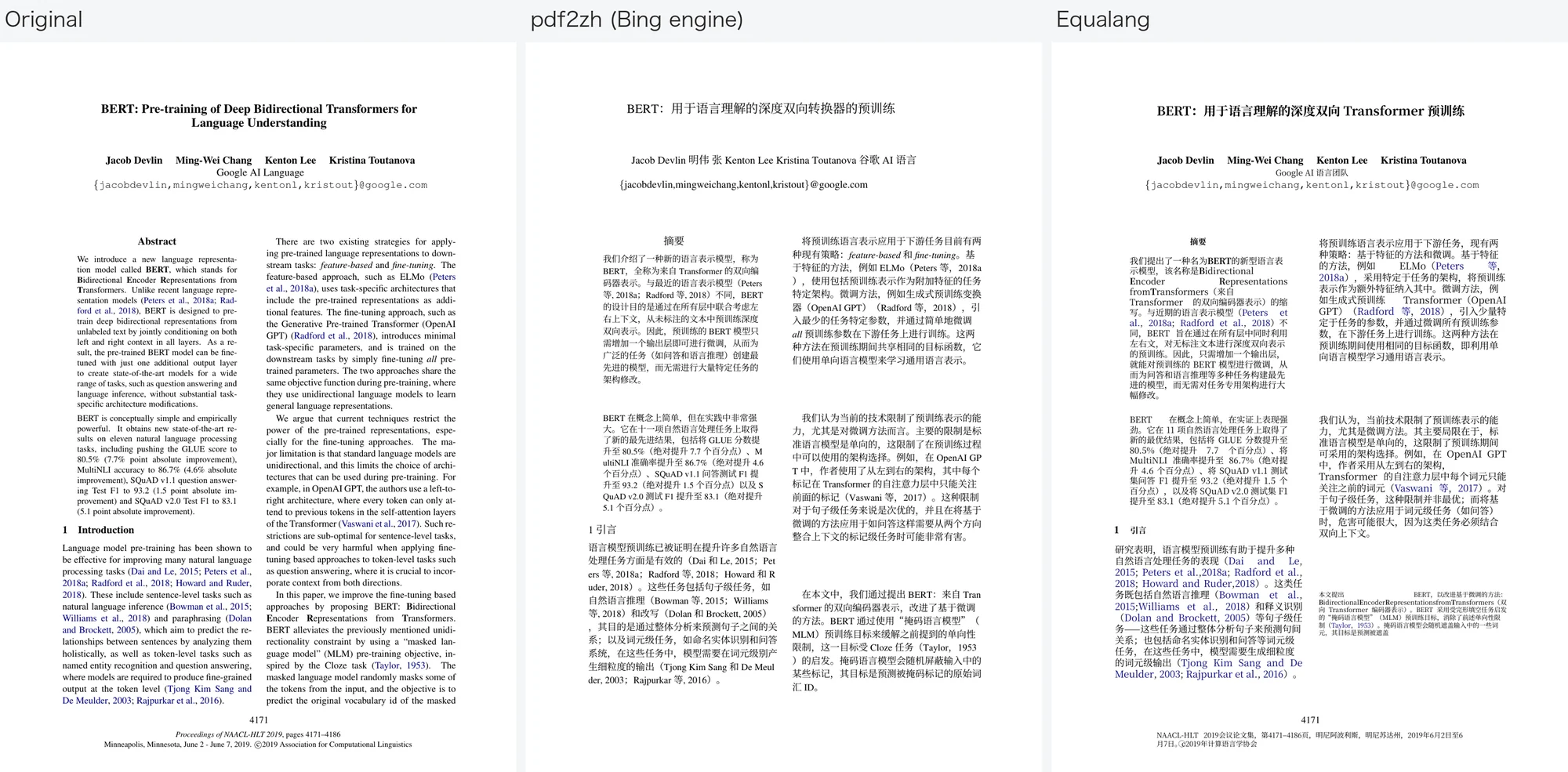
Examining the screenshot reveals several concrete observations:
- Two-Column Layout: Both full-document tools successfully maintained the standard double-column academic format and the positioning of the abstract block; only Equalang's page keeps the page number (4171) and the conference footer, while pdf2zh's page has neither.
- Names and Affiliations: With the default free Bing backend, pdf2zh translated the author names and organizational affiliation into Chinese characters (e.g., "Ming-Wei Chang" became "明伟 张", and "Google AI Language" became "谷歌 AI 语言"). Equalang kept the four original author names in English and translated the affiliation line as "Google AI 语言团队".
- Typography and Bold Formatting: pdf2zh dropped the bold weight from the title and the capitalized acronym letters "B", "E", "R", and "T" in the abstract. Equalang retained bolding on the title and on the letters "B", "E", "R", and "T".
- Citation Links: In pdf2zh's page the citations are black text, in Equalang's they stay blue.
Note on Engine Configuration: The translation quality and naming conventions of pdf2zh depend heavily on which backend translation engine you configure. Linking a commercial LLM API will produce different linguistic results than the default free Bing engine. Additionally, when formula optimization is turned off in Equalang, inline fractional equations are flattened into standard text strings; for heavily mathematical papers, enabling formula optimization is recommended.
How to Choose for Your Research Workflow
-
Scenario 1: Daily skimming, vocabulary lookups, and note-taking If you prefer reading papers in their original English and only need occasional help with complex sentences or terms, Translate for Zotero is an agile, battle-tested tool that integrates smoothly with annotations.
-
Scenario 2: Local execution, command-line familiarity, zero budget If you are comfortable managing Python environments and want to avoid third-party service fees (or want to set up a local model yourself for offline translation), Zotero PDF2zh keeps formulas and layout.
-
Scenario 3: Existing Immersive Translate Pro subscribers If you already rely on Immersive Translate for web reading and maintain an active Pro subscription, their official Zotero plugin lets you leverage your existing account for full-document bilingual layouts.
-
Scenario 4: Immediate setup and Office files If you prefer a plugin that works immediately without local server scripts, or frequently work with Word manuscripts, PowerPoint slides, and Excel experimental tables from colleagues, the Equalang Zotero Plugin fits your workflow. For deeper explorations of academic document translation tools, see our related guides at Academic Paper Translation Tools and Zotero Translation Plugin.
Sources
- Translate for Zotero GitHub Repository: https://github.com/windingwind/zotero-pdf-translate
- Zotero PDF2zh GitHub Repository: https://github.com/guaguastandup/zotero-pdf2zh
- PDFMathTranslate GitHub Repository: https://github.com/PDFMathTranslate/PDFMathTranslate
- Immersive Translate Zotero Official Page: https://immersivetranslate.com/zh-Hans/zotero-translator/
- Original BERT Paper (NAACL-HLT 2019): https://aclanthology.org/N19-1423/