Translate Word and PPT Attachments Inside Zotero
 Equalang
In brief
Translate Word reports and PowerPoint slides directly inside Zotero. Keep headings, tables, and chart labels with translations attached under parent items.
Keywords: Zotero translate attachments; Word translation Zotero; PowerPoint translation Zotero; Zotero plugin; document translation; academic slides
Direct Answer: Can You Translate Word and PPT Attachments in Zotero?
Yes. When your Zotero library contains conference slide decks, seminar presentations, or advisor-annotated Word drafts, you do not need to export them to third-party tools or copy text out slide by slide. Using the Equalang Zotero plugin, you can right-click any .docx or .pptx attachment to translate the entire file.
The resulting translation is placed as a child attachment directly beneath the original bibliographic entry, synchronizes across devices with standard Zotero syncing, and strives to preserve key structural layouts—including headings, bulleted lists, tables, chart labels.
Supported Attachment Types and the Right-Click Workflow
Academic research libraries rarely contain standalone PDFs alone. In everyday literature management, items often collect diverse supplementary files:
- Research proposals, revision responses, and annotated drafts in Word (
.docx) - Meeting slides, conference presentations, and lecture decks in PowerPoint (
.pptx) - Supplementary data tables in Excel (
.xlsx) and academic preprints in PDF
While most Zotero translation plugins focus exclusively on inline selection lookup in the PDF reader or full-paper PDF rendering, Equalang directly supports full-document translation across PDF, Word, PowerPoint, and Excel attachments.
To initiate translation, right-click the target .docx or .pptx file under its parent item in your Zotero library and select "Translate with Equalang…". The plugin supports Zotero 7, 8, 9, and 10 on both Windows and macOS, installed by downloading the official .xpi file and choosing "Install Plugin From File…" in Zotero's "Tools -> Plugins" gear menu.
What the Confirmation Dialog Shows Before Translating
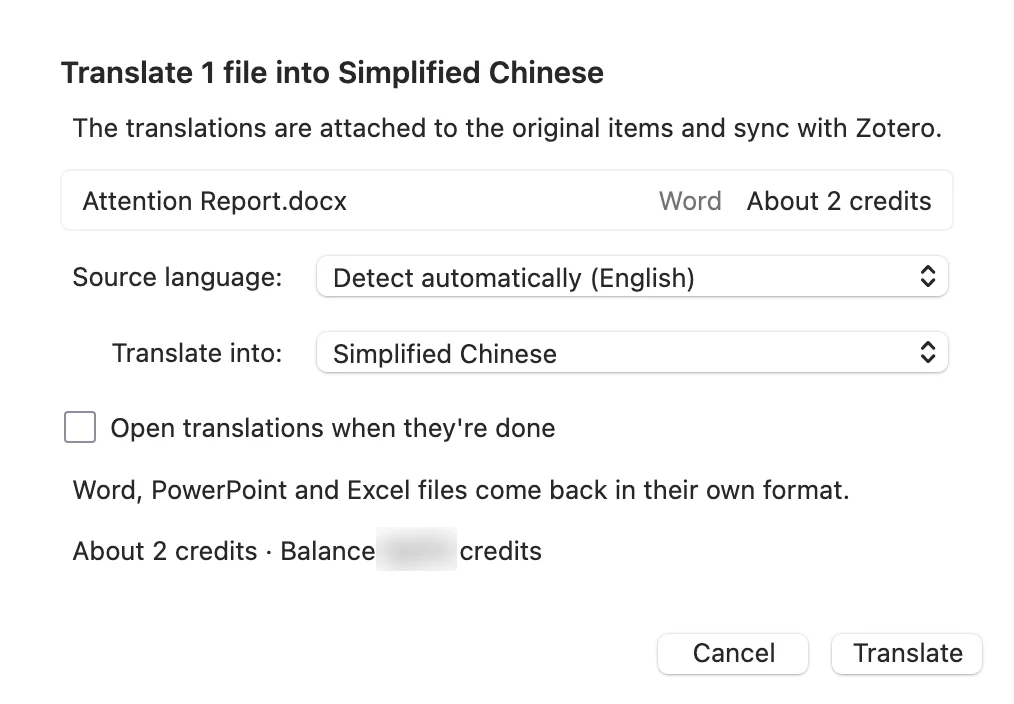
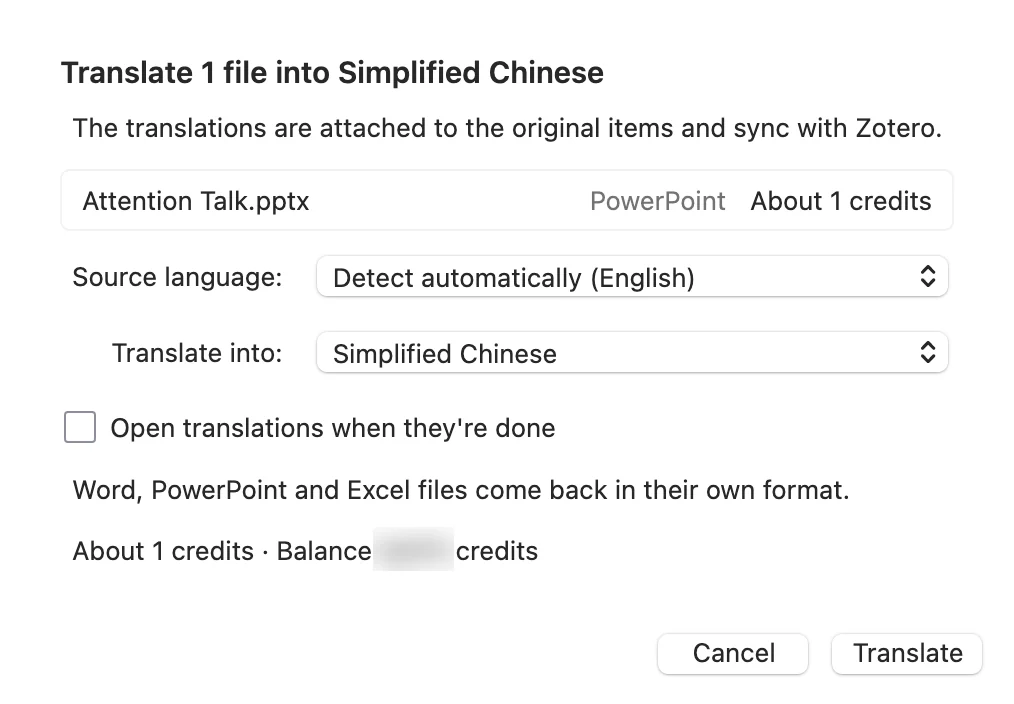
Right-clicking an attachment opens a dedicated confirmation modal:
- File details and credit estimation: Displays the target attachment name, file type ("Word" / "PowerPoint"), estimated credits required, and your current credit balance. Credit balances are shared across your web account and plugin.
- Language selection: The source language defaults to auto-detection, while the target language can be selected from the dropdown list.
- Auto-open on completion: Checking "Open translations when they're done" instructs Zotero to immediately open the translation with the computer's default app once processing finishes.
- Streamlined Office settings: Unlike PDF translation jobs—which offer bilingual alternating layouts and formula rendering toggles—Word and PowerPoint translation jobs present a streamlined interface focused directly on document generation.
- Risk-free cancellation: If you decide not to proceed, clicking cancel aborts the task immediately with zero credits deducted.
Where Translated Files Live: Child Attachments and Status Tracking
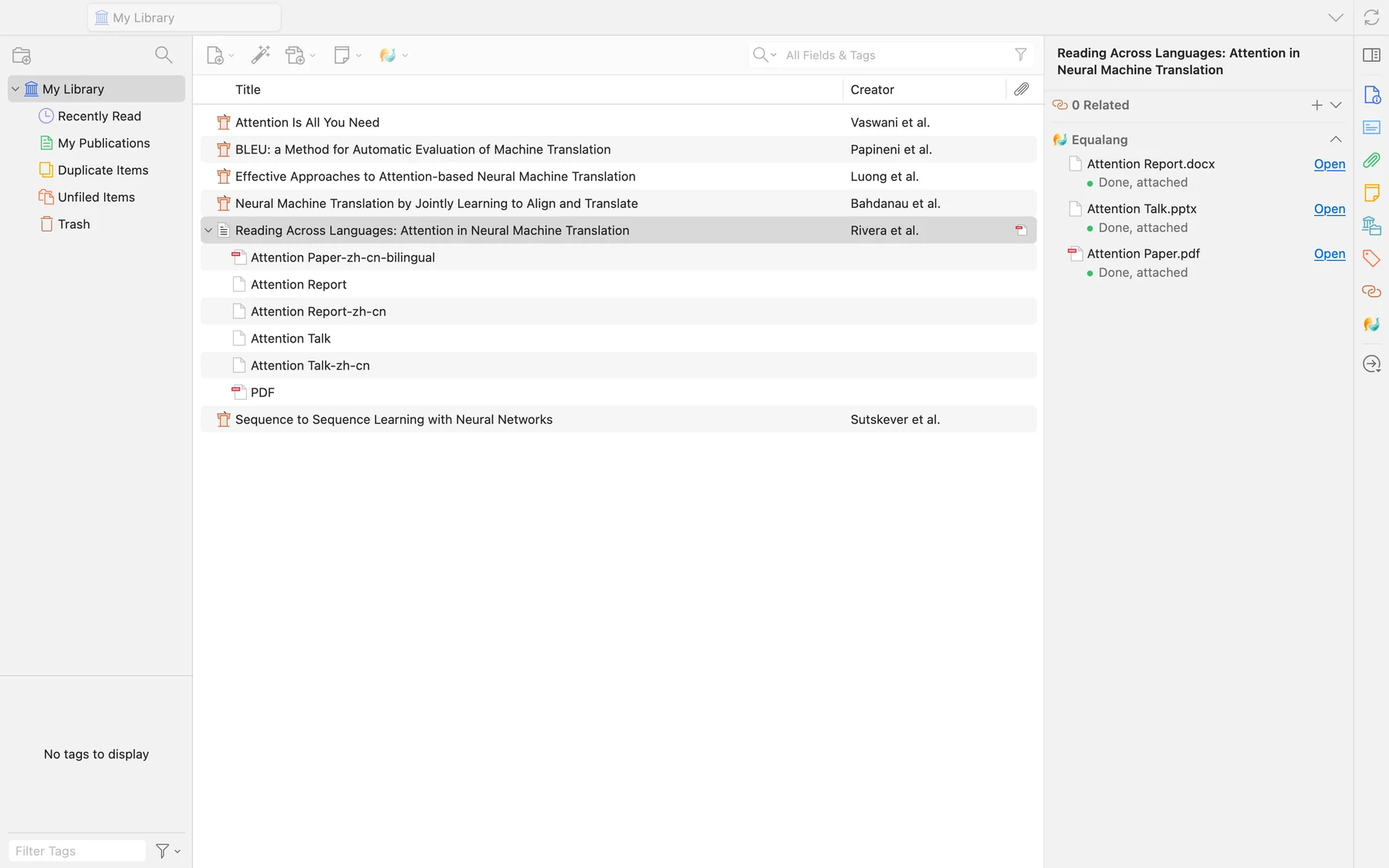
Once submitted, translation runs asynchronously in the background, allowing you to continue reading other papers without interruption:
- Organized parent-child tree: In the Zotero item tree, the sample record
Reading Across Languages: Attention in Neural Machine Translationmaintains its original files alongside the newly generated translated files:Attention Report-zh-cn(.docx) andAttention Talk-zh-cn(.pptx), arranged beside the translated PDF. - Equalang status pane: In the right-hand metadata pane, the Equalang section reports real-time progress percentages during processing. When complete, the status updates to "Done, attached" with a clickable "Open" shortcut.
- Cloud synchronization: Because translated files are stored as standard Zotero child attachments by default, they automatically sync across your registered computers. If you prefer managing files in a dedicated local directory, you can configure the plugin to link files from disk (available for "My Library").
- Task persistence: The task window tracks ongoing jobs. If you need to shut down your machine, you can safely exit Zotero and resume tracking when you reopen the application.
Opening Translated Files: Real Word and PowerPoint Comparisons
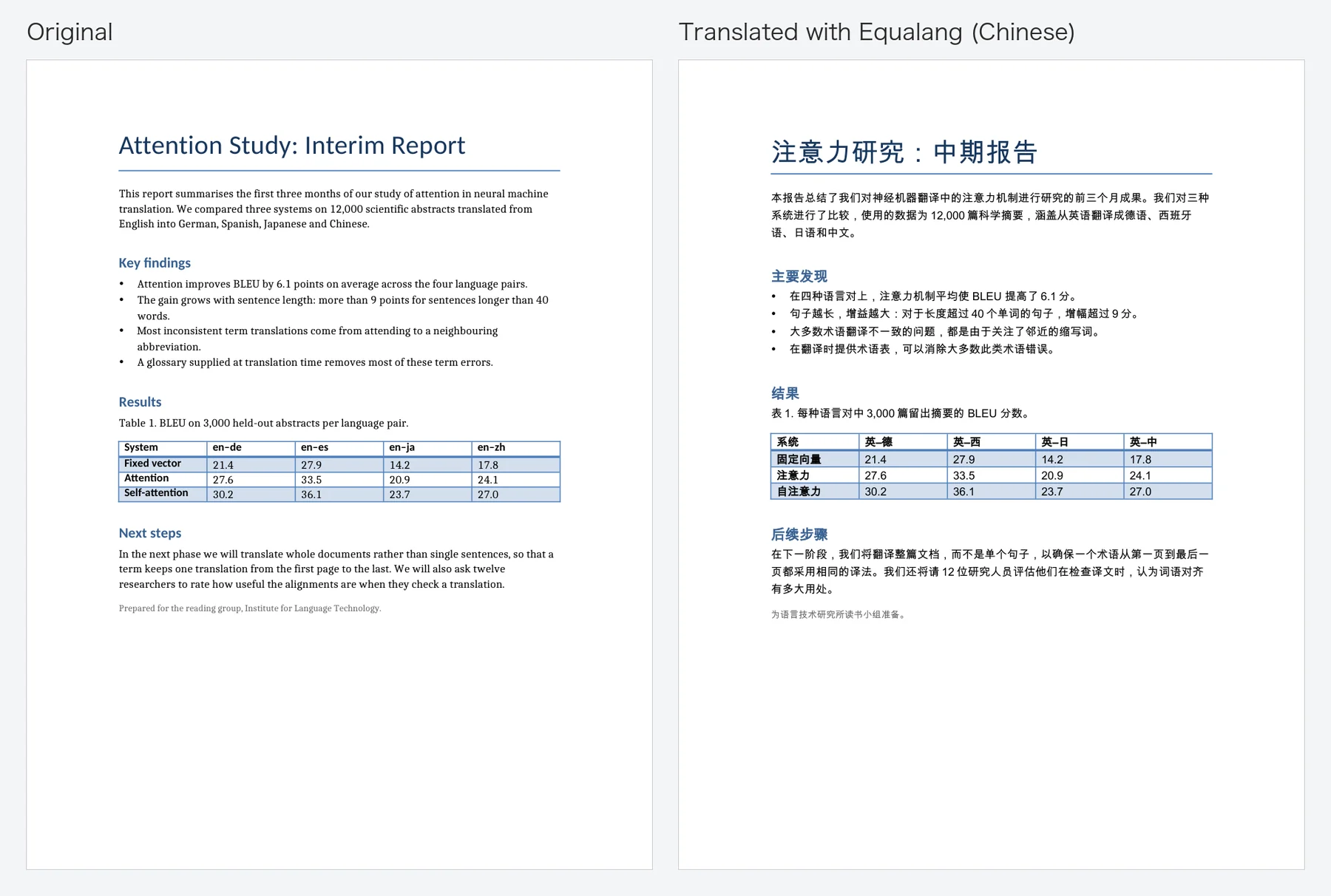
Opening Attention Report-zh-cn.docx next to the original English report demonstrates how structure is retained:
- Structure: In the picture, the heading, bullet list and table keep their structure (the table's bold header row is still bold).
- Native editability: The output is a standard editable
.docxfile, making it straightforward to copy excerpts or continue editing annotations.
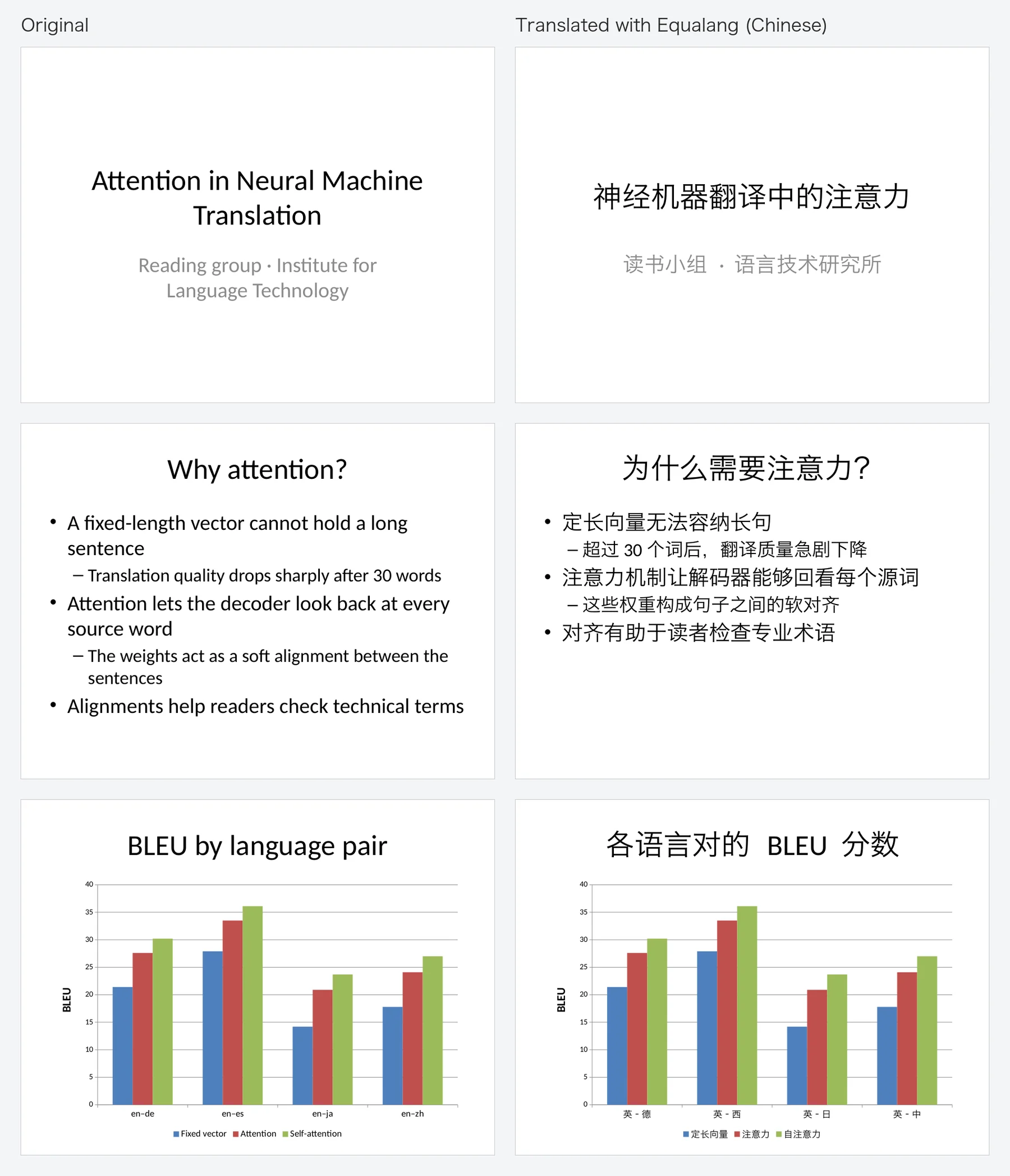
Opening the 3-slide deck Attention Talk-zh-cn.pptx alongside the original presentation highlights slide deck handling:
- Slide structure: Slide titles, body bullet points, and multi-level sub-bullets remain organized across all slides.
- Charts and translated labels: On the third slide featuring the
BLEU by language pairbar chart, the bars and values are unchanged, while chart titles, axis category labels (such asen-detranslating to英-德), and legends are translated.
Practical Precautions and Operational Boundaries
To ensure reliable literature workflows, keep these practical boundaries in mind:
- Tracked changes and margin comments: If a Word document contains active revision history or dense marginal annotations from an advisor, we recommend accepting or clearing revisions before translation, or conducting a manual review of comment alignments afterward.
- Complex animations and custom shapes: Fixed text placed on the slide master or layout (footers, corner labels) may stay in the original language, so check it; however, intricate trigger animations or custom macro-driven graphics should be checked manually.
- Network connectivity: Document translation transmits attachments to Equalang servers under our established privacy policy. The plugin does not perform offline translation. (Selection translation inside the PDF reader transmits only highlighted words).
- Version compatibility: Supported on Zotero 7, 8, 9, and 10 on Windows and macOS. Linux, mobile Zotero and Zotero 6 or earlier are not supported (iPad / iOS / Android).
Getting Started and Related Resources
- Download and install the Zotero extension: https://equalang.com/extension/zotero
- Web document and spreadsheet translation portal: /documents
- Guide to PDF bilingual reading and selection translation: /blog/zotero-translate-plugin
- Formatting preservation tips for thesis manuscripts in Word: /blog/translate-thesis-keep-word-formatting
Sources
- Zotero Support: Plugins for Zotero
- Microsoft Learn: [MS-DOCX]: Word Extensions to the Office Open XML (.docx) File Format
- Equalang Plugin Documentation: Zotero Integration and Workflow Guide