Translating a Thesis Ruined the Formatting: Is There a Way Around It?
 Equalang
In brief
Translating a thesis often wrecks headings and tables. Learn how to translate Word files while keeping layout intact, plus a 5-point post-translation checklist.
Keywords: thesis translation; translate Word document keep formatting; academic paper translation; Word document layout; graduate thesis format
Translating a thesis chapter, literature review, or an entire dissertation draft in Microsoft Word is exhausting enough on its own. But for many graduate students, the real headache begins the moment they try to translate it: copying and pasting text into a standard translation box wipes out hours of formatting work in seconds. Heading hierarchies collapse into regular paragraphs, multi-level outline numbering resets, carefully formatted tables spill across margins, figure captions detach from graphics, and citation markers dissolve into plain strings. Realigning sixty pages of academic formatting by hand can easily take days.
Why Copy-Pasting Breaks Word Formatting
In Microsoft Word (.docx), formatting is not just decorative styling applied on top of characters. Beneath the surface, Word files store structural XML packages that govern paragraph styles, outline levels, table cell geometry, dynamic fields, and bookmark anchors.
When you copy text from Word into a conventional web translator, only raw text transfers to your clipboard. The underlying structural tags are stripped away. When you paste that text back into Word, the editor treats it as unstyled or default body text. All the relationship data—which heading belongs to which section, how table borders align, and how captions connect to figures—is completely lost.
Writers often attempt a couple of common alternatives, but each comes with practical boundaries:
- Word built-in translation (Review > Translate): Word includes a native translation feature suitable for quick reference or reading short passages. However, on long, multi-page chapters with complex multi-level numbering, nested tables, and dense reference sections, it often requires manual section-by-section handling, and layout elements can still shift out of place.
- Generic web translators: Quick for isolated paragraphs, but pasting back into Word completely destroys document hierarchy and requires manual re-typesetting from scratch.
Translating the Document Directly to Keep Layout Intact
To keep formatting intact, the translation engine must work on the document package as a whole: extracting text strings directly from their XML containers, translating them in context, and placing them back into the exact same structural nodes.
Below, we will demonstrate this workflow using Equalang.
Navigate to the Equalang document translation page, upload your .docx file, and select your source and target languages.
To demonstrate how thesis formatting is handled during translation, we use a sample chapter from a Chinese master's thesis ("Chapter 1 Introduction" of "A Study of Commuting Connections by Urban Bikesharing"). The document contains a running header, chapter title, section headings, first-line indents, bold and italic text, a superscript citation, a numbered list, a table with a caption, and a bar chart.
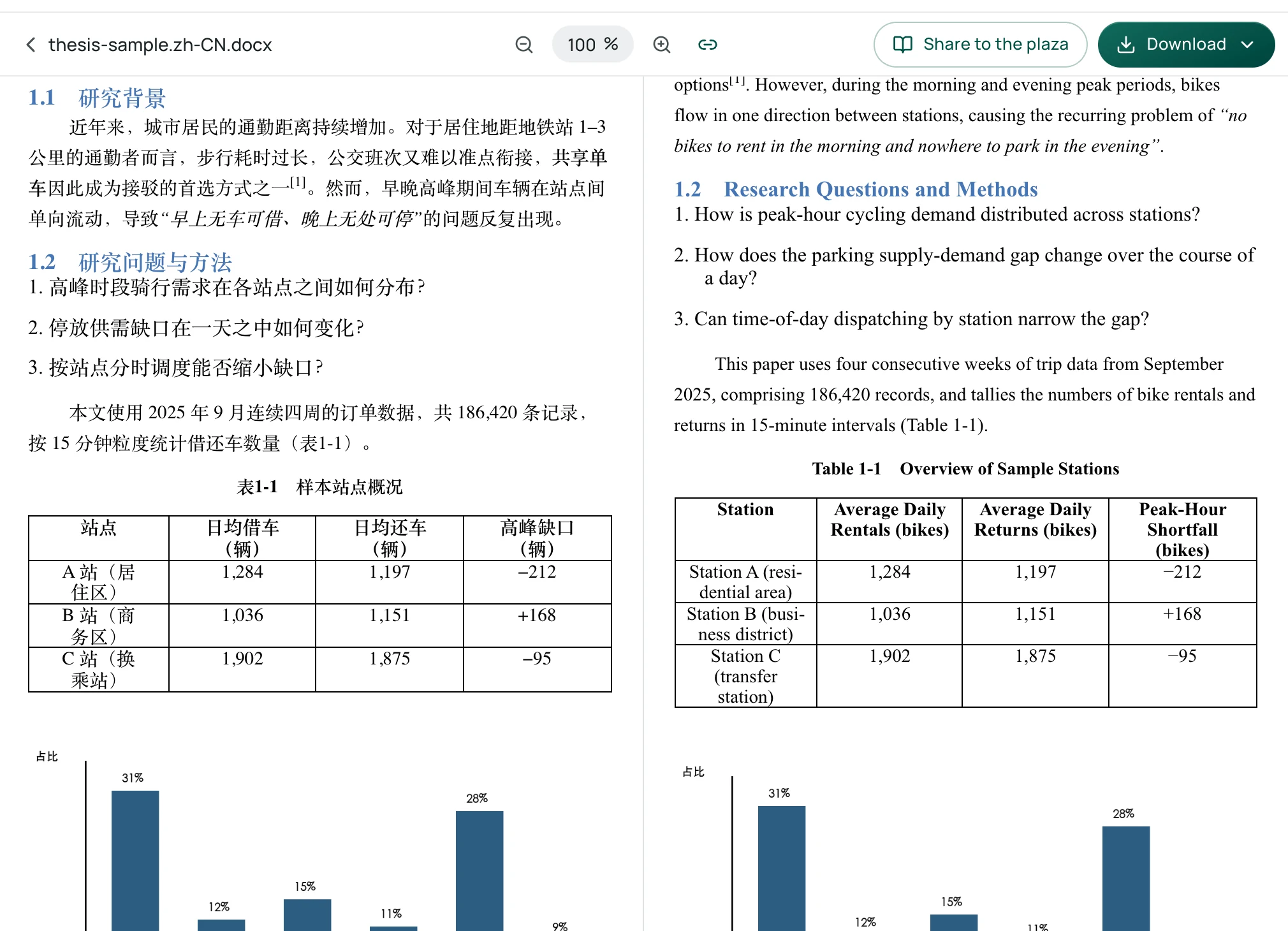
Once the translation job finishes, you download an editable Word (.docx) file rather than a static visual snapshot or plain text.
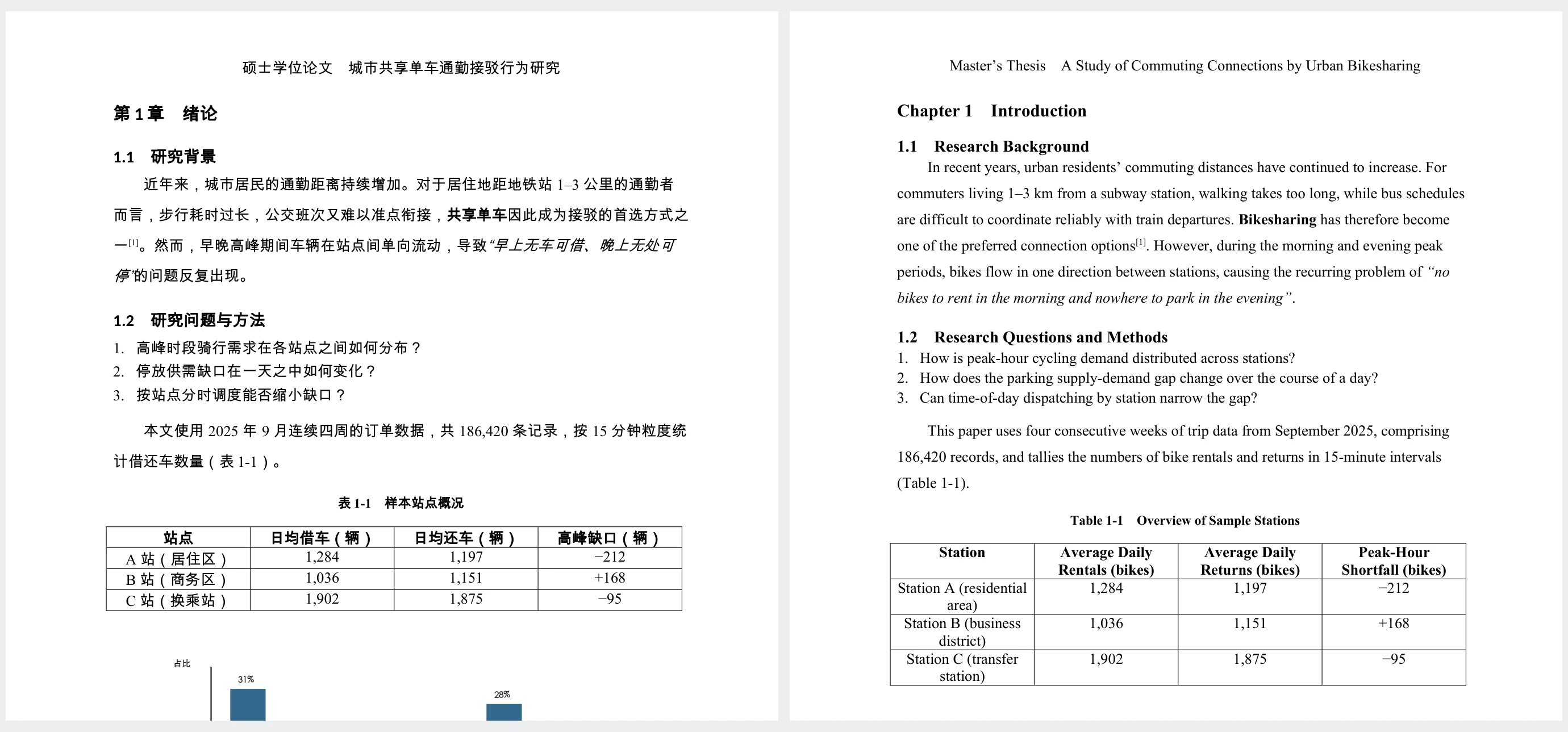
In the translated file, the document layout remains structured and functional:
- Running headers and chapter titles (e.g., "Chapter 1 Introduction") maintain their structural positions and heading levels;
- First-line paragraph indents are retained;
- In-line formatting—such as bold terms (e.g., "Bikesharing") and italic quotations—remains mapped to the corresponding translated text;
- Superscript citation formatting (e.g., "[1]") remains intact;
- Numbered list sequences (1–3) and their indentations are preserved;
- Table captions (e.g., "Table 1-1 Overview of Sample Stations"), column counts, and cell numbers stay aligned, with longer English entries wrapping into multiple lines.
For broader document formatting practices, see our guide on how to translate Word documents while keeping formatting. If parts of your research material or appendices are in PDF format, see our guide on translating academic paper PDFs.
Honest Formatting Boundaries
It is important to understand the practical limits of automated document translation. We do not claim 100% pixel-perfect preservation. Because text length varies between languages (for example, English text often expands significantly compared to Chinese), line breaks, font sizes, and total page counts will naturally adjust to fit the content. Headers, footers, and tightly spaced tables should always be given a quick visual review.
Post-Translation Checklist: What to Review Before Submission
Translating the file directly gives you an editable Word document with its formatting preserved, saving days of manual realignment. However, an academic thesis is a high-stakes document, and any machine-translated draft requires careful author review before submission.
Use this 5-point checklist before submitting or sharing your draft:
- Discipline-Specific Terminology: General AI models often select common colloquial synonyms instead of standard academic terminology. Check specialized terms, model names, and theoretical concepts against accepted literature in your subfield.
- In-Text Citations and Reference Lists: Ensure author surnames, publication years, and journal titles were not translated if they originally appeared in another language. Verify that your required citation style (APA, IEEE, Chicago, etc.) retains correct punctuation, ordering, and italics.
- Equation Objects and Mathematical Symbols: Inspect Word equation objects, MathType formulas, superscripts, subscripts, and Greek variables. While document-level translation preserves structural objects, complex mathematical expressions should be verified to confirm no symbols or indices were displaced.
- Captions and Cross-References: Confirm that "Figure" and "Table" captions remain correctly numbered and positioned near their corresponding visuals, and check that in-text cross-references point to the correct sections or anchors.
- Author Review and Institutional Guidelines: Treat the translated output as an author-supervised working draft, not a final unverified submission. Crucially, check your university's or department's specific academic integrity policies regarding translation assistance and AI-assisted drafting to ensure full institutional compliance.