How to Translate Product Images for New Amazon Marketplaces
 Equalang
In brief
Expanding to new Amazon marketplaces? Learn how to generate in-place translated image drafts quickly and polish them with a practical seller workflow.
Keywords: Amazon product images; image translation; marketplace expansion; listing localization; photo translation
When expanding an Amazon store into new international marketplaces—such as Germany, Japan, France, or Mexico—one recurring obstacle catches many sellers off guard. Automated listing tools and translation feeds can readily translate product titles, bullet points, and descriptions, but they completely bypass text baked directly into product images. For modern e-commerce listings, secondary gallery images, dimension diagrams, feature breakdowns, and comparison charts carry the heavy lifting of customer conversion. Re-creating half a dozen visual assets from scratch for each language requires substantial graphic design spend and weeks of coordination, creating a painful bottleneck for smaller sellers.
Why Image Text Becomes an Expansion Bottleneck
Automated catalog synchronization typically only touches plain-text database fields. It has no mechanism for parsing or substituting the copy flattened inside raster graphics.
For a seller testing three new marketplaces with seven infographic images per listing, that translates to over twenty localized graphics before verifying whether the product even gains traction in those territories. Hiring professional translators and graphic designers to rebuild every image upfront is expensive and slow. Most sellers do not need polished perfection on day one; they need a reliable, fast way to draft localized visuals so they can plan layouts and evaluate market entry without burning through their operating budget.
Generating In-Place Drafts with Equalang Photo Translation
To solve the layout disconnect, use Equalang photo translation. Instead of extracting foreign words into an isolated table and forcing you to guess how they fit visually, photo translation detects the text inside an image and replaces it directly in its original position.
Here is an example showing how in-place replacement functions on a product infographic:
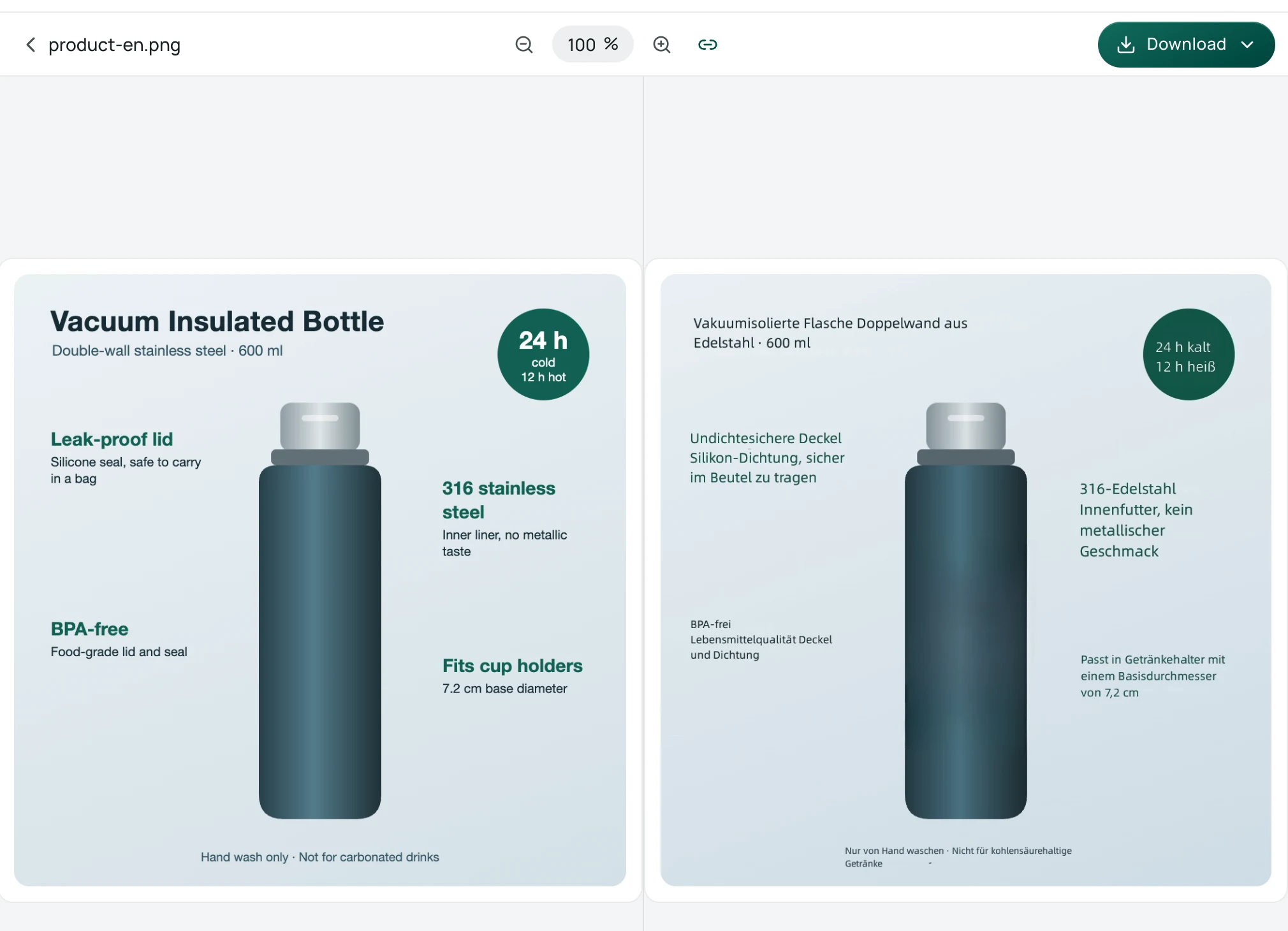
The screenshot above shows an English product infographic translated into German. The translated copy is placed back over the original coordinates, covering the title, feature callouts, and bottom notes while keeping specifications like 600 ml and 7.2 cm. At the same time, visible limitations remain: the large bold green feature headings and their descriptions end up in a uniform type size, losing the visual hierarchy, and some German text appears small. Additionally, phrasing such as "Undichtesichere Deckel" requires review by a native speaker, and a designer will still need to refine the layout before listing.
A Practical Three-Step Workflow: Draft, Review, and Polish
We never recommend uploading raw, machine-translated graphics straight to your active marketplace listings. Automated translation can misinterpret nuanced marketing phrases, and automated rendering cannot match a bespoke brand typeface.
Instead, treating photo translation as a drafting tool unlocks a practical three-step localization workflow:
- Generate an in-place draft: Upload your existing product images to Equalang photo translation to instantly see how the translated target text fits within your image dimensions and visual callouts.
- Review copy with a native speaker: Check the draft alongside your original product specifications. A native speaker or experienced translator can refine technical terminology, adjust tone, and catch industry-specific nuances that machines miss.
- Hand off to your designer for final polish: Provide your graphic designer with the verified copy and the in-place draft. Because the designer can visually see exactly where every word belongs relative to arrows, badges, and icons, they do not have to guess placement. They can focus entirely on typography, font matching, and visual harmony.
This division of labor minimizes communication friction and significantly reduces designer billable hours.
What Works Well and Honest Limitations
Understanding where automated image translation excels—and where it falls short—helps set realistic expectations:
- What works best: Clear, high-contrast, horizontally printed text against relatively clean backgrounds. Specification tables, numbered feature callouts, and clean dimension overlays produce the most legible draft replacements.
- Visual differences: Translated text will not match the original font family, weights, or exact line breaks. Because target languages vary in sentence length, typography can appear uneven compared to original vector artwork.
- Complex graphics: Stylized decorative fonts, handwritten notes, low-contrast text, or vertical text orientations can leave behind text residue or lead to missed characters. Highly specialized product jargon may also require manual correction.
- Privacy and retention: Uploaded images and their translation results are retained on our servers for 14 days, after which they can no longer be accessed. Equalang does not sell personal data, nor do we use submitted files to train AI models.
Moving Forward with Marketplace Localization
When launching products across borders, visual localization does not have to be an all-or-nothing expense. Starting with automated in-place drafts gives your team an immediate visual reference, making subsequent review and design polish far more manageable.
If you are expanding your catalog, start by testing your most text-heavy infographic to see how foreign copy fits your current layout. Sellers coordinating cross-border supply chains can also explore our practical notes on sourcing on 1688 and Taobao, or read about everyday visual translation in our guide to photo translation for travel.