Can You Live Translate a Japanese VTuber Stream While Watching?
 Equalang
In brief
How to follow Japanese VTuber streams live using real-time speech and chat translation, what options exist, and the real limits of machine translation.
Keywords: Japanese VTubers; live stream translation; YouTube live chat; Hololive raw streams; real-time subtitles
Tuning into a live Japanese VTuber stream—whether an unarchived karaoke stream, an endurance gaming marathon, or a relaxed chatting session from Hololive or independent creators—offers an energy that recorded clips never quite capture. But for overseas fans who do not speak Japanese, watching "raw" can feel like listening through a frosted window. The streamer bursts into laughter or shouts in surprise, and you are left guessing what happened. By the time dedicated community clippers translate and publish highlights hours or even days later, the shared live moment has long passed. Meanwhile, the live chat moves too fast in Japanese kanji, abbreviations, and stream slang to paste into a translation app.
Is there a workable way to live translate a Japanese VTuber stream while you watch?
What Options Currently Exist
Fans typically turn to a few common workarounds, each with clear tradeoffs:
- Volunteer live translators in chat: On popular streams, bilingual fans sometimes post live summary translations marked with tags like "[EN]". When present, they are invaluable. However, they rely entirely on unpaid community effort, cover only a small fraction of streams, and their messages quickly get buried as chat velocity spikes.
- Platform automatic captions: YouTube provides automated captions and translation on many pre-recorded videos. For live streams, however, native Japanese live captions are rarely available, and the platform does not offer built-in translation for rolling live chat.
- Local AI transcription tools: Tech-savvy viewers sometimes route stream audio through virtual cables into local speech recognition models like Whisper. While this approach runs locally on your machine, it demands a powerful GPU, complex audio configuration, and often introduces noticeable processing lag.
Translating Audio and Live Chat in the Browser
Below is how this works in Equalang, a browser extension to provide side-by-side translation across web pages, videos, and live broadcasts.
Following a raw VTuber broadcast requires following two distinct streams of context: what the streamer is saying, and how the community in chat is reacting.
1. Generating real-time subtitles from live speech
When a YouTube live broadcast has no native subtitles, Equalang's live interpretation captures the audio directly in your browser tab, transcribes spoken phrases into text, and displays translated subtitles alongside the original audio.

2. Translating live chat messages in-line
For VTuber broadcasts, chat is half the entertainment. Viewers react to sudden plot twists, warn the streamer of approaching dangers, and share running gags. In the Equalang browser extension, you can independently turn on live chat translation for YouTube live streams. Incoming comments appear with an in-line translation directly underneath the original Japanese text.
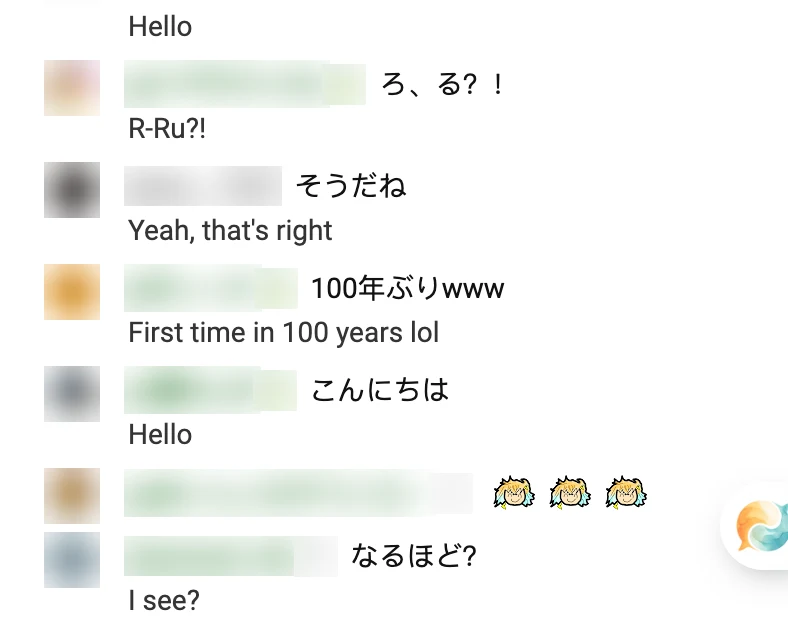
As shown in the capture above from the live chat replay of a Japanese VTuber gaming stream, each viewer message displays an English translation beneath it, allowing you to follow the conversation without leaving the stream.
The Honest Limits of Machine Translation
While real-time machine interpretation makes raw streams accessible, it is important to understand its practical boundaries:
- Game sound effects and music: VTubers rarely stream from silent rooms. High-energy background music, explosive combat audio, and in-game character dialogue frequently compete with the streamer's voice. Strong background audio remains one of the primary reasons speech recognition misses words or mistranscribes phrases.
- Fast speech, screaming, and overlapping voices: When streamers get excited, jump during horror games, laugh while speaking, or talk over one another in multi-person collaborations, speech clarity drops sharply. Machine models struggle significantly when multiple people speak at once.
- Slang and community memes: Stream culture thrives on slang, playful abbreviations (such as kusa or w for laughter), and idiosyncratic lore. Machine translation handles grammar and standard vocabulary well, but it often interprets subculture jokes literally.
- Processing delay: Real-time interpretation must buffer short audio slices to recognize and translate speech. It cannot provide instantaneous or zero-latency output.
Machine translation cannot match the polish and cultural nuance of a dedicated human translator. Its role is that of a real-time compass: giving you enough context to follow the game objective, understand why the streamer is reacting, and feel connected to the live broadcast.
Practical Suggestions for Watching Live
- Combine speech subtitles with chat: When heavy in-game audio disrupts speech recognition, glancing at the translated chat often reveals what just happened based on viewer reactions.
- Use machine translation for live context, fan clips for nuance: Rely on live interpretation to experience the broadcast live, and turn to community clippers afterward when you want a deeper breakdown of complex jokes or lore.
- Explore related formats: If you also follow creators from other regions or want to practice watching recorded content with dual captions, take a look at our guides on watching Korean VTuber raw livestreams and using bilingual video subtitles.