Is It Rude to Use a Translation App While Traveling?
 Equalang
In brief
Using a translation app abroad is rarely rude if handled with care. Practical etiquette and screen-sharing tips for counters, pharmacies, and taxis.
Keywords: travel translation etiquette; using translation apps abroad; face-to-face translation; travel language barrier; speaking to locals
Standing at a train station counter, stepping into a neighborhood pharmacy, or sitting in the back of a taxi in a city where you do not speak the language can make anyone hesitate. You need to ask a simple question, but pulling out your phone feels slightly uncomfortable. Will the person across from you assume you are lazy? Will holding up a screen come across as abrupt, or even impolite?
This worry is shared by almost every traveler who wants to be respectful. Yet when you look at the exchange from the other person's perspective, the hesitation rarely comes from the translation technology itself. A counter clerk, pharmacist, or driver usually appreciates clear communication over prolonged confusion. The awkwardness tends to arise from how the phone is introduced: being suddenly confronted with a screen shoved forward without warning, not knowing whether the app is recording, or waiting through a sluggish back-and-forth where neither person can see what is happening.
With a few practical adjustments in etiquette, you can use translation tools naturally without creating tension or discomfort.
1. Greet in the local language first
Before taking out your phone, acknowledge the person in front of you. A simple "hello," "please," or "excuse me" in the local tongue takes only seconds to learn, but it sets an entirely different tone. It demonstrates that you recognize where you are and are trying to connect, rather than treating the interaction as an inconvenience.
Once you have exchanged initial greetings, a quick polite gesture—such as smiling and asking, "May I use a translator?" or simply pointing gently to your phone—signals your intent. This brief pause prepares the other person and gives them a moment to adjust, turning the tool into a mutual aid rather than a sudden intrusion.
2. Keep the screen visible so both of you can follow along
The most common source of friction during translated conversations is the "type, turn, pass" routine. One person looks down, types or speaks into their device, inspects the result, and then turns the phone around to show the other person. The second person reads, types their reply, and hands the phone back.
This dance feels clunky because it leaves one party entirely in the dark while the other operates the device. Whenever possible, position your screen where both of you can see it simultaneously. When the other person can see words appearing in real time, they understand that the tool is processing their speech, which prevents misunderstandings and keeps the interaction flowing.
3. Speak in short, direct sentences
Translation systems handle clear, self-contained sentences far better than long, rambling thoughts. When we feel nervous in an unfamiliar place, we often add polite filler words: "I was just wondering if it might be possible to find something mild for a scratchy throat."
To help the translation remain accurate and easy to read, strip the message down to its core: "I have a sore throat. Do you have lozenges?" Clear phrasing reduces errors, speeds up the exchange, and spares the person behind the counter from having to read a wall of translated text just to understand what you need.
4. Confirm numbers, dates, and times explicitly
Spoken numbers are among the easiest details for speech recognition to mishear or confuse, especially in busy transit hubs or bustling shops. Whether you are confirming a train departure time, a baggage claim deadline, a prescription schedule, or a taxi fare, do not rely solely on spoken audio.
Look directly at the text on the screen, point to the figure, and confirm it with a nod or a brief repetition: "Four-thirty p.m., correct?" Verifying essential figures takes only a moment, but it avoids costly miscommunications later in your trip.
How we designed face-to-face translation to remove the awkwardness
Equalang's face-to-face mode was built specifically to solve the frustration of passing a phone back and forth across a counter. Instead of downloading a separate app, you can open it directly in a mobile, tablet, or desktop browser.
When you place your phone flat on the counter or table between you and choose the "Facing" layout, the screen splits horizontally. The top half flips upside down so it faces the other person, while the bottom half faces you.
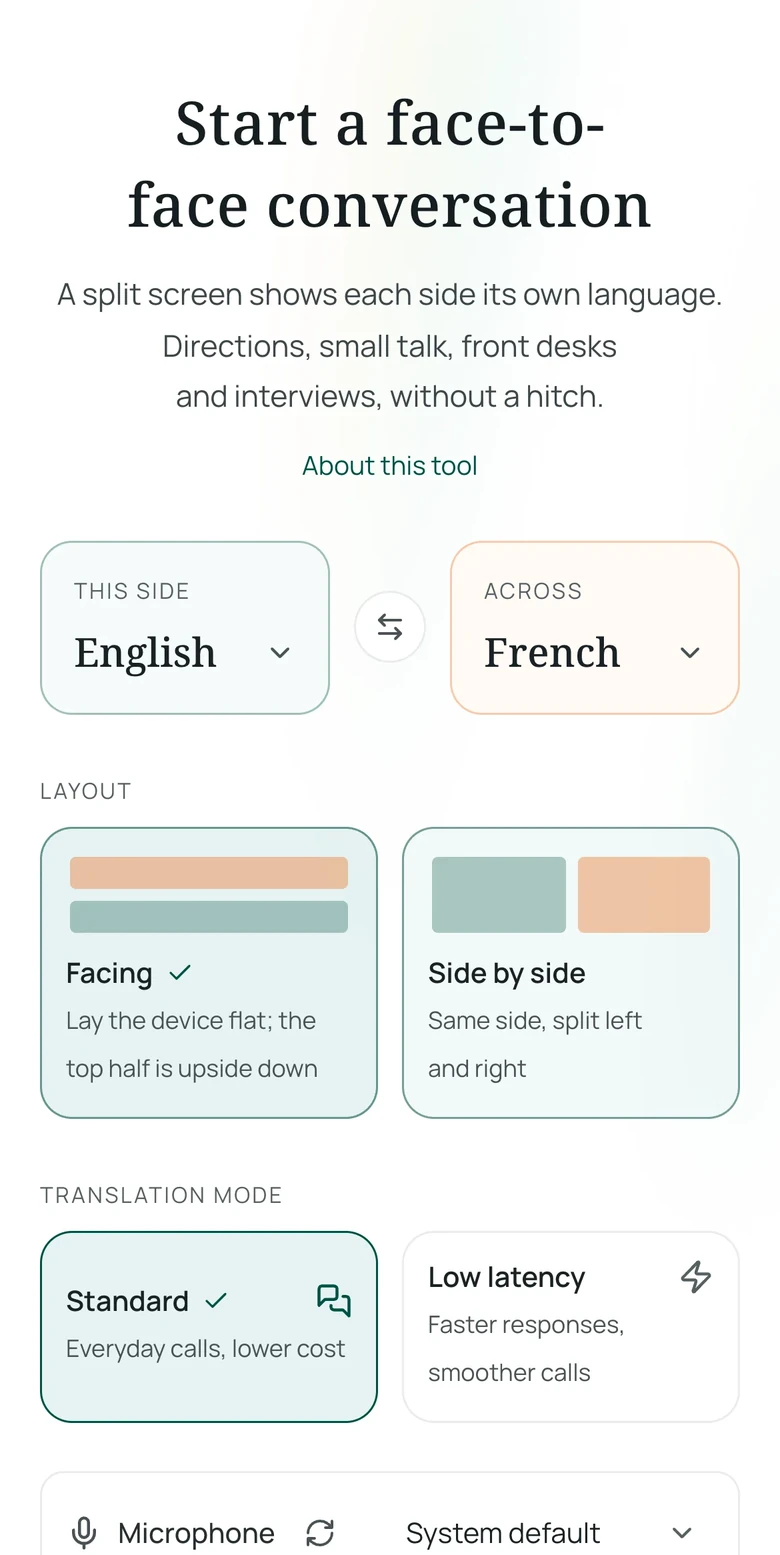
As you speak, your spoken words appear on your side while the translation appears right side up for the person opposite you. When they respond in their language, their words are translated instantly onto your half. Neither of you needs to pass the device around or lean over awkwardly to read upside-down text.
For deeper scenarios involving two-way conversation while traveling, explore our guide on talking face-to-face while traveling. If you are organizing a family trip where older relatives might feel intimidated by complicated menus, our advice on traveling with parents covers smoother approaches. When navigating foreign street signs, train schedules, or printed menus, photo translation for travel and our dedicated photo translator allow you to parse written information without speaking at all.
Keeping a verifiable record when details matter
Certain interactions carry real consequences if a detail is forgotten—such as confirming dosage instructions at a neighborhood pharmacy.
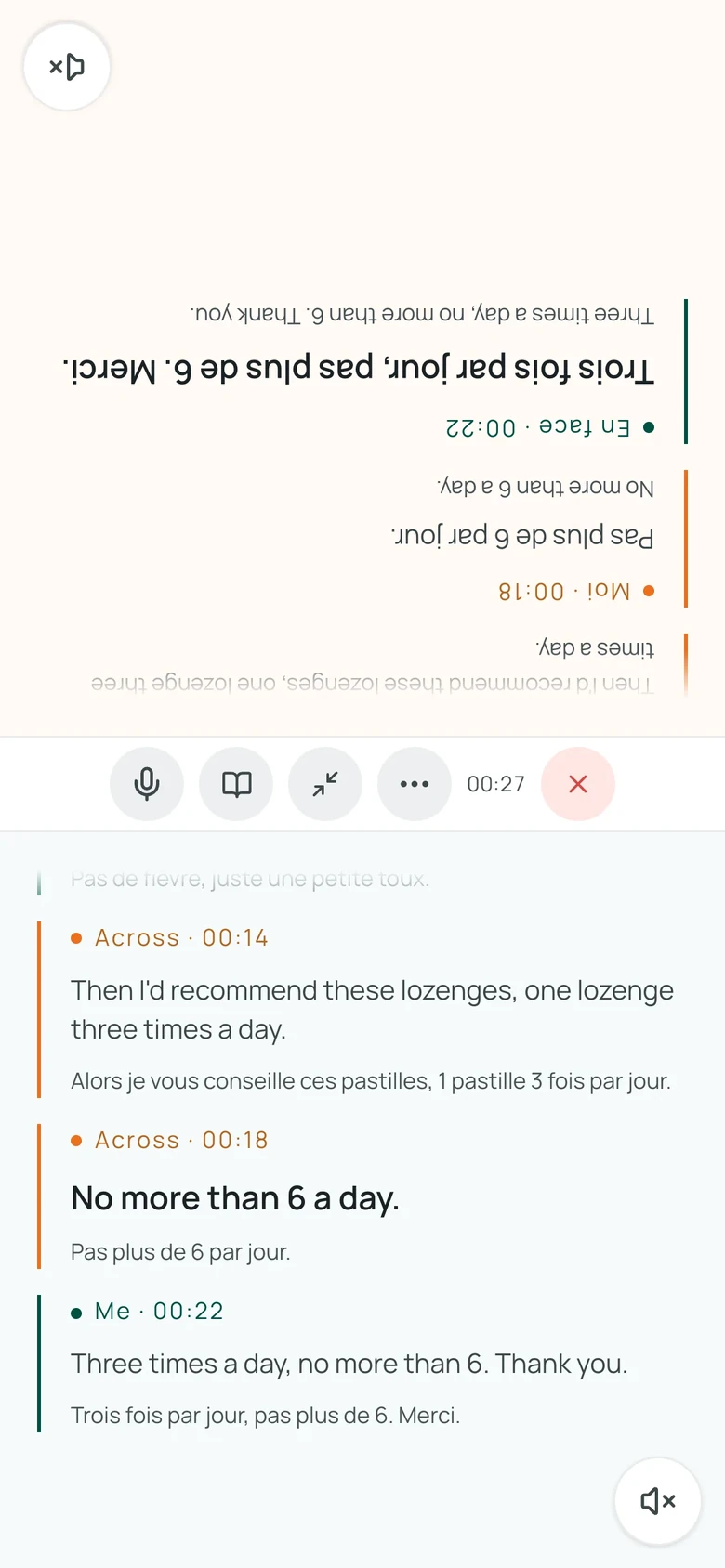
For example, in a sample conversation at a French pharmacy counter purchasing cough lozenges, the pharmacist explains the dosage instructions in French ("one lozenge three times a day", "no more than 6 a day"), which appear clearly on the bottom half with the English translation and French original, followed by the traveler's confirmation. Having the conversation transcript remain in the session means you do not have to rely on hurried memory after leaving the counter. You can glance back at the exchange in your browser anytime to confirm the exact dosage and daily limit.
Real-world limits and considerations
While browser-based translation makes cross-language encounters much smoother, it is important to understand its practical boundaries:
- Ambient noise levels: Heavy traffic, train announcements, or loud background music can degrade microphone clarity. In noisy transit centers or bustling night markets, speak close to the microphone or take a step away from loud speakers before speaking.
- Connectivity requirements: Because Equalang runs inside your browser, it requires an active internet connection (cellular data or Wi-Fi) to process translations.
- Language pair support: Real-time two-way speech translation requires both selected languages to be supported for speech recognition and translation in the directory. You can select between standard mode and low-latency mode depending on your session needs.
- Data retention: Conversation transcripts and audio processing records are kept for 14 days from the conclusion of the session, after which they are permanently deleted. If you need to keep specific logistical notes, export the transcript or take a screenshot before that period expires.
- Privacy: We do not sell your personal data, nor do we use your conversation transcripts or audio to train AI models.
Using a translation app abroad is not an admission of failure; it is a practical tool for mutual understanding. When combined with a polite greeting, a clear screen, and short sentences, technology helps bridge the gap rather than getting in the way.