Traveling with Elderly Parents: How Split-Screen Translation and Photo Overlays Ease Airport Customs Anxiety
 Equalang
In brief
A practical guide to international travel with aging parents: use 180° split-screen simultaneous translation and in-place photo overlays to resolve customs questions and paper declaration forms with zero stress.
Keywords: traveling with elderly parents translation, split-screen simultaneous translation, customs declaration photo translation, airport immigration translation, face-to-face translation app
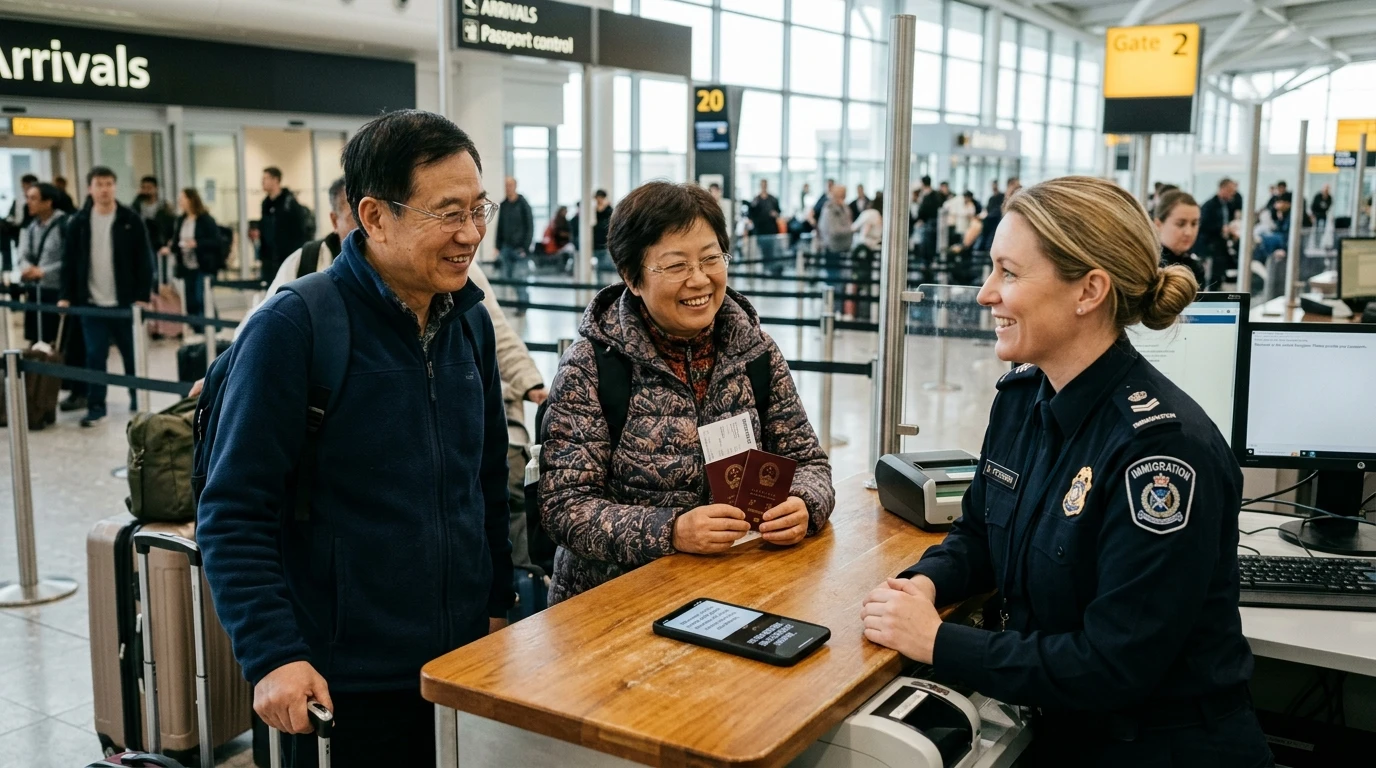
Taking retired parents on an overseas vacation—or watching them travel abroad independently to visit family, navigating connecting flights through bustling international hub airports—is a moment of deep anxiety for many families.
Used to the familiar comforts of their native language at home, elderly travelers often experience a sudden surge of stress in foreign airports. At the immigration inspection counter, confronted by stern border control officers firing off rapid questions ("Where will you stay? How many days?"), an elderly parent wearing reading glasses can easily freeze up. Even after making it through, the flight attendants hand out complex paper Customs Declaration forms covered in tiny English print and cramped grids, leaving them sweating over which box belongs to their name, passport number, or temporary address.
The core challenge of language barriers for older travelers is that tools cannot be cumbersome. Seniors struggle with microscopic fonts, complex settings menus, and multi-step interactions. An effective solution must feel as natural and direct as everyday conversation: laying a single phone flat on a counter for 180° face-to-face split-screen simultaneous translation, and snapping a single photo of a form to get an in-place translated visual overlay.
1. Why Traditional Translation Apps Fall Short for Aging Parents
Many translation apps that tech-savvy younger travelers take for granted become major pain points when handed to older parents:
- Passing the phone back and forth creates tension: Conventional voice translation tools require one person to hold a button, speak, and then physically hand the phone to the other person to listen, who must then hold a button and speak back. At a formal immigration checkpoint or customs counter, repeatedly passing a device across the desk is clunky and can easily trigger impatience or heightened scrutiny from border officials.
- Tiny text and deep navigation menus: Most consumer translation apps feature crowded interfaces, small buttons, and buried submenus. Under the stress of an unfamiliar airport, older travelers frequently tap the wrong screen or lose their place.
- Plain-text OCR strips away form structure: When taking a photo of a paper arrival card or customs declaration, typical OCR apps dump out a continuous block of plain translated text. By stripping away the form's original borders, checkboxes, and grid lines, they leave travelers guessing which translated phrase corresponds to which physical box on the paper form.
2. 180° Face-to-Face Split-Screen Translation: Smooth Counter Inquiries
For close-range exchanges at an immigration booth or airport customer service desk, the most stress-free method is two-way, opposite-facing split-screen simultaneous translation. Below, we demonstrate the real-world workflow using the Face-to-Face translation feature developed by our team at Equalang.
No App Installation Required: Instant Browser Access
Equalang's face-to-face simultaneous translation runs directly inside a mobile browser, so older travelers do not need to search app stores, manage logins, or install bulky native applications.
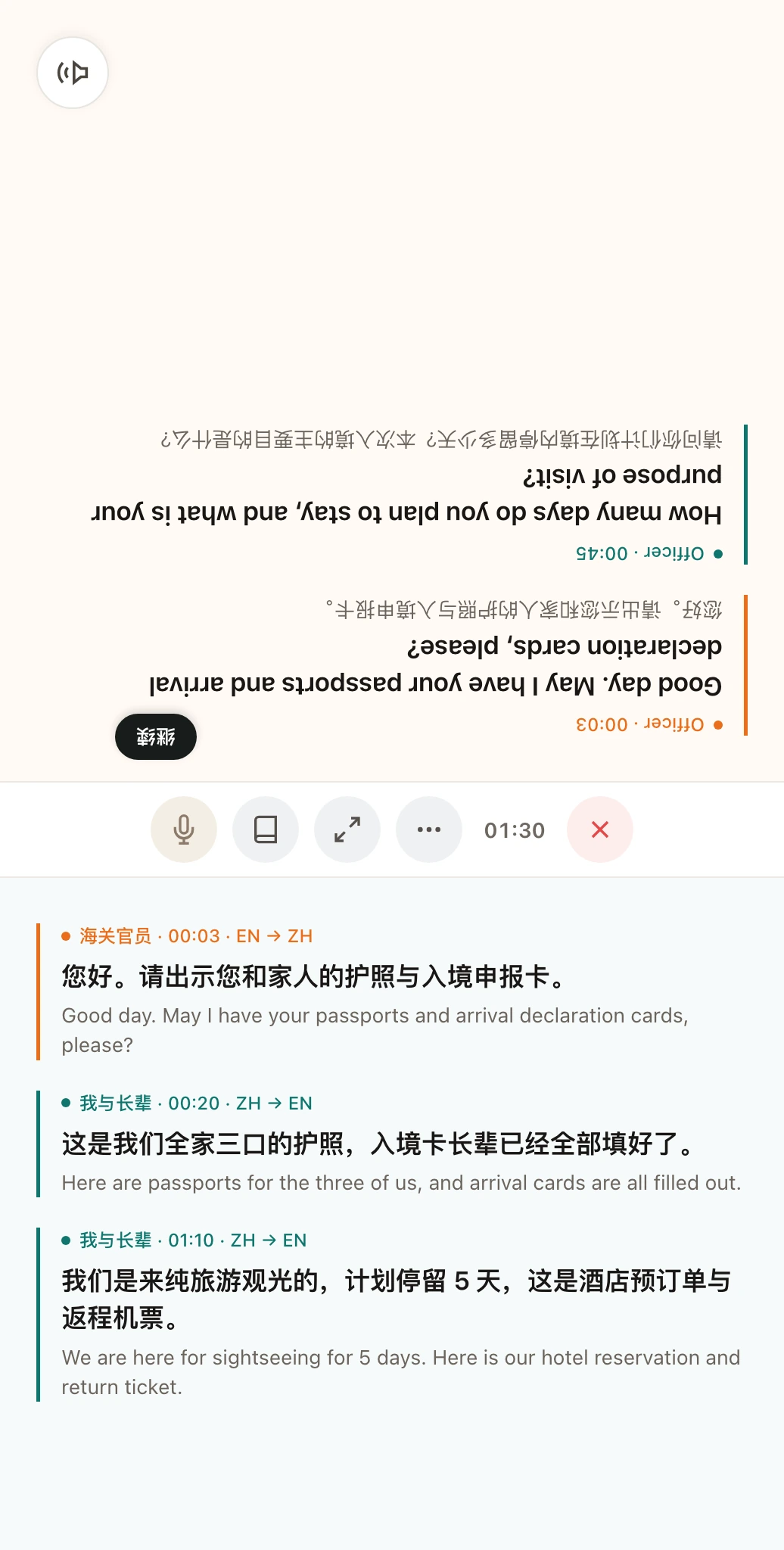
Once inside the Face-to-Face workspace, selecting "Opposite" mode inverts the top half of the screen when the phone is laid flat on a desk or counter:
Key Usability Details of Opposing Split-Screen Design
As shown in the illustrative diagram, the opposing layout delivers several practical advantages:
- Each party views their own orientation: The top half of the screen is flipped 180° to face the border control officer or service agent, displaying their native language (e.g., English). The bottom half faces the parent, displaying Chinese.
- No passing the phone or button-juggling: Neither party needs to pass the device back and forth. Both individuals simply speak naturally toward the phone's microphone. The system automatically transcribes and presents translations bi-directionally on both sides of the screen, removing the anxiety of managing a phone during a formal interview.
- Reviewable bilingual transcript: Once the conversation wraps up, users can scroll through the complete bilingual dialogue history to verify flight numbers, gate directions, or other critical details exchanged during the conversation.
3. In-Place Photo Overlays: Filling Out Arrival Cards Without Confusion
Before landing, flight attendants distribute arrival cards and customs declaration forms for the destination country. For older passengers unfamiliar with foreign forms, in-place photo translation overlays provide the most straightforward guidance.
Visual Layout Preserved Directly Over the Form
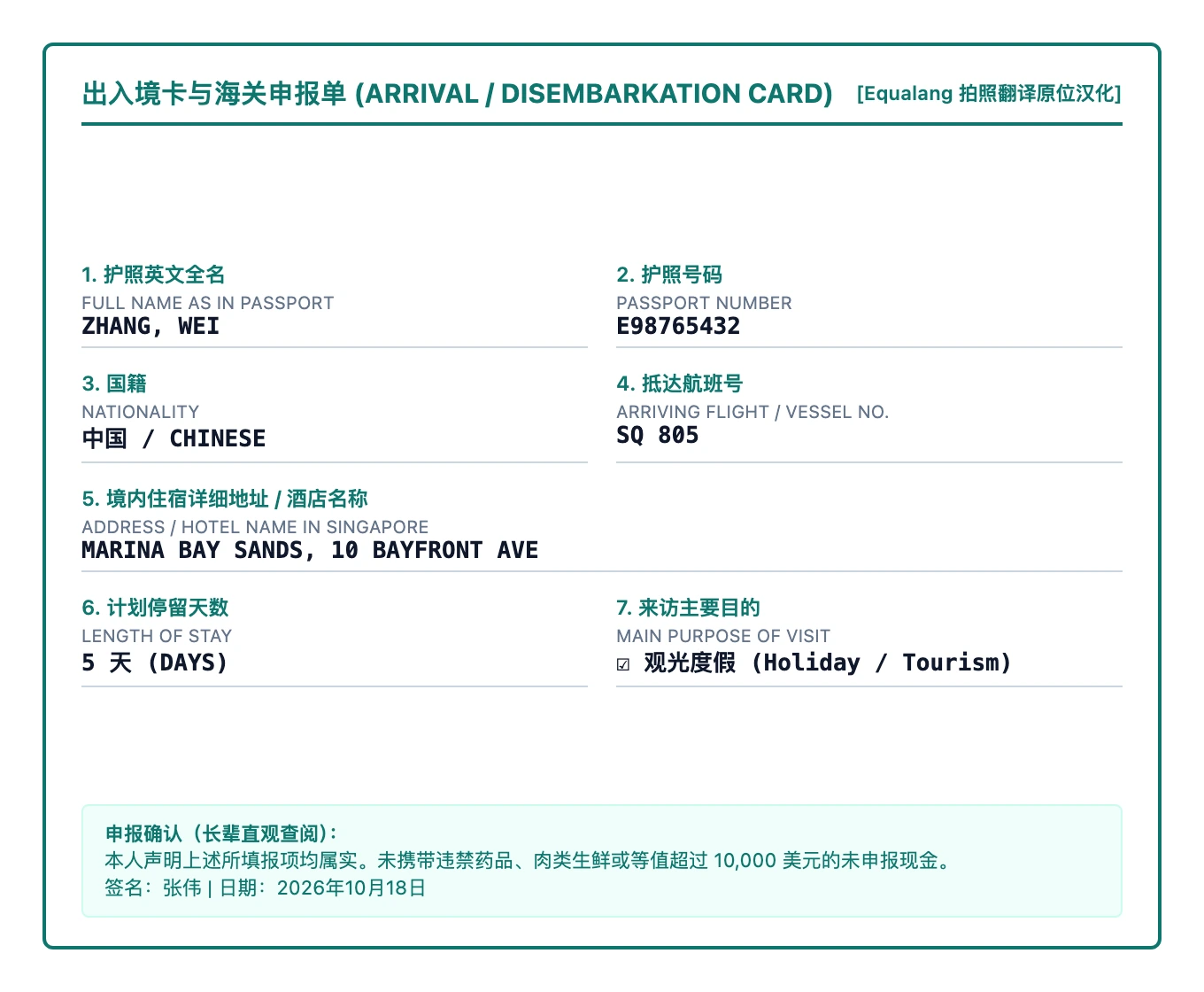
Travelers simply open photo translation on their phone and take a picture of the paper declaration form. After parsing the document hierarchy, the engine places translated labels directly over the original fields, lines, and checkboxes:
Why In-Place Overlays Work Better for Seniors
- Precise visual alignment: As shown in the illustrative diagram, critical declaration prompts such as "Length of stay", as well as the cash declaration at the bottom, have Chinese printed directly above the original English. Parents can look at the translated prompts on their phone screen while simultaneously filling in names, passport numbers, or dates into the corresponding paper blanks.
- One-tap toggle to verify against the original: The interface includes a quick toggle button to switch back and forth between the translated overlay and the original photo, making it easy to double-check source headers before inking the paper card.
4. A Pre-Departure Checklist for Parents Traveling Abroad
To ensure a seamless journey through customs and immigration, prepare these three essential physical backups for your parents before they depart:
- Keep printed travel itineraries handy: Print out the full round-trip flight itinerary (showing e-ticket numbers in English) and hotel reservation confirmations. Place them in a clear front pocket of your parents' carry-on bag. If an immigration officer asks for proof of stay or return travel, presenting printed paper confirmations is often faster and less intimidating than attempting verbal explanations.
- Prepare a concise English emergency contact card: Write a clear, simple note on an index card for their wallet: "I cannot speak English. I am visiting my family in [City]. Here is my child's phone number: +86-xxx." This gives airport staff an immediate way to reach you if unexpected delays occur.
- Emphasize strict customs declaration rules: Remind parents never to pack prohibited agricultural goods—such as fresh fruits, dried meats, seeds, or unsealed food products—in checked or carry-on luggage. On customs forms, emphasize answering every declaration checkbox honestly to avoid steep regulatory fines or confiscations.
Sources
- Equalang Face-to-Face and Photo Translation: https://equalang.com/face-to-face
- International Air Transport Association (IATA) Travel Centre Document Requirements: https://www.iatatravelcentre.com/
- Consular Services Travel Safety & Entry Advisories: http://cs.mfa.gov.cn/