
Beelinguapp Alternatives for Bilingual Books Online
In brief
Compare top Beelinguapp alternatives to read bilingual books online, from side-by-side public-domain classics and EPUBs to web serials and audio stories.
Keywords: beelinguapp alternatives; bilingual books online free; bilingual books spanish english free online; parallel text books online; side by side bilingual reader
Finding the right platform to read bilingual books online depends on whether you want mobile audio stories, full-length novels on an e-reader, or live web articles. Beelinguapp remains a strong choice for beginners practicing listening with short, karaoke-style narrated texts on a phone. For full-length classics and academic literature on desktop, tablet, or Kindle, Equalang Plaza offers over 75,000 public-domain books and 24,000 open-access papers with free 20% side-by-side browser previews and downloadable bilingual files, while Wikisource provides free community-proofread classics for readers willing to align chapters manually, and the Equalang browser extension handles live web serials and essays.
Quick Comparison of Bilingual Reading Platforms
Why Readers Outgrow Mobile Graded-Story Apps
Most language learners start looking for Beelinguapp alternatives at a predictable milestone: the transition from short graded passages to real books. When you first build vocabulary in Spanish, French, German, or Japanese, reading a 400-word fairy tale or news summary while following karaoke-style highlighted narration on your phone feels effortless.
Once you reach an intermediate level and want to read an entire novel or a university paper, three friction points appear:
- Screen ergonomics: Reading a 300-page nineteenth-century novel or a two-column scientific paper on a vertical smartphone screen strains your eyes compared to a laptop monitor, iPad, or e-ink device.
- Catalog depth: Audio-first mobile apps naturally focus on short narratives because recording human voiceovers for tens of thousands of full-length books is impractical.
- Offline e-reader ownership: Many intermediate learners want to download an
EPUBor a side-by-sidePDFto annotate on their own device rather than staying locked inside a mobile subscription app.
If your goal is still focused on shadowing spoken pronunciation during a commute, sticking with Beelinguapp makes sense. If you want to sit down with Pride and Prejudice, Dracula, The Odyssey, or a machine-learning paper, you need a library built for long-form text. Check our guide on whether bilingual reading is effective for how parallel text supports that transition.
Reading Full-Length Classics and Papers on Equalang Plaza
We built Equalang Plaza specifically for readers who want full-length public-domain books and open-access research papers formatted for side-by-side reading and offline download. Instead of short summaries, the catalog brings together over 75,000 public-domain books—drawn from sources such as Aozora Bunko, Wikisource, and Standard Ebooks—alongside more than 24,000 open-access papers under CC BY, CC BY-SA, and CC0 licenses from OpenAlex, PubMed Central, and arXiv.
How to Read and Download Bilingual Editions
- Search across languages: Open Equalang Plaza and search by title, author, or DOI in any language. You can filter by All, Books, or Papers, and narrow the list by your target language.
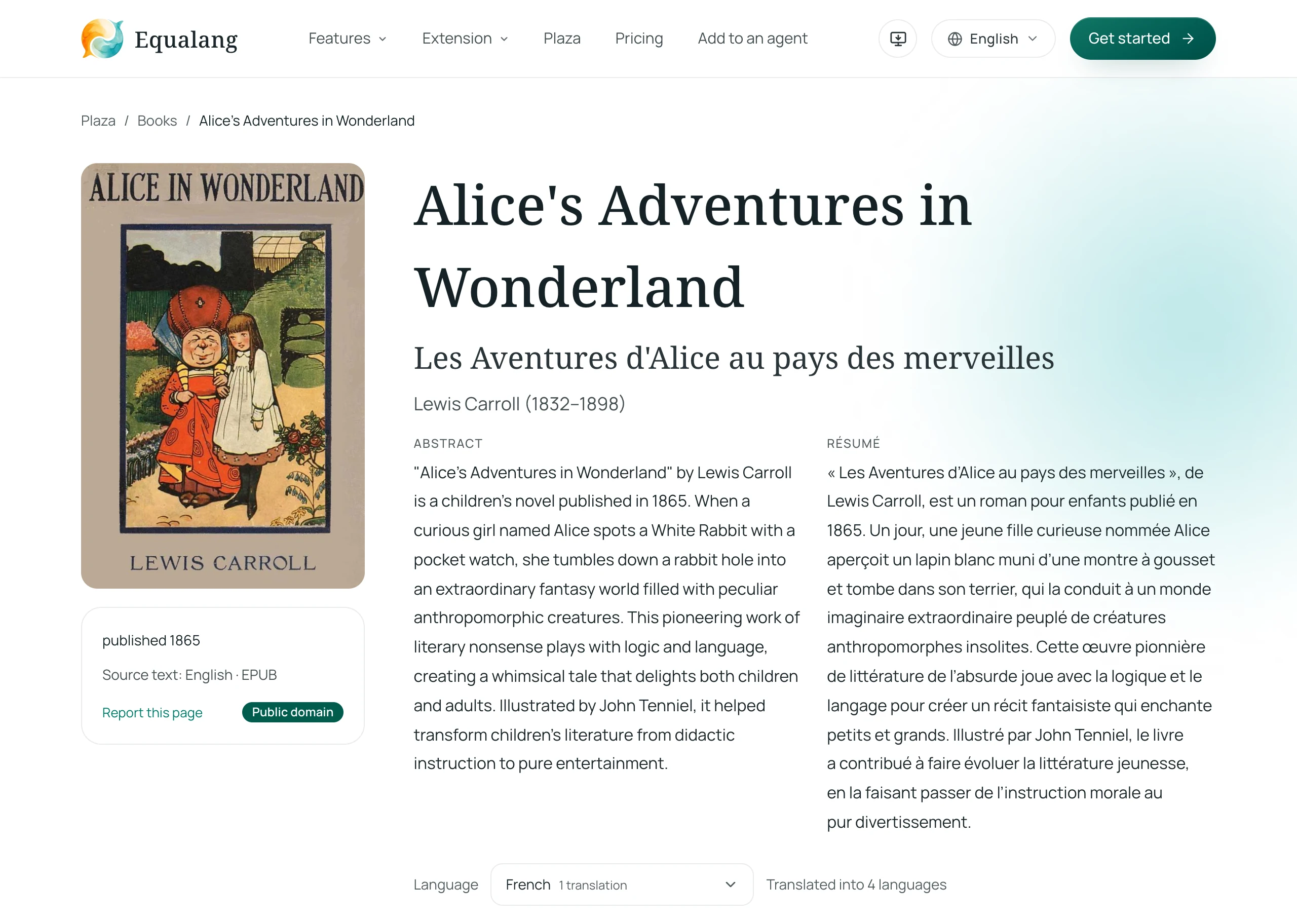
- Read originals and sample 20% side by side for 0 credits: Once signed in, you can read or download any original source file for 0 credits. You can also open any available translation in your browser to read the first 20% side by side with synchronized scrolling at no cost. For example, on the work page for Alice's Adventures in Wonderland, you can compare the English original against both human public-domain translations (such as Henri Bué's French edition, Les Aventures d'Alice au pays des merveilles) and AI-translated editions across dozens of languages.
- Download full EPUBs or bilingual PDFs at 1/10 cost: If the 20% preview fits your reading level, you can download the full translated edition for 1/10 of the standard translation credit cost (rounded up and displayed on the page). For instance, downloading the Chinese AI translation of the OpenAlex open-access paper 3D Gaussian Splatting for Real-Time Radiance Field Rendering costs 24 credits. Downloaded files keep the source format (
EPUBoutputsEPUB), while everyPDFpurchase includes both a layout-preserved translationPDFand a page-by-page alternating bilingualPDF— plus full online reading access and unlimited re-downloads. - Request or share missing translations: If a work in the plaza does not yet have your target language, click Translate now on the source edition or click Want this translation to register demand (frequently requested titles are prioritized). If you upload a file on the document translation page that already has a translation in the plaza, we prompt you to preview or download the existing plaza edition at the 1/10 rate so you do not pay twice. And if you translate your own public-domain book or
CC BY/CC BY-SA/CC0paper, you can click Share to the plaza at the top of the workspace (up to 3 submissions per day, published after copyright review); each time another reader downloads your shared edition, you receive 1/10 of your translation cost back in credits until your original spend is recovered.
Honest Boundaries to Keep in Mind
Because we want you to pick the right tool before spending time or credits, here are the exact limits of Equalang Plaza:
- No synchronized voiceover narration: Unlike Beelinguapp, Equalang Plaza is a visual side-by-side reading and downloadable
EPUB/PDFlibrary. It does not include human audiobook narration or karaoke audio highlighting. - Sign-in is required: You must sign in to read or download 0-credit originals and to open the free 20% synchronized bilingual preview. Full translation downloads require credits at 1/10 of standard translation cost rather than being zero-credit downloads.
- Strictly public-domain and open-access licenses: You will not find modern copyrighted bestsellers, DRM-locked textbooks, or paywalled journal articles in the plaza. Works carrying
NC(non-commercial) orND(no derivatives) restrictions cannot be shared to the plaza, and sharing refunds cap at your original translation credit cost. - Translation coverage grows by demand: Not every book or paper has pre-built editions in every language yet, though you can trigger a translation from the plaza source or report missed lines, mistranslations, or layout glitches on existing editions (heavily flagged editions are re-translated).
Pairing Public-Domain Originals Manually on Wikisource
If you are looking for "bilingual books spanish english free online" or classic French, German, Russian, Chinese, or Japanese literature without creating an account, Wikisource (https://wikisource.org/) is one of the oldest community-proofread digital libraries on the web.
Because volunteers proofread scans of historical editions across dozens of language subdomains, you can often find both an original work (say, in French or Spanish) and a nineteenth- or early-twentieth-century English translation hosted on their respective Wikisource portals. To read them side by side:
- Open the original text in one browser window and use the left-hand language sidebar to jump to the matching work in your second language.
- Snap the two browser windows side by side on a desktop monitor.
Where manual pairing breaks down: Historical translators frequently merged paragraphs, abridged chapters, or split dialogue differently from the original author. Without synchronized paragraph alignment, your left and right tabs drift apart within a few pages. Wikisource is rewarding when you want a specific human-proofread historical translation for zero cost, whereas Equalang Plaza eliminates the alignment chore by pairing the source and translation in a single synchronized view. For more step-by-step tactics on structuring your study sessions, see how to read English books with bilingual immersion.
Reading Live Web Serials and Essays with a Browser Extension
Not every bilingual reading session revolves around a classic novel or a downloadable EPUB. Many learners practice daily with serialized web fiction on Pixiv or Wattpad, long-form essays on Substack, or discussions on Reddit.
For live web content, the Equalang browser extension works directly inside Chrome, Edge, Firefox, or macOS Safari (currently available as a temporary install on macOS 18.4+). Once enabled in bilingual mode, each translated paragraph appears directly beneath its corresponding original paragraph as you scroll down the page, keeping links pointed to their original destinations. When you only need help with an unfamiliar word or phrase, you can turn on selection translation to view a contextual translation popover rather than translating the entire page. The extension shares the exact same account and credit balance as the web workspace and plaza.
Frequently Asked Questions
Can I read bilingual books online for free on Equalang Plaza?
Yes, with clear boundaries: once you sign in to Equalang Plaza, reading and downloading any original public-domain book or open-access paper costs 0 credits, and you can read the first 20% of any available translation side by side with synchronized scrolling for free. Downloading the full translated EPUB or bilingual PDF costs 1/10 of the standard translation credit price.
How does Equalang Plaza differ from Beelinguapp?
Beelinguapp is a mobile-first iOS and Android app focused on short graded stories, news, and fairy tales paired with karaoke-style human audio narration. Equalang Plaza is built for full-length reading on desktop, tablet, and e-readers—hosting 75,000+ public-domain books and 24,000+ open-access papers with side-by-side browser previews and downloadable EPUB and PDF files, without audiobook voiceovers.
What if a book on Equalang Plaza does not have a translation in my language yet?
You can click Want this translation on the work's page so popular requests get prioritized, or click Translate now to run a full translation directly from the plaza source edition. If you translate a public-domain book or an eligible open-access paper (CC BY, CC BY-SA, or CC0) yourself, you can also share it to the plaza and earn back 1/10 of your translation cost in credits each time another reader downloads it, up to your original spend.
Sources
- Equalang Plaza (English): https://equalang.com/plaza
- Equalang Plaza (Simplified Chinese): https://equalang.com/zh-CN/plaza
- Equalang Credit Rates API (
preview_ratio,download_ratio,share_refund_ratio): https://equalang.com/v1/rates - Equalang Plaza Sample Work API (3D Gaussian Splatting for Real-Time Radiance Field Rendering): https://equalang.com/v1/plaza/works/3d-gaussian-splatting-for-real-time-radiance-field-rendering-f467b4?locale=zh-CN
- Equalang Browser Extension: https://equalang.com/extension
- Equalang Document Translation: https://equalang.com/documents
- Beelinguapp Official Website: https://beelinguapp.com/
- Wikisource Multilingual Portal: https://wikisource.org/