
Aozora Bunko in English: Read Bilingual Japanese Books
In brief
Read Aozora Bunko Japanese classics with English translations. Compare raw XHTML, furigana tools, browser extensions, and Equalang Plaza bilingual books.
Keywords: aozora bunko english; aozora bunko in english and bilingual japanese books; read japanese classics bilingually; natsume soseki akutagawa bilingual; equalang plaza aozora bunko
Aozora Bunko (aozora.gr.jp, 青空文庫) does not have an official English interface or built-in English translations, but you can read its 17,000+ public-domain Japanese classics with English support in three practical ways. If you want to read directly on aozora.gr.jp while keeping native ruby furigana (<ruby> tags), open any book's XHTML file in your browser and pair pop-up dictionary extensions like Yomitan or 10ten with the Equalang browser extension for paragraph-by-paragraph bilingual translation. If you want downloadable editions or side-by-side reading without navigating Japanese-only author tables or Shift_JIS text zips, Equalang Plaza indexes public-domain Japanese works from Aozora Bunko alongside global classics (75,000+ books total), letting you read originals for 0 credits after signing in, sample 20% of available translations side by side, or trigger a full translation on demand.
Quick Comparison: Ways to Read Aozora Bunko in English
Why Raw Aozora Bunko Trips Up Overseas Readers and Learners
If you have ever clicked into Aozora Bunko looking for Natsume Soseki (Kokoro こころ, I Am a Cat 吾輩は猫である), Ryunosuke Akutagawa (Rashōmon 羅生門, In a Grove 藪の中), Osamu Dazai (No Longer Human 人間失格, Run, Melos! 走れメロス), Mori Ogai, or Kenji Miyazawa, you immediately hit two hurdles.
First, the entire site interface, fifty-sound (五十音順) author index, and bibliographic card metadata (図書カード) are 100% in Japanese. Unless you already know the kanji spelling of an author's name or work title, finding the right file takes extra cross-referencing.
Second, Aozora Bunko distributes its texts in two specialized formats designed for Japanese volunteer proofreaders:
Shift_JISzipped plain text (.zip/.txt): Uses special Aozora formatting brackets for ruby furigana (such as|羅生門《らしょうもん》) and layout notes ([#改ページ]). Opening these files in a standard Western text editor often produces garbled characters (mojibake) unless you manually switch encoding toShift_JISor run them through a Java converter likeAozoraEpub3.- XHTML web files (
.html): Rendered right in your browser with proper<ruby>furigana tags. While these pages work well with pop-up dictionary extensions like Yomitan or 10ten Japanese Reader, there are no English translations on Aozora Bunko itself. Even when you look up every unfamiliar noun with a hover dictionary, Meiji- and Taisho-era literary grammar, classical verb inflections, and long nested clauses frequently leave intermediate learners guessing what actually happened in a paragraph.
Method 1: Search, Preview, and Download Aozora Classics on Equalang Plaza
When you want to skip Shift_JIS encoding quirks and read Japanese public-domain literature alongside an English translation—or download a clean e-book file—Equalang Plaza puts Aozora Bunko works into a multilingual catalog alongside public-domain titles from Wikisource and Standard Ebooks, as well as permissively licensed open-access papers.
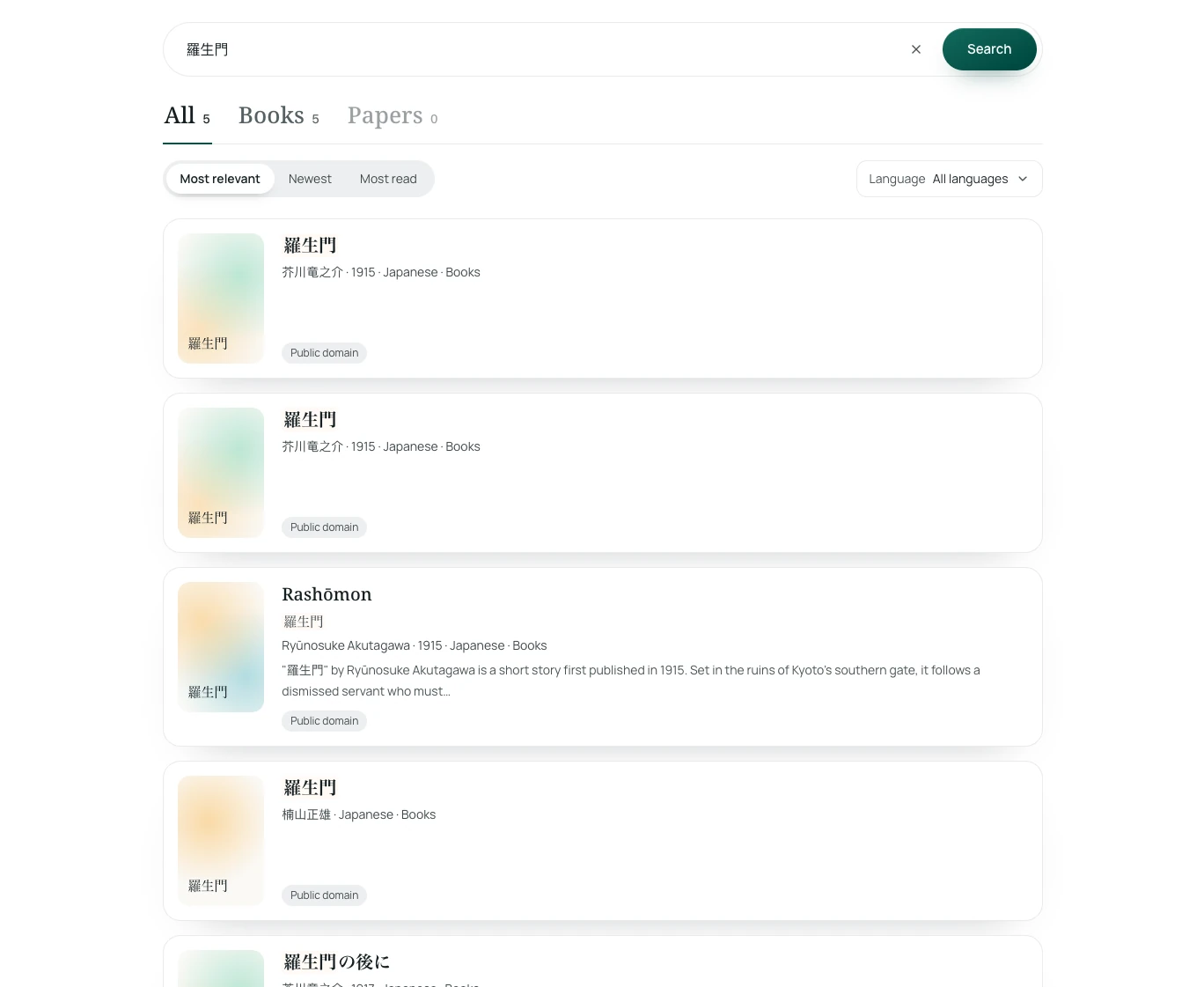
Here is how to use Equalang Plaza for Japanese public-domain books:
- Search by title or author in any language: Open Equalang Plaza, filter by Books, and type a Japanese title or author name such as
羅生門or夏目漱石(or search by keywords in your target language). You will see the indexed Japanese public-domain editions right away. - Read or download the Japanese original for 0 credits: Once signed in, you can open or download the original Japanese source edition for free (0 credits).
- Sample the first 20% bilingually for free: For works that already have an English (or Chinese, Spanish, French, Korean, etc.) translation on the Plaza, signed-in readers can read the first 20% for free in a side-by-side view where the Japanese original and the translation scroll in sync.
- Download the full translated book at 1/10 of standard translation credits: If the 20% preview fits your reading level, you can download the full translated file in the same format as the source edition (for example, an EPUB source outputs an EPUB) for 1/10 of the standard document translation credit cost, rounded up and shown clearly on the page.
- What if a specific Japanese story has no English edition yet?: Not every one of Aozora Bunko's 17,000+ titles has been pre-translated into every language. When you land on an untranslated Japanese work in Equalang Plaza, you have two choices right on the listing: click
Translate nowto start a full translation straight from the Plaza source text without hunting down an external file, or clickRequest this translationto register your interest (works with more reader requests are prioritized for Plaza translation). You can also report missed lines, mistranslations, or layout glitches while reading; heavily reported editions are re-translated.
Honest boundaries to keep in mind: You must sign in to read or download free originals and sample the 20% bilingual preview. Full translated downloads require credits (1/10 of the standard translation cost, not 0 credits). Finally, Equalang Plaza only hosts public-domain works and permissively licensed open-access papers (CC BY, CC BY-SA, CC0)—modern copyrighted Japanese novels by living authors are not in the Plaza.
Method 2: Read Raw aozora.gr.jp XHTML Pages with the Equalang Browser Extension
Many Japanese learners prefer reading directly on aozora.gr.jp because the raw .html files preserve the volunteer-annotated furigana readings above kanji and open instantly in a browser tab. You do not have to give up that workflow to get sentence-level English help.
At the bottom of any Aozora Bunko book card (図書カード), scroll to the ファイルのダウンロード (File Download) or いますぐXHTML版で読む (Read XHTML version now) link and click the .html option. Once the Japanese story opens in Chrome, Edge, Firefox, or Safari on macOS, turn on the Equalang browser extension and select Bilingual mode.
- Paragraph-by-paragraph bilingual display: As you scroll down the story, the extension places the English translation directly beneath each corresponding Japanese paragraph. You can read the Japanese text first, use your furigana or hover dictionary for individual kanji, and glance down a single line whenever a classical grammatical turn or idiom obscures the meaning. Toggle the extension again to return to the clean Japanese original.
- Context-aware word selection: If you only want help on occasional phrases without translating the whole page, enable word selection translation in the extension panel. Highlighting a phrase and clicking the translation icon opens a pop-up showing how the phrase translates in that specific context, often accompanied by a brief AI explanation of part of speech and example sentences.
For a detailed walkthrough of how browser-based bilingual reading works across different web layouts, see our guide on how to read foreign websites bilingually.
Method 3: Convert Aozora Files with AozoraEpub3, Translate via /documents, and Share Back
If you enjoy curating your own e-reader library—or if you downloaded a lesser-known Aozora Bunko text that is not yet in Equalang Plaza—you can combine standard Japanese community conversion tools with Equalang Document Translation:
- Upload
.html,.txt, or.epubdirectly: Equalang Document Translation supportsEPUB,HTML,TXT,PDF,DOCX,PPTX, andXLSX(currently covering Chinese, English, Japanese, Korean, Spanish, French and other languages). If you convert an Aozora Bunko zip into a clean.epubusingAozoraEpub3or save the.htmlfile fromaozora.gr.jp, you can upload it straight to/documents. If the book you upload already has a matching translation in Equalang Plaza, the workspace will prompt you so you can preview or download the existing Plaza edition at 1/10 the cost instead of paying to translate it again. - Keep character and place names consistent in long novels: When uploading a full-length novel like Soseki's Kokoro or I Am a Cat as an
EPUBorPDF, open Translation settings before starting and toggle on Keep names and terms consistent. This option (turned off by default, billed at an additional 4 credits per 1,000 tokens) helps unify character names and place names across chapters. Once the job finishes, you can read the source and translation side by side with synchronized scrolling in the web translation workspace, or download the translated file (our three-chapter EPUB validation preserved the table of contents, internal forward/back links, chapters, and illustrations). Check out our bilingual book immersion guide for more e-reader tips. - Share public-domain translations to Equalang Plaza to earn back your credits: Because Aozora Bunko works are in the public domain, once your document translation finishes in the workspace, you can click Share to the plaza at the top of the workspace (up to 3 submissions per day, published after copyright verification). Every time another reader downloads your shared edition on Equalang Plaza, 1/10 of the credits you spent on that translation are refunded to your account, up to the full amount you originally paid.
Which Starter Classics Should You Read First?
If you are ready to test a bilingual workflow today, these four Aozora Bunko staples offer a smooth progression from crisp short stories to psychological novels:
- Ryunosuke Akutagawa (
芥川龍之介) — Rashōmon (羅生門) & In a Grove (藪の中): Short, tightly structured stories with vivid narrative hooks. Searching羅生門on Equalang Plaza immediately brings up five public-domain Japanese entries so you can inspect the text right away. - Osamu Dazai (
太宰治) — Run, Melos! (走れメロス) & No Longer Human (人間失格): Run, Melos! uses relatively direct sentence structures that reward intermediate learners, while No Longer Human benefits heavily from side-by-side paragraph translations when Dazai's introspective sentences stretch across multiple lines. - Natsume Soseki (
夏目漱石) — Kokoro (こころ) & I Am a Cat (吾輩は猫である): Pillars of modern Japanese literature. Because these are longer multi-chapter books, reading a side-by-side EPUB or enabling name consistency during translation keeps recurring characters clear. - Mori Ogai (
森鷗外) — The Dancing Girl (舞姫) & Takasebune (高瀬舟): Takasebune is a concise philosophical short story, whereas The Dancing Girl uses classic Meiji literary style (文語体)—a textbook example of where word-by-word pop-up dictionaries struggle and a full paragraph translation saves hours of confusion.
Frequently Asked Questions
Does Aozora Bunko have an official English website or built-in English translations?
No. Aozora Bunko (https://www.aozora.gr.jp/) is a Japanese volunteer digital library whose interface, author index, and 17,000+ texts are entirely in Japanese. To read Aozora Bunko books with English translations, you can either search the title on Equalang Plaza for side-by-side reading and downloadable editions, or open an Aozora Bunko .html file in your browser with the Equalang browser extension.
Is it free to read Aozora Bunko Japanese books on Equalang Plaza?
Once you sign in to Equalang Plaza, reading and downloading the original Japanese public-domain books costs 0 credits, and you can preview the first 20% of any available translation side by side for free. Downloading a full translated book costs 1/10 of the standard translation credits.
What if an Aozora Bunko book I want doesn't have an English translation on Equalang Plaza yet?
If a public-domain book in Equalang Plaza does not have your target language edition yet, you can click Translate now right on the Plaza page to translate the source text immediately, or click Request this translation so popular requests get prioritized. You can also translate an .epub, .html, or .txt file from Aozora Bunko in Equalang Document Translation and click Share to the plaza to earn back 1/10 of your translation cost each time another reader downloads it (up to your original spend).
Sources
- Aozora Bunko Official Digital Library: https://www.aozora.gr.jp/
- Equalang Plaza (Public-Domain Books & Open-Access Papers): https://equalang.com/plaza
- Equalang Browser Extension: https://equalang.com/extension
- Equalang Document Translation: https://equalang.com/documents