How to Watch VibeShort Dramas with Subtitles
 Equalang
In brief
Watch VibeShort AI short dramas on your computer with real-time translated subtitles, even with burned-in captions.
Keywords: vibeshort; vibeshort subtitles; vibeshort translated subtitles; watch vibeshort on pc; vibeshort english subtitles
In the two titles we opened, VibeShort streams its AI short dramas with English subtitles burned directly into the video picture, offering no selectable subtitle tracks or native language toggles in its web player. If you want to watch VibeShort dramas on a computer with translated subtitles in your own language—such as Spanish, Chinese, or French—you can generate real-time translated captions in your desktop browser while keeping the burned-in English visible for bilingual viewing.
What subtitle options does VibeShort offer natively?
VibeShort (vibeshort.live), operated by Agile Quadrant Media Limited, produces original AI-generated short drama stories. The platform provides localized website navigation across 16 language versions, and its homepage features selected titles prefixed with "[Dubbed]" (such as "[Dubbed]Two Brides, One Fate").
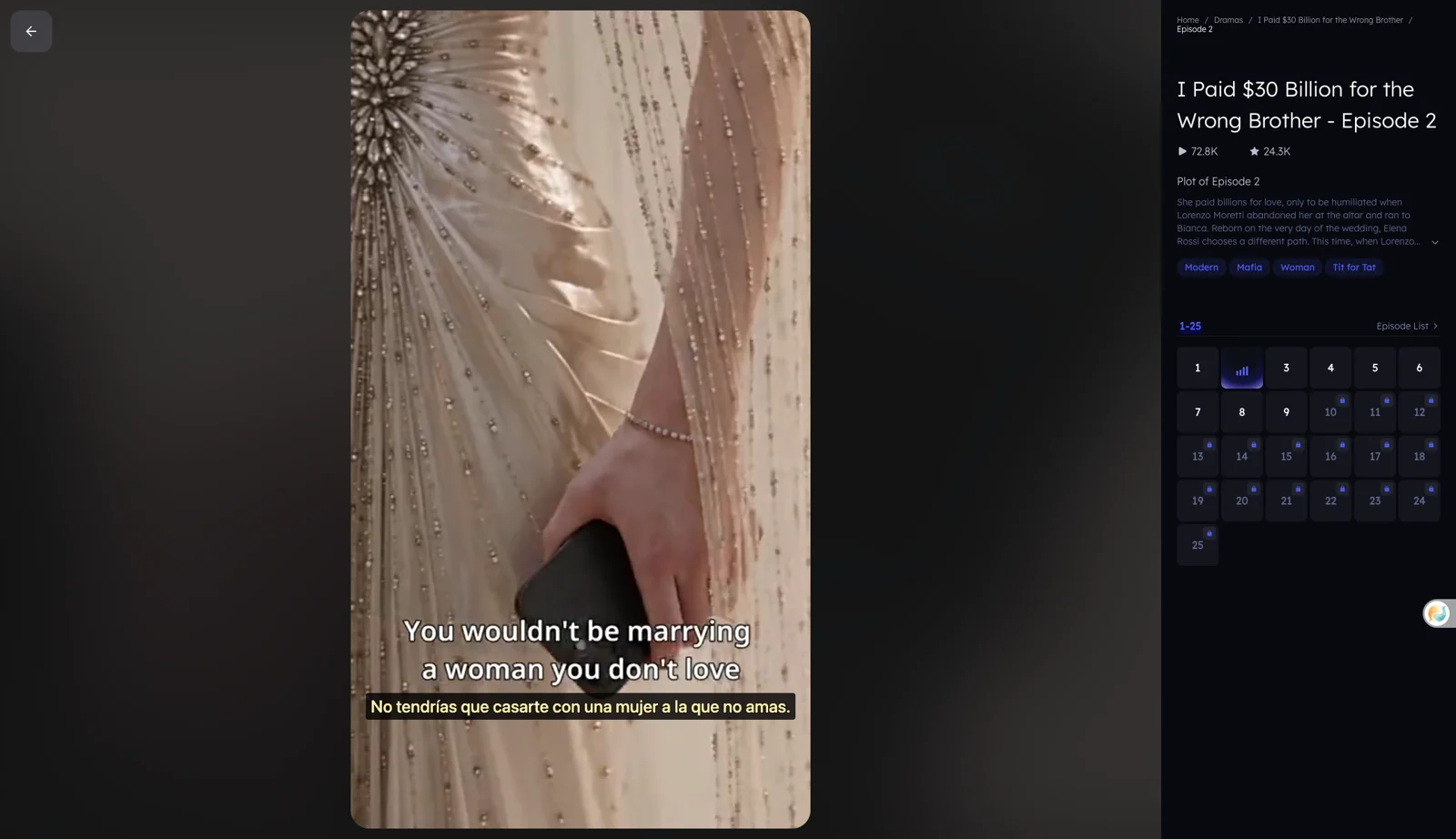
However, in the two titles we opened in its web player—They Broke Me, I Hid His Son Season 2 and I Paid 30 Billion for the Wrong Brother—dialogue subtitles are rendered directly into the video frame itself. There are no closed-caption (CC) files or selectable text tracks available in the player controls. If an episode has hardcoded English text in the video, viewers who need subtitles in other languages cannot simply toggle a player setting.
How to watch VibeShort with translated subtitles on a computer
Because the web player provides no separate text tracks, generating translated subtitles on a computer requires a tool capable of listening to the video audio and transcribing it as characters speak. Here is how to do it using Equalang on desktop:
- Open the episode in your desktop browser: Navigate to your chosen drama on vibeshort.live using Chrome, Edge, or Firefox (see the Equalang extension installation guides).
- Activate live interpretation: Click the Equalang icon in the player's control bar to open its menu. Because VibeShort has no closed-caption tracks, Equalang automatically switches on live interpretation, displaying the notice: "No captions found; live interpreting was switched on."
- Select your target language: Choose your preferred language from the menu. During our tests, we verified both Spanish and Simplified Chinese.
- Set caption display to "Translation only": In the extension menu under "Caption display", choose "Translation only". Because VibeShort already burns English subtitles into the video picture, "Translation only" places the translated line directly beneath the burned-in English. This gives you a natural bilingual view without generating a duplicate English line that covers the original frame.
- Play the drama: Start video playback. Translated subtitles will appear on screen as the characters speak. When episode 1 finishes, VibeShort automatically advances to episode 2, and the live translation continues without manual re-configuration.
What it costs on VibeShort and for subtitles
Watching dramas on VibeShort involves two separate considerations: access to episodes and the cost of live subtitle translation.
- VibeShort episode access: On the web player, early episodes of certain titles are available to watch logged out (for instance, episodes 1–9 of They Broke Me, I Hid His Son Season 2 played without locks). Locked episodes (such as episode 10 onward) display a QR code directing viewers to the mobile app. On mobile, VibeShort operates on coins and subscriptions (such as Weekly Pass Pro at $19.99/week or Annual Pass Pro at $149.99/year via the iOS App Store). Free coins can also be earned by completing in-app reward tasks. The browser extension does not unlock paid or locked episodes; VibeShort's own pass and coin rules apply.
- Subtitle translation credits: When Equalang generates subtitles by listening to video audio, usage is billed based on the audio sent for recognition at 5 credits per minute (listed under "Speech to text" on the Equalang pricing page), plus a small charge for translated text based on token volume. New accounts receive 200 free credits upon registration to test the player before purchasing credit packs. Purchased credits do not expire and are shared across web translation and browser extension features.
Limits to know and honest alternatives
While live interpretation allows you to follow VibeShort dramas in your native language, keep the following practical limitations in mind:
- Audio interference: Speech recognition relies on clear dialogue. Rapid dialogue, loud dramatic background scores, or multiple characters speaking simultaneously can cause occasional word misrecognitions.
- Initial recognition delay: Captions do not appear the exact instant you press play; the initial phrase requires a few seconds to process before subtitles stream steadily.
- No paywall bypass: The extension translates what is playing; it cannot unlock episodes that require platform coins or passes.
If you prefer alternative ways to watch:
-
VibeShort's native dubbed catalog: Check VibeShort's homepage for titles with the "[Dubbed]" tag; available dubbed languages depend on what the platform provides.
-
For techniques on other drama streaming sites, see our workflow for watching short dramas with dual subtitles or review supported extension video sites.
Frequently asked questions
Does VibeShort provide official multi-language subtitle tracks?
No. In the two titles we opened, VibeShort displays burned-in English text embedded directly into the video stream rather than offering selectable closed-caption tracks. While the platform has localized website navigation and a few dubbed titles, foreign-language subtitles require real-time speech translation tools.
Can Equalang unlock locked VibeShort episodes?
No. Equalang only provides translation and interpretation for media playing in your browser. It does not unlock, bypass, or decrypt paid episodes on VibeShort. Locked episodes must be unlocked using VibeShort coins, reward tasks, or an official subscription pass.
How do I cancel a VibeShort subscription?
According to VibeShort's terms of service and store listings, subscriptions auto-renew unless cancelled before the renewal date. If you subscribed on an iPhone, manage or cancel the renewal in your Apple ID account settings under Subscriptions; Android users can cancel via Google Play.
Does VibeShort have a customer service phone number?
No customer service phone number is listed on VibeShort's website, terms of service, or app store pages. Customer inquiries must be sent by email to service@vibeshort.live.
Sources
- VibeShort official website: https://www.vibeshort.live/
- VibeShort Terms of Service: https://www.vibeshort.live/terms-of-service
- VibeShort on iOS App Store: https://apps.apple.com/us/app/vibeshort-ai-short-dramas/id6758667154
- VibeShort on Google Play: https://play.google.com/store/apps/details?id=com.vibeshort.visualnovel.android&hl=en&gl=US
- Equalang browser extension: https://equalang.com/extension
- Equalang credit rates and pricing: https://equalang.com/pricing