How to Watch ReelShort and TikTok Dramas with Real-Time Bilingual Subtitles
 Equalang
In brief
Struggling to follow fast-paced, unsubtitled short dramas on ReelShort and TikTok? Here is how to enable real-time bilingual subtitles using a browser extension to display original and translated captions side by side on screen.
Keywords: bilingual subtitles for short dramas; ReelShort subtitles; TikTok drama translation; vertical video live captions; browser subtitle extension

Over the past year, vertical micro-dramas have sparked a global craze. Platforms like ReelShort, TikTok, and DramaBox are packed with fast-paced, localized short dramas spanning viral tropes—from billionaire rivalries and werewolf alphas to contract marriages and dramatic revenge arcs. But for viewers eager to follow these fast-moving productions—whether international releases, foreign-language originals, or cross-cultural adaptations—clicking into an episode often presents an immediate hurdle: raw, unsubtitled dialogue. Filled with rapid-fire slang, cultural idioms, and high-intensity confrontational banter, trying to follow along while constantly pausing to look up words ruins the cliffhanger pacing.
The core frustration of watching vertical micro-dramas comes down to three things: lightning-fast pacing that leaves no room to pause, dialogue packed with dense colloquialisms, and standard subtitle overlays that easily obstruct the actors' faces.
In this article, we explain how to enable smooth, real-time bilingual subtitles on desktop browsers for short dramas to display original and translated captions side by side on screen.
1. Why Traditional Subtitle Tools Fail for Vertical Short Dramas
Anyone accustomed to using traditional media players or subtitle extensions for standard TV series quickly runs into several frustrating roadblocks when trying to watch vertical short dramas:
- Lack of official multilingual subtitle tracks: Whether on the ReelShort web player or TikTok's drama tabs, many episodes are released with only a single audio track—often without any closed captions or embedded text subtitles at all. This immediately renders conventional tools that rely on external SRT or VTT files useless.
- Cramped vertical framing that blocks faces: While 16:9 widescreen videos offer ample room along the bottom margin, 9:16 vertical frames are dominated by close-up shots, expressive reactions, and subtle facial acting. Standard floating desktop subtitle windows often sit right across the center of the frame, covering the leads' faces, or use rigid, oversized fonts that conceal crucial visual interactions.
- Rapid, highly colloquial dialogue: The appeal of short dramas lies in plot twists packed into 60-second episodes, delivered through punchy, rapid-fire lines. If subtitle translation lags even slightly, you get a jarring disconnect where an emotional confrontation has already ended before the translation finally catches up.
Watching vertical short dramas doesn't require cumbersome offline video burning. Instead, it calls for a lightweight setup combining real-time speech translation and simultaneous bilingual display.
2. Comparing Three Common Ways to Watch Unsubtitled Short Dramas
To bridge the language gap when watching raw short dramas, viewers typically turn to one of three approaches:
For viewers who want frictionless, continuous binge-watching, using a desktop browser paired with a lightweight browser extension offers the smoothest overall experience. Below, we demonstrate the setup using the Equalang browser extension developed by our team.
3. Three Steps to Enable Real-Time Bilingual Subtitles for Overseas Short Dramas
Using any mainstream desktop browser (Chrome, Edge, or Firefox) alongside the extension's video captioning feature, you can display the original audio dialogue and Chinese translation side by side on screen.
Step 1: Open the Drama in Your Desktop Browser
Navigate to the drama player page on ReelShort, TikTok, or YouTube in your desktop browser.
When you open an episode video, the extension automatically detects the video player container and attaches a subtitle control toggle near the control bar or player corner.
Step 2: Choose the Subtitle Mode Based on the Video Source
Overseas short dramas typically fall into one of two categories, both of which the extension handles seamlessly:
- Videos with existing English subtitle tracks: If the video has a readable English subtitle track, click the subtitle icon on the player to enable Bilingual Subtitles. The extension automatically reads the original subtitle stream and renders the translated Chinese captions directly beneath the original text.
- Raw audio without subtitles (Live Speech Translation): For raw episodes that contain only spoken dialogue and no subtitle tracks, enable Live Translation mode, and the extension will generate synchronized English transcription alongside Chinese translation in real time.
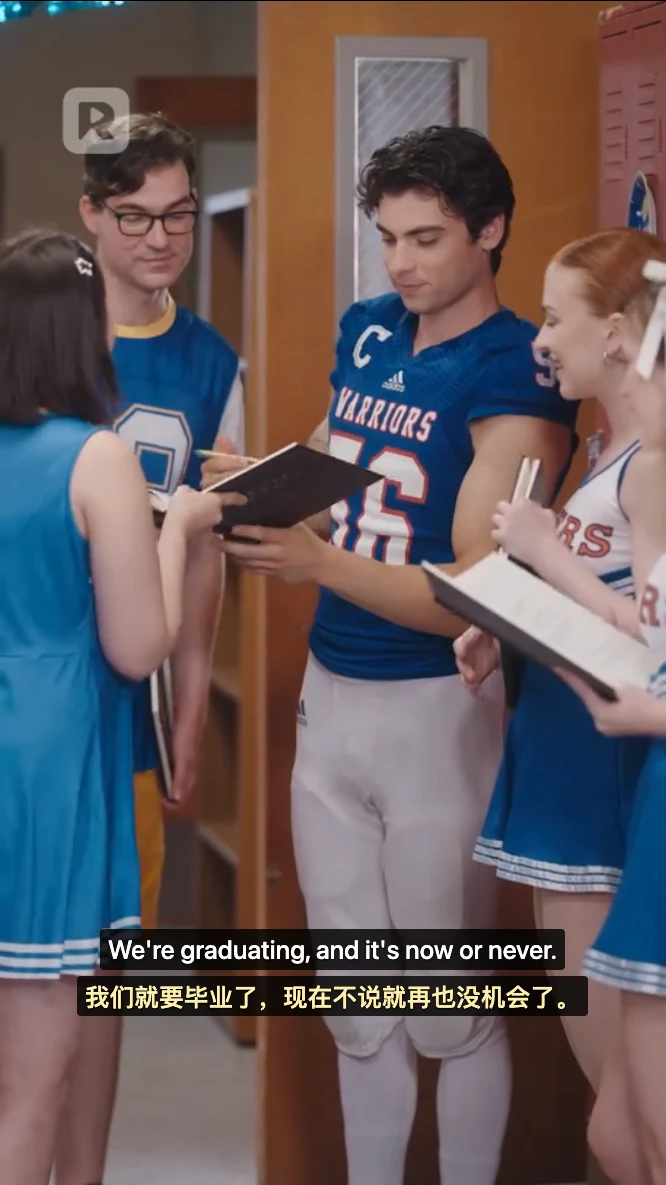
As shown in the screenshot:
- The original English text is "We're graduating, and it's now or never.";
- The Chinese translation is "我们就要毕业了,现在不说就再也没机会了。".
Step 3: Fine-Tune Subtitle Formatting for Vertical Framing
In vertical micro-dramas, the biggest annoyance is subtitles masking the actors' close-up expressions. Click the subtitle control panel to adjust the subtitle display type and translation position as needed:
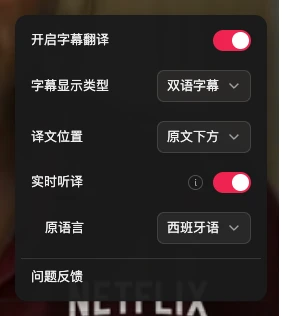
- Subtitle display type and position: Click the subtitle control panel to adjust the subtitle display type (bilingual / translation only) and translation position as needed.
4. Practical Tips for a Smoother Short Drama Viewing Experience
While enjoying an immersive binge-watching experience, keeping the following practical tips in mind can help you get a better viewing experience:
- Distinguish dialogue from heavy background noise: Some micro-dramas lean heavily on loud dramatic background music (BGM) and intense sound effects during shouting matches or action sequences. When background audio significantly overpowers dialogue, speech recognition accuracy may temporarily dip—a normal limitation of real-time audio separation technology.
- Opt for high-definition official streams: Cleaner, higher-bitrate audio streams yield faster, more consistent speech recognition and translation.
- Shared balance across platforms: Your Equalang account balance is shared seamlessly across both the web document translator and the browser extension, eliminating the need to manage separate accounts or top-ups between daily work and entertainment.
Sources & Attribution
- Equalang Browser Extension Overview
- ReelShort Official Short Drama Platform
- TikTok Web Official Site
- W3C Web Video Text Tracks Format (WebVTT) Specification
- Chrome Web Store Extension Security and Permissions Guidelines