How to Read web Action Manga in English
 Equalang
In brief
Read Futabasha's web Action manga in English directly in your browser. Learn what the site offers and how in-page comic translation works step by step.
Keywords: web action manga english; read web action manga; comic-action translation; futabasha web action english; manga web reader translator
webアクション (web Action, comic-action.com), operated by Futabasha, publishes all its manga and interface text exclusively in Japanese, with no official English edition available on the website. While free chapters can be read immediately without registering an account, the site itself does not provide English subtitles or translated dialogue. To read its manga in English on a computer, you can translate the speech bubbles directly inside web Action's web reader using a desktop browser extension.
What web Action offers on desktop browsers
web Action is a digital manga platform operated by Futabasha Publishers Ltd. (株式会社双葉社), based in Tokyo, Japan. The site updates new serial chapters every Tuesday and Friday ("毎週 火・金 更新中!"). While it provides ongoing series and popularity rankings, printed comic volumes are not sold directly within the platform.
The reading rules on web Action depend on the chapter's status:
- Free chapters: You can read free episodes without creating an account or logging in ("無料話の閲覧は会員登録不要でお楽しみいただけます").
- Paid chapters: Unlocking paid episodes requires registering a free account and purchasing points ("ポイント"). Purchased and granted points expire at the end of the sixth month, counting the month they were credited as the first.
- International access: During testing on 2026-11-12, chapter pages loaded normally from outside Japan without region-blocking screens, rendering high-resolution canvas pages.
Because the reader delivers pages as image canvases rather than selectable text, standard browser page translators cannot detect or translate the Japanese dialogue.
How to translate web Action manga into English
Below, we demonstrate the reading workflow using Equalang on a desktop browser. You can also explore how dedicated comic translation works across different services in our manga translation extension guide.
- Install the Equalang extension on a desktop Chromium browser (such as Google Chrome or Microsoft Edge) or Mozilla Firefox (version 0.4.56 or newer, such as 0.4.60), and sign in.
- Open
comic-action.comand navigate to any free chapter in the web reader. In our 2026-11-12 test, we opened the prologue of Host and Shachiku (ホストと社畜) by Mitsuru Kawajiri. - Under Equalang's floating ball on the right edge of the page, locate the comic translation button, which displays an open book icon with a smiling face. Hovering over it displays "Translate comics on this site, 5 credits per page".
- Click the comic button once to enable translation for the site. The tooltip changes to "Stop translating comics on this site". The extension remembers this setting for web Action across visits.
- Within approximately half a minute, the visible pages refresh with English text lettered directly into the speech bubbles, with the original Japanese text cleaned out.
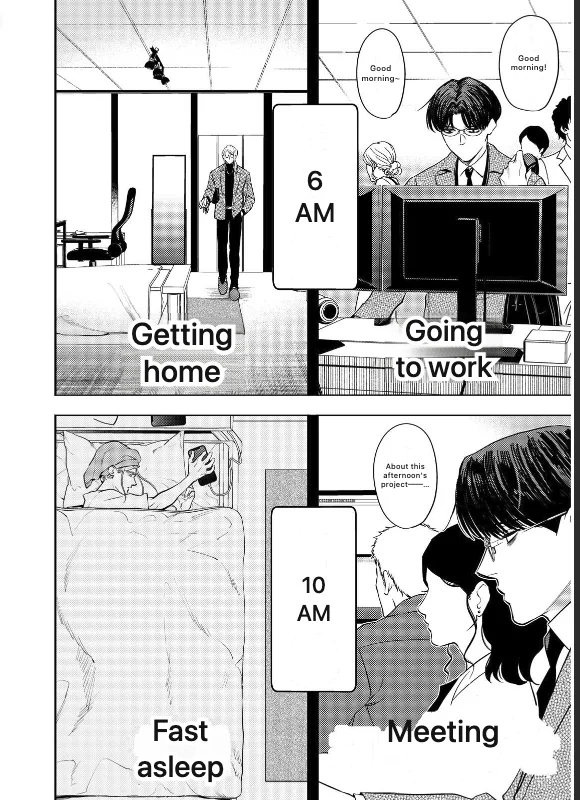
If the opening page of a chapter is a dialogue-free color cover, the extension recognizes that there is no text and leaves it untouched. Once you turn to the next spread, the translated panels appear.
Credit rates and local page caching
Comic translation in the extension follows specific usage rules:
- Per-page pricing: Translating a manga page costs 5 credits. Pages with no text are not charged.
- Initial allowance: New accounts receive 200 credits upon registration, which can be reviewed on the pricing page.
- Local caching: In Equalang, translated pages are saved locally on your computer. When you return to read the same chapter again, the extension loads your cached pages without charging additional credits. Credits are only deducted again if you explicitly choose to re-translate a page.
- No paywall bypassing: The extension only processes the pages loaded in your browser window. It does not unlock paid or coin-gated chapters; those still require web Action's official points.
Limitations and honest alternatives
During our hands-on testing on web Action, we noted several practical boundaries:
- Reader-page availability: The comic translation button only appears on web Action's chapter reading interface (
/episode/<id>). It does not appear on title summary pages or catalog indexes. - Machine translation nuances: Automated translation can sometimes misread informal spoken Japanese, slang, or vertical sound effects. Hovering your mouse over any translated page lets you view the original Japanese artwork or request a fresh re-translation.
If you prefer other reading methods, consider these alternatives:
- Mobile optical translation: You can point a phone running an image translation tool (such as Google Lens) at your monitor. This avoids installing extensions, though holding a mobile device throughout an entire volume is physically awkward.
- Official international releases: Some Futabasha series receive licensed English localizations published in print or through international digital stores. Checking licensed storefronts guarantees human-localized dialogue.
For a wider list of supported manga and webtoon readers, see the Equalang supported sites list.
Frequently Asked Questions
Does web Action (Futabasha) offer an official English mode?
No. web Action (Futabasha) operates entirely in Japanese across its catalog, titles, and reading interface, and does not provide an official English version on its website.
Can a browser extension unlock paid chapters on web Action?
No. Extensions only translate pages that are already accessible in your browser. Paid chapters on web Action (Futabasha) still require logging in with an account and spending official platform points.
Do I need to create an account to read free chapters on web Action?
No. web Action (Futabasha) allows anyone to read free episodes directly in their browser without registering an account.
Why doesn't the comic translation icon appear on the web Action homepage?
The comic translation feature is designed specifically for comic reader interfaces. On web Action (Futabasha), the tool appears only when you open an active chapter page under the /episode/ path.