Read Manga and Webtoons in Your Language on Official Sites
 Equalang
In brief
Read raw chapters on Shonen Jump+, MANGA Plus, and NAVER Webtoon without screenshots. Equalang cleans speech bubbles and letters translations on the page.
Keywords: manga translator extension; webtoon translation; Shonen Jump+; NAVER Webtoon; translate manga in browser
When a new chapter drops on Shonen Jump+ or NAVER Webtoon ahead of its official translation—or when a series you follow has no translated release at all—reading it on the official site usually means juggling tools. Built-in browser page translation only touches HTML text and ignores speech bubbles inside images. Taking screenshots and feeding them into a phone or desktop photo translator works for a panel or two, but doing that across a 20-page chapter or a long vertical scroll breaks the pacing and leaves the translation sitting in a separate window away from the art. Generic OCR tools also struggle with vertical Japanese typesetting, stylized fonts, and text split across narrow bubbles.
The Equalang browser extension lets you read those chapters right on the official reader page: it erases the original lines inside the speech bubbles and letters the translation back into the artwork as you read.
What Changes on the Page
Instead of overlaying floating text boxes on top of the artwork, the extension cleans the original dialogue out of each bubble and sets the translated lines inside the bubble's shape. When the target is English, the translation is set horizontally to fit each bubble's shape.
Here are two small panel crops from chapter 1 of Tatsuya Endo's SPY×FAMILY (officially free to read on Shonen Jump+, published by Shueisha), translated from Japanese into English:
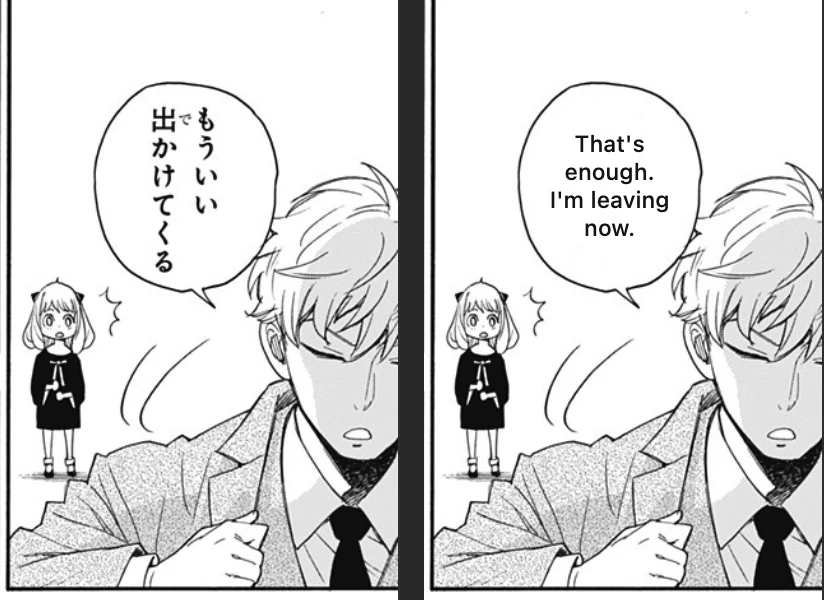
In the first panel, the two vertical columns of Japanese ("もういい 出かけてくる"—"That's enough. I'm leaving now.") are wiped clean and replaced with horizontal English text centered inside the bubble.
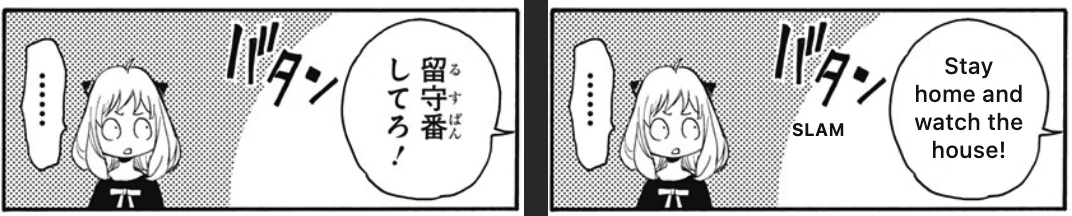
In the second panel ("留守番してろ!"—"Stay home and watch the house!"), the dialogue inside the jagged bubble is replaced while the hand-drawn door-slam sound effect ("バタン") is kept intact as part of the drawing, with a small translated note ("SLAM") placed right beside it.
As you flip or scroll through a chapter, the extension translates the page in front of you and pre-translates the upcoming pages in the background. To keep character names and recurring terms from shifting mid-chapter, each page carries over the terminology and the last few lines from the previous page.
Turning It On Across Official Manga and Webtoon Sites
When you open a supported comic site, a manga button—an open book with a smiling face—appears directly underneath the floating ball on the edge of the page.
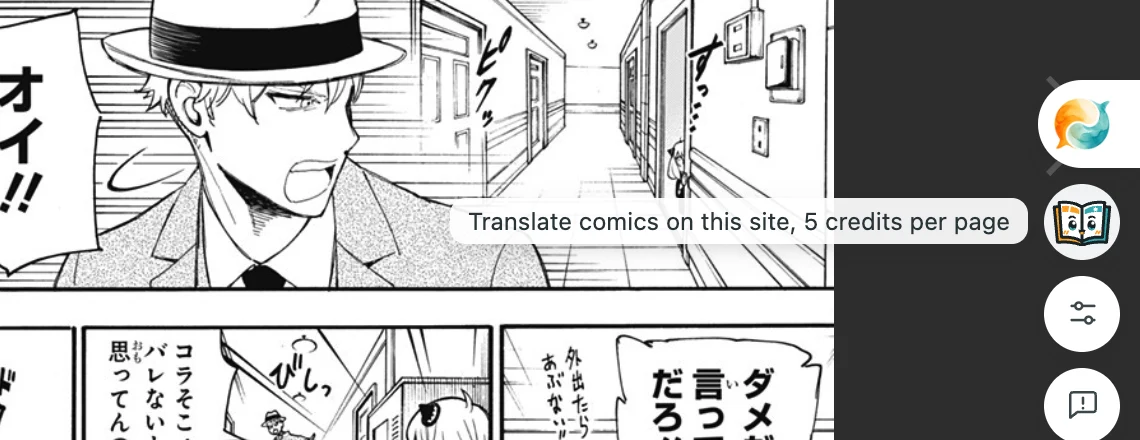
Click the open-book button once to turn on comic translation for that website, and click it again to turn it off. The extension remembers your choice per site, so turning it on for Shonen Jump+ will not trigger it on other sites unless you enable it there too.
Supported sites come from a list delivered to the extension (67 sites as of October 26, 2026), including these official ones:
- Japanese manga platforms: Shonen Jump+, MANGA Plus, comic DAYS, and other major publisher sites.
- Korean and global webtoon platforms: NAVER Webtoon, WEBTOON, Tapas, and others.
- Chinese comic platforms: Bilibili Comics, Tencent Comics, Kuaikan, and more.
The manga button arrives in extension version 0.4.56, so please update your extension first (manga translation requires extension version 0.4.56 or later).
How Long Vertical Webtoons and Pricing Work
Webtoons and vertical strips are built differently from page-by-page manga. Official webtoon readers often slice a single long scroll into dozens of smaller image files, and a slice cut can easily slice right through the middle of a speech bubble. Before translating a strip, the extension stitches those image slices back together and splits them cleanly at the blank spaces between panels.
Because paged manga and vertical strips are segmented differently, they are billed separately:
- Paged manga: 5 credits per page.
- Vertical strips (webtoons): 3 credits per strip segment.
- Pages without text: Free—full-page illustrations or silent action pages with no dialogue do not use credits.
- Local caching: Pages you have already translated are saved on your computer, so scrolling back or re-opening the chapter on the same machine will not charge you again.
Your browser extension shares the same account and credit balance as the web app (whether you use it for comics, web pages, or reading non-English research papers). On the pricing page, the smallest credit pack is $10 for 10,000 credits, and purchased credits never expire.
Honest Limits and How to Check the Original
Automated comic translation can make mistakes, especially when Japanese omits pronouns or mixes in foreign words. In the same two-page spread from SPY×FAMILY chapter 1 where we took the crops above, one perspective error came up, and loanwords are another thing to watch out for:
- Flipped speaker perspective: The line "これで出られまい" (meaning "She won't be able to get out now") had its subject reversed as "I can't leave now".
- Untranslated loanwords: Foreign words or katakana loanwords can also sometimes be left in their original form rather than translated.
When a line reads awkwardly or doesn't match the character's expression, move your mouse cursor over the page. From the hover controls, you can view the original untranslated page to check the raw text or artwork, or click Translate again to run that page again (note that re-translating a page charges credits again).
Sources
- Tatsuya Endo, SPY×FAMILY, Chapter 1, Shonen Jump+ (Shueisha): https://shonenjumpplus.com/episode/10834108156648240735
- Equalang browser extension: https://equalang.com/extension