How to Translate Twitch Chat Live in Your Browser
 Equalang
In brief
Learn practical ways to translate Twitch live chat messages in real time while keeping badges and emotes readable, plus how browser tools and chat extensions compare.
Keywords: translate twitch chat; translate twitch chat to english; translate twitch chat extension; translate twitch chat firefox; translate twitch chat live
Twitch does not include a built-in button for viewers to translate live chat messages. To translate Twitch chat in real time while watching a stream on twitch.tv, you can use a desktop browser extension in Chrome, Edge, or Firefox (such as the Equalang browser extension) to display bilingual translations directly beneath incoming chat messages or look up selected lines on demand, or rely on broadcaster-configured channel translation bots and built-in browser page translation when available.
When you join an international esports broadcast or a foreign-language creator's channel on Twitch, the video stream is only half the experience. Twitch's live chat sidebar carries real-time viewer reactions, context on what the streamer is discussing, and community answers—alongside subscriber badges and custom emotes. Because channel-based translation bots only exist when a broadcaster sets one up, viewers typically rely on browser-side tools to read foreign-language chat. (If you also want to translate the streamer's spoken audio alongside the chat room, see our guide on enabling real-time Twitch bilingual subtitles and chat translation.)
How Viewer Chat Translation Works in a Browser Extension
When watching live streams, reading a bilingual chat layout—where the translated line appears directly beneath each original viewer message while preserving usernames, badges, and inline emotes—makes it much easier to follow fast-moving conversations than replacing the entire page's text.
With the Equalang browser extension, Twitch is among the supported sites, and you can enable Viewer Chat Translation directly from the in-player Equalang control menu while watching on a desktop browser (packages are available for Chrome, Edge, Firefox, and Safari; our live Twitch test was conducted in desktop Chrome):
- Open the Twitch stream in your desktop browser. Open any active channel on
twitch.tvin Chrome, Edge, or Firefox with the right-hand chat sidebar expanded. - Choose your target language and toggle Viewer Chat Translation. Click the Equalang menu icon in the bottom-right corner of the Twitch video player, set your target language (such as English, Simplified Chinese, Spanish, Japanese, or Korean), and turn on Viewer Chat Translation.
- Read incoming bilingual chat or translate selected lines. Once enabled, new messages in the chat sidebar display their translations directly beneath the original text. You can also highlight individual chat lines at any time to use selection lookup for specific comments on demand.
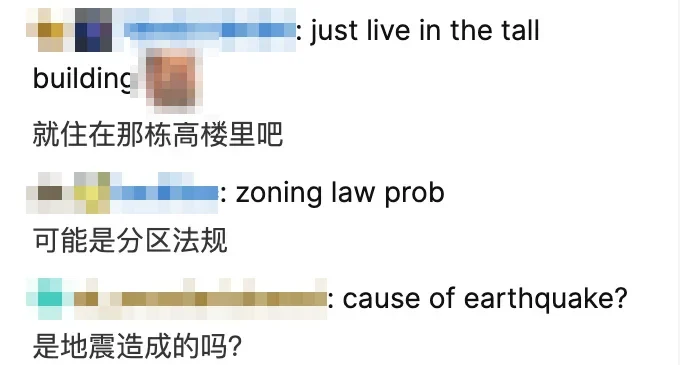
In our verified Twitch live chat test shown above, incoming English viewer comments in the right-hand chat sidebar—such as "just live in the tall building", "zoning law prob", and "cause of earthquake?"—are translated into Chinese directly below each original line ("就住在那栋高楼里吧", "可能是分区法规", and "是地震造成的吗?") while keeping viewer usernames, subscriber badges, and inline emotes intact.
Keeping both the original message and the translation visible is especially useful in gaming and IRL streams. When a chat line mixes proper nouns or game terminology with a short reaction, seeing the original text right above the translation helps you tell whether a term is a username, an emote name, or a regular conversational phrase.
Practical Boundaries of Live Chat Translation
Live chat behaves differently from a static article, and real-time chat translation comes with several practical boundaries to keep in mind:
- One-way reading aid only: Viewer chat translation is strictly for reading incoming messages posted by other viewers in the chat room. It does not post messages on your behalf or automatically translate outgoing replies that you type into the chat input box.
- High-velocity chat during hype moments: During major tournament plays or streamer raids, rapid chat scrolls quickly down the sidebar. Translating every line in a fast-moving chat room continuously processes incoming text, whereas selection translation lets you look up only the specific messages you want to read.
- Gaming slang and community emotes: Everyday viewer questions and commentary translate clearly, but Twitch-specific emotes, shorthand, or community memes may occasionally be translated literally as regular words (for instance, translating the emote
'MLADY'literally as'My lady'). Keeping the original line visible lets you spot chat slang right away.
Billing and Credit Usage
In Equalang, text translation usage is metered by token volume at a single rate of 10 credits per 1,000 tokens. New accounts receive 200 credits upon sign-up so you can test live chat and web translation directly. For full details on credit packages, visit the pricing page.
Built-In Browser Translation vs. Channel Chat Bots
Depending on how active a stream's chat room is, you can also compare browser extension chat translation with built-in browser page translation or broadcaster-configured chat bots.
1. Built-In Browser Page Translation
Modern desktop browsers include native full-page translation features that convert visible text on a web page into your preferred language.
- When it is convenient: In slower chat rooms where viewers write full sentences and you only want a quick overview of the page without installing an extension.
- Limitations for live chat: Full-page translation is designed for static web pages and replaces the original text in place rather than displaying a bilingual view. When applied to an entire Twitch tab, it easily misaligns on a rapidly scrolling chat room and converts interface labels and usernames along with chat messages, making it harder to distinguish user handles and emote text from actual commentary.
2. Broadcaster-Configured Chat Translation Bots
In some channels, the streamer sets up a third-party translation bot in their chat room to repost translated messages for specific languages.
- When it is convenient: When a broadcaster has already configured a bot for your language pair, translations appear directly in the public chat feed without any setup on your end.
- Limitations for viewers: Viewers cannot enable or configure a channel bot themselves. Whether a bot is present—and which languages it translates—depends entirely on the broadcaster's channel setup, and bot reposts can double the message volume in busy chat rooms.
Choosing a Setup for How You Watch
A suitable approach depends on how active the chat room is and how often you need translations:
- Quiet channels with occasional foreign messages: Use selection lookup in a browser extension to translate individual chat messages on demand, or briefly toggle your browser's built-in page translator when you only need a quick check.
- Following ongoing live stream discussions: Use a bilingual viewer chat translation workflow with the Equalang browser extension so original usernames, badges, and emotes stay visible alongside translated text, and pair it with live bilingual video subtitles when you also want to follow what the streamer is saying.
Frequently Asked Questions
Does Twitch have a built-in chat translator for viewers?
No. Twitch's chat sidebar displays viewer messages, badges, and emotes in real time, but Twitch does not provide a native viewer setting to automatically translate live chat into your language.
Can Equalang translate messages that I type into Twitch chat?
No. Equalang's Viewer Chat Translation is a one-way reading aid that translates incoming messages posted by other viewers; it does not translate or send outgoing messages that you type into the chat box.
How much does Equalang text translation cost?
Text translation in Equalang is billed at a single rate of 10 credits per 1,000 tokens, and new accounts receive 200 credits upon sign-up. You can view credit details on the pricing page.