How to Translate Pixiv Manga to English on Desktop
 Equalang
In brief
Pixiv translates titles and comments, but not comic pages. Here is how to read Pixiv manga in English using a browser extension, plus costs and limits.
Keywords: translate pixiv manga; translate pixiv to english; pixiv manga translator; pixiv translate extension; translate pixiv images
Pixiv does not translate manga images into English. While the platform provides built-in machine translation for artwork titles, captions, and user comments, the comic pages themselves remain in their original Japanese. To read Pixiv manga in English while browsing, you need an in-page tool or browser extension that translates text directly inside the web reader, erasing original text inside speech bubbles and lettering English translations into the panels.
Does Pixiv Have Built-in English Translation for Manga?
Pixiv offers several multilingual features, but none of them translate the text inside comic artwork:
- Interface languages: You can switch the website interface in the footer between English, Japanese, Korean, Simplified Chinese, Traditional Chinese, Thai, and Bahasa Melayu. This translates site navigation, buttons, and menus.
- Built-in automatic translation: Added under Article 22-2 of Pixiv's Terms of Use on December 16, 2020, this feature automatically translates titles, captions, and comments. Pixiv's help center explicitly clarifies that "automatic translation does not change the works themselves." Furthermore, automatic translation is rolled out gradually, does not support age-restricted (R-18 / R-18G) content, and launched on desktop and mobile web rather than the mobile app.
- Creator-requested translations: Under Article 21-3, creators can choose to solicit manual translations from users for a work's title, caption, or text. When an author approves a submission, the translated text is displayed alongside the post.
- Tag translations: Under Article 22, community members can submit translated or romanized tags to help international readers search for works.
In short, Pixiv provides no official tool to translate dialogue bubbles or handwritten text inside manga pages.
How to Translate Pixiv Manga on Desktop Step by Step
To translate manga pages as you turn them, you can use a desktop browser extension capable of in-image translation. Below, we demonstrate the reading workflow using Equalang on desktop (tested on 2026-11-12 using extension version 0.4.60 on a Chromium browser):
- Open the manga chapter: Navigate to any manga post on pixiv.net in your desktop browser (such as a free public chapter) and open it in Pixiv's web reader.
- Locate the comic translation button: On artwork pages, look beneath Equalang's floating ball on the right edge of your browser window. A comic button showing an open book with a smiling face will appear. Hovering over it displays the tooltip: "Translate comics on this site, 5 credits per page".
- Turn on site translation: Click the comic button once. The tooltip changes to "Stop translating comics on this site", and your preference is remembered for Pixiv.
- Read translated pages in place: Within about half a minute, the visible pages update. The original Japanese lettering inside speech bubbles is erased, and English dialogue is rendered in its place, fitted to the shape of the bubbles.
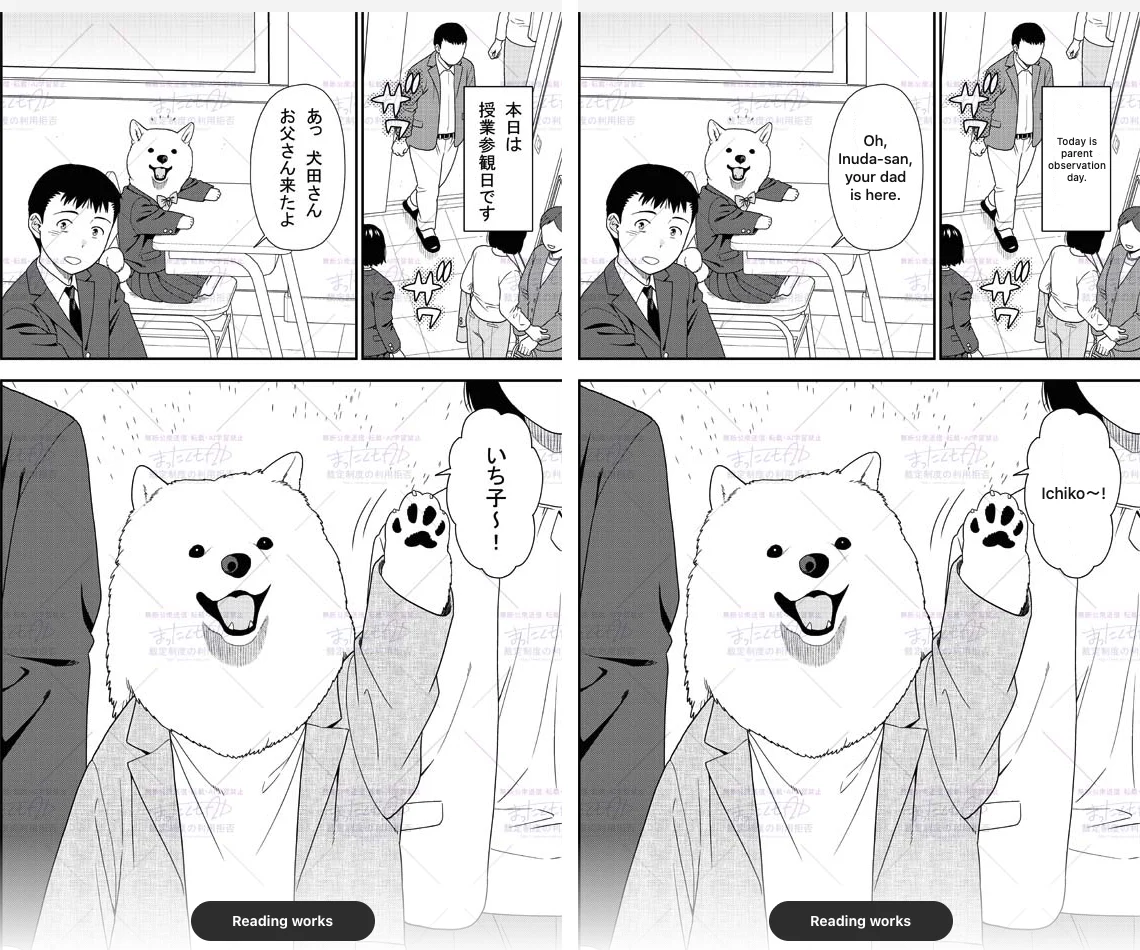
The extension runs on desktop Chrome, Edge, and Firefox. You can check setup instructions and compatibility on the extension guide and the supported comic sites list.
What It Costs and How Credits Work
In Equalang, comic translation is billed per processed page:
- Page rates: Translating standard manga pages costs 5 credits per page (or 3 credits per strip segment on vertical-scroll webtoons).
- Text-free pages: Pages containing only illustrations without text are not charged.
- Local storage: Translated pages are stored locally on your computer. Equalang does not deduct credits again if you return to read those same pages later, unless you explicitly select the option to re-translate.
- Account balance: New accounts receive 200 free credits upon sign-up, which you can use across both the web tools and the extension without separate subscriptions (see pricing details).
Important note on paid content: The extension only translates images that load in your browser. It does not unlock paid chapters or Pixiv Premium features (which costs $4.15 USD per month on the web). Any paywalled content still requires normal purchase through Pixiv.
Limits We Observed and Honest Alternatives
During testing and inspection of Pixiv's platform rules, several constraints should be kept in mind:
- Reader-page availability: The comic translation button appears on Pixiv's artwork pages (pixiv.net/artworks/...). It does not appear on artist profiles or tag search listings.
- Machine translation accuracy: Automatic translation can occasionally misunderstand slang, puns, or sound effects. Hovering your mouse over any translated page lets you switch back to the original Japanese view or request a re-translation of that specific page.
If you prefer not to use an in-browser reader extension, consider these alternatives:
- Creator-approved community translations: Check whether the artist has enabled Pixiv's built-in translation request feature (Article 21-3) or provided official multi-language links in the work's caption.
- External OCR and screenshot translators: You can take screenshots of individual panels and run them through mobile translation apps or desktop OCR tools. While this requires manual clipping for every page, it works without adding a reader extension. For broader comparisons across other manga readers and formats, see our manga translation extension guide.
Frequently Asked Questions About Pixiv Translation
Does Pixiv have an official manga page translation button?
No. Pixiv provides automatic translation only for artwork titles, captions, and user comments. Pixiv's official documentation states that automatic translation does not change the works themselves, meaning comic pages and dialogue bubbles remain untranslated.
Can I view and translate R-18 manga on Pixiv?
To view R-18 or R-18G works on Pixiv, you must create an account, register your date of birth, and turn on "Show explicit content (R-18)" under your display settings on desktop. Note that Pixiv's official automatic translation excludes R-18 content entirely. An extension can translate dialogue on visible reader pages once unlocked, but it cannot bypass Pixiv's age gates or regional availability rules.
Does a translation extension unlock Pixiv Premium or paid manga?
No. A translation tool only reads and translates images that Pixiv has already delivered to your browser. It does not bypass paywalls, grant free access to locked chapters, or substitute for Pixiv Premium ($4.15 USD per month on the web).
Sources
- Pixiv Terms of Use (pixiv Inc.): https://policies.pixiv.net/en.html
- Pixiv Help Center - About automatic translation: https://www.pixiv.help/hc/en-us/articles/62942662015257-About-automatic-translation
- Pixiv Help Center - Why can't I see the Translate command: https://www.pixiv.help/hc/en-us/articles/63704320977177-Why-can-t-I-see-the-Translate-command-on-work-details-pages
- Pixiv Help Center - What is pixiv Premium: https://www.pixiv.help/hc/en-us/articles/231827668-What-is-pixiv-Premium
- Pixiv Help Center - Viewing age-restricted contents: https://www.pixiv.help/hc/en-us/articles/235585288-I-would-like-to-view-age-restricted-contents-R-18-R-18G
- Equalang Browser Extension: https://equalang.com/extension
- Equalang Supported Comic Sites: https://equalang.com/extension/sites
- Equalang Pricing and Credits: https://equalang.com/pricing