How to Read pixiv Comic in English on a Computer
 Equalang
In brief
pixiv Comic has no official English edition. Here is how to read Japanese manga chapters in English directly inside your desktop browser reader.
Keywords: pixiv comic english; read pixiv comic in english; pixiv comic translator; pixiv manga translation; comic pixiv net english
pixivコミック (pixiv Comic, comic.pixiv.net) does not offer an official English version or language toggle. The entire platform—including publisher serializations, exclusive titles, and user submissions—is published exclusively in Japanese. While the site itself does not provide translations, you can read its manga in English on a desktop computer by using an in-place comic translation extension directly inside pixiv Comic's web reader.
Does pixiv Comic have an official English edition?
pixiv Comic is operated by pixiv Inc. in Tokyo and hosts commercial label serializations (such as the "プラミル" label), exclusive platform works, and an indie submission section. Its desktop web reader ("ブラウザ版") allows anyone to open and read designated free episodes (often marked "8話無料" or "12話無料") without creating an account or logging in, even from outside Japan.
However, there is no English interface, and individual manga series do not offer official foreign-language releases on the site. In addition, free access is time-limited: some older episodes display "掲載期間が終了しました" (publication period ended) once their promotional window closes. Locked or advance episodes require browser coins ("ブラウザ版購入コイン"), which are sold in packs starting at 100 coins for ¥100 and expire 180 days after purchase.
How to read pixiv Comic in English on your computer
Standard full-page translation features in browsers cannot translate text flattened inside manga image files. To read speech bubbles in English, you need an extension that detects Japanese text in comic panels and letters the translated text back into the bubbles. Below, we illustrate the workflow using Equalang (/extension) on desktop Chromium (Chrome, Edge) or Firefox.
- Open a chapter in the web reader: Visit
comic.pixiv.netand open any free chapter in the browser viewer. - Find the comic translation button: Under Equalang's floating ball on the right edge of the page, a comic button (an open book with a smiling face) appears on supported comic reader pages. Hovering over it displays "Translate comics on this site, 5 credits per page".
- Turn on comic translation: Click the comic button once. The tooltip changes to "Stop translating comics on this site", and the extension remembers this setting for pixiv Comic.
- Read translated pages: Within about half a minute, the visible pages show translated English dialogue lettered into the speech bubbles, with the original Japanese text erased.
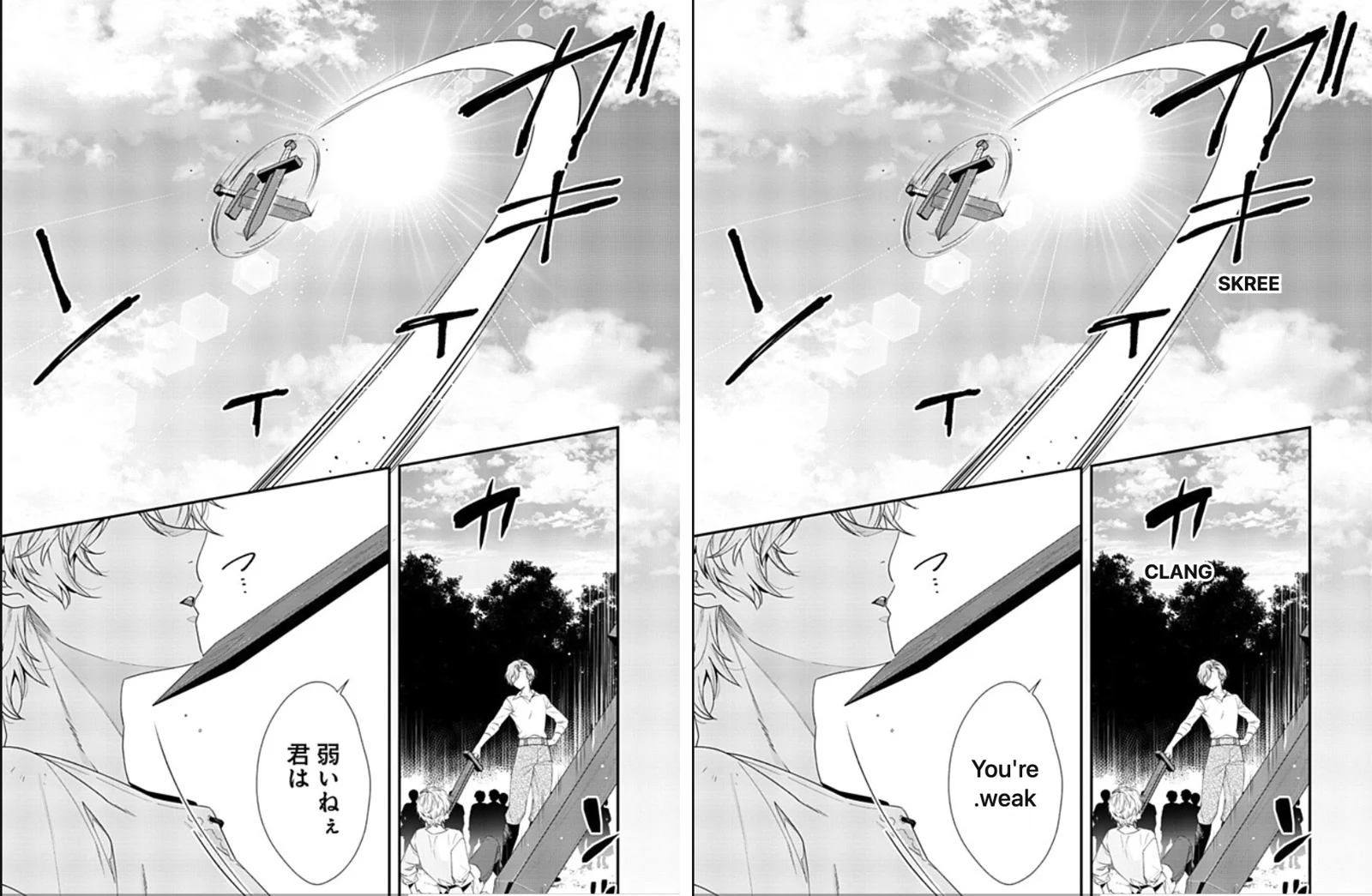
In our test on Chapter 1 of 死にたくないので英雄様を育てる事にします, drawn sound effects (such as ガギ) remained part of the artwork, while small English glosses like “SKREE” and “CLANG” were added beside them.
Reading limits and things to keep in mind
When using an in-browser translation tool on pixiv Comic, keep these practical boundaries in mind:
- Reader pages only: The comic translation button only appears on reader pages (chapter viewers), not on catalogue, index, or series overview pages.
- No paywall bypassing: The extension cannot unlock paid episodes, bypass coin requirements, or restore expired chapters marked "掲載期間が終了しました". Paid chapters still require official pixiv Comic coins.
- Machine translation accuracy: Automated translation can misinterpret slang, puns, or fantasy terminology. When reading with Equalang, hovering over any page allows you to view the original Japanese art or request a re-translation.
What it costs
Translating manga pages with Equalang costs 5 credits per page. Pages without text or dialogue bubbles are free. Translated pages are kept on your computer, so re-reading them will not charge credits again unless you explicitly choose to re-translate. New accounts receive 200 free credits upon registration, which covers up to 40 manga pages before you decide whether to purchase additional credits on the pricing page.
Other ways to read Japanese manga
If you prefer not to use an in-browser extension, here are practical alternatives:
- Phone OCR translation (Google Lens): You can hold a smartphone with Google Lens or a similar translation app up to your computer screen. This is free and requires no browser add-on, though holding your phone page by page can be tiring for longer chapters.
- Official localized releases: Many popular manga featured on pixiv Comic are eventually licensed for English publication in print. While official localizations lag behind the Japanese raw chapters, they provide professional human adaptation.
- Comparing reader tools: To explore how different desktop utilities handle comic sites, see our guide on manga translation extensions.
Frequently Asked Questions
Does pixiv Comic have an official English translation toggle?
No. pixiv Comic (comic.pixiv.net) does not have an English language toggle or localized UI. All navigation menus and published manga series are available only in Japanese.
Can an extension unlock paid chapters on pixiv Comic?
No. Browser translation extensions only process images already loaded and visible in your browser. They do not grant free coins, bypass account locks, or unlock paid chapters.
Can I read free manga on pixiv Comic without logging in?
Yes. The desktop web reader allows you to read promotional free episodes (such as Episode 1 or ongoing free campaigns) directly without creating an account or signing in.
Why doesn't Google Translate work on pixiv Comic pages?
Google Translate's built-in webpage translator only translates text elements in HTML. Because manga dialogue is flattened into images, standard page translation tools cannot detect or translate speech bubbles.
Sources
- pixiv Comic: https://comic.pixiv.net/
- pixiv Policies and Terms: https://policies.pixiv.net/
- pixiv Comic Coin Store: https://comic.pixiv.net/store/coins
- Equalang Extension: https://equalang.com/extension
- Equalang Pricing: https://equalang.com/pricing