How to Read MANGA Plus in Chinese and Other Languages
 Equalang
In brief
MANGA Plus lacks Chinese and several languages. Here is what Shueisha offers officially and how to translate comic pages in place on a computer.
Keywords: manga plus chinese; manga plus languages; manga plus translate; read manga plus in chinese; manga plus shueisha translation
MANGA Plus by SHUEISHA does not offer Chinese or Japanese editions. Officially, available languages vary by title, with One Piece offering eight languages: English, Spanish, Thai, Brazilian Portuguese, Indonesian, French, German, and Vietnamese. If you want to read MANGA Plus in Chinese or another unsupported language on a desktop browser, you can translate the official English pages in place using a browser extension.
What languages does MANGA Plus by SHUEISHA have?
MANGA Plus by SHUEISHA is operated directly by Shueisha Inc. to distribute official manga translations worldwide simultaneously with Japan ("Simulrelease"). While it provides global access, language availability depends on the specific title.
For major titles such as One Piece, the platform lists eight available languages:
- English
- Español (Spanish)
- ภาษาไทย (Thai)
- Bahasa IND (Indonesian)
- Português BR (Brazilian Portuguese)
- Français (French)
- Deutsch (German)
- Tiếng Việt (Vietnamese)
Chinese (Simplified or Traditional) and Japanese are not offered in the catalog. The site interface includes a language switcher in the header (such as "Language EN"), but this only filters titles into the languages Shueisha officially licensed for the service.
Reading on the desktop web is free without logging in, but it comes with catalog restrictions. For ongoing titles like One Piece, MANGA Plus makes the first three chapters (#001–#003) and the latest three chapters (#1196–#1198) viewable on the website. Whenever a new chapter is published, the oldest of the three latest chapters is hidden. Unlocking the full back catalog requires Shueisha's mobile application, where paid subscription tiers are managed via app stores rather than the web reader.
How to translate MANGA Plus comics on a computer
If you want to read on a desktop screen in a language MANGA Plus does not provide, you can translate the web reader's pages directly in your browser. Below is a demonstration using Equalang on a desktop browser (Chrome, Edge, or Firefox; see the manga translation extension guide for general extension setups).
Based on tests conducted on 2026-11-12 using desktop Chromium with extension version 0.4.60, follow these steps:
- Open a chapter in the web reader: Navigate to any free chapter on the MANGA Plus website (for example, One Piece chapter 1) without needing to log in.
- Locate the comic translation icon: Look at the floating ball on the right edge of the screen. On supported comic readers, an open book icon with a smiling face appears directly beneath the ball. Hovering over it displays the tooltip: "Translate comics on this site, 5 credits per page".
- Turn on comic translation: Click the book button once. The tooltip updates to "Stop translating comics on this site". Equalang remembers this preference per website, so future chapters on MANGA Plus will follow the same setting.
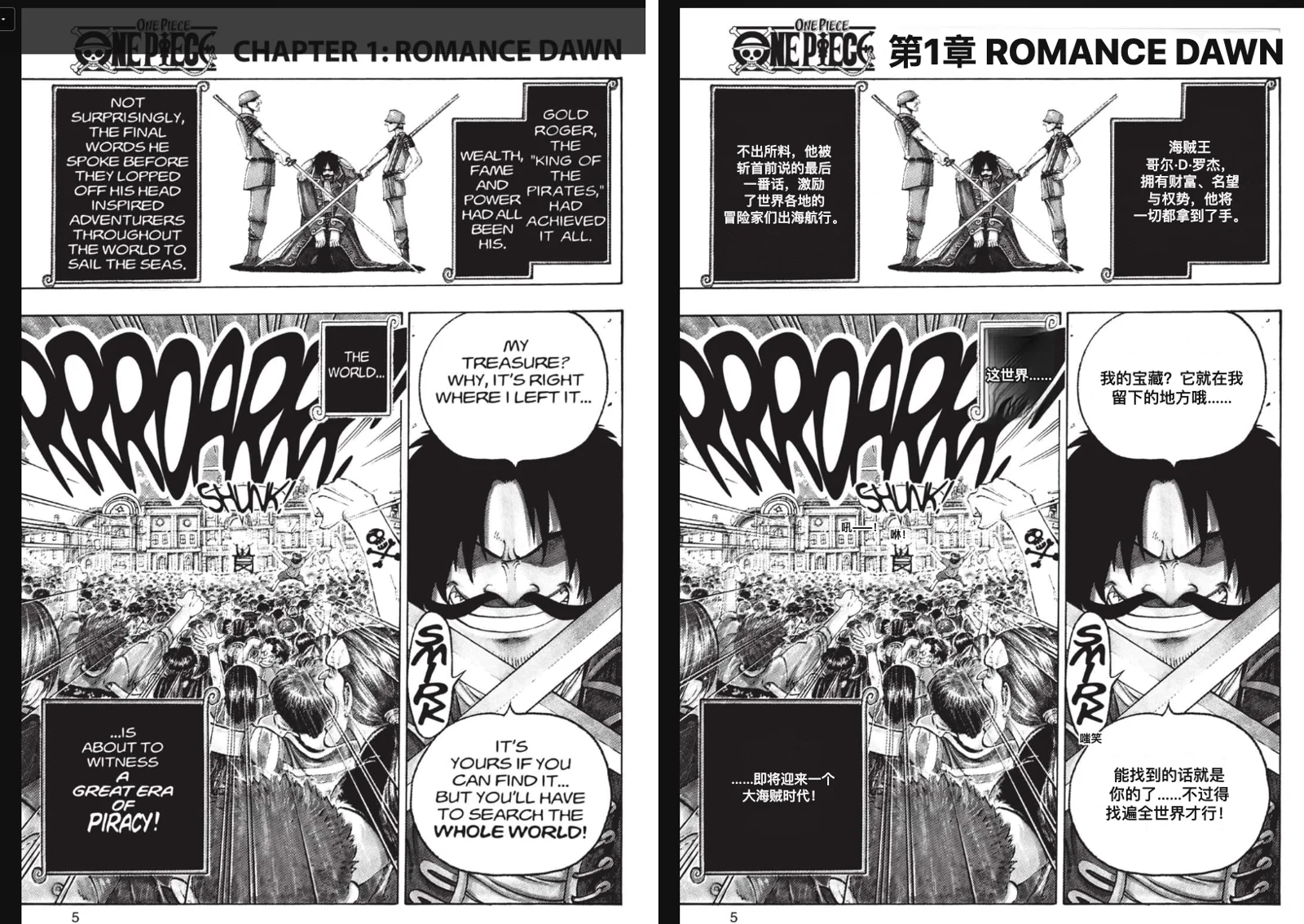
- Read translated pages in place: Within about half a minute, the visible pages erase the original English dialogue and insert the translated text directly into the speech bubbles, formatted to fit their shape.
What it costs to translate manga pages
Comic page translation in Equalang is billed on a per-page consumption basis:
- Standard manga pages: 5 credits per page.
- Vertical-scroll strips (webtoons): 3 credits per strip segment.
- Text-free pages: Pages containing only art and no speech bubbles or text are free.
- Local cache: Translated pages are saved locally on your computer. Re-reading pages you have already translated does not deduct credits again unless you explicitly choose to re-translate that page.
- Trial balance: Signing up for a new account includes 200 free credits, allowing you to test dozens of pages before deciding on credit packs. Details on account balances and rates are listed on the /pricing page.
Keep in mind that the extension is solely an in-page translator; it does not unlock locked or paywalled chapters on MANGA Plus. Chapters hidden behind app-exclusive tiers or platform paywalls remain inaccessible unless unlocked through Shueisha's official mobile channels.
Limits observed and honest alternatives
During our hands-on testing on 2026-11-12, we noted several specific operational limits:
- Reader pages only: The comic translation button appears strictly on chapter reader URLs (the web viewer). It does not appear on title summary pages, update feeds, or catalog lists.
- Target language performance varies: Translating the official English edition of One Piece into Simplified Chinese worked within 30 seconds. However, when we tested Korean as the target language twice on the exact same page (waiting up to two minutes each time), no Korean translation appeared and the English original stayed in place. Do not assume Korean works on this platform.
- OCR and typography quirks: Highly stylized sound effects or text printed over intricate artwork may occasionally be skipped or approximated. Hovering your mouse over any translated page gives you the option to view the original page or trigger a single-page re-translation.
Honest alternatives: If you can read any of the languages Shueisha officially supports, reading the official translations (such as English, Spanish, or French) remains the cleanest option. For readers seeking Chinese editions, check licensed regional print publishers or authorized digital storefronts holding distribution agreements with Shueisha. To view other platforms compatible with in-place translation, review the directory on /extension/sites or install the browser companion from /extension.
Frequently asked questions
Does MANGA Plus by SHUEISHA have an official Chinese version?
No. MANGA Plus by SHUEISHA does not offer Chinese. Available languages vary by title across the catalog.
Can I read all chapters of a manga for free on the MANGA Plus website?
No. On the MANGA Plus by SHUEISHA website, only the latest three chapters (and the first three chapters for select ongoing titles) are freely viewable. Reading the remaining back catalog requires Shueisha's mobile app.
Does the translation extension unlock paid chapters on MANGA Plus by SHUEISHA?
No. The extension only translates pages that are already loaded and viewable in your browser. It does not bypass paywalls or grant access to subscriber-only chapters on MANGA Plus by SHUEISHA.
Which desktop browsers support comic translation on MANGA Plus by SHUEISHA?
You can use the extension on desktop Chrome, Microsoft Edge, and Mozilla Firefox. Installation guides are available on the /extension page.
Sources
- MANGA Plus by SHUEISHA Home: https://mangaplus.shueisha.co.jp/
- MANGA Plus Title Details (One Piece): https://mangaplus.shueisha.co.jp/titles/100020
- MANGA Plus Web Terms of Use: https://mangaplus.shueisha.co.jp/terms_web/eng/
- MANGA Plus About Page: https://mangaplus.shueisha.co.jp/web_pages/1120/
- Equalang Extension: https://equalang.com/extension
- Equalang Pricing: https://equalang.com/pricing
- Equalang Supported Sites: https://equalang.com/extension/sites