How to Read Manga ONE in English on Desktop
 Equalang
In brief
Manga ONE is Japanese-only, but you can read its web manga in English on desktop using in-place translation. Here is how it works, step by step.
Keywords: manga one english; read manga one in english; manga one desktop; translate manga one; manga one shogakukan
Manga ONE (マンガワン), operated by Shogakukan (株式会社小学館), does not offer an official English edition, translated UI, or foreign-language catalogue on its website (manga-one.com). Every series—including major hits like Kengan Omega (ケンガンオメガ)—is published solely in Japanese. However, Manga ONE does not geo-block international desktop browsers, and its web reader allows visitors to read designated free daily chapters without an account. If you want to read these chapters in English on your computer, you can translate the dialogue directly inside the speech bubbles using a desktop browser extension.
Does Manga ONE Have an Official English Version?
Manga ONE is an official digital manga platform run by Shogakukan, based in Chiyoda-ku, Tokyo. Its desktop web reader publishes Shogakukan serials, one-shots, and user submissions submitted through #マンガイチ.
The site itself is entirely in Japanese:
- No language toggle: Navigation menus, banners, and reader controls ("次話", "全画面", "前話") are Japanese only.
- Supported browsers: Recommended environments listed under its legal specifications include modern versions of Microsoft Edge, Google Chrome, Mac Safari, and Mozilla Firefox.
- Free reading system: Chapters marked with a green "Daily Free" (毎日無料) badge can be read for free at a rate of one chapter per day. The platform also features "Free Life" (無料ライフ) points, which replenish up to 4 points twice daily (at 9:00 and 21:00) when a user holds fewer than 4.
- Paid reading: Beyond free chapters, reading requires platform coins. Manga ONE sells coins starting at 160 coins for ¥160 (which covers up to 4 chapters), progressing through ¥480 (12 chapters), ¥1,000 (up to 28 chapters), up to ¥10,000, payable by credit cards, carrier billing, Suica, or PayPay via SB Payment Service.
For international readers looking for official English chapters on manga-one.com, no official translation exists on the platform.
How to Translate Manga ONE on a Computer
Below, we demonstrate the setup with Equalang (equalang.com/extension), which adds in-place comic translation to desktop Chrome, Edge, and Firefox. The tool detects supported web comic viewers, removes the original text inside speech bubbles, and re-letters the translated lines to match the layout.
Here is the exact step-by-step workflow tested on Manga ONE:
- Install and set up the extension: Open your desktop browser with the Equalang extension installed and signed in. Set your target language to English in the extension settings.
- Open a Manga ONE chapter: Visit manga-one.com and click on a free chapter (such as Kengan Omega chapter 376). When the site's initial cookie notice dialog ("Cookie等の使用について") appears, click close ("閉じる").
- Locate the comic translation button: In the web reader, look along the right edge of the screen for Equalang's floating ball. Directly underneath it, a comic translation button—styled as an open book with a smiling face—appears automatically on supported comic readers. Hovering over it displays the tooltip: "Translate comics on this site, 5 credits per page".
- Turn on comic translation: Click the comic button once. The tooltip updates to "Stop translating comics on this site", and the setting is remembered for manga-one.com.
- Read the translated pages: Within roughly half a minute, visible page spreads display English dialogue lettered cleanly inside the original speech bubbles. Because the chapter opens on a cover or title page, click or scroll to the subsequent spread to read the dialogue.
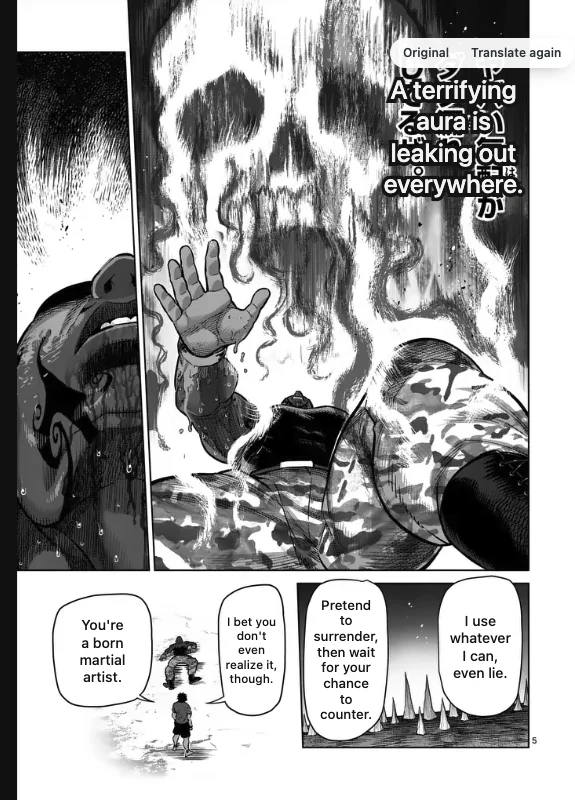
What Reading Manga ONE with Equalang Costs
Comic translation uses a straightforward credit model:
- 5 credits per page: Standard comic pages cost 5 credits each. Pages without dialogue or text are completely free.
- Local storage: Translated pages are saved locally on your computer. Re-reading pages you have already translated costs no additional credits unless you explicitly choose to re-translate them.
- Welcome balance: New Equalang accounts receive 200 free credits upon registration (equalang.com/pricing), which allows you to translate approximately 40 dialogue pages before deciding on a paid package.
Please note that browser translation tools do not unlock locked, coin-restricted, or member-only chapters. To access paid chapters, you must still purchase official coins through Manga ONE's shop.
Limitations We Saw and Alternatives
During our hands-on testing on Manga ONE, we observed several operational limits to keep in mind:
- Reader page activation only: The comic translation button appears exclusively inside Manga ONE's reader viewer (chapter URL). It does not appear on title summary pages, author indexes, or the main directory.
- Initial image loading time: Manga ONE's image servers deliver high-resolution page spreads (720×1020 pixels), which took approximately 30 seconds to fully load on international connections before translation commenced.
- Machine translation nuances: Complex martial arts terminology or idiosyncratic slang may occasionally contain inaccuracies. Hovering your cursor over any translated page allows you to view the original Japanese text or request a re-translation.
If you prefer not to use in-page browser translation, consider these alternatives:
- Mobile screen OCR / Google Lens: You can point a smartphone running Google Lens or an image translation app at your computer screen. While free, it disrupts reading rhythm and requires manual framing for every frame.
- Licensed English releases: Many prominent Shogakukan series eventually receive official localization through English publishers (such as Viz Media) in digital or print formats. While professionally edited, licensed editions typically lag months or years behind Manga ONE's weekly Japanese releases.
- For a broader overview of reading Japanese and Korean webcomics on your computer, see our detailed guide on manga translation extensions.
Frequently Asked Questions
Does Manga ONE have an official English version or language toggle?
No. Manga ONE (operated by Shogakukan) is published exclusively in Japanese. Its website (manga-one.com) has no English interface, subtitle options, or official multilingual chapter releases.
Can I read Manga ONE outside Japan without a VPN?
Yes. During our testing, Manga ONE's web reader loaded smoothly from outside Japan without IP blocking. Unregistered readers can open free chapters directly, dismiss the initial cookie banner, and read daily free releases in standard desktop browsers.
Does the browser extension unlock paid Manga ONE chapters?
No. The extension only translates images that the reader loads on your screen. Chapters requiring Manga ONE coins remain locked behind Shogakukan's paywall and must be purchased legitimately through the platform.
Sources
- Manga ONE official website: https://manga-one.com/
- Manga ONE Terms of Service: https://manga-one.com/settings/rule
- Manga ONE Specified Commercial Transactions Law page: https://manga-one.com/settings/transaction-law
- Manga ONE Usage Guide: https://manga-one.com/settings/how-to-use
- Manga ONE Coin Shop: https://manga-one.com/shop
- Equalang Browser Extension: https://equalang.com/extension
- Equalang Pricing: https://equalang.com/pricing