Read Comic Trail Manga in English: Web Reader Guide
 Equalang
In brief
Comic Trail manga is Japanese-only. Here is how to read chapters in English in your browser, what it costs, and desktop translation limits.
Keywords: comic trail manga english; comic trail houbunsha; read comic trail in english; comic trail translation; equalang manga extension
Comic Trail (コミックトレイル), Houbunsha's online manga magazine at comic-trail.com, publishes all of its serialized manga and creator audition entries exclusively in Japanese. The platform offers no official English edition, language toggle, or translated releases. However, because its desktop web reader opens without region locks or required user accounts, you can read Comic Trail manga in English directly in your browser using an in-place comic translation extension that translates text inside the speech bubbles.
Does Comic Trail Offer Official English Translations?
Comic Trail is operated by Houbunsha (the publisher behind Manga Time Kirara and the COMIC FUZ digital platform). The site showcases serialized manga alongside submissions from its creator audition program ("#漫画家オーディション"), with outbound links directing readers to Amazon for published volumes.
The site uses the Comic DAYS web reader engine (/episode/<id>), delivering manga chapters on high-resolution canvas spreads (1350x1920 per page). During testing from outside Japan, the reader opened smoothly without geo-blocking or login prompts, listing chapters under its free distribution catalog ("無料配信中のおすすめ作品").
Official language support remains strictly Japanese.
How to Translate Comic Trail Manga on a Computer
Standard webpage translation tools fail on Comic Trail because the dialogue is rendered onto HTML5 canvas elements rather than selectable HTML text. Here is how to translate a chapter directly on comic-trail.com using Equalang:
Before starting, install the extension on desktop Chrome, Edge, or Firefox via the Equalang extension page.
- Open a chapter: Navigate to any manga chapter in Comic Trail's web reader (for example, the free chapter 1 of Monster Island / モンスターアイランド by 聖おま).
- Locate the comic translation button: On supported manga readers, a comic icon depicting an open book with a smiling face appears directly underneath Equalang's floating ball on the right edge of the page. Hovering over it displays: "Translate comics on this site, 5 credits per page".
- Turn translation on: Click the comic button once. The tooltip changes to "Stop translating comics on this site". Equalang remembers this setting per site, so returning to Comic Trail later will keep translation active automatically.
- Read translated spreads: Within about thirty seconds, the visible pages show English dialogue lettered directly into the speech bubbles, with the original Japanese characters cleanly erased.
- Two-page spreads: Comic Trail displays chapters as two-page spreads; both pages are translated simultaneously.
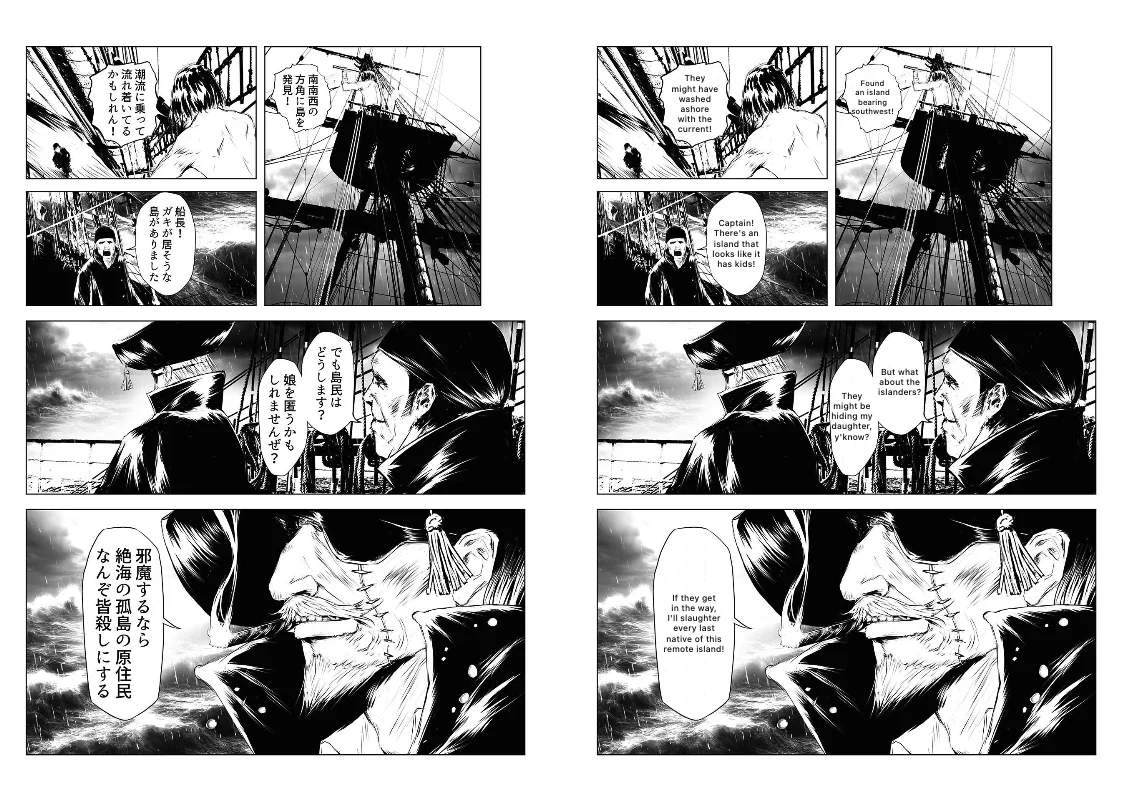
As you turn pages, upcoming pages are translated in the background so you can keep reading without disruption. If you hover your cursor over any translated page, you can inspect the underlying Japanese text or trigger a fresh re-translation. For a broader overview of comic readers, see our guide on manga translation extensions.
How Translation Credits Work on Comic Trail
Equalang uses a shared credit balance between the browser extension and web services (Equalang pricing).
- Per-page rate: Standard comic translation costs 5 credits per page (vertical-scroll webtoons cost 3 credits per strip segment).
- Blank pages are free: Pages containing no dialogue or text cost 0 credits.
- Kept on this computer: Translated pages are stored locally on your computer. Re-reading a chapter or flipping back and forth does not deduct credits again unless you explicitly select re-translate.
- Free starting allowance: New accounts receive 200 credits upon sign-up, which is enough to read roughly 40 pages of Comic Trail manga before deciding on an optional credit pack.
- No paywall bypassing: The extension translates visible text in the reader; it does not bypass paywalls or unlock paid chapters.
Limitations and Honest Alternatives
While in-browser translation allows you to follow Comic Trail serials comfortably, keep these practical boundaries in mind:
- Reader pages only: The comic translation icon appears exclusively on chapter reader URLs (
/episode/...). It does not appear on Comic Trail's homepage or catalog indexes. For browsing site titles and summaries, standard full-page text translation can be used instead. - Machine translation can be wrong; hover over a page to see the Japanese original or translate the page again.
Alternative Options
- Mobile camera translation: Pointing Google Translate or another camera translation app at your desktop monitor requires no extension installation. However, it requires holding your phone throughout the chapter and does not reconstruct clean panel lettering.
- Full-page browser translation: Native browser translation tools attempt to translate text nodes in the DOM, leaving Comic Trail's canvas-rendered pages completely untranslated.
- Official licensing: If you prefer professionally edited localizations, check whether major international publishers license Houbunsha serials for official English releases on digital storefronts like Amazon Kindle.
Frequently Asked Questions
Does Comic Trail (Houbunsha) have an official English website or app?
No. Comic Trail operates entirely in Japanese at comic-trail.com. Houbunsha has not released an English edition or an international app for the platform.
Can Equalang translate Comic Trail manga on mobile phones?
No. Equalang's comic reader translation currently runs on desktop Chromium browsers (Chrome, Edge) and Firefox. It is not available on mobile phone browsers.
Does Equalang unlock paid chapters on Comic Trail?
No. The extension only translates what is already rendered in your browser. It does not bypass paywalls, unlock subscriber chapters, or grant free access to paid content.
Sources
- Comic Trail official portal: https://comic-trail.com/
- Comic Trail sample chapter (Monster Island): https://comic-trail.com/episode/12207421984336456554
- Houbunsha copyright policy: https://houbunsha.co.jp/copyright.html
- Equalang extension: https://equalang.com/extension
- Equalang supported comic sites: https://equalang.com/extension/sites
- Equalang pricing: https://equalang.com/pricing