How to Read Bomtoon in English on a Computer
 Equalang
In brief
Bomtoon has no English site. Learn how to translate Korean webtoons in place on your computer with a browser extension, what it costs, and the limits.
Keywords: bomtoon english; bomtoon translation; read bomtoon in english; bomtoon webtoon; korean comic translation
If you search for "bomtoon english", the Korean webtoon platform 봄툰 (Bomtoon, at www.bomtoon.com) does not have an English version or an English interface. Its footer language menu lists Korean (봄툰), Japanese (BeLTOON), Traditional Chinese (Bomtoon Taiwan), Thai (LezhinTH), Spanish (LezhinES), German (lezhinDE), and French (lezhinFR), but no English option. For official English releases, its parent company Kidari Studio directs readers to Lezhin Comics (lezhinus.com), where selected titles are licensed and translated. If the webtoon you want to follow is exclusively available on the Korean Bomtoon site, you can read it in English directly in your computer browser using a comic translation extension that erases the original Korean text and letters English into the speech bubbles as you scroll.
Does Bomtoon have an English version?
봄툰 (Bomtoon) is a South Korean digital comics platform operated by Kidari Studio Corp. Ltd. ((주)키다리스튜디오). The site specializes in webtoons, serialized comics, web novels, and short plays (웹툰 / 만화 / 소설 / 플레이), with an emphasis on genres such as BL, romance, romance fantasy, fantasy, GL, drama, and comedy. It also hosts exclusive original serials under sections like "오직봄툰" and "Only 봄툰 독점 신작", alongside Korean-translated Japanese manga.
The entire Bomtoon web platform operates strictly in Korean. While Kidari Studio provides international portals in Japanese, Traditional Chinese, and several European languages through Lezhin, there is no dedicated Bomtoon English website.
On the Korean site, free preview episodes open directly in your browser without requiring an account or login. For example, episode 1 of the series 이웃집 길드원 (Neighborhood Guild Member) opens at /viewer/n_guild/01 with a standard viewer interface showing a page counter, previous/next buttons, and comments. Subsequent paid episodes require platform coins (such as "3 C" per episode), which are managed through Bomtoon's coin refill systems ("코인충전소").
How to read Bomtoon in English on a computer
Because webtoons are rendered as flat image files, you cannot highlight or copy the Korean dialogue into standard translation tools. A comic-reading browser extension solves this by detecting the speech bubbles in the reader, recognizing the Korean text, and re-lettering the translated English directly onto the artwork.
Here is how to read Bomtoon in English on a computer using Equalang (version 0.4.56 or newer; tested with 0.4.60 on a desktop Chromium browser on 2026-11-12):
- Open a chapter in Bomtoon's web reader: Navigate to a free episode on www.bomtoon.com (such as a free first episode).
- Locate the comic translation icon: Under Equalang's floating ball on the right edge of the page, a comic button (an open book with a smiling face) will appear once the reader loads. Hovering over it displays the tooltip: "Translate comics on this site, 3 credits per segment".
- Turn translation on: Click the comic button once. The tooltip updates to "Stop translating comics on this site". The extension saves this preference so Bomtoon chapters stay enabled in future visits.
- Read as you scroll: Within about half a minute, visible speech bubbles will display English translation in place of the Korean lettering. Because Bomtoon uses a continuous vertical-scroll format, the comic is translated in segments as you scroll down the page.
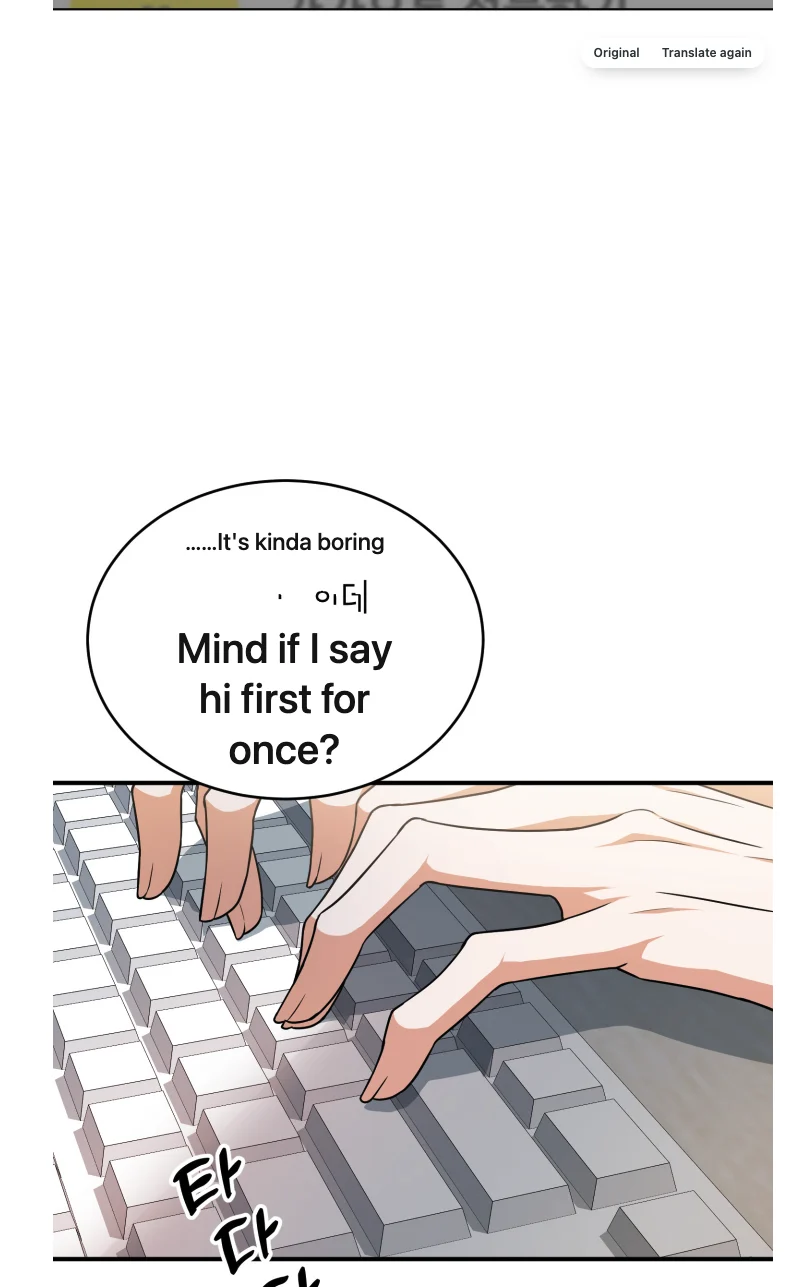
When you hover your mouse over any translated segment, a small action bar appears in the upper-right corner with two options: "Original" (to view the unaltered Korean artwork) and "Translate again" (to re-run the translation on that segment).
Limitations we noticed in testing
During our tests on Bomtoon's desktop reader, we observed several operational boundaries:
- The translation icon only loads in the viewer: The open-book translation button only activates on actual chapter reader URLs (
/viewer/...). It does not appear on title summary pages (/detail/...), genre indices, or the site homepage. - Occasional machine translation artifacts: Machine translation can misinterpret colloquial slang, and text-cleaning algorithms occasionally miss stray punctuation or sound effects. In our test on 이웃집 길드원 episode 1, one dialogue bubble rendered the line "Mind if I say hi first for once?", but left a small stray Korean mark ("아니") next to the English text while the rest of the bubble was cleanly re-lettered. Using the "Original" button quickly resolves any ambiguity.
- Paywalls remain intact: Browser translation tools do not unlock paid episodes or bypass age verification. Any chapter marked with a coin requirement (such as "3 C") still requires unlocking with Bomtoon coins.
What it costs
Comic translation in the extension is billed by processed visual content:
- Vertical webtoons: Bomtoon's vertical strips are processed in sliced segments, costing 3 credits per segment. (Standard page-turn comics cost 5 credits per page).
- Text-free panels: Segments without text cost 0 credits.
- Local caching: Translated segments are stored locally in your browser. Scrolling back through a chapter you have already read does not consume additional credits unless you click "Translate again".
New accounts get 200 free credits upon sign-up, and you can view credit packages on the pricing page. Purchased credits do not expire.
Honest alternatives for reading Bomtoon titles
If you prefer not to use in-browser comic translation, consider these alternatives:
- Check Lezhin Comics: Since both services belong to Kidari Studio, popular Bomtoon titles are frequently picked up for official English releases on Lezhin Comics (lezhinus.com). While updates may lag behind Korean serialization, official English editions provide professional localization and lettering.
- Bomtoon Taiwan (Traditional Chinese): If you can read Traditional Chinese, the footer language menu links directly to Bomtoon's Taiwan service, which publishes localized editions of major Korean titles.
- Mobile OCR and screen translators: Using smartphone translation apps or screen-capture tools can translate dialogue panel by panel. However, this method requires manual captures and disrupts the continuous vertical reading experience.
For more details on setting up translation on international comic sites, see our guide on using Korean websites without reading Korean.
Frequently asked questions
Does 봄툰 (Bomtoon, Korean) have an English version?
No, 봄툰 (Bomtoon, Korean) operates entirely in Korean and does not offer an English interface or English comic localizations. Its parent company Kidari Studio handles English releases through Lezhin Comics, while Bomtoon's direct foreign portals are limited to Japanese, Traditional Chinese, Thai, Spanish, German, and French.
Can Equalang unlock paid episodes on 봄툰 (Bomtoon, Korean)?
No. Equalang only translates text visible on web pages and cannot bypass Bomtoon's paywalls or digital rights controls. Free preview episodes can be read and translated immediately, but locked episodes still require unlocking with Bomtoon coins.
Why is the comic translation icon missing on 봄툰 (Bomtoon, Korean)?
The comic translation icon only appears when you are inside the active web reader viewer (/viewer/...) on 봄툰 (Bomtoon, Korean). It does not appear on the homepage, genre catalogue, or series overview pages (/detail/...). Once you click into a chapter, the icon appears under the floating ball.
How much does it cost to translate a chapter on 봄툰 (Bomtoon, Korean)?
Because 봄툰 (Bomtoon, Korean) uses a vertical-scrolling webtoon layout, translation costs 3 credits per strip segment as you scroll down. Segments without speech bubbles are free, and translated segments remain cached in your browser so re-reading does not consume extra credits.
Sources
- Bomtoon: https://www.bomtoon.com/
- Bomtoon Comics: https://www.bomtoon.com/bom/comic/main
- Equalang Extension: https://equalang.com/extension
- Equalang Pricing: https://equalang.com/pricing