Watch TopShort Dramas with Translated Subtitles
 Equalang
In brief
Watch TopShort dramas on your computer with translated subtitles. Learn what TopShort provides, how to set up real-time captions, and current limits.
Keywords: topshort drama; topshort translated subtitles; watch topshort on pc; topshort english subtitles; topshort bilingual subtitles
If you want to watch TopShort drama with translated subtitles on a computer, the short answer is that TopShort's web player (www.topshortapp.com) allows you to stream early episodes directly in your browser, but the episode we checked had English subtitles burned permanently into the video picture. The website offers no alternative subtitle tracks, no closed caption toggle, and no language settings. To watch these dramas with subtitles in your native language—such as Spanish or Chinese—you need a browser extension that performs real-time audio interpretation, recognizes spoken dialogue as the characters speak, and displays the translated text directly below the hardcoded English subtitles.
What TopShort Offers on Desktop
TopShort is a short-video drama streaming service operated by Han Book Pte. Ltd. (support@topshortapp.com; listed under developer JoyHunter on the Apple App Store and Joy Hunter on Google Play). The platform features vertical serials focused on popular themes like romance, marriage, and counterattack stories, including titles such as Love is on the Way (89 episodes) and The Hidden Billionaire (100 episodes).
When visiting the desktop platform, make sure to navigate to https://www.topshortapp.com/. During our testing on 2026-11-12, accessing https://topshortapp.com/ without the www prefix returned an expired SSL certificate error, whereas https://www.topshortapp.com/ loaded properly.
On the website, selecting a drama opens the player at #/watch?vid=<id>. For Love is on the Way, episodes 1 through 4 play completely free without requiring an account login. However, selecting episode 5 prompts "Download TopShort to Continue Watching" alongside "Episodes(5/89)". There is no coin or VIP purchase button anywhere on the desktop site; all subscriptions and coin packages are handled exclusively within the mobile apps.
Crucially, in the episode we checked, the subtitles were hardcoded into the video frames. For example, in episode 1 of Love is on the Way at timestamp 0:40, the English sentence "I heard the dowry was only $8,800" is rendered as part of the video image, accompanied by a vertical Chinese production disclaimer ("影视效果 请勿模仿"). Because these lines are drawn directly into the video stream, the player has no selectable subtitle tracks or subtitle files to turn on, turn off, or switch.
How to Watch TopShort on a Computer with Translated Subtitles
Because TopShort provides no digital subtitle track for translation tools to hook into, you need an extension that captures audio from the web player and translates spoken dialogue as it happens.
Below, we demonstrate the step-by-step setup on a desktop Chromium browser using the Equalang extension, which is also available for Edge and Firefox.
- Open the drama player: Install the extension and go to
https://www.topshortapp.com/#/home. Choose a drama and click "Play Now" to enter the player page. - Start playback and auto-detect: Begin playing episode 1. Because the web player provides no digital subtitle track, Equalang automatically displays the notice: "No captions found; live interpreting was switched on." The extension starts transcribing dialogue as characters speak.
- Open the player menu: In the player's bottom control bar, click the Equalang icon to open its settings menu.
- Configure display settings:
- Set Caption display to Translation only.
- Set Translation position to Below the original.
Choosing "Translation only" is essential for TopShort. Because English subtitles are already burned into the video footage, setting the display to "Translation only" neatly positions your translated subtitle line immediately beneath the hardcoded English text. If you choose "Both languages", the extension generates an English transcription line that directly overlays and obscures the burned-in video text.
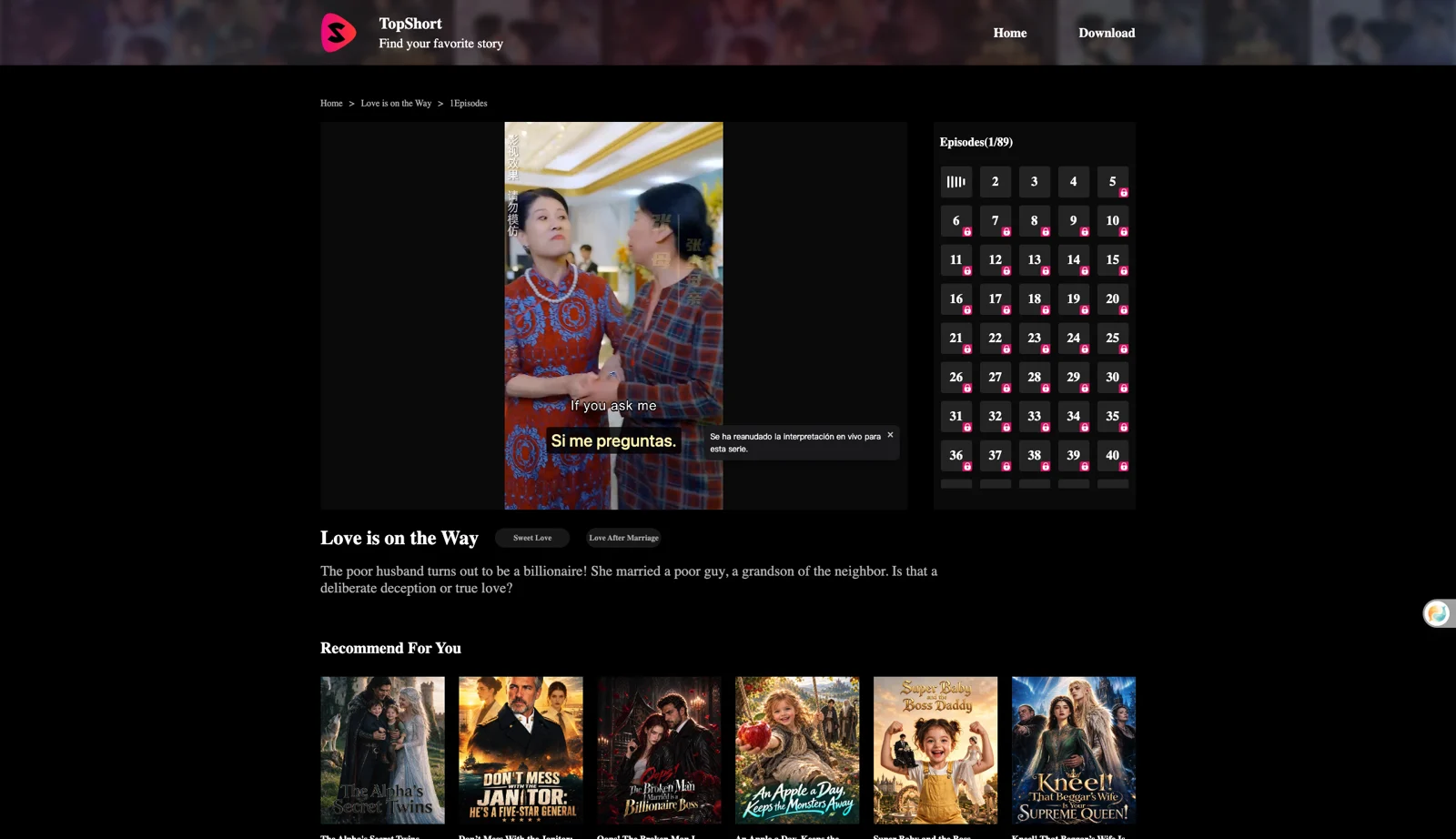
During our tests on Love is on the Way (episode 1), we verified both Simplified Chinese and Spanish output. In both cases, the translated lines appeared cleanly below the burned-in English dialogue.
Limitations We Observed
While live audio interpretation makes watching TopShort dramas in other languages possible, there are three practical boundaries to keep in mind:
- Paid and locked episodes remain locked: The extension only interprets audio from videos that are actively playing. It does not unlock episodes, bypass app download prompts, or grant free access to locked episodes (such as episode 5 onwards). Platform coins or mobile app subscriptions still apply.
- Background audio can cause misheard words: Speech recognition relies on clear vocal audio. Fast dialogue, loud dramatic music, overlapping voices, or sound effects can occasionally cause the model to mishear words.
- Initial playback delay: Subtitles do not appear instantaneously at the very first frame. The first lines take a few seconds to appear after you press play.
Honest Alternatives
If you prefer not to use a live-interpreting browser extension, here are the available alternatives:
- The official TopShort mobile app: Downloading TopShort on iOS or Android gives you access to full episodes and account login. The app store metadata lists support for English, Simplified Chinese, Traditional Chinese, Japanese, and Korean interfaces, though drama subtitle options still depend on individual title dubbing and hardcoding.
- Exploring other short drama platforms: If you watch short dramas across different services, see our broader guide on watching short dramas with dual subtitles to compare how other sites handle text tracks versus burned-in subtitles.
What It Costs
TopShort's web player is free to use for its introductory episodes. In Love is on the Way, episodes 1–4 played without an account.
When generating subtitles via live interpretation, Equalang charges based on the audio sent for recognition: 5 credits per minute under "Speech to text" (as listed on the pricing page), plus 10 credits per 1,000 tokens for the translated text. New accounts receive 200 free credits upon registration, allowing you to test the setup on early episodes before deciding whether to purchase credits. Note that we do not estimate the credit cost of an entire episode, as dialogue density and episode lengths vary.
Frequently Asked Questions
Can I watch all episodes of a TopShort drama on a computer?
No. TopShort's website (www.topshortapp.com) only streams early teaser episodes (such as episodes 1–4 of Love is on the Way). In Love is on the Way, episode 5 and later require downloading the official TopShort mobile app, and no coin or VIP purchases are offered on the desktop website.
Does TopShort offer multi-language subtitle tracks on its web player?
No. The episode we checked had English subtitles burned directly into the video picture. There are no built-in closed captions, external subtitle files, or alternative language tracks available in the web interface.
Can a browser extension unlock paid episodes on TopShort?
No. Browser extensions cannot bypass paywalls or unlock content on TopShort. The extension only translates audio that is already playing on your screen; accessing locked episodes still requires TopShort's official app and currency.
Why do translated subtitles take a few seconds to start on TopShort?
Because TopShort has no pre-existing subtitle track, the first lines take a few seconds to appear after you press play.
Sources
- TopShort Official Website: https://www.topshortapp.com/
- TopShort on Apple App Store: https://apps.apple.com/us/app/topshort-novels-and-drama/id6449445543
- TopShort on Google Play: https://play.google.com/store/apps/details?id=com.tikshorts.novelvideos&hl=en&gl=US
- Equalang Browser Extension: https://equalang.com/extension
- Equalang Pricing: https://equalang.com/pricing