Stardust TV Drama with Translated Subtitles on PC
 Equalang
In brief
Watch Stardust TV dramas on a computer with translated or bilingual subtitles. Here is what the web player offers and how to add subtitles step by step.
Keywords: stardust tv drama; stardust tv drama with translated subtitles; stardusttv; stardust tv subtitles; stardust tv series
If you want to watch a Stardust TV drama with translated subtitles on a computer, StardustTV (stardusttv.net) allows you to stream episodes in a desktop browser, but its videos come with English subtitles burned directly into the image. Because the web player provides no closed caption tracks or subtitle language settings, you cannot turn off or switch subtitles on the platform. To get subtitles in your own language—such as Spanish, Chinese, or German—you can use a desktop browser extension that listens to the spoken dialogue in real time and displays translated captions right beneath the original English lines.
Does StardustTV Have English Subtitles or Other Languages?
StardustTV streams short-form dramas spanning romance, fantasy, revenge, and suspense, with many titles produced using AI assistance (the web player displays a "Contains AI-generated content" notice on affected titles). The website includes 14 language editions in its code—such as English, Spanish, Japanese, Korean, French, and Arabic—and features localized catalog sections like its Spanish portal (/es) with Spanish drama titles.
However, when you open an episode (such as episode 1 of Hit by the Campus Queen, Beauties Chase Me after confirming the 16+ age prompt), the dialogue is hardcoded: English text is drawn directly into the video frames rather than delivered through toggleable subtitle tracks. While this accommodates English readers immediately, viewers who want subtitles in another language or who prefer bilingual captions cannot change the subtitle language using the platform's native player controls.
How to Watch StardustTV Dramas with Translated Subtitles on a Computer
To watch StardustTV dramas with subtitles in your own language, you can use a browser extension that performs real-time audio interpretation. Below, we demonstrate with Equalang (/extension) on a desktop Chromium browser (such as Chrome or Edge):
- Open the drama episode: Navigate to stardusttv.net and open the episode you want to watch. When playback begins (for example, episode 1 of My Billionaire Sister Crashed My Divorce), the extension detects that the player lacks a subtitle file and automatically switches on live interpretation, showing the notice: "No captions found; live interpreting was switched on."
- Select your target language: Click the Equalang icon in the player's control bar to open the menu. Choose your target language, such as Spanish or Simplified Chinese.
- Set caption display to "Translation only": In the menu under "Caption display", select "Translation only". Because StardustTV already has English subtitles burned into the video frames, setting the display to "Translation only" places the translated line directly under the burned-in English text. This gives you a clean bilingual layout without creating a duplicate English line over the video.
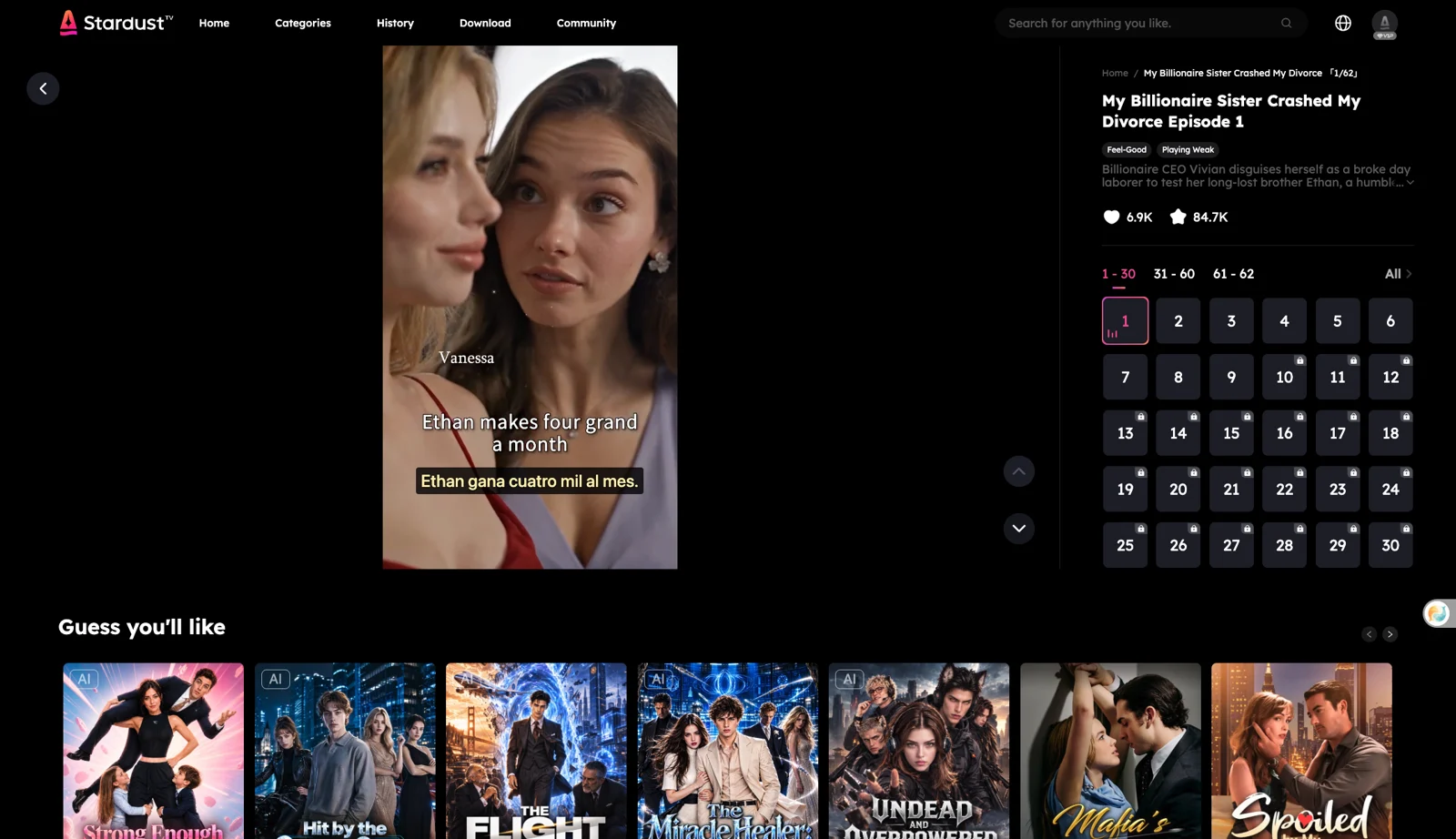
If you watch short dramas across other streaming platforms as well, you can read our guide on watching short dramas with dual subtitles or browse other supported sites.
What Are the Limitations and Honest Alternatives?
During our testing on November 12, 2026, we noted several practical boundaries:
- Brief initial delay: Subtitles appear a moment after you press play, as the speech recognition requires a few seconds to process the first spoken lines.
- Speech recognition boundaries: Pronunciation can occasionally be misheard when intense background music swells, sound effects clash, or characters talk over each other.
- Paywalls remain in place: The extension does not unlock locked or paid episodes. On StardustTV, series typically offer several free introductory episodes (for example, episodes 1–7 of Hit by the Campus Queen, Beauties Chase Me play freely, but episode 8 locks behind a paywall). Continuing past locked episodes still requires StardustTV's native coins or passes.
If you prefer not to use speech interpretation tools, consider these honest alternatives:
- Browse StardustTV's localized sub-sites: Explore regional catalog sections like
stardusttv.net/es, where certain series are listed with localized titles and may feature dedicated edits. - System live captioning and screen OCR: You can use built-in operating system live captions or third-party screen OCR translators. However, screen OCR tools can occasionally flicker or drop words when subtitles move quickly against changing video scenes.
What It Costs on StardustTV and for Translation
Understanding the costs on both StardustTV and the subtitle tool helps you plan your viewing:
- StardustTV pricing: Introductory episodes require no login. To continue past locked episodes, StardustTV sells virtual coin packs on the web starting at $9.99 for 1,000 coins (+300 bonus coins) up to $99.99 for 10,000 coins (+10,000 bonus coins). The mobile app also offers an optional weekly subscription that allows watching stories while active (valid for 7 days, billed weekly; cancel at least 24 hours before renewal). Downloading the mobile app and signing in provides a 50-coin bonus. Under StardustTV's terms, virtual currency and goods bought through automatic, recurring or subscription payments are final and non-refundable, except at StardustTV's sole discretion.
- Subtitle translation pricing: In Equalang, video subtitles generated through real-time audio interpretation are billed by the duration of audio sent for recognition at 5 credits per minute (listed under "Speech to text" on the pricing page), plus translated text billed by token count. New accounts receive 200 free credits to test before deciding whether to purchase credits, and the extension shares this balance with your web account.
Frequently Asked Questions
Does StardustTV have an official subtitle toggle on its website? No, StardustTV does not offer a subtitle toggle or closed-caption track on its web player. Dialogue is burned directly into the video frames in English, so changing languages requires an external tool that translates spoken audio.
Can a browser extension unlock paid episodes on StardustTV? No. Browser extensions only generate subtitles for the video currently playing on screen. They cannot bypass StardustTV paywalls or unlock locked episodes, which still require StardustTV coins or subscriptions.
How do I cancel a StardustTV subscription? If you subscribed to StardustTV on iOS, open your iPhone Settings > Apple ID > Subscriptions > Stardusttv, and cancel at least 24 hours before the weekly renewal date. You can also contact support at updates@stardust-tv.com.
Why do translated subtitles sit below the English text on StardustTV? Because StardustTV's videos already have English subtitles burned into the video image, selecting "Translation only" in the extension menu positions the translated line directly under the burned-in English text, creating a clean bilingual layout without duplicate lines.
Sources
- StardustTV Official Website: https://www.stardusttv.net/
- StardustTV Terms of Service: https://www.stardusttv.net/terms-service
- StardustTV on the Apple App Store: https://apps.apple.com/us/app/stardusttv-short-drama-movie/id6502377927
- StardustTV on Google Play: https://play.google.com/store/apps/details?id=com.shdj.test&hl=en&gl=US
- Equalang Browser Extension: https://equalang.com/extension
- Equalang Pricing: https://equalang.com/pricing