
OpenAlex vs Semantic Scholar vs PubMed Central: OA Guide
In brief
Compare OpenAlex, Semantic Scholar, and PubMed Central by catalog size, licenses, AI tools, and APIs, plus how to read OA papers side by side in two languages.
Keywords: openalex vs semantic scholar vs pubmed central; openalex vs google scholar; semantic scholar vs google scholar; free open access journals; bilingual research paper reader
OpenAlex, Semantic Scholar, and PubMed Central (PMC) solve three distinct stages of open-access research: use OpenAlex (https://openalex.org/) when you need a 250M+ cross-disciplinary catalog with CC0 metadata, exact Creative Commons license filters, and a free REST API; use Semantic Scholar (https://www.semanticscholar.org/) when you want AI-generated TLDR summaries, citation intent filters, and Semantic Reader overlays across 200M+ papers; and use PubMed Central (https://pmc.ncbi.nlm.nih.gov/) when you need guaranteed full-text biomedical and life-sciences articles rather than abstract-only citations. Once you locate an open-access paper on any of these platforms, Equalang Plaza (https://equalang.com/plaza) lets you search its DOI, title, or author across 24,000+ permissively licensed (CC BY, CC BY-SA, CC0) papers to read or download the original PDF alongside a layout-preserved bilingual edition.
Quick Comparison: OpenAlex vs. Semantic Scholar vs. PubMed Central vs. Equalang Plaza
Why Researchers Confuse These Three Platforms
When researchers search openalex vs google scholar or semantic scholar vs google scholar, they usually start looking for a single search bar that finds everything and opens a free PDF. In practice, academic discovery splits into three different layers:
- Bibliographic and license graphs tell you what exists, who cited whom, which institution funded the work, and whether a free copy is legally available.
- AI triage engines help you decide in thirty seconds whether a paper is worth reading by classifying why other papers cited it.
- Full-text archives actually store and serve the complete article body, figures, and downloadable PDFs.
Trying to use one tool for all three jobs causes unnecessary friction. Here is how each platform works in daily research—and where its boundaries sit.
OpenAlex: The Open Metadata Graph and License Engine
Built by the nonprofit OurResearch as the successor to Microsoft Academic Graph, OpenAlex (https://openalex.org/) indexes more than 250 million scholarly works across humanities, social sciences, STEM, and medicine.
What You Can Do with OpenAlex
- Filter by exact Open Access and license status: Unlike general web search engines that lump free-to-read bronze articles together with reusable papers, OpenAlex records Open Access status and exact Creative Commons licenses (
cc-by,cc0, etc.) in its metadata. - Query a free, open REST API under
CC0: Because OpenAlex releases its catalog metadata under the public-domainCC0dedication, developers, librarians, and scientometrics teams can pull citation networks, author disambiguations, and institutional output without commercial API paywalls. - Trace cross-disciplinary connections: Its coverage reaches far beyond computer science or clinical medicine, making it a strong alternative when evaluating
openalex vs google scholarfor systematic reviews or institutional dashboards.
Limitations to Keep in Mind
OpenAlex is a metadata catalog and knowledge graph, not a full-text hosting repository. It points you to the landing page or open-access PDF hosted by a journal, institutional repository, or preprint server, and it does not generate AI reading overlays or translated full texts.
Semantic Scholar: AI Triage, TLDRs, and Citation Intent
Developed by the Allen Institute for AI (Ai2), Semantic Scholar (https://www.semanticscholar.org/) is a free AI-powered discovery engine covering 200 million+ papers, with its deepest coverage in computer science, biomedicine, and neuroscience.
What You Can Do with Semantic Scholar
- Scan one-sentence
TLDRsummaries: Instead of reading twenty dense abstracts on a results page, you can scan concise AI-generatedTLDRlines that state a paper's core objective and contribution. - Filter by citation intent ("Highly Influential Citations"): A paper with 500 citations might only be mentioned in passing as background context. Semantic Scholar classifies whether a citation builds upon a paper's methods, compares against its results, or simply mentions it, highlighting Highly Influential Citations.
- Read with Semantic Reader: On supported papers, the Semantic Reader overlay turns static PDFs into interactive documents with inline citation cards and skimming highlights.
Limitations to Keep in Mind
While Semantic Scholar covers 200M+ papers across fields, its AI features and full-text parsing are strongest in computer science, biomedicine, and neuroscience. Like OpenAlex, it indexes papers in their original language; if you are reading a dense paper outside your first language, you still face the raw source PDF.
PubMed Central (PMC): Full-Text Biomedical Archive (Not Just Abstracts)
Maintained by the U.S. National Library of Medicine (NLM), PubMed Central (https://pmc.ncbi.nlm.nih.gov/) is a free full-text archive storing millions of complete biomedical and life-sciences journal articles.
What You Can Do with PubMed Central
- Get the complete article, not just the abstract: The most common point of confusion in medical literature searches is mixing up PubMed with PubMed Central. While PubMed is an abstract and citation index, every record in PubMed Central is a full-text article complete with tables, figures, and references.
- Filter for the
Open Access Subset: Not every free-to-read article in PMC allows redistribution or derivative works. PMC maintains a dedicatedOpen Access Subsetof articles licensed under Creative Commons or similar permissive terms that allow text mining, reuse, and adaptation.
Limitations to Keep in Mind
PMC is strictly focused on biomedicine and the life sciences. You will not find pure mathematics, humanities, or general computer science venues unless they intersect with biomedical research. Furthermore, full texts are stored in their publication language (predominantly English).
Where Equalang Plaza Fits: Reading Open-Access Papers Side by Side in Your Language
While OpenAlex, Semantic Scholar, and PubMed Central help you find open-access papers in their original publication language, reading a 15-page, two-column research PDF filled with equations and tables in a second language is a different hurdle. Copying paragraphs into a chat box breaks formulas, loses figure captions, and forces you to translate from scratch even when thousands of other researchers are reading the exact same paper.
That is why we built Equalang Plaza (https://equalang.com/plaza) directly on top of permissive open-access repositories. Equalang Plaza currently indexes 24,000+ permissively licensed (CC BY, CC BY-SA, CC0) open-access papers sourced from OpenAlex, PubMed Central, and arXiv, alongside public-domain books (from sources such as Aozora Bunko, Wikisource, and Standard Ebooks).
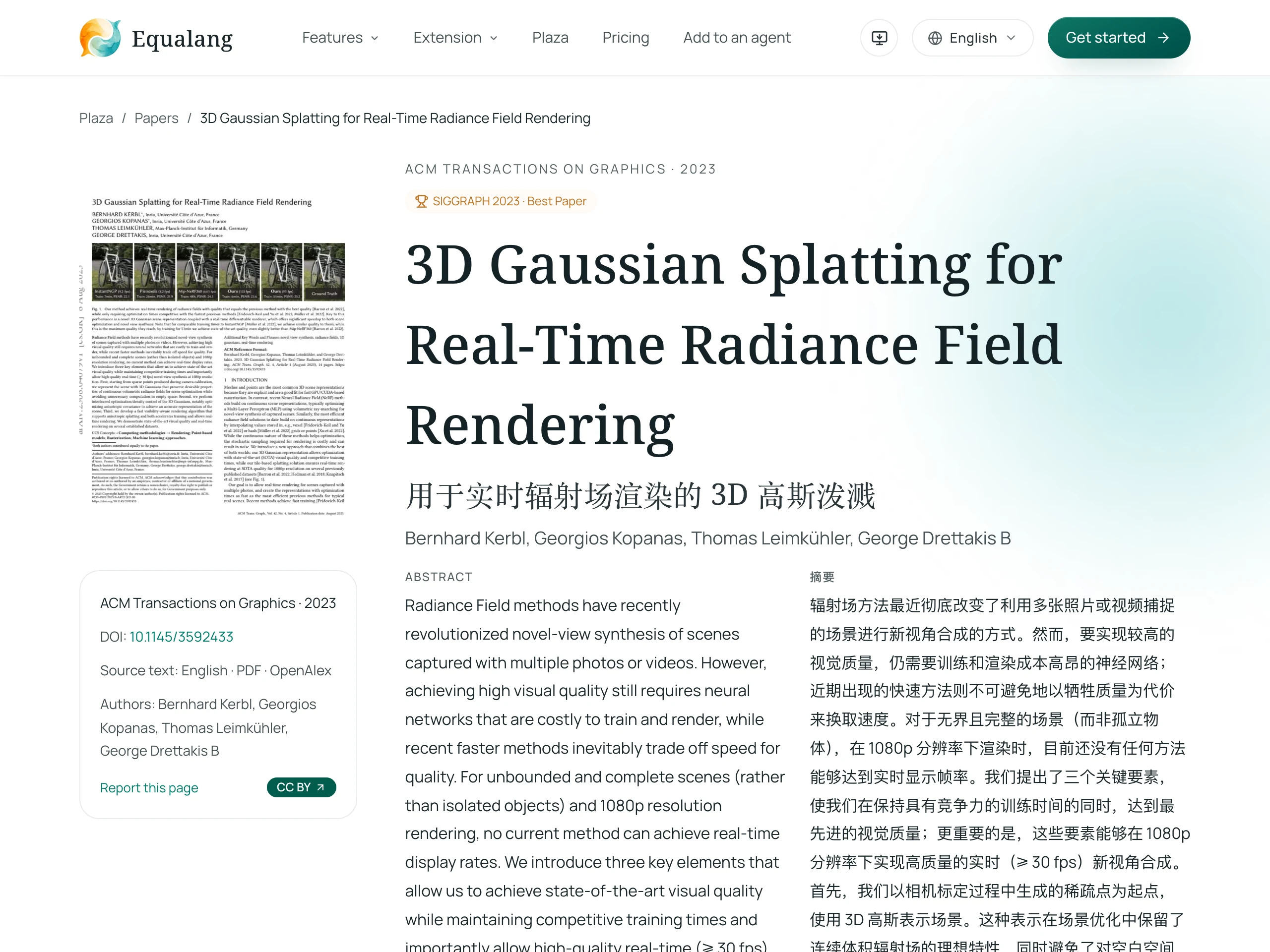
How to Use Equalang Plaza with Your OA Literature Workflow
- Search by DOI, title, or author in any language: Copy a DOI or title from OpenAlex, Semantic Scholar, or PMC and paste it into Equalang Plaza. You can filter by All / Books / Papers and by your target language.
- Read the original for 0 credits and sample 20% side by side: Once signed in, you can read or download the original source PDF for 0 credits, and sample the first 20% of any existing translation for free with the original and translation displayed side by side and synchronized scrolling enabled.
- Download both PDF editions for 1/10 of the standard translation cost: If a translation already exists in the plaza, you do not pay the full cost of running a new translation job. Downloading a full plaza edition costs 1/10 of the standard translation credits (rounded up and displayed on the page—for example, downloading the Chinese AI translation of the OpenAlex open-access paper 3D Gaussian Splatting for Real-Time Radiance Field Rendering costs 24 credits). Every PDF purchase gives you two files at once plus full online access:
- A layout-preserved translated PDF that keeps two-column structure, headers, figure captions, bold emphasis, clickable cross-references, and reconstructed tables and equations.
- A page-by-page alternating bilingual PDF (open it in a two-page view in your local PDF reader—turning off separate cover-page display if pages shift—to read original on the left and translation on the right).
- Request, translate, or share to earn back credits:
- If a plaza paper does not have your target language yet, click Translate now directly from the plaza source, or click Request this translation so high-demand works are prioritized.
- If you upload a PDF on the document translation page that already has a translation in the plaza, Equalang prompts you so you can sample or download the plaza edition at 1/10 cost instead of paying to re-translate it.
- If you translate a public-domain book or a permissively licensed OA paper (
CC BY,CC BY-SA,CC0) that is not yet in the plaza, click Share to the plaza at the top of the workspace (up to 3 submissions per day, published after copyright verification). Each time another reader downloads your shared edition, you receive 1/10 of your translation cost back in credits until your original cost is recouped. - Spot a mistranslation, missing line, or layout issue while reading? Report it inline—editions with frequent reports are queued for retranslation.
Honest Boundaries of Equalang Plaza
To keep your workflow predictable, keep these four limits in mind:
- Sign-in is required: You must sign in to read or download 0-credit originals and to sample the first 20% of translations online.
- Full translations cost 1/10 credits, not 0: While originals and 20% previews are free after sign-in, downloading the complete translated PDF costs 1/10 of the standard translation credit rate.
- Strictly permissive licenses (
CC BY,CC BY-SA,CC0) and public domain: Equalang Plaza does not host paywalled journal articles, modern copyrighted commercial books, or papers carrying Non-Commercial (NC) or No-Derivatives (ND) restrictions—nor can those restricted works be shared to the plaza. For your own personal copies of non-plaza PDFs, you can translate them privately via Document Translation or the Equalang Zotero Plugin (see our guide on how to read research papers not in English). - Target languages are expanding: Not every indexed work already has a pre-generated translation in every language; when a language is missing, you can trigger a translation on demand or register a request.
Recommended Workflow: Putting All Four Together
- Step 1 — Map the field or pull API data: Query OpenAlex to find works across disciplines and verify which papers carry a
CC BYorCC0license. - Step 2 — Triage reading priority: Check Semantic Scholar for one-sentence
TLDRsummaries and Highly Influential Citations to pick the 3–5 papers that actually matter. - Step 3 — Fetch biomedical full texts: For clinical and life-sciences literature, grab the complete archived article from PubMed Central (PMC).
- Step 4 — Read side by side in your native language: Paste the paper's DOI or title into Equalang Plaza to preview the first 20% bilingual edition for free or download both the layout-preserved and alternating bilingual PDFs at 1/10 of standard translation credits.
Frequently Asked Questions
What is the difference between PubMed and PubMed Central (PMC)?
PubMed is a citation and abstract database—many of its entries link out to paywalled publisher websites. PubMed Central (https://pmc.ncbi.nlm.nih.gov/) is the U.S. National Library of Medicine's full-text archive, meaning every article stored in PMC is readable in full for free, and its Open Access Subset is licensed under Creative Commons terms for reuse.
When should I use OpenAlex instead of Semantic Scholar?
Use OpenAlex when you need broad disciplinary coverage across 250M+ works, CC0 open metadata via a free REST API, or explicit filters for Creative Commons licenses (cc-by, cc0). Use Semantic Scholar when you want AI-powered reading triage—specifically one-sentence TLDR summaries, citation intent classifications (Highly Influential Citations), and Semantic Reader PDF overlays in computer science, biomedicine, or neuroscience.
Can I upload any free-to-read paper from PMC or OpenAlex to Equalang Plaza?
Only papers under permissive licenses that allow adaptations and commercial use—specifically CC BY, CC BY-SA, and CC0 (alongside public-domain books)—are indexed in or eligible to be shared to Equalang Plaza. Papers with Non-Commercial (NC) or No-Derivatives (ND) clauses, or free-to-read articles under standard publisher copyright, cannot be shared publicly to the plaza, though you can translate your own files privately in Document Translation.
Sources
- OpenAlex Official Website: https://openalex.org/
- Semantic Scholar Official Website: https://www.semanticscholar.org/
- PubMed Central (PMC) Official Archive: https://pmc.ncbi.nlm.nih.gov/
- Equalang Plaza (Bilingual Public-Domain Books & Open-Access Papers): https://equalang.com/plaza
- Equalang Document Translation: https://equalang.com/documents
- Equalang Zotero Plugin: https://equalang.com/extension/zotero
- Equalang Credit Rates & Plaza Ratios (
/v1/rates): https://equalang.com/v1/rates