Watch NetShort Dramas on Web with Translated Subtitles
 Equalang
In brief
Want translated subtitles on NetShort web? Here is how to watch NetShort dramas on your computer with real-time translated or dual subtitles.
Keywords: netshort; netshort web; netshort drama; netshort subtitles; netshort dual subtitles
If you are searching for "netshort web" to watch NetShort dramas on a computer in your own language, NetShort streams directly in a desktop browser at netshort.com, but its web player provides no subtitle menu or selectable closed-caption tracks. The episodes we opened had English subtitles permanently burned directly into the video stream. To watch NetShort on a PC or Mac with translated subtitles—such as Spanish or Chinese—you need a browser extension that captures the audio stream, performs real-time speech recognition, and places translated subtitles on screen as the characters speak.
What NetShort Offers on the Web (and What It Lacks)
NetShort (operated by NETSTORY PTE. LTD. in Singapore) hosts a catalog that its site states contains over 108,000 short dramas. The platform allows desktop playback directly at netshort.com without installing an app.
When you visit the site on a desktop browser, you can start streaming immediately under a "Visitor" status without logging in. Early episodes of many series are free: on Big Mistake: Torturing The Hidden Billionaire, for example, episodes 1 through 13 play without an account, while episode 14 locks and prompts for 50 coins or viewing inside the mobile app.
NetShort's official FAQ states that the platform supports 17 languages (including English, Traditional Chinese, Simplified Chinese, Spanish, Japanese, Korean, French, German, and others) and maintains localized landing portals such as /es/. However, inside the web player, the video is delivered as an MP4 stream without separate text tracks (<track>). For titles produced or released with burned-in English text, there is no built-in switch to toggle subtitles off or translate them into another language.
How to Watch NetShort on a Computer with Translated Subtitles
Below, we demonstrate the setup using Equalang (equalang.com/extension), an AI translation extension for desktop Chrome, Edge, and Firefox.
In our tests on 2026-11-12 using a desktop Chromium browser running extension version 0.4.60, we tested episode 1 of The Secret Behind the Family Portrait on netshort.com:
- Open the episode: Navigate to the drama on
netshort.comand start playback. - Open the menu: Click the Equalang icon in the player's control bar.
- Automatic live interpretation: Because NetShort embeds no text tracks, the extension automatically turns on live speech interpretation and displays the notification: "No captions found; live interpreting was switched on."
- Select Caption Display: Set "Caption display" to "Translation only". This is the key setting for NetShort: because English subtitles are already drawn into the video picture, choosing "Both languages" causes the extension's generated English line to sit directly over the video's burned-in English text. Setting it to "Translation only" places the translated line directly beneath the burned-in English, giving you clean dual-language reading without redundant text.
- Choose your target language: Select your preferred language (we verified both Simplified Chinese and Spanish).
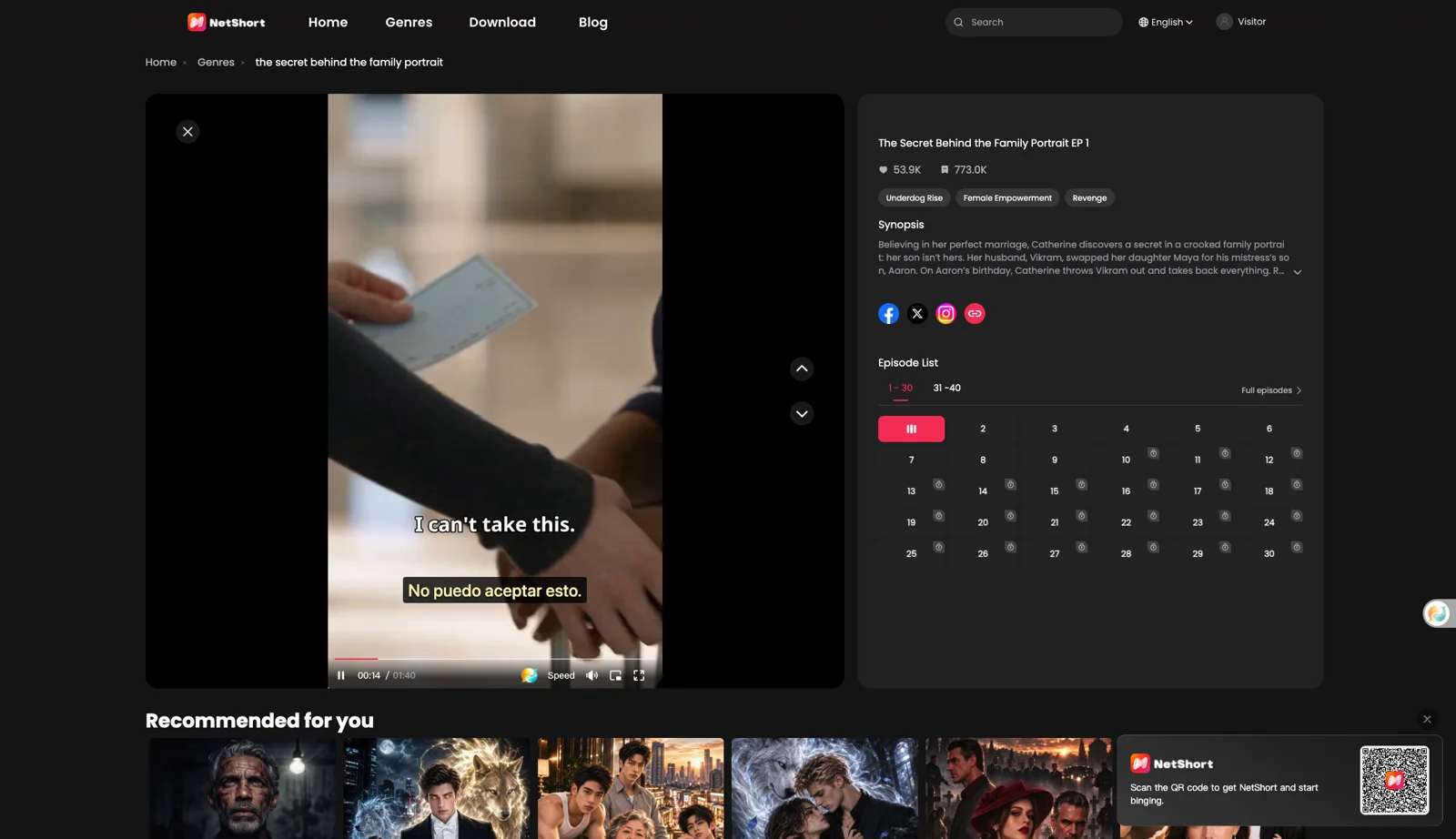
When episode 1 concluded, NetShort automatically transitioned to episode 2, and the live subtitles carried on. If NetShort displays its overlay button ("Click to unmute"), clicking it does not disrupt subtitle generation. For viewers watching series on other streaming sites, our guide to watching short dramas with dual subtitles covers additional platform layouts.
Limits We Observed and Honest Alternatives
While live interpretation solves the missing subtitle track, several practical boundaries apply:
- Paid episodes remain locked: The extension cannot unlock paid or coin-gated episodes. When a series hits a paywall (such as episode 14 on Big Mistake), NetShort's coins, VIP pass, or app requirements still apply.
- Audio recognition clarity: The extension hears spoken dialogue. Loud background music, sound effects, or actors speaking over each other can cause misheard words.
- Initial processing delay: Captions do not appear the split second you click play; the opening sentences take a few seconds to process.
If you prefer not to use an extension, consider these alternatives:
- NetShort localized sections: Browse NetShort's localized language directories (such as
netshort.com/es/for Spanish-titled series), although title availability varies significantly by region.
What It Costs
Equalang video subtitles created through live interpretation are billed based on the length of audio sent for recognition: 5 credits per minute under "Speech to text" on the pricing page, plus the translated text billed by volume (10 credits per 1,000 tokens).
New accounts receive 200 credits upon registration. The extension and web dashboard share a single credit balance, and purchased credits do not expire. More supported video services can be checked on the supported sites page.
Frequently Asked Questions
Can I watch NetShort on a computer without the app?
Yes. NetShort hosts its official web player at netshort.com. On desktop browsers, early episodes of many series can be watched directly as a visitor without signing in.
Why does the NetShort web player have no subtitle options?
NetShort encodes subtitles directly into the video frames (burned-in subtitles) rather than providing switchable closed-caption tracks. The web player contains no native subtitle selection menu.
Does a subtitle extension unlock paid NetShort episodes?
No. The extension only translates audio and subtitles on screen. Locked or VIP episodes still require NetShort coins, subscriptions, or watching in the NetShort mobile app.
Is there a NetShort customer service phone number?
No customer service phone number is listed on NetShort's official agreements or FAQ. Official support is handled via email at support@netshort.com or through in-app feedback.
Sources
- NetShort Website: https://netshort.com/
- NetShort FAQ: https://netshort.com/faq
- NetShort User Agreement: https://netshort.com/agreement/1?modelsType=0&language=en_US
- NetShort Membership Agreement: https://netshort.com/agreement/4?modelsType=0&language=en_US
- Equalang Extension: https://equalang.com/extension
- Equalang Supported Sites: https://equalang.com/extension/sites
- Equalang Pricing: https://equalang.com/pricing
- Equalang Short Drama Guide: https://equalang.com/blog/watch-short-dramas-dual-subtitles