Watch MoboReels Short Dramas With Translated Subtitles
 Equalang
In brief
Learn how to watch MoboReels short dramas on a desktop browser with bilingual or translated subtitles, plus official language options and limitations.
Keywords: moboreels short drama; moboreels subtitles; watch moboreels on pc; moboreels english subtitles; translated subtitles
If you want to watch MoboReels short dramas on a computer with translated subtitles in your own language, you can do it directly in a desktop browser. MoboReels provides a web player with text-based subtitles and localized series versions, but it only displays one language at a time and lacks built-in bilingual display. By using a desktop browser translation extension on moboreels.com, you can read the site's original subtitle track and automatically display a translated subtitle line beneath it for dual-language viewing.
What MoboReels Offers on Desktop: Subtitles and Language Options
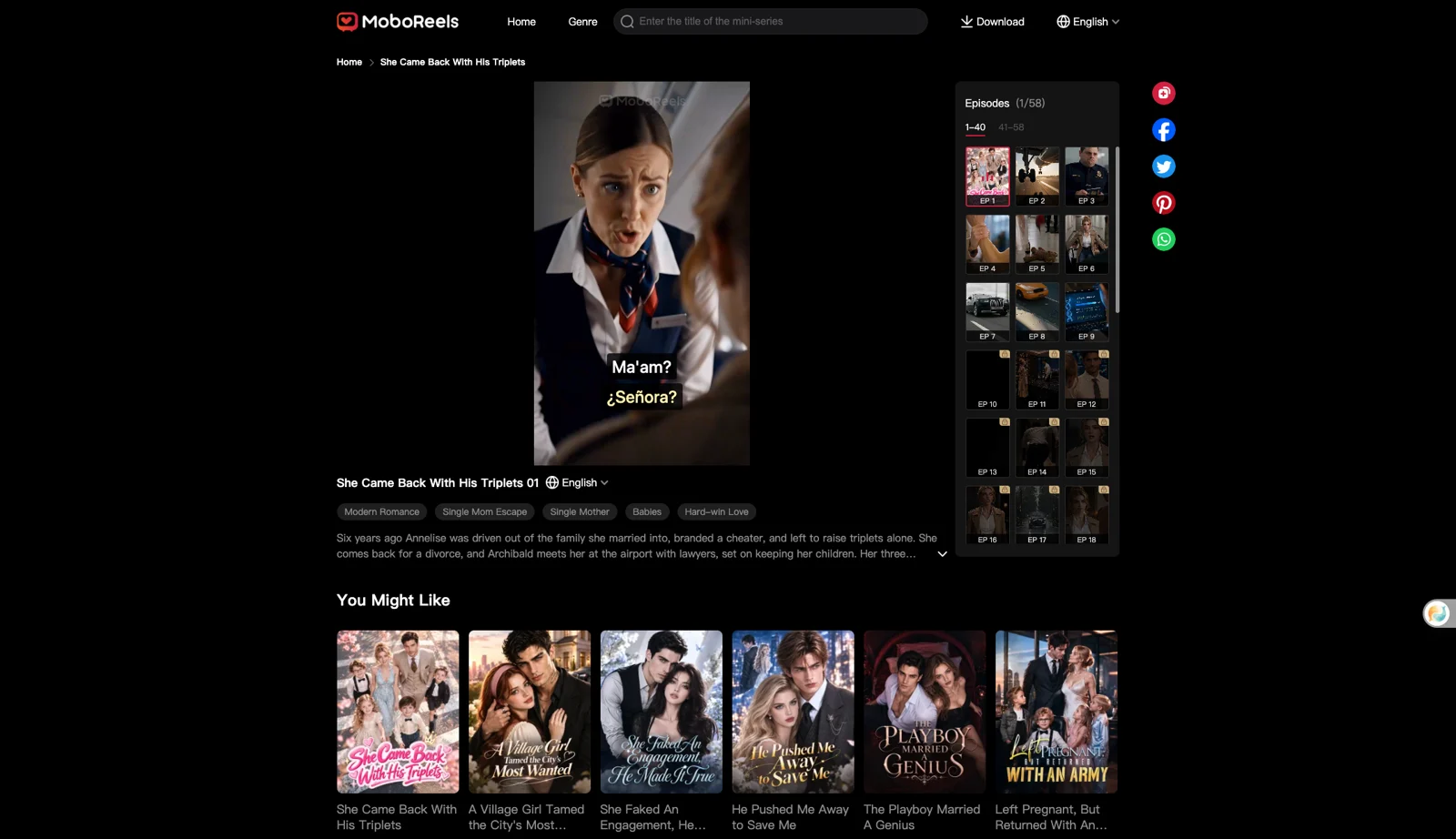
MoboReels (operated by CHANGDU (HK) TECHNOLOGY LIMITED) allows viewers to stream episodes directly on its website (moboreels.com). You can browse to a drama page such as /drama/she-came-back-with-his-triplets-147905322 to watch episode 1, and subsequent episodes follow URLs like /episode/<title>-<id>-<nn>.
Unlike many short-drama streaming platforms that permanently burn subtitles into the video picture, MoboReels uses an independent text layer. When an episode loads, the player fetches subtitle timestamps and lines via a JSON request (getSubtitles) and draws them as standard page text (div.subtitles-item) over the video stream. Any on-screen graphical banners—such as character identification tags—remain part of the recorded video frame in English, but spoken dialogue is delivered as text.
The desktop site also provides a built-in language selector next to the drama title. For She Came Back With His Triplets, the menu lists 16 languages: English, Español, Português, 日本語, Русский, Bahasa Indonesia, Deutsch, Français, Filipino, Tiếng Việt, Italiano, ไทย, العربية, Türkçe, Polski, and Bahasa Melayu. However, selecting another language (such as Español) redirects your browser to an entirely separate localized series page (Regreso Triunfal: Los Trillizos Genio del Millonario), displaying single Spanish subtitles. The native player does not support bilingual side-by-side subtitles, nor does it let you translate into languages outside the catalog for that specific drama.
How to Watch MoboReels with Dual Subtitles on a Computer
Because MoboReels outputs its dialogue into the web page DOM, a subtitle extension can read the original lines and translate them without needing to capture or transcribe audio. Below, we demonstrate the workflow using the Equalang extension on a desktop Chromium browser (tested on 2026-11-12 with version 0.4.60, also supported on Chrome, Edge, and Firefox).
- Open the episode: Navigate to moboreels.com and open the drama you want to watch, such as episode 1 of She Came Back With His Triplets.
- Open the extension settings: Click the Equalang icon in the web player control bar to bring up the subtitle settings.
- Configure languages and layout: Set your target translation language (we verified both Simplified Chinese and Spanish on the same episode). Under caption display, select "Both languages" (or "Translation only" if you prefer not to see the original line). Set the translation position to "Below the original".
- Start playback: Click play on the video. The extension reads the text subtitles directly from the player and renders the translated line beneath the original. Note that the first subtitle lines take a few seconds to appear after pressing play.
If you also follow short dramas across multiple video sites, see our guide on watching short dramas with dual subtitles for cross-platform tips. You can install the tool from the Equalang extension page and review the full list of compatible services on supported sites.
How Subtitle Translation Is Billed
Because MoboReels provides subtitles as a text track, translation is billed purely by text volume (measured per 1,000 tokens) rather than by audio minutes. Under our pricing rules, translating existing subtitle segments consumes 10 credits per 1,000 tokens (roughly equivalent to 1,000 CJK characters or 4,000 English characters).
Live speech recognition (which costs 5 credits per audio minute) is not triggered when clean text subtitles are detected. New accounts receive 200 free credits upon registration to test the player integration. Purchased credits never expire, and your credit balance is shared seamlessly between the browser extension and the web platform.
Limits We Observed and Honest Alternatives
While watching MoboReels in a browser with translated subtitles works smoothly on accessible episodes, keep these limitations in mind:
- Free vs. Locked Episodes: The browser extension does not bypass platform locks or grant free access to paid episodes. In our tests on She Came Back With His Triplets (58 episodes), episodes 1 through 9 played freely without lock icons, but episode 10 onwards carried lock badges. Attempting to open locked episode 20 displayed a "Download App" overlay with QR codes for Google Play and the App Store. Unlocking paid content requires MoboReels Coins under their official terms.
- Initial Delay: Subtitles appear a moment after pressing play; the opening sentences take a few seconds to initialize.
- Speech Recognition Caveats: If you watch un-subtitled clips where live audio interpretation is required instead of text translation, heavy background music or rapid overlapping dialogue can impair speech recognition accuracy.
If you do not want to install an extension, consider these alternatives:
- Official Localized Pages: If MoboReels already offers an official translation in your language (such as Spanish or Japanese), using the platform's native dropdown is free and requires no third-party tools, provided you do not need bilingual comparison.
- Full-Page Browser Translators: Desktop browsers offer full-page translation (e.g., Chrome Translate), but applying full-page translation to dynamic media players frequently breaks live DOM subtitle timers or desynchronizes playback overlays.
Frequently Asked Questions
Does MoboReels have English subtitles on PC?
Yes. On the MoboReels desktop website, dramas such as She Came Back With His Triplets display original English subtitles in an on-screen text layer (div.subtitles-item) directly over the video player.
Can a browser extension unlock paid MoboReels episodes?
No. Browser translation extensions only translate subtitles for video streams you can currently play. Locked episodes on MoboReels require the platform's own coins or app access as outlined in CHANGDU (HK) TECHNOLOGY LIMITED's terms of service.
How do I cancel a MoboReels subscription?
According to official app store listings, you can cancel your MoboReels subscription at any time by navigating to your Apple App Store or Google Play account subscriptions at least 24 hours before your renewal date.
Is translating MoboReels subtitles billed by video duration?
No. Because MoboReels provides readable text subtitles, translation is billed by the amount of text (tokens), not by the duration of the video. The 5 credits per minute audio speech-to-text rate applies only when a video has no subtitle track and requires live audio interpretation.
Sources
- MoboReels Official Website: https://www.moboreels.com/
- MoboReels Terms of Service: https://www.moboreels.com/termsofService
- MoboReels Episode Sample: https://www.moboreels.com/drama/she-came-back-with-his-triplets-147905322
- MoboReels on Apple App Store: https://apps.apple.com/us/app/moboreels-short-drama-series/id6450243852
- MoboReels on Google Play: https://play.google.com/store/apps/details?id=com.changdu.mobovideo&hl=en&gl=US
- Equalang Browser Extension: https://equalang.com/extension
- Equalang Pricing: https://equalang.com/pricing