Hongguo English Subtitles: How to Watch on a Computer
 Equalang
In brief
Hongguo has no official English subtitles. Here is how to watch Hongguo short dramas on a desktop browser with live bilingual subtitles, step by step.
Keywords: hongguo english subtitles; does hongguo have english subtitles; hongguo short drama; hongguo app english subtitles; watch hongguo on computer
Does Hongguo (红果短剧) have English subtitles?
No, Hongguo (红果短剧) does not have official English subtitles. The streaming website (hongguoduanju.com) and its desktop web player operate exclusively in Chinese. In the dramas we tested, Chinese subtitles are burned directly into the video picture, and the video player provides no subtitle tracks and no language switcher.
Hongguo is Douyin Group's free short-drama platform, operated by Beijing Bimo Liuxiang Technology Co., Ltd. Its catalog covers popular Chinese micro-drama genres, including urban drama, fantasy, time travel, family conflict, and costume romance, alongside movies, TV series, novels, and audiobooks. On a computer browser, the platform provides a web player at /player/<series_id>. For the series checked during testing, the first 5 episodes are accessible without logging in (accessible_episode_cnt: 5), while episode 6 onward display lock icons on the playlist. A login popup ("登录发现更多精彩内容") may appear over the player requesting an SMS code (defaulting to +86 phone numbers) or a QR code scan with the Hongguo mobile app; closing this dialog allows the current episode to keep playing.
How to watch Hongguo dramas on a computer with subtitles
Because Hongguo does not provide subtitle files or multi-language options, watching on a desktop computer requires a tool that recognizes spoken Chinese dialogue and translates it as the video plays. Below, we demonstrate using Equalang (a browser extension for desktop Chrome, Edge, and Firefox) to generate real-time subtitles.
Here is how to set it up step by step:
- Install the extension: Add the extension to your desktop browser from the Equalang extension page.
- Open Hongguo: Visit hongguoduanju.com and navigate to the episode you want to watch.
- Open the player menu: Click the Equalang icon in the player's control bar to open its settings menu.
- Set your language and layout: Select English as your target language. Under "Caption display", choose "Both languages" (or "Translation only"). Under "Translation position", choose whether translated lines appear below or above the original text.
- Allow live interpretation to start: Because Hongguo videos contain no text subtitle tracks, the extension automatically switches on its listening mode with the notice: "No captions found; live interpreting was switched on."
- Start playback: Press play. Real-time bilingual subtitles will appear directly beneath the video picture.
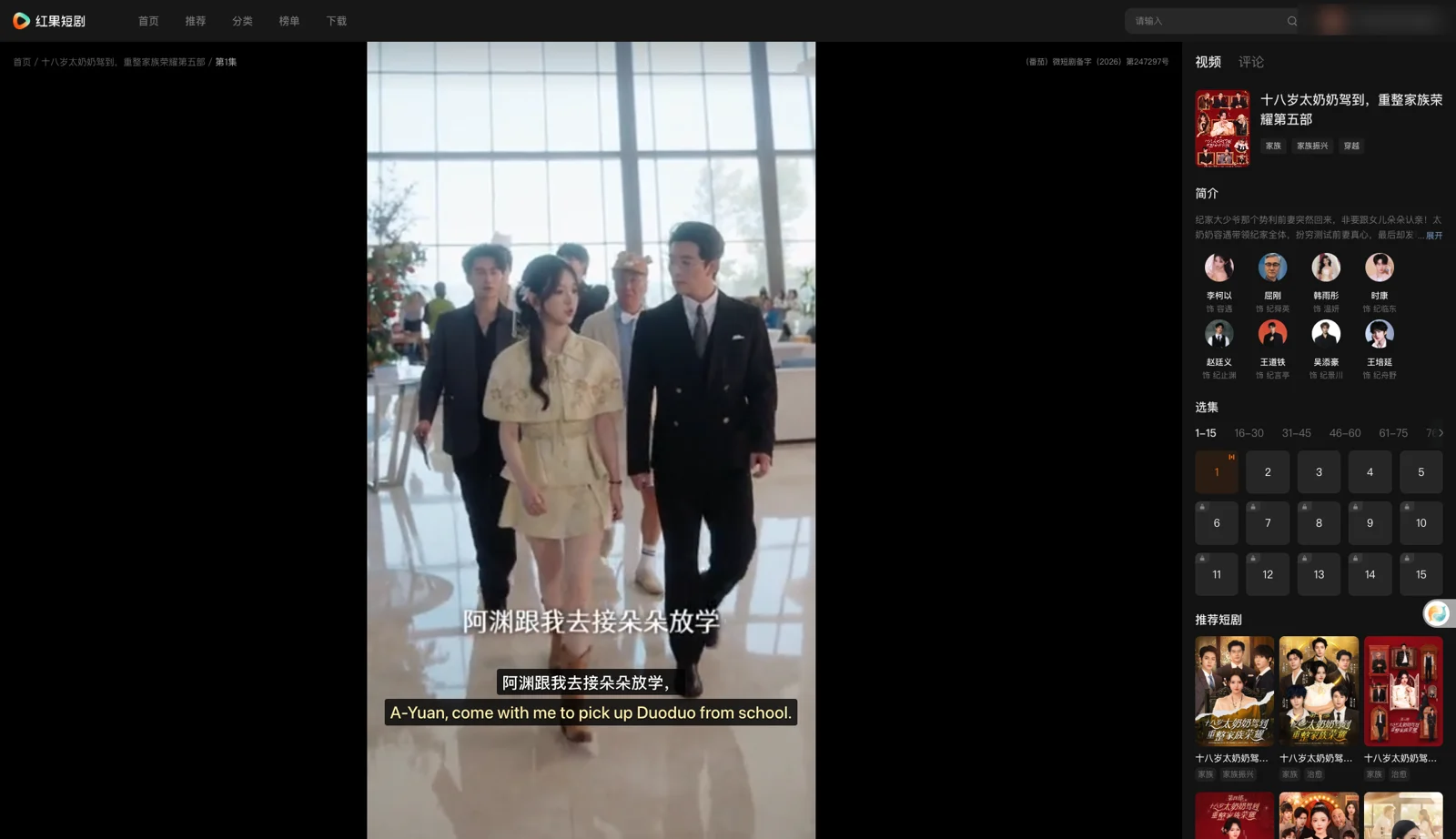
In our test on November 12, 2026, on episode 1 of The 18-Year-Old Great-Grandma, Part 5 (十八岁太奶奶驾到,重整家族荣耀第五部), Equalang recognized the dialogue and displayed two lines underneath the burned-in Chinese video picture:
- Spoken dialogue: 「当年我因意外去世,」 → Translation: "I died in an accident back then,"
- Spoken dialogue: 「重新遇见了我的儿子和重孙子。」 → Translation: "I got to see my son and great-grandson again."
- Spoken dialogue: 「找到了,我查到季家新孙子就在海城。」 → Translation: "We found him. I traced the Ji family's new grandson to Haicheng."
Limits of live subtitle translation and honest alternatives
While live interpretation lets you follow the plot on desktop, our test notes highlight several practical limitations you should know before watching:
- It does not unlock locked episodes: The extension only transcribes and translates audio that actually plays in your browser. It cannot unlock locked episodes or bypass VIP walls. Episodes beyond the initial free preview require unlocking them in the Hongguo mobile app or purchasing a membership.
- Audio interference can cause misheard words: Speech recognition depends on clean dialogue. Loud dramatic background music, sudden sound effects, or characters shouting over one another make recognition harder and can lead to occasional mistranslations.
- Slight delay on start: Subtitles appear a moment after you press play, as the first lines take a few seconds to start transcribing.
If you prefer pre-edited, human-curated English subtitles without relying on live speech recognition, consider these alternatives:
- International short-drama platforms: Dedicated export services such as ReelShort, DramaBox, and GoodShort produce micro-dramas in English tailored for international audiences. You can check our breakdown in our guide on watching short dramas with dual subtitles.
- Screen OCR translation software: Desktop OCR overlay tools take periodic screen captures of the burned-in Chinese text and translate it. However, Chinese short dramas frequently use decorative calligraphic fonts and rapid camera cuts, which often cause OCR tools to miss lines or mangle sentence structures.
What subtitle translation costs
When videos do not have closed captions, live interpretation is billed by the duration of audio sent for recognition. According to the Equalang pricing page, speech-to-text recognition costs 5 credits per minute. The resulting translated text is billed separately by volume at 10 credits per 1,000 tokens (around 1,000 Chinese characters or 750 English words).
New accounts receive 200 free credits upon sign-up, which allows you to test the feature on Hongguo before deciding whether to purchase more credits. Purchased credits do not expire, and your balance is shared between the website and the browser extension without a separate plugin subscription.
Frequently asked questions
Does Hongguo (红果短剧) offer an English interface or English subtitles?
No. Hongguo (红果短剧) is designed for the domestic Chinese market. The website and web player are available only in Chinese, and in the dramas we tested, Chinese subtitles are burned directly into the video picture, with no subtitle tracks in the player.
Can you watch Hongguo (红果短剧) on a computer outside China?
The website (hongguoduanju.com) is reachable from outside China, but whether video playback works outside mainland China has not been confirmed.
Does the extension unlock locked episodes on Hongguo (红果短剧)?
No. The extension only translates what is currently playing on screen. It does not bypass locks, unlock VIP episodes, or grant access to paid content on Hongguo (红果短剧).
How do I cancel a Hongguo (红果短剧) subscription on iOS?
If you subscribed to Hongguo's auto-renewing monthly membership (¥16/month) on an Apple device, go to iOS Settings > Apple ID > Subscriptions, select Hongguo (红果短剧), and tap Cancel Subscription.
Sources
- Hongguo official website: https://hongguoduanju.com/
- Hongguo on the Apple App Store: https://apps.apple.com/cn/app/id6451407032
- Equalang extension: https://equalang.com/extension
- Equalang supported video sites: https://equalang.com/extension/sites
- Equalang pricing: https://equalang.com/pricing