FlickReels Website: Watch Dramas With Translated Subtitles
 Equalang
In brief
Learn how to watch FlickReels short drama on your computer with translated subtitles, what the website provides, desktop extension setup, and limits.
Keywords: flickreels website; flickreels short drama; flickreels subtitles; watch flickreels on pc; flickreels app
If you want to watch FlickReels short dramas on your computer with subtitles in your own language, the FlickReels website (flickreels.net) lets you stream initial episodes in a desktop browser, but its videos come with hardcoded English text burned permanently into the picture rather than selectable subtitle tracks. To get bilingual or translated subtitles, you need a desktop browser extension that listens to the audio and overlays translations right below the burned-in lines.
Does FlickReels Have Subtitles on Its Website?
FlickReels, operated by FARSUN PTE. LTD., streams vertical short dramas featuring billionaires, CEOs, werewolves, and vengeful queens. While known primarily for its mobile app with over 10 million downloads on Google Play, the platform also provides a web player at flickreels.net/playlist/....
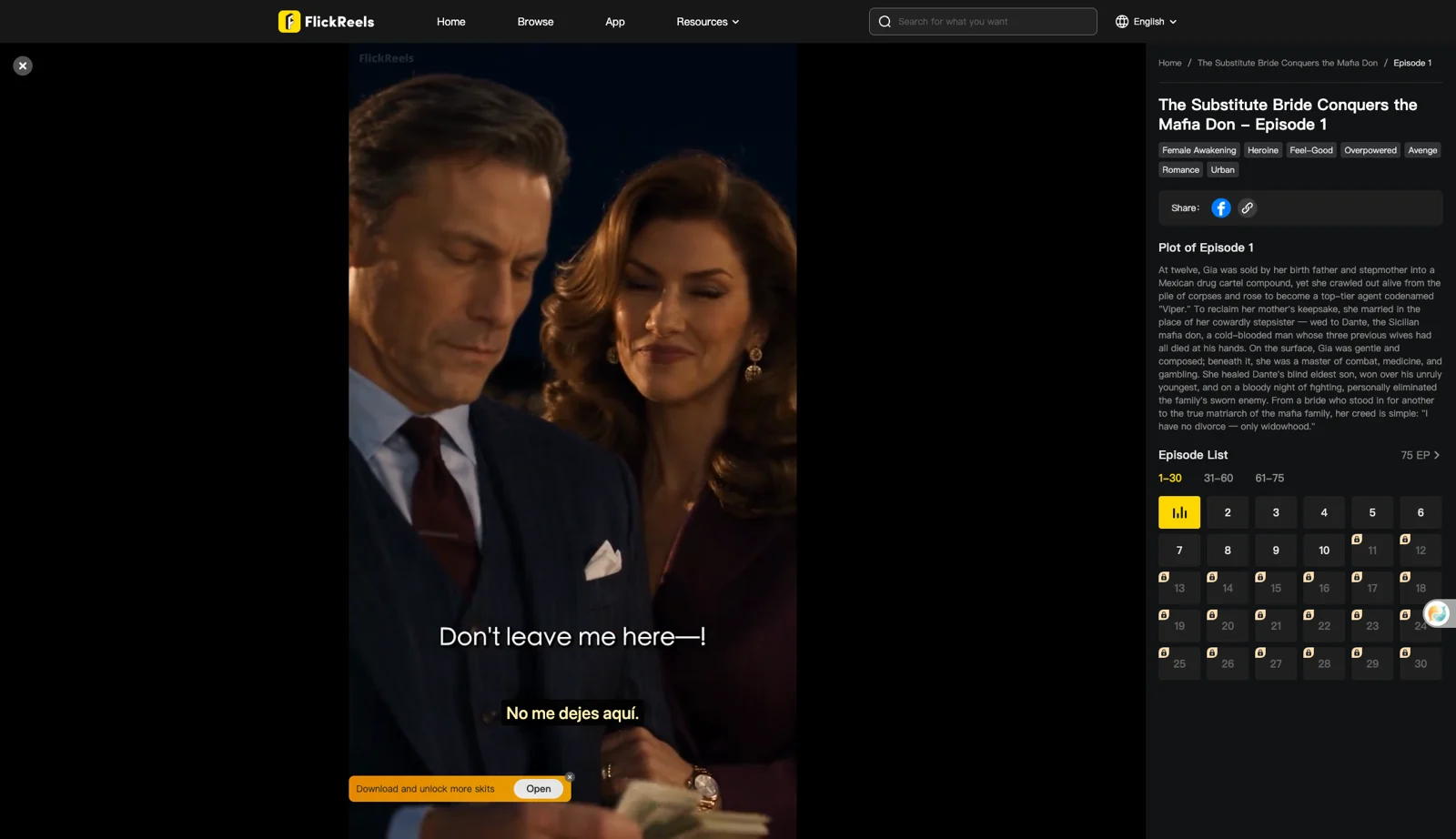
On a desktop browser, you can open and watch episodes without logging in. For example, on "They Don't Know I'm the Don's Pregnant Queen" (42 episodes), episodes 1 through 10 play freely. From episode 11 onward, episodes show lock icons. Clicking a locked episode displays a notice: "You need to download APP to watch this episode" alongside a QR code. The web player shows no purchase or unlock buttons, and free episodes display an in-player banner saying "Download and unlock more skits".
The website interface supports 10 languages (English, 日本語, 한국어, 繁體中文, Español, Bahasa Indonesia, ภาษาไทย, Deutsch, português, and français). FlickReels also has localized subdomains, like a Spanish section at /es/ with Spanish titles and burned-in Spanish lines (such as "Creyeron que moriría encerrada."), plus select titles marked "(Dubbed)" on the homepage. However, on most dramas, dialogue lines like "Do you even know who Mr.Christian is?" are burned directly into the video in English, with no togglable closed captions or subtitle files loaded by the player.
How to Watch FlickReels on a Computer With Translated Subtitles
Because FlickReels provides no separate subtitle track for a browser to translate, standard subtitle plugins find nothing to convert. Below, we demonstrate using Equalang (/extension) on desktop Chromium browsers (Chrome or Edge) to generate real-time translated subtitles via speech recognition.
Here are the steps:
- Open the drama: Go to flickreels.net and open an episode page (such as episode 1 of "The Substitute Bride Conquers the Mafia Don").
- Start playback: FlickReels videos do not autoplay on load. Click play in the video player to start streaming.
- Open settings: In the player's control bar, the Equalang icon opens its menu.
- Select your target language: Choose your preferred language (for instance, Spanish or Simplified Chinese).
- Automatic speech recognition: When playback begins, the extension automatically detects that no caption track exists and displays the notice: "No captions found; live interpreting was switched on." It then captures the spoken dialogue and writes translated subtitles on screen as the characters speak.
Why Set Caption Display to "Translation Only"?
FlickReels videos already have English subtitles rendered directly into the video stream. If you leave the display mode on "Both languages", the extension will generate an extra English line that duplicates the burned-in English text.
In our tests on November 12, 2026, setting "Caption display: Translation only" showed only the translation, positioned below the burned-in English subtitle. You can comfortably read the original English in the video while following the translated line below it simultaneously.
What It Costs to Generate Subtitles
FlickReels does not charge for its initial free web episodes. For generated subtitles, processing spoken audio without an existing subtitle track is billed based on recognition time. Under the Speech to Text rate on the pricing page (/pricing), recognition costs 5 credits per minute of audio sent, while the resulting translated text is billed by token volume (10 credits per 1,000 tokens). New Equalang accounts receive 200 free credits upon registration, allowing you to test the workflow on initial episodes. Purchased credits do not expire and are shared across both the website and browser extension.
Limits to Keep in Mind
When watching FlickReels on a desktop computer with live translation, keep several practical constraints in mind:
- No bypass for locked episodes: The extension only translates audio from videos that actually play. It cannot unlock paid or locked episodes (on that title), which still require the platform's mobile app and native subscriptions or coins.
- Speech recognition accuracy: Because subtitles are transcribed from spoken audio, rapid dialogue, loud dramatic background music, or overlapping voices can cause words to be misheard.
- Brief initial delay: Subtitles appear a moment after pressing play. The first spoken lines take a few seconds to process before appearing on screen.
Alternatives for Watching FlickReels
If you prefer not to use an audio-transcription extension, you have a few alternatives:
- FlickReels localized subdomains: Check whether the drama has been adapted on FlickReels' localized portals, such as the Spanish
/es/site, which features titles with burned-in Spanish dialogue, or look for "(Dubbed)" releases on the main page. - Mobile app playback: If you prefer watching on your phone, the official FlickReels mobile app on iOS and Android offers full catalog access and native navigation, though subtitle customization remains subject to in-app settings.
- Other desktop short drama options: For readers exploring broader platforms, you can check our short drama subtitles guide to see how caption availability compares across other web players.
Frequently Asked Questions
Does FlickReels offer selectable subtitle tracks on its website?
No, the FlickReels web player does not provide selectable subtitle tracks, closed caption toggles, or downloadable subtitle files. Dialogue is burned directly into the video image, primarily in English.
Can I unlock paid FlickReels episodes on my computer?
No, locked episodes on FlickReels currently display a QR code directing viewers to download the mobile app, with no web purchase or unlock option available.
Why do translated subtitles take a few seconds to appear on FlickReels?
Because FlickReels lacks native text captions, the tool must hear the dialogue in real time, creating a brief delay before the first line of dialogue renders.
How many free episodes does FlickReels provide per series?
The number of free episodes on FlickReels varies by title. On the title we checked, "They Don't Know I'm the Don's Pregnant Queen" (42 episodes), episodes 1–10 played free and locks start at episode 11.
Sources
- FlickReels Official Website: https://www.flickreels.net/
- FlickReels User Agreement: https://www.flickreels.net/user-agreement
- FlickReels Mobile App Portal: https://www.flickreels.net/app
- Equalang Browser Extension: https://equalang.com/extension
- Equalang Pricing: https://equalang.com/pricing