FlexTV Website: Watch Dramas with Subtitles on PC
 Equalang
In brief
Learn how to watch FlexTV dramas on your computer with translated or dual subtitles, what the web player provides, credit costs, and actual limits.
Keywords: flextv; flextv website; flextv drama; flextv subtitles; dual subtitles
When you open the FlexTV website (flextv.cc) on a computer to stream short dramas, you will quickly notice that the web player does not provide a subtitle toggle button or alternative language tracks. Instead, dialogue subtitles are hardcoded directly into the video frames. If you want to watch FlexTV dramas with subtitles in your native language or follow along with dual subtitles on your desktop browser, you can use a browser extension that listens to the audio stream and renders translated captions right below the existing on-screen text.
Does FlexTV Offer Subtitles on Its Website?
FlexTV is an online short-drama streaming platform operated by Singapore-based YUDER PTE. LTD., featuring original and licensed micro-dramas across genres like romance, billionaire CEO, and werewolf stories. While its website interface menu lists 16 languages (including English, Japanese, Korean, Spanish, French, German, and Chinese) and its official FAQ mentions support for 17 languages, this localized navigation does not mean every video comes with switchable subtitle tracks.
On the desktop web player, episodes carry subtitles burned directly into the picture. For example, during our checks of episode 1 of After He Took My Kidney, I Changed the Groom, lines such as "why agree to the engagement" were part of the video stream itself, with no external text tracks attached to the underlying <video> element. FlexTV does host localized subpages—such as its Spanish portal (/es), which features dramas with burned-in Spanish lines—and lists several titles tagged with "(DUBBED)". However, for the series we checked, viewers cannot select or toggle subtitle tracks inside the player.
Regarding viewing access, FlexTV allows visitors to stream early episodes without registering (for instance, episodes 1–7 of After He Took My Kidney, I Changed the Groom play freely while logged out). Beginning with episode 8 of that series, episodes are locked behind paywalls requiring coins or a VIP subscription. On the web store, US-located visitors see options such as a Weekly VIP pass ($6.99 for the first week, then $9.99 per week, auto-renewing) and coin bundles ranging from 200 coins for $1.99 up to 4,000+2,800 coins for $39.99. VIP members also gain access to 1080p HD streaming.
How to Watch FlexTV with Translated Subtitles on a Computer
Because the web player provides no digital subtitle tracks that can be translated directly, watching in another language requires real-time speech recognition. Here is how to do it with Equalang using our desktop browser extension.
- Open your browser, navigate to an episode on
flextv.cc(such as episode 1 of A Pinch of Little Witch), and press play. - Since FlexTV does not provide a subtitle track, the extension automatically detects the missing captions and turns on live interpretation, displaying the notification: "No captions found; live interpreting was switched on."
- Click the Equalang icon in the player's control bar to open the settings menu.
- Select your target language (we verified both Simplified Chinese and Spanish on this episode).
- Under Caption display, select Translation only (
Caption display: Both languages / Translation only). Because FlexTV already has English subtitles burned into the video image, choosing "Translation only" places the translated line directly underneath the original burned-in English text. This gives you a clean bilingual layout without clutter. Choosing "Both languages" would generate a duplicate English line alongside the video's existing text. - Keep the default position or adjust it via Translation position (
Translation position: Below the original / Above the original).
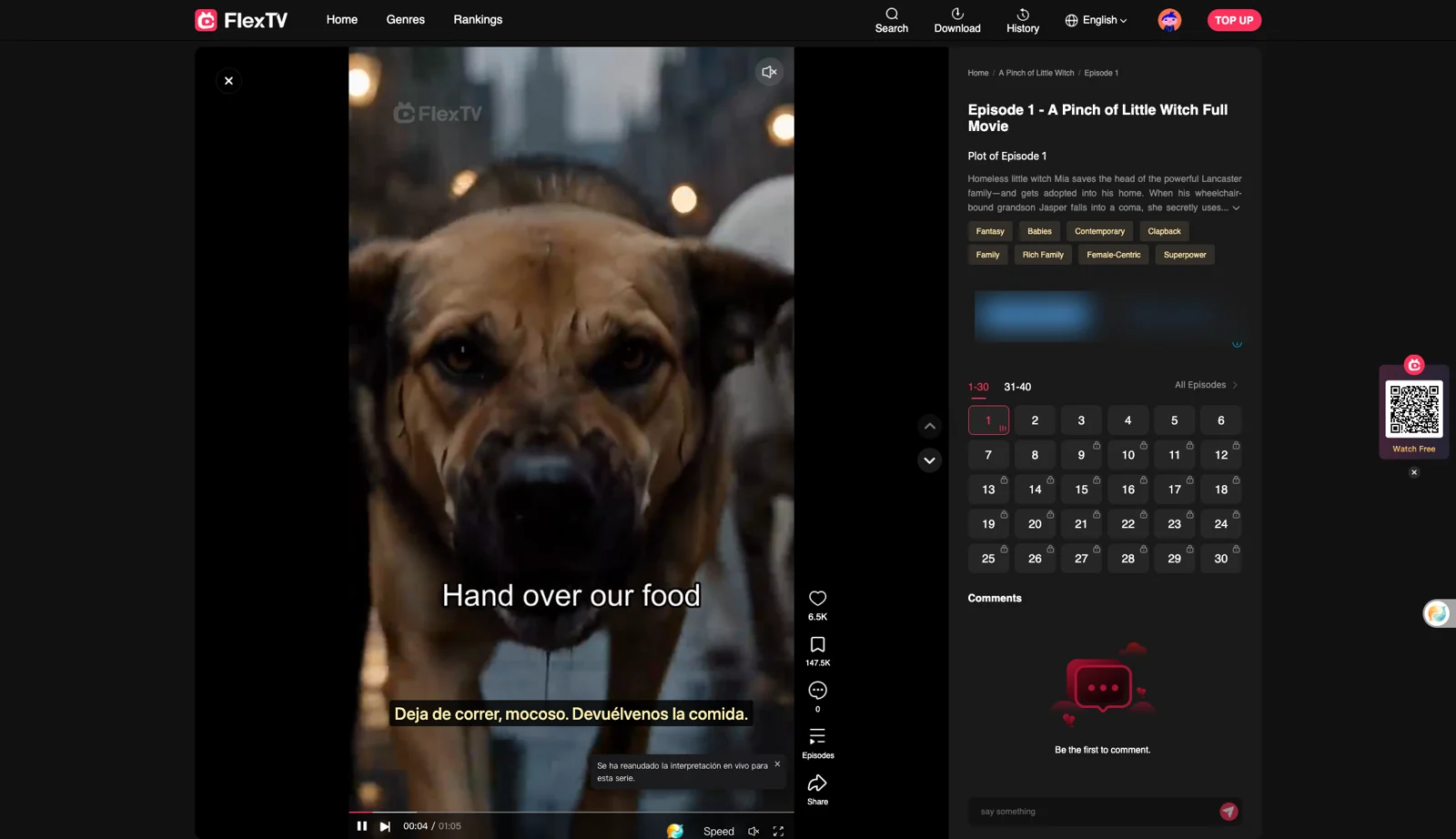
Subtitles will begin displaying shortly after playback starts.
What It Costs for Speech Recognition Subtitles
When watching videos that lack original subtitle tracks, Equalang's live interpretation bills speech recognition at 5 credits per minute of audio sent for recognition (listed under "Speech to text" on our pricing page). The translated text is billed separately based on character volume (10 credits per 1,000 tokens).
Newly registered accounts receive 200 free credits to test features before purchasing. Purchased credit packages do not expire, and your account balance is shared seamlessly between the website and the browser extension.
Practical Limits and Platform Alternatives
While real-time captioning solves the language barrier on web streams, our testing highlighted several practical boundaries:
- No paywall bypassing: The extension only transcribes and translates audible dialogue on the screen; it does not unlock locked or VIP episodes. FlexTV's coin requirements and subscription rules still apply from locked episodes onward.
- Audio overlap and background music: Live interpretation relies on hearing dialogue clearly. If a drama scene features loud background music, dramatic sound effects, or multiple actors shouting over one another, speech recognition accuracy can degrade.
- Slight initial processing buffer: Subtitles do not appear at the exact millisecond you press play; processing the initial speech buffer takes a few seconds.
If you prefer alternative viewing methods, consider these options:
- FlexTV Regional Portals: Check FlexTV's localized site sections (such as
/es) or look for series with the "(DUBBED)" tag if your preferred language is already offered natively. - FlexTV Mobile Apps: FlexTV maintains native mobile apps on the Apple App Store and Google Play Store.
- Other Web Drama Platforms: If you watch short dramas across multiple sites, explore our guide to watching short dramas with dual subtitles or check our catalog of supported sites.
Frequently Asked Questions
Does the FlexTV website have a subtitle menu to switch languages?
No. The FlexTV web player does not provide an interactive subtitle track menu; English dialogue lines are hardcoded directly into the video stream on the main site.
Can I use a browser extension to watch locked FlexTV episodes for free?
No. Browser extensions only assist with subtitle transcription and translation. They do not bypass FlexTV's paywall, and locked episodes still require official FlexTV coins or a VIP pass.
How do I avoid a duplicate English line on FlexTV?
Because FlexTV has English subtitles burned into the video frame, set your subtitle display mode to "Translation only" in the player menu so the translated line sits cleanly beneath the burned-in English text.
What happens when FlexTV dialogue plays over loud background music?
Because speech recognition relies on capturing clear audio frequencies, intense background scores or overlapping voices in FlexTV episodes can cause occasional misheard phrases.
Sources
- FlexTV Official Website: https://www.flextv.cc/
- FlexTV FAQ: https://www.flextv.cc/faq
- FlexTV User Agreement: https://api.flextv.cc/h5/userAgreement.html
- Equalang Extension: https://equalang.com/extension
- Equalang Supported Platforms: https://equalang.com/extension/sites
- Equalang Pricing: https://equalang.com/pricing