Best Dual Subtitles Chrome Extensions (2026 Roundup)
 Equalang
In brief
Compare top dual subtitles Chrome extensions for YouTube, Netflix, and Coursera. See supported platforms, free limits, and missing subtitle options.
Keywords: dual subtitles chrome extension; bilingual subtitles extension; youtube dual subtitles; netflix bilingual subtitles; video subtitle translator
If you are looking for a dual subtitles Chrome extension, the right choice depends on two factors: the video platforms you watch and whether your videos already have subtitle tracks. For dedicated language learners focusing strictly on YouTube and Netflix, Language Reactor provides deep dictionary integration, though it does not support services like Disney+ or Coursera. For broad platform coverage across streaming sites and lecture platforms like Coursera and Udemy, Trancy and Immersive Translate support the widest range of websites, with Immersive Translate offering unlimited YouTube bilingual subtitles on its free tier. For open-source minimalism, Read Frog covers YouTube, Netflix, and X without subscriptions. If you need subtitles on videos that lack captions entirely, speech recognition tools (such as Language Reactor Pro, Trancy Premium, Immersive Translate Pro, or Equalang) can generate lines from audio, but this capability requires a paid subscription or consumes account credits.
Here is an objective roundup of the top dual subtitle extensions available in the Chrome Web Store as of November 2026, detailing their supported platforms, handling of videos without subtitles, and pricing trade-offs.
Quick Comparison of Dual Subtitle Extensions
1. Language Reactor: Best for Focused YouTube and Netflix Study
Language Reactor (formerly Language Learning with Netflix) remains a benchmark for learners who want interactive vocabulary tools alongside their video playback.
- Platform coverage: Strictly limited to Netflix and YouTube. In its official FAQ, the vendor confirms it does not support Disney+, Amazon Prime Video, or mobile operating systems.
- Videos without subtitles: Free users rely on the closed captions provided by Netflix and YouTube. Pro subscribers gain speech recognition across all Netflix audio tracks (useful for dubbed audio) and "Enhanced YouTube ASR", released in extension v6 in October 2026. Machine translations are capped at approximately 5 hours of new content daily.
- Pricing: Free tier available; Pro costs $5.95 per month, $13.95 for three months, or $39.95 per year.
- Trade-off: If your study materials are hosted on Coursera, Udemy, or Disney+, Language Reactor cannot be used on those sites.
2. Trancy: Broad Streaming & Learning Support with Generous Free Downloads
Trancy is designed for cross-platform video immersion, linking streaming entertainment with structured language study.
- Platform coverage: Supports YouTube, Netflix, Disney+, HBO, TED, Coursera, Udemy, and additional sites.
- Videos without subtitles: On the free tier, Trancy works only with videos that already have subtitle tracks. Its "YouTube AI Subtitle Transcription" is restricted to the Premium plan, allowing transcription for up to 40 YouTube videos per day.
- Pricing: Free forever tier includes unlimited bilingual subtitle downloads, but caps vocabulary bookmarks at 100 words and 50 sentences. Premium is $2.27 per month ($27.30 per year on sale), and Premium + Advanced AI is $5.72 per month.
- Trade-off: AI transcription for raw videos is strictly limited to YouTube; other streaming sites require existing caption tracks.
3. Immersive Translate: Versatile Bilingual Reading and Video Translation
Immersive Translate approaches dual subtitles as part of a comprehensive web-translation extension.
- Platform coverage: Works on YouTube, Netflix, Prime Video, Coursera, Udemy, and dozens of other video platforms.
- Videos without subtitles: If subtitles are missing, its AI speech recognition generates new subtitles and translates them. This feature is restricted to Pro and Max subscribers, with a combined quota of 1,000 minutes per month.
- Pricing: YouTube bilingual subtitles are free and unlimited. Subtitle file exports and speech recognition are reserved for Pro ($6.99/month on sale) and Max ($13.99/month).
- Trade-off: The 1,000-minute monthly ceiling on AI-generated subtitles requires heavy viewers to monitor their usage.
4. Read Frog: Lightweight, Free, and Open Source
Read Frog is an open-source browser extension (licensed under GPL-3.0 with over 10,000 GitHub stars) designed for users who want clean bilingual display without accounts, subscriptions, or paywalls.
- Platform coverage: Targets YouTube (including Shorts and embedded players), Netflix, and X (formerly Twitter).
- Videos without subtitles: Relies strictly on existing video caption tracks; it does not offer built-in speech recognition for uncaptioned audio.
- Trade-off: Narrow platform focus and no ASR fallback when creators upload videos without subtitles.
5. Other Notable Extensions: eJOY, InterSub, and Dualsub
- eJOY AI Dictionary: Strong for educational portals like Coursera, Udemy, LinkedIn Learning, and MasterClass. Basic tier covers YouTube and Netflix; advanced platform access and AI caption completion require paid Pro tiers (starting from $3.16/month).
- InterSub: Helpful for Crunchyroll, Prime Video, and Coursera. If a video lacks a track in your native language, its AI subtitle translator can construct the secondary line on the fly on paid and trial plans.
- Dualsub: Historically popular, but recent updates changed its scope: as of v2.72.0 (November 8, 2026), it dropped third-party streaming sites to support YouTube only. Furthermore, v2.73.0 removed the ability to show two original tracks, supporting only English-to-target translation.
Step-by-Step: How Dual Subtitles Work in Practice
To see how a dual subtitle extension operates during everyday playback, here is a walkthrough using Equalang on a recorded video.

Step 1: Open the Video and Enable Captions
Open your video on a supported platform such as YouTube or Netflix. Ensure the video player's native closed captions (CC) are enabled so the extension can read the timed transcript track.
Step 2: Activate the Subtitle Display
Click the extension's icon directly within the player's control bar. You can toggle between:
- Bilingual view: Displays the original audio transcription above and the translated meaning directly beneath it.
- Translation only: Replaces the source text with your target language while preserving the subtitle position and timing.
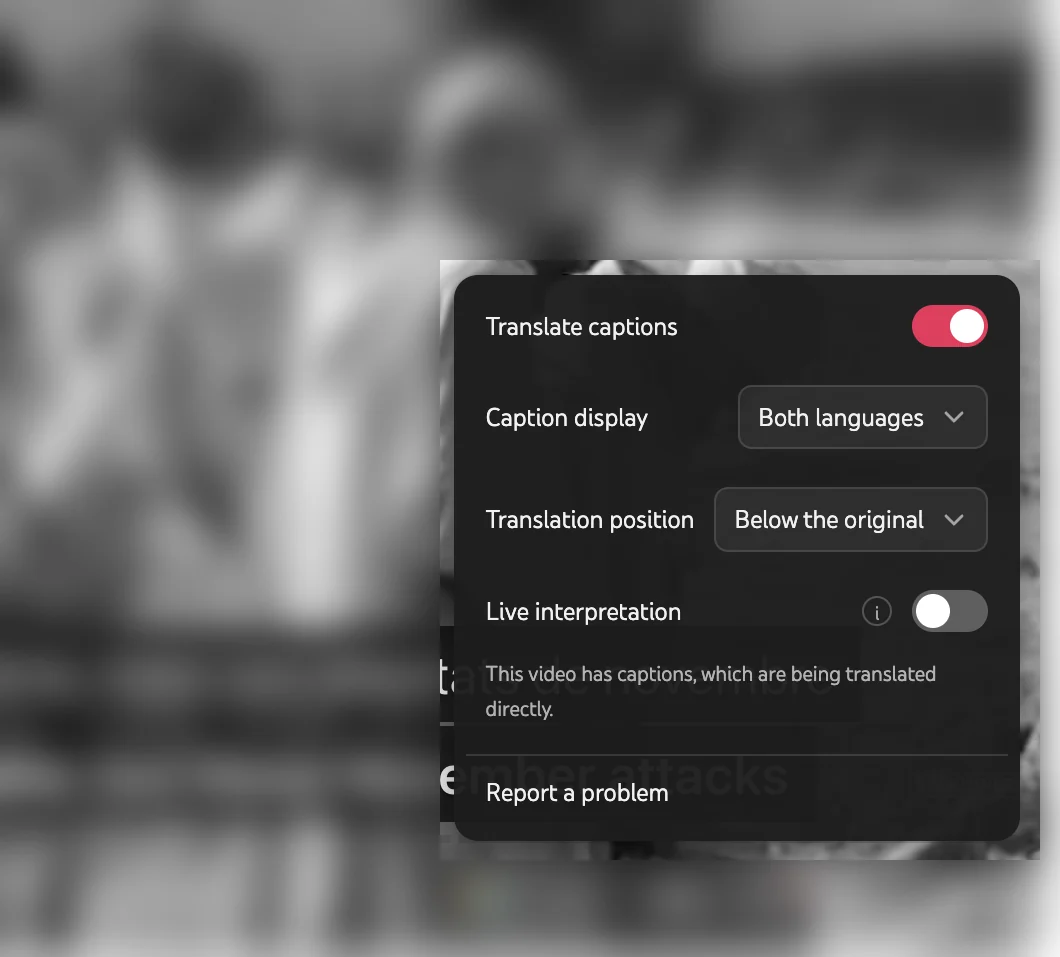
Step 3: Handling Videos Without Existing Subtitles
When you encounter a video or interview that has no pre-existing caption tracks, standard caption translation tools cannot generate text. In this scenario, you can enable real-time listening translation. The extension captures the incoming audio stream, transcribes the speech into text, and displays the translated dialogue as an overlay on the screen. Because continuous audio processing requires substantial computational resources, speech-to-text features consume account credits rather than running as an unmetered free service.
How to Choose the Right Extension for Your Workflow
- If you only watch YouTube and Netflix for language study: Language Reactor offers specialized word-banking and dictionary lookups, provided you do not need other video platforms.
- If you take online courses or watch multiple streaming services: Trancy and Immersive Translate are the most flexible choices for platforms like Coursera, Udemy, Disney+, and HBO. For detailed course setups, see our guide on watching online courses with bilingual subtitles.
- If you refuse paid subscriptions: Read Frog delivers a clean, open-source experience for YouTube and Netflix without feature gating.
- If you frequently encounter videos with no subtitles: Choose a tool with built-in speech recognition (such as Immersive Translate Pro, Trancy Premium for YouTube, or Equalang) so you can generate bilingual subtitles directly from the audio stream.
Sources
- Language Reactor Help & Pricing: https://www.languagereactor.com/help/basic , https://www.languagereactor.com/pro-mode , https://www.languagereactor.com/help/faq
- Trancy Pricing & Downloads: https://www.trancy.org/pricing , https://www.trancy.org/download
- Immersive Translate Video & Pricing: https://immersivetranslate.com/en/video/ai-video-translator/ , https://immersivetranslate.com/en/pricing/
- Dualsub Documentation: https://www.dualsub.xyz/en/docs/website.html , https://www.dualsub.xyz/en/docs/changelog.html
- eJOY AI Dictionary: https://ejoy-english.com/en , https://ejoy-english.com/plans
- Read Frog GitHub Repository: https://github.com/mengxi-ream/read-frog
- Chrome Web Store Listings (accessed November 10, 2026):
- Language Reactor: https://chromewebstore.google.com/detail/hoombieeljmmljlkjmnheibnpciblicm
- Trancy: https://chromewebstore.google.com/detail/mjdbhokoopacimoekfgkcoogikbfgngb
- Immersive Translate: https://chromewebstore.google.com/detail/bpoadfkcbjbfhfodiogcnhhhpibjhbnh
- Dualsub: https://chromewebstore.google.com/detail/gnlibmlfpencglodjpgnalbdebfhpmfp
- eJOY AI Dictionary: https://chromewebstore.google.com/detail/amfojhdiedpdnlijjbhjnhokbnohfdfb
- InterSub: https://chromewebstore.google.com/detail/hhbnckjhjihjangdepdebbnooibiphge
- Read Frog: https://chromewebstore.google.com/detail/modkelfkcfjpgbfmnbnllalkiogfofhb
- Equalang Browser Extension & Pricing: https://equalang.com/extension , https://equalang.com/pricing