How to Watch CHZZK Live Streams with Real-Time Subtitles
 Equalang
In brief
Watch LCK matches, Korean game streamers, and VTubers live on CHZZK with bilingual subtitles in sync with the voice—no waiting for subtitled clips.
Keywords: CHZZK live subtitles; LCK Korean stream; Korean game streamers; VTuber live translation; Korean real-time subtitles
Watching a live LCK broadcast, a pro player's late-night solo queue stream, or a Korean VTuber's chatting session on CHZZK hits the same wall when you do not speak Korean: live streams on CHZZK have no built-in subtitle track. Browser page translation only turns the menus and buttons into English, and if you wait for fan-subbed clips to show up on social media hours later, the hype of the live play or joke is already gone.
Turn On Voice-Synced Subtitles on the CHZZK Player
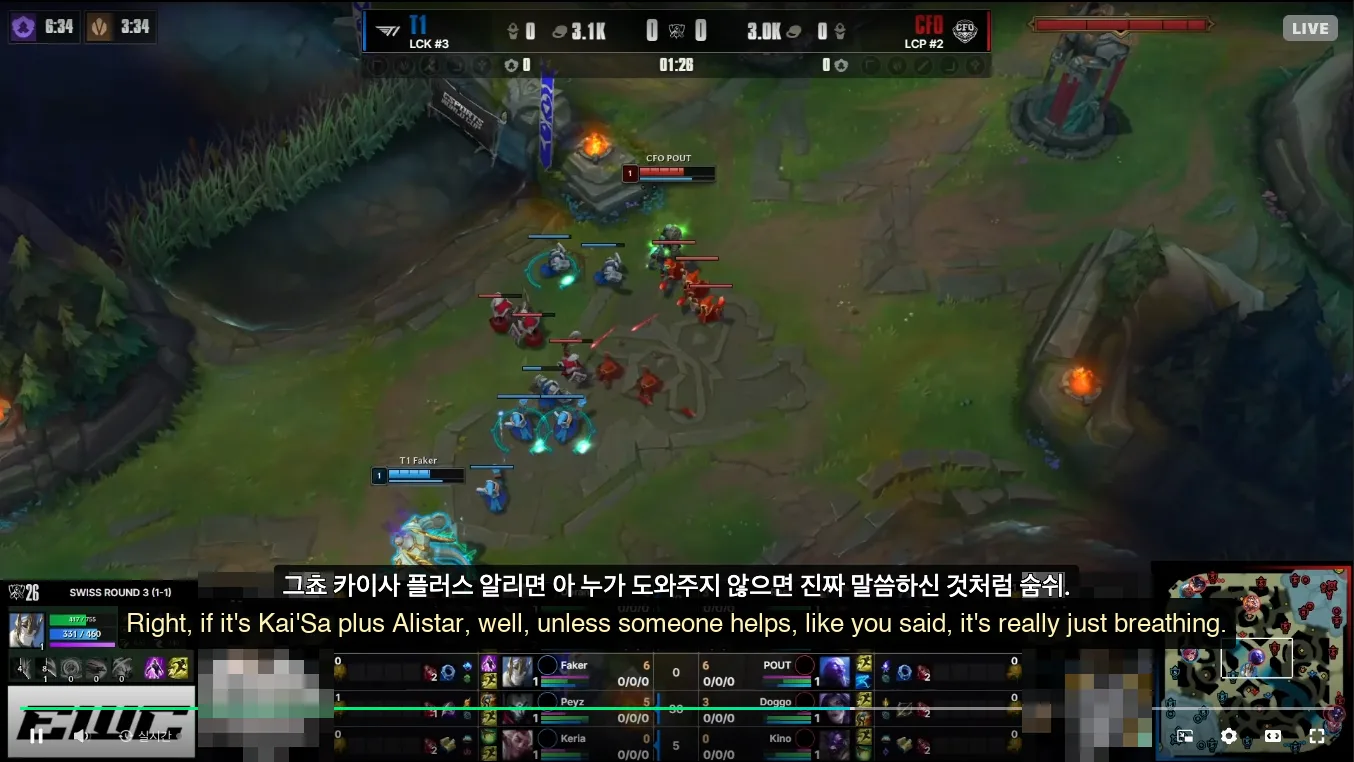
For major tournaments, you can sometimes switch to an English co-stream on another platform, and for solo streamers you can wait for translated highlight uploads days later. If you want to stay on the original Korean broadcast on CHZZK and follow what the casters or streamers are saying as it happens, you can use real-time listening to generate bilingual subtitles directly on the video.
Here is how to set it up with the Equalang browser extension:
- Open the stream on CHZZK in your desktop browser—for example, the official LCK channel on CHZZK.
- Hover your mouse over the video player and click the Equalang button in the player control bar.
- In the menu that opens, make sure Subtitle translation and Real-time listening are both turned on and set Source language to Korean; the language you want to read (such as English or Simplified Chinese) is chosen in the Equalang extension settings. Locking the source language to Korean matters because fast Korean commentary mixed with English game terms or loud cheers can otherwise be misheard as another language.
Once enabled, Equalang shows the Korean transcript and your translation at the bottom of the player in sync with the speaker's voice, so you can read each call right as you hear it. In the same menu, you will also find a Chat message translation toggle for reading incoming messages in the live chat box.
Practical Tips for Watching Live
A few small adjustments make a noticeable difference during a long broadcast:
- Give it a moment right after turning it on: Right after you open a stream or switch languages, the player briefly shows a "preparing subtitles" notice; after a short wait, the voice-synced lines begin rolling.
- Know when noise gets in the way: Loud background music, heavy in-game sound effects during a five-on-five teamfight, or multiple streamers talking over each other on voice chat can cause occasional misheard words. Solo commentary, draft analysis, post-game interviews, and chatting streams come through much more cleanly.
If you are following international League of Legends tournaments, you can check upcoming match times on the LoL Esports schedule and read our Worlds 2026 live subtitles guide. If you mostly watch virtual streamers, see our guide to watching raw VTuber streams on CHZZK and Twitch.
Sources
- LCK Official Channel on CHZZK: https://chzzk.naver.com/9381e7d6816e6d915a44a13c0195b202
- LoL Esports Official Schedule: https://lolesports.com/