Best Real-Time Translation Apps: 7 Tools Compared (2026)
 Equalang
In brief
Compare the top real-time translation apps in 2026. See speech languages, offline support, device limits, and pricing for Google, Apple, Samsung, and more.
Keywords: best real time translation app; real time speech translation; live conversation translator; offline translation app; voice translation 2026
The best real-time translation app depends entirely on your phone hardware, whether you have an active internet connection, and whether you are speaking face-to-face or across devices. Here is the direct verdict for 2026:
- Best overall for cross-platform mobile use (Android & iOS): Google Translate (free, over 70 spoken languages, face-to-face split-screen mode, but offline speech translation is restricted to Pixel 9, 10, and 11).
- Best for iPhone users wanting built-in offline privacy: Apple Translate (free, built into iOS, 21 language variants, on-device offline mode, split-screen conversation).
- Best for Samsung Galaxy devices: Samsung Interpreter (built into One UI 6.1+, 24 languages, works offline with downloaded language packs).
- Best for East Asian languages (Korean, Japanese, Chinese): Naver Papago (free, 14 languages, simultaneous 1:1 conversation mode, offline voice on iOS).
- Best for single-device split-screen dialogue on Android/iOS: Microsoft Translator (free, 48 speech languages; note that multi-device conversation rooms have been retired).
- Best hands-free wearable hardware: Timekettle W4 Pro (earbuds + app, 42 online languages, 13 offline pairs centered on English and Chinese, one-time hardware purchase).
- Best for browser use, lectures, and zero-install calls: Equalang (web-based live listening, face-to-face split screen, and link-based calls where the other person does not need to install an app).
Quick Comparison: 7 Leading Real-Time Translation Options in 2026
1. Everyday In-Person Conversations: The Native Phone Apps
For most travelers and bilingual interactions, the first instinct is to pull out a smartphone. How well these tools work in practice depends heavily on their interface design and offline capability.
Google Translate: Broadest Language Coverage, Hardware-Locked Offline Voice
Google Translate remains the most versatile standalone app for Android and iOS.
- Interface & Modes: In the Conversation tab, two speakers can take turns speaking, or use auto-detection. The "Face to face" split-screen view inverts the top half of the screen so the person standing opposite can read translations naturally without leaning over your shoulder.
- Language Figures: In a June 9, 2026 official blog update, Google announced speech-to-speech translation in over 70 languages. Its help documentation lists 73 speech entries, while the Google Play listing states 70 languages for bilingual Conversations and 8 languages for continuous Transcribe.
- The Offline Reality: The Google Play listing notes offline text translation for 59 languages. However, offline live voice translation is strictly limited: Google's official Android help page confirms that live translate speech offline is currently only available for Pixel 9, 10, and 11 users, supporting 10 language pairs paired with English (Italian, Spanish, French, German, Portuguese, Hindi, Russian, Swedish, Japanese, Indonesian). If you are on an iPhone or a non-Pixel Android phone, voice translation requires an active cellular or Wi-Fi connection.
- Desktop Limitation: Google's Help Center explicitly states: "You can't talk and translate at the same time on Google Translate for the web, but you can use the Translate app on a phone or tablet."
Apple Translate: Seamless On-Device Privacy on iOS
For iPhone users traveling abroad, Apple Translate delivers a fast, private experience.
- How it Works: Built into iOS (requiring iOS 14.0 or later), iPadOS, and watchOS. The Conversation tab offers a single microphone button with automatic language detection, displaying speech bubbles on the appropriate side. It also supports Face to face view and an Auto Translate toggle to speak without repeatedly tapping the microphone.
- Languages: Supports 21 language variants: Arabic, Chinese (Mandarin Simplified & Traditional), Dutch, English (US & UK), French, German, Hindi (new in iOS 27), Indonesian, Italian, Japanese, Korean, Polish, Portuguese (Brazil), Russian, Spanish, Thai, Turkish, Ukrainian, and Vietnamese.
- Offline Capability: Apple includes an "On-device mode" that enables a fully offline experience for any downloaded language pack. Processing happens on the device without sending voice clips to the cloud.
- Trade-off: It is strictly locked to Apple hardware, and 21 language variants is narrower than Google's catalog.
Samsung Interpreter: Deeply Integrated for Galaxy Devices
If you own a Samsung Galaxy phone or tablet running One UI 6.1 or newer, Interpreter is integrated directly into the operating system.
- Access: Swiping down with two fingers opens the Quick settings panel, where the Interpreter icon launches a dedicated split-screen interface.
- Languages: Samsung's Newsroom reported on October 14, 2026, that language support expanded to 24 languages (including Malay and Hungarian). English and Spanish are pre-installed; other languages are available as free downloads.
- Offline Operation: According to Samsung documentation, Interpreter functions offline once language packs are downloaded. If you pair Galaxy Buds, audio interpretation plays directly into your ears while the screen displays text for the other party.
- Trade-off: Requires a Samsung account login and compatible Galaxy hardware. While basic Galaxy AI features are free, Samsung notes that enhanced or third-party AI features may be subject to different terms in the future.
Microsoft Translator: Clean Split-Screen, Retired Multi-Device Rooms
Microsoft Translator provides a reliable single-phone conversation tool, but long-time users should note recent structural retirements.
- Speech Coverage: Microsoft's language table marks 48 languages with "Yes" for speech-to-speech translation out of 136 total language entries.
- The Big Change: Microsoft officially retired its multi-device conversation room feature (which allowed multiple people to join a shared translation session via QR code) in version 26.7.1 on June 30, 2026. The Windows desktop app has also been retired. The app is now strictly focused on single-device split-screen mobile conversations and quick mic translation.
- Offline: While Microsoft's website mentions offline conversation use, current App Store and Google Play descriptions do not highlight offline capabilities, and Microsoft does not publish a confirmed list of offline speech languages.
2. Regional and Specialized Alternatives: Papago and iTranslate
Naver Papago: 14 Languages and 1:1 Simultaneous Speaking
Naver Papago is widely used across South Korea, Japan, and parts of Southeast Asia.
- Languages: Focuses on 14 languages: Korean, English, Japanese, Chinese (Simplified/Traditional), Spanish, French, Vietnamese, Thai, Indonesian, Russian, German, Italian, and Arabic.
- Conversation Experience: The 1:1 Conversation mode allows both parties to speak simultaneously without constantly toggling input controls.
- Offline Status: Papago includes offline text translation. In the iOS version history, version 1.12.0 (September 2025) added an offline voice translation feature, though the primary App Store description still emphasizes text.
- Privacy Note: On iOS, voice recognition for Vietnamese, Thai, Indonesian, Russian, and Italian utilizes the OS speech recognition permission, which transmits voice data to Apple in accordance with Apple's policies.
iTranslate Converse: Push-to-Talk for iOS
iTranslate Converse is an iOS-exclusive app (iPhone, Apple Watch, and Apple Silicon Macs) designed around a simple physical interaction.
- Interaction: Uses a "Tap & Hold to Speak, Release to Translate" gesture with automatic detection between two selected languages.
- Languages & Pricing: Supports 38 spoken languages according to its developer listing. While the app is free to download, it offers Pro in-app purchases and subscriptions (such as Pro at $7.99, a weekly subscription at $4.99, or a yearly subscription at $69.99). Offline support is not stated on its official product pages.
3. Browser-Based Workflows: Zero-Install Listening and Calls
Mobile translation apps excel when two people are standing next to each other on the street. However, they struggle in professional desktop environments: following a foreign webinar on a laptop, listening to an international conference lecture, or calling an overseas supplier who does not want to install a translation app.
This is where Equalang provides a browser-based, zero-install workflow.
Live Listening for Presentations and Lectures
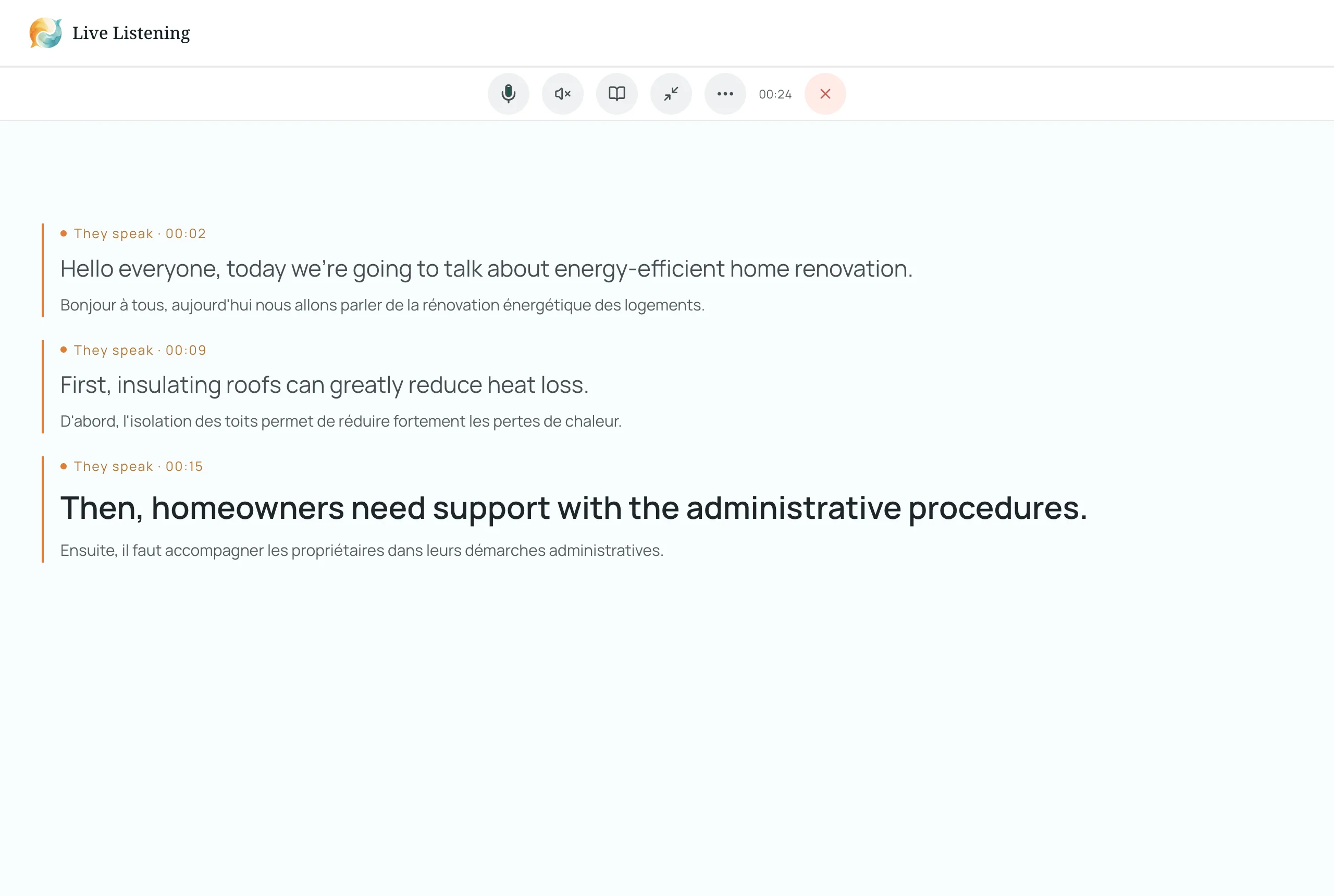
On equalang.com/listen, you can run continuous translation on your laptop, tablet, or smartphone browser without installing software:
- Dual-Language Subtitles: You select the spoken language and your target language. "Both · Quick" displays large translated text with smaller original speech below it, while "Both · Study" reverses the emphasis.
- Transcript Export & AI Summary: You can pause and resume listening at any point. When the session concludes, you can export a complete bilingual transcript. For structured meetings or academic seminars, an integrated AI summary extracts key discussion points and action items, allowing you to click any bullet point to jump back to that moment in the original transcript.
Face-to-Face and Link-Based Translated Calls
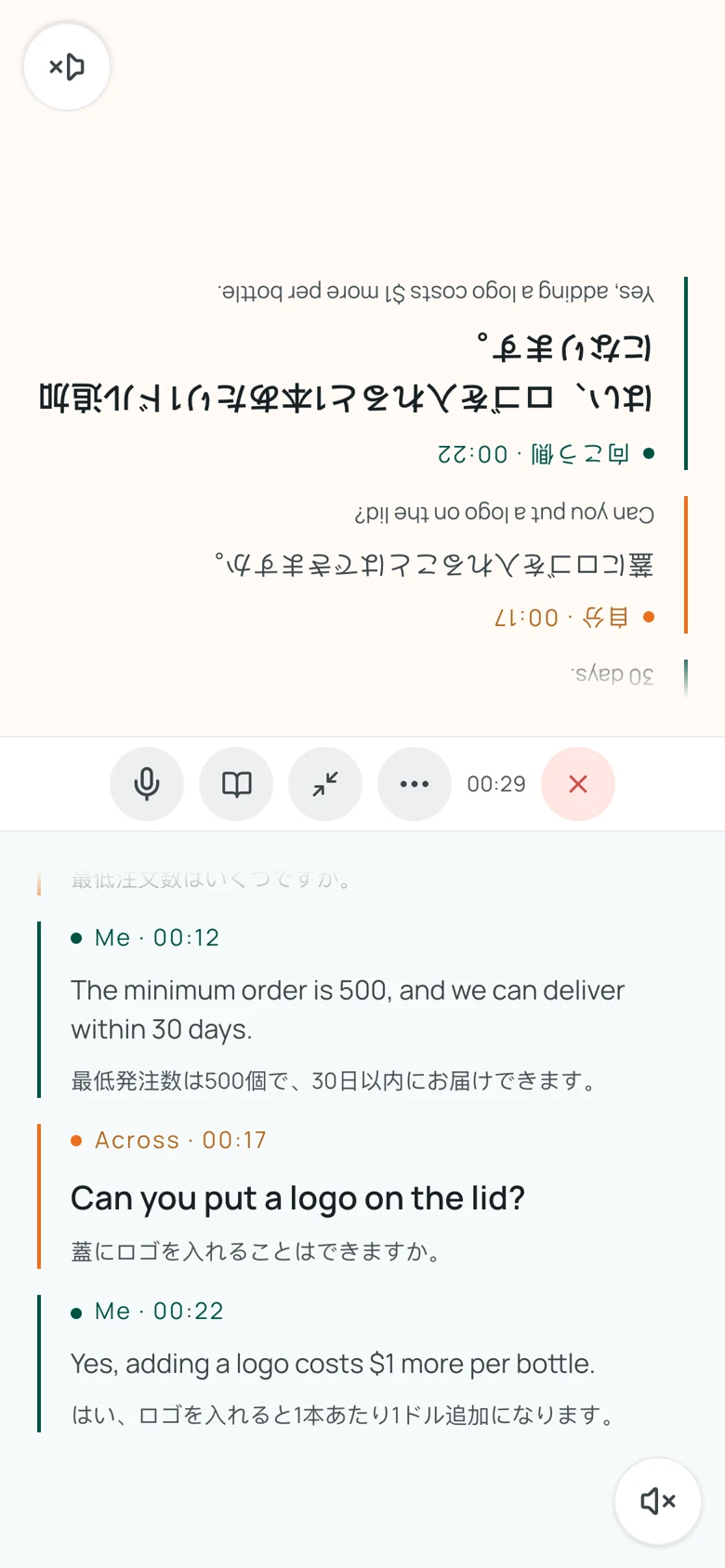
- Face-to-Face on Any Screen: On equalang.com/face-to-face, two people can share a phone, tablet, or laptop. In "Facing" mode, the upper half of the screen inverts for the person across the table; in "Side-by-side" mode, the screen splits left and right. Transcripts are retained for 14 days and can be exported immediately.
- Translated Calls via Link: On equalang.com/call, you set both languages, enter your name, and generate an invitation link. The recipient simply opens the link in their mobile or desktop browser—they do not need to register an account or install an application. During the call, each party speaks and hears their own language while following live captions. The call host covers the usage credits.
- Real Trade-Offs and Boundaries: Unlike native mobile apps, Equalang requires an active internet connection (there is no offline mode). Usage is metered based on audio processed: simultaneous captioning costs 35 credits per audio minute (roughly $0.035/min on the $10 for 10,000 credits package), and optional translated voice read-aloud costs an additional 150 credits per minute. New accounts receive 200 free credits at sign-up, and purchased credits never expire. Language coverage varies by mode; for example, Swedish is currently supported as a listening output language, but not as a two-way spoken source. User data is never used to train AI models.
For more on in-person translation mechanics, see our guide on talking face-to-face while traveling and our comparison of Apple built-in features and Equalang.
4. Wearable Translation Hardware: Timekettle W4 Pro Earbuds
For users who find passing a smartphone back and forth awkward during long business lunches, factory walkthroughs, or guided tours, dedicated hardware earbuds represent a distinct alternative.
How the Timekettle W4 Pro Operates
- Form Factor: Open-ear translation earbuds equipped with triple microphones, paired with the Timekettle smartphone app.
- Language Coverage: Supports 42 languages and 95 accents online, covering two-way simultaneous interpretation, media translation, and phone call translation.
- Offline Packages: Provides 13 offline language pairs centered on English and Chinese hubs (pairing English and Chinese with Japanese, Korean, French, Spanish, Russian, and German). Two offline language pairs can be downloaded for free using bundled coupons; additional offline pairs cost $10 per pair (5 Fish) or require a subscription. Media translation strictly requires an active internet connection.
- Battery Life: Provides up to 6 hours of continuous translation on a single charge (12 hours for music playback), with a 1.5-hour charging time.
- Trade-Offs: Requires purchasing and carrying dedicated hardware that must be kept charged and connected to a smartphone app. While core online features do not require a recurring subscription, expanding offline language coverage beyond the initial coupon pairs requires separate payments.
How to Choose: Decision Framework for 2026
To pick the right tool, match your primary constraint against these verified options:
- Traveling completely offline with poor connectivity:
- If you have an iPhone, download your destination languages in Apple Translate before departing.
- If you have a Samsung Galaxy device, download offline language packs in Samsung Interpreter.
- If you carry a Google Pixel 9, 10, or 11, use Google Translate for offline speech on supported English pairs.
- For non-Pixel Android users, verify whether your destination language supports offline text, as offline voice translation is not supported on your hardware.
- Everyday travel conversations with roaming data:
- Google Translate provides the widest overall language coverage (over 70 spoken languages) and an intuitive face-to-face split screen.
- Business or tourism in Korea, Japan, or China:
- Naver Papago supports 14 languages, simultaneous 1:1 speaking, and offline voice translation on iOS.
- Formal in-person business meetings without phone passing:
- Timekettle W4 Pro earbuds allow hands-free eye contact, provided you keep the offline packs or cellular connection ready.
- Lectures, seminars, and calling overseas contacts without app downloads:
- Use Equalang in your browser for continuous dual-language captioning and transcript exports on equalang.com/listen, or send a zero-install invitation link on equalang.com/call.
Sources
- Google Translate Help, Live Translate (Android): https://support.google.com/translate/answer/6142474?hl=en&co=GENIE.Platform%3DAndroid
- Google Translate Help, Computer: https://support.google.com/translate/answer/6142474?hl=en&co=GENIE.Platform%3DDesktop
- Google Play Store, Google Translate: https://play.google.com/store/apps/details?id=com.google.android.apps.translate&hl=en_US&gl=US
- Google Keyword Blog (Jun 9, 2026): https://blog.google/innovation-and-ai/models-and-research/gemini-models/gemini-live-3-5-translate/
- Google Keyword Blog (Sep 4, 2026): https://blog.google/products-and-platforms/products/translate/google-translate-ios-android-upgrades/
- Apple App Store, Apple Translate: https://apps.apple.com/us/app/translate/id1514844618
- Samsung Newsroom (Oct 14, 2026): https://news.samsung.com/global/samsung-expands-language-support-across-ai-experiences-on-galaxy
- Samsung Support (Interpreter): https://www.samsung.com/us/support/answer/ANS10000753/ and https://www.samsung.com/us/support/answer/ANS10000935/
- Samsung UK (Galaxy AI Features): https://www.samsung.com/uk/support/mobile-devices/how-to-use-the-galaxy-ai-features-on-the-s24-series/
- Microsoft Translator Languages: https://www.microsoft.com/en-us/translator/languages/
- Microsoft Translator Education & Retired Features: https://www.microsoft.com/en-us/translator/education/live-conversations/
- Apple App Store, Microsoft Translator: https://apps.apple.com/us/app/microsoft-translator/id1018949559
- Apple App Store, Naver Papago: https://apps.apple.com/us/app/naver-papago-ai-translator/id1147874819
- Apple App Store, iTranslate Converse: https://apps.apple.com/us/app/itranslate-converse/id1241264761
- Timekettle W4 Pro Product Landing Page: https://www.timekettle.co/pages/w4-pro
- Equalang Live Listening: https://equalang.com/listen
- Equalang Face-to-Face Translation: https://equalang.com/face-to-face
- Equalang Translated Calls: https://equalang.com/call
- Equalang Pricing & Credit Rates: https://equalang.com/pricing