How to Set Up Dual Subtitles on Youku International (youku.tv)
 Equalang
In brief
Learn how to use the Equalang browser extension on Youku International (youku.tv) to display original and translated subtitles simultaneously on screen.
Keywords: Youku International; youku.tv; dual subtitles; bilingual subtitles; subtitle translation; Equalang
Youku International (youku.tv) is a go-to streaming platform for overseas viewers, international students, and Chinese drama enthusiasts looking to watch costume dramas, modern series, and original variety shows. To serve global audiences, youku.tv provides official multilingual subtitles—including English, Thai, Indonesian, Vietnamese, and Spanish—for many of its titles.
However, during actual viewing, multilingual families watching together, language learners studying dialogue, or viewers verifying translation accuracy often run into a common frustration: the web player typically allows only one subtitle track to be active at a time. Selecting one language makes it impossible to see another simultaneously. Furthermore, when dealing with culturally specific idioms or metaphors, monolingual subtitles often fail to convey the full context.
How can you display both the original and translated subtitles on screen simultaneously in Youku International's web player? This article explains how to enable dual subtitles using the Equalang browser extension, along with workarounds for clips that lack subtitles.
1. Shows with Official Subtitles: Enable Dual On-Screen Subtitles
When a drama on Youku International already includes official foreign-language subtitles, translating directly from those existing subtitles provides the most stable viewing experience.
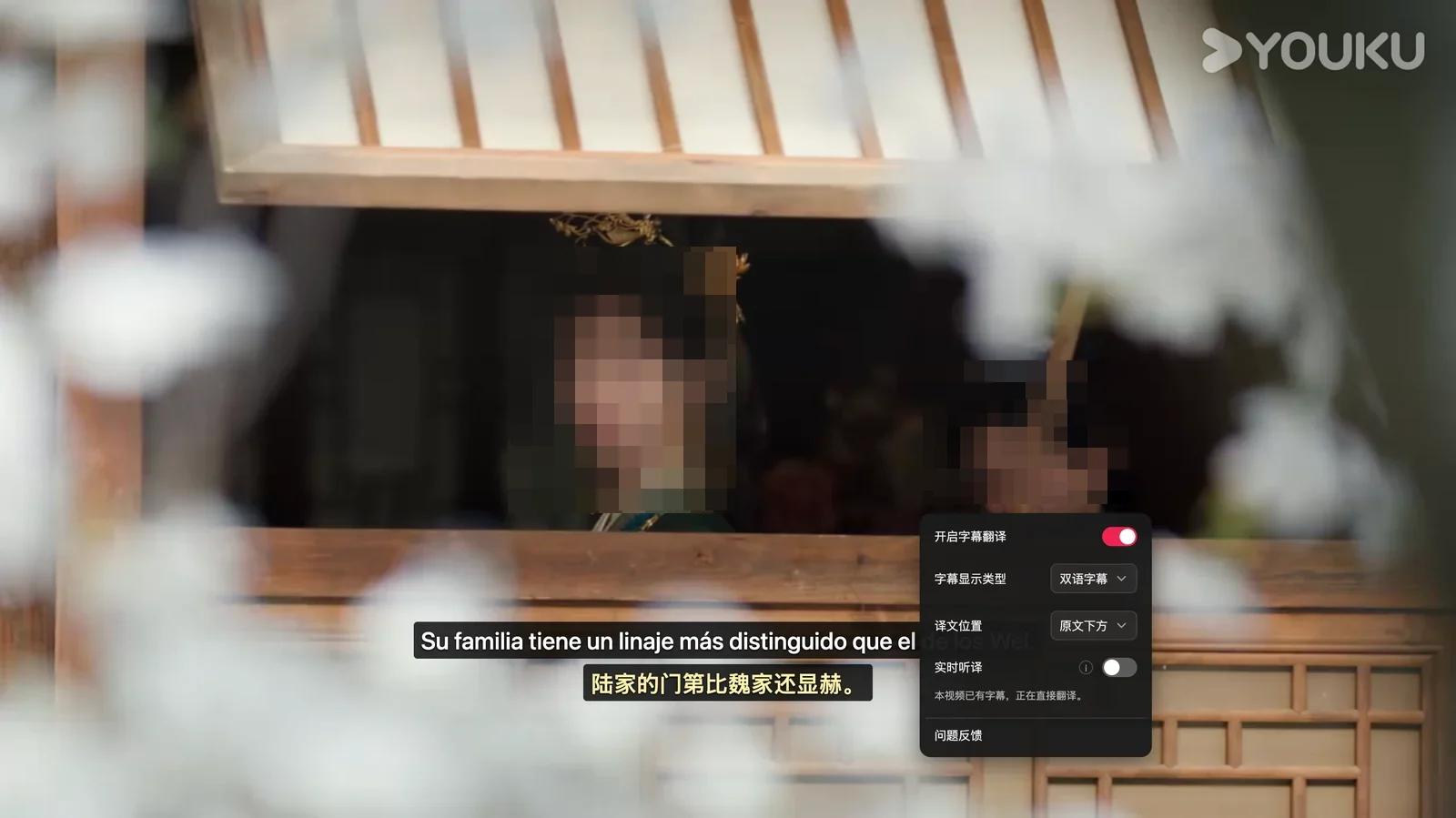
Open youku.tv in a desktop browser (such as Chrome or Edge) and navigate to the video playback page. If the video supports multilingual subtitles, first turn on your desired official subtitle in the Youku player control bar (such as Spanish subtitles 'Español'). Next, click the Equalang extension icon or open its control panel, enable 'Subtitle Translation', and set the target language to your preferred language (such as Simplified Chinese).
At this point, the extension translates the existing subtitles directly and displays them on screen in bilingual format. For example, when watching a show with Spanish subtitles on youku.tv, enabling subtitle translation causes the extension panel to display the message, 'This video already has subtitles, translating directly.' The player then displays bilingual subtitles, translating the Spanish line 'iré personalmente a darle las gracias.' directly into '我会亲自登门致谢。'.

For subtitle display preferences, the extension provides several practical options:
- Subtitle Display Mode: Users can choose between 'Dual Subtitles' or 'Translation Only' in the panel. When 'Dual Subtitles' is selected, the original and translated subtitles are stacked vertically for easy side-by-side reference. If you only need to follow the plot, you can switch to displaying only the translation.
- Flexible Translation Positioning: The translation can be positioned 'Below Original' or 'Above Original', catering to different reading habits.
2. Videos Without Subtitles: Real-Time Speech Translation Assistance
Beyond full episodes with official subtitles, when browsing trailers, behind-the-scenes clips, or other video segments that lack embedded soft subtitles, you can also use the extension's 'Real-Time Speech Translation' feature for assistance.
For clips without subtitles, turning on real-time speech translation can generate dual subtitles. Note that for video streams protected by copyright encryption (DRM), encrypted video audio cannot be directly transcribed or translated. However, as long as the video itself comes with an official subtitle track, you can still achieve on-screen dual subtitles through the subtitle translation feature.
3. Comparison of Common Subtitle Viewing Methods
To help you choose the best approach for your needs, here is an objective comparison of the common methods available today:
- Native Single Subtitle on Youku International: Built directly into the player, this option incurs minimal system overhead and loads quickly. However, it can display only one language at a time, cannot provide dual original-and-translated subtitles, and cannot generate text for behind-the-scenes clips lacking official subtitles.
- Standard Web Translation Extensions / Generic User Scripts: Primarily intended for static web text. Faced with the dynamic subtitle mechanisms of streaming video players, general page translation extensions often struggle to accurately identify subtitle tracks and may disrupt normal playback controls.
- Equalang Browser Extension: Builds upon existing subtitles to provide dual-track, on-screen comparison. Users can toggle between dual subtitles or translation-only display, customize whether translations appear above or below the original text, and use real-time speech translation as a backup for clips without subtitles. First-time use requires installing the extension in your browser.
4. Limitations and Key Considerations
During actual viewing, certain technical limitations exist due to audio characteristics and platform security mechanisms:
- Interference from Complex Background Audio and Overlapping Dialogue: When multiple people speak simultaneously or when loud background music and sound effects are present, voice recognition can be disrupted, affecting the accuracy of speech translation.
- Encrypted Video and Subtitle Constraints: For encrypted videos protected by digital rights management (DRM), security restrictions prevent direct audio translation. However, if the video has official text subtitles, dual subtitles can still be displayed normally via subtitle translation.
- Buffering Required for Semantic Completeness: Accurate translation relies on relatively complete sentence structures. During real-time speech translation, the engine must receive a certain segment of audio to perform sentence splitting and semantic restructuring, meaning instantaneous, zero-latency synchronization is not technically feasible.
5. Recommended Viewing Setup
When streaming shows on Youku International, consider the following configuration tips:
- Check for Official Subtitle Tracks First: When playing full episodes, first verify in the player control bar whether official subtitles are available. Translating existing subtitles directly is much more reliable, as text accuracy and timeline alignment are generally superior to real-time speech transcription.
- Choose Display Preferences Based on Your Reading Habits: Select 'Dual Subtitles' or 'Translation Only' in the extension panel based on how you read, and position the translation above or below the original text to maintain visual comfort while watching.
Sources
- Youku International Official Website: https://www.youku.tv/
- Equalang Browser Extension: https://equalang.com/extension