How to Watch Xiaohongshu Videos and Live Streams with Bilingual Subtitles: Real-Time Audio Translation Guide
 Equalang
In brief
Want to enable bilingual subtitles and real-time voice translation while watching international creators on Xiaohongshu Web? This guide explains how to configure the Equalang browser extension for dual-language viewing, along with key practical tips.
Keywords: Xiaohongshu bilingual subtitles; Xiaohongshu real-time translation; Xiaohongshu web; video bilingual subtitles; Equalang
Browsing Xiaohongshu on desktop via the web (xiaohongshu.com) has become a popular way for many users to research study-abroad experiences, international visa guides, off-the-beaten-path travel itineraries, foreign-language product reviews, and multilingual lifestyle vlogs. Viewing image and video posts on a larger screen not only offers an expansive view but also makes it easier to take notes. However, when watching audio and video content created by international creators in foreign languages, viewers often encounter two major obstacles:
First is the lack of subtitles and the need for dual-language comparison. Many original-audio posts on Xiaohongshu are casual daily vlogs, street clips, or spontaneous unboxings. Much of this content lacks hardcoded Chinese subtitles and may not include a foreign-language subtitle track. Even when videos do have subtitles, they typically feature only a single language track, making it impossible to view the original spoken words and Chinese translation side by side. When dealing with colloquial slang, technical abbreviations, or linked speech, verifying the original phrasing becomes difficult.
Second is the limitation of traditional translation tools in audio and video scenarios. Standard full-page browser translators primarily target static text on web pages. They cannot directly process audio signals within a video container, offering no transcription or translation support for foreign-language videos without existing subtitles.
This article provides an objective overview of current subtitle solutions and explains how to enable bilingual subtitles and real-time voice translation on Xiaohongshu Web using the Equalang extension.
1. Objective Comparison of Mainstream Xiaohongshu Subtitle Solutions
To obtain translations for foreign-language dialogue on Xiaohongshu Web, three common solutions are currently available, each with clear use cases and limitations:
- Full-page/selection translation browser extensions: These can quickly translate post descriptions and comment sections, but they do not work for videos. They only read static DOM text nodes and cannot interface with audio signals inside media containers, leaving them unable to provide speech translation for untranscribed, original-audio videos.
- Conventional Tampermonkey scripts and microphone-based speech recognition: Some Tampermonkey user scripts attempt to inject subtitle containers by observing DOM nodes, but frequent changes to Xiaohongshu's web structure and components often cause these injections to break. Meanwhile, floating-window tools that capture audio via the system microphone often pick up ambient noise and keystrokes, resulting in poor recognition stability and difficulty syncing accurately with video playback.
- Dedicated streaming translation extensions (e.g., Equalang browser extension): These capture playback audio directly within the current browser tab and render native subtitle overlays on top of the video player, supporting real-time voice translation for both video posts and live streams.
2. Video Post Modal: Enabling Bilingual Subtitles and Real-Time Translation
Clicking any video post on Xiaohongshu Web opens a standalone player modal over an overlay backdrop. With the Equalang browser extension, you can enable real-time speech translation and dual-subtitles when playing foreign-language video posts without built-in captions.
Here are the specific steps:
Open Xiaohongshu Web in desktop Chrome or Edge, and navigate to a foreign-language video post. Click the Equalang extension icon to open the settings panel, toggle on "Enable Subtitle Translation", and set the target language to Chinese.
When playing a video without existing subtitles, the extension automatically detects this and prompts: "No subtitles detected. Real-time translation automatically enabled." Within the settings panel, you can configure the subtitle display as follows:
- Subtitle Display Type: Choose between "Bilingual Subtitles" or "Translation Only".
- Translation Position: Choose between "Below Original" or "Above Original".
- Real-Time Translation Settings: Toggle on real-time translation, and select the source language (e.g., "English") and translation mode (e.g., "Standard").
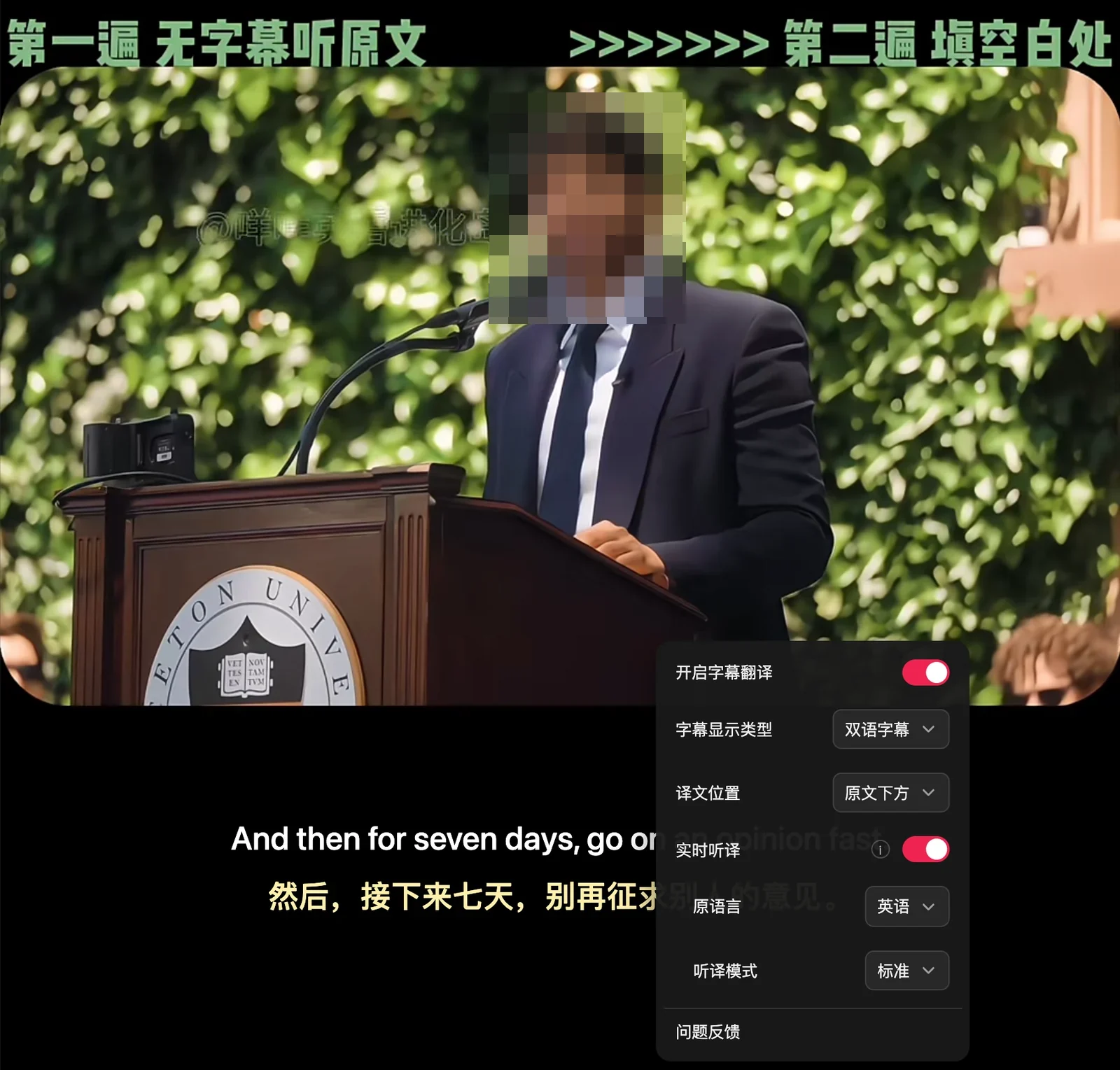
In an actual test with an untranscribed English speech clip, the extension automatically prompted: "No subtitles detected. Real-time translation automatically enabled." During playback, bilingual subtitles appeared synchronized in the black bar area below the video frame.

During video playback, the bilingual subtitles feature the following interactive highlights:
- Vertical separation of original and translation: Depending on your chosen translation position (below or above the original text), the original foreign audio and Chinese translation are displayed concurrently, allowing you to follow the meaning while checking the original wording.
- Flexible display mode switching: Switch between "Bilingual Subtitles" and "Translation Only" according to your language proficiency, catering to both in-depth language learning and casual browsing.
3. Xiaohongshu Live Streams: Real-Time Audio Interpretation
Beyond video posts, cross-border live streaming on Xiaohongshu is also a major avenue for discovering overseas lifestyle updates and product recommendations. Live streams represent a classic real-time audio scenario where pre-existing subtitle files do not exist.
Xiaohongshu live streaming is officially supported by the Equalang extension. After entering a foreign-language live stream and turning on real-time translation, the extension transcribes and translates the host's spoken audio in real time, presenting it as a lightweight subtitle bar directly on the stream to help viewers keep pace with the host.
4. Technical Constraints and Usage Guidelines
Stream-based real-time speech recognition and machine translation rely on probabilistic statistical models. In real-world network and acoustic environments, several objective technical boundaries exist:
- Interference from complex background audio and overlapping voices: Real-time voice translation depends on a clear vocal frequency band. If a video post or live stream contains loud background music (BGM), ambient sound effects, or multiple people talking at once, the voice signal becomes diluted, which may cause transcription accuracy to fluctuate.
- DRM-encrypted video restrictions: Encrypted video streams cannot be translated from audio, though existing subtitle tracks can still be translated. Public videos and live streams on Xiaohongshu are standard unencrypted streams, allowing the extension to capture audio and translate without issue. However, on platforms protected by hardware-level DRM, browser sandbox security prevents direct capture of decrypted audio, restricting translation solely to pre-existing subtitle tracks.
- Latency from semantic segmentation and sentence parsing: Translating foreign-language audio requires sentence-level context and logical restructuring rather than word-for-word output. Real-time speech translation needs a brief moment for semantic chunking and sentence segmentation, introducing a slight inherent delay rather than instantaneous synchronization.
5. Practical Browsing and Troubleshooting Tips
To ensure a smoother bilingual viewing experience on Xiaohongshu Web, consider the following tips and troubleshooting steps:
- Monitor network stability and playback state: Real-time translation requires a stable downstream internet connection. If you experience playback stutter or buffering, wait for the stream to stabilize rather than refreshing the page repeatedly, which forces connections to re-establish.
- Configure subtitle display options properly: When using the tool for the first time, choose between "Bilingual Subtitles" or "Translation Only" in the settings panel based on your reading preferences, and set the translation to appear "Below Original" or "Above Original" for the most comfortable side-by-side reading experience.
Sources
- Xiaohongshu Official Creator Service Platform: https://creator.xiaohongshu.com/
- Equalang Official Website: https://equalang.com/