How to Enable Bilingual Subtitles on Rakuten Viki: Side-by-Side Translations for K-Dramas and J-Dramas
 Equalang
In brief
When watching K-dramas, J-dramas, or variety shows on Rakuten Viki, not every title supports the platform’s Learn Mode for bilingual subtitles, and Chinese subtitles often lag behind English releases. This guide explains how to translate Viki’s built-in original or English subtitles into Chinese in real time for side-by-side display, along with quick lookup tips for unfamiliar expressions.
Keywords: Rakuten Viki bilingual subtitles; Viki Chinese subtitles; K-drama bilingual subtitles; video subtitle translation; Equalang
When watching Korean dramas, Japanese dramas, or Asian variety shows on Rakuten Viki, viewers usually run into two main frustrations. First, while Viki offers a built-in Learn Mode that natively displays bilingual subtitles (original language + target language) on supported titles, it is not available for every show, variety program, or language pair. When you are stuck with monolingual subtitles, switching to Chinese means losing the original Korean or Japanese phrasing; switching back to the original subtitles or English makes it easy to lose track of the plot when dealing with slang, honorific shifts, or long, complex sentences. Second, Viki relies on community volunteers for subtitles. When a new episode drops, it often only has original Korean subtitles or an early English translation, leaving Chinese subtitles delayed.
As long as the show or episode includes at least one existing subtitle track—such as original Korean closed captions or an early English track—you can translate those built-in subtitles directly into Chinese and display them stacked alongside the original text. Here is how to do it using Equalang.
1. Enabling Bilingual Subtitles in the Viki Player
Equalang is a side-by-side AI translation tool whose browser extension translates built-in subtitles on video streaming platforms into your target language and displays them on screen alongside the original text. Viki is among its supported platforms.
Getting started takes just a few simple steps:
- Install the Equalang browser extension on a desktop browser (Chrome, Edge, Firefox, or Safari 18.4+ on Mac).
- Open an episode on Viki, and turn on any available subtitle track (such as Korean, Japanese, or English) via the settings icon in the bottom-right corner of the player.
- Click the Equalang icon in the player control bar, enable Subtitle Translation, and set your target language to Simplified Chinese.
- Choose your preferred display mode in the panel: select "Bilingual" if you want to learn a language while watching, or "Translation Only" if you just want to follow the plot smoothly. In Bilingual mode, you can also toggle between "Translation above original" and "Translation below original".
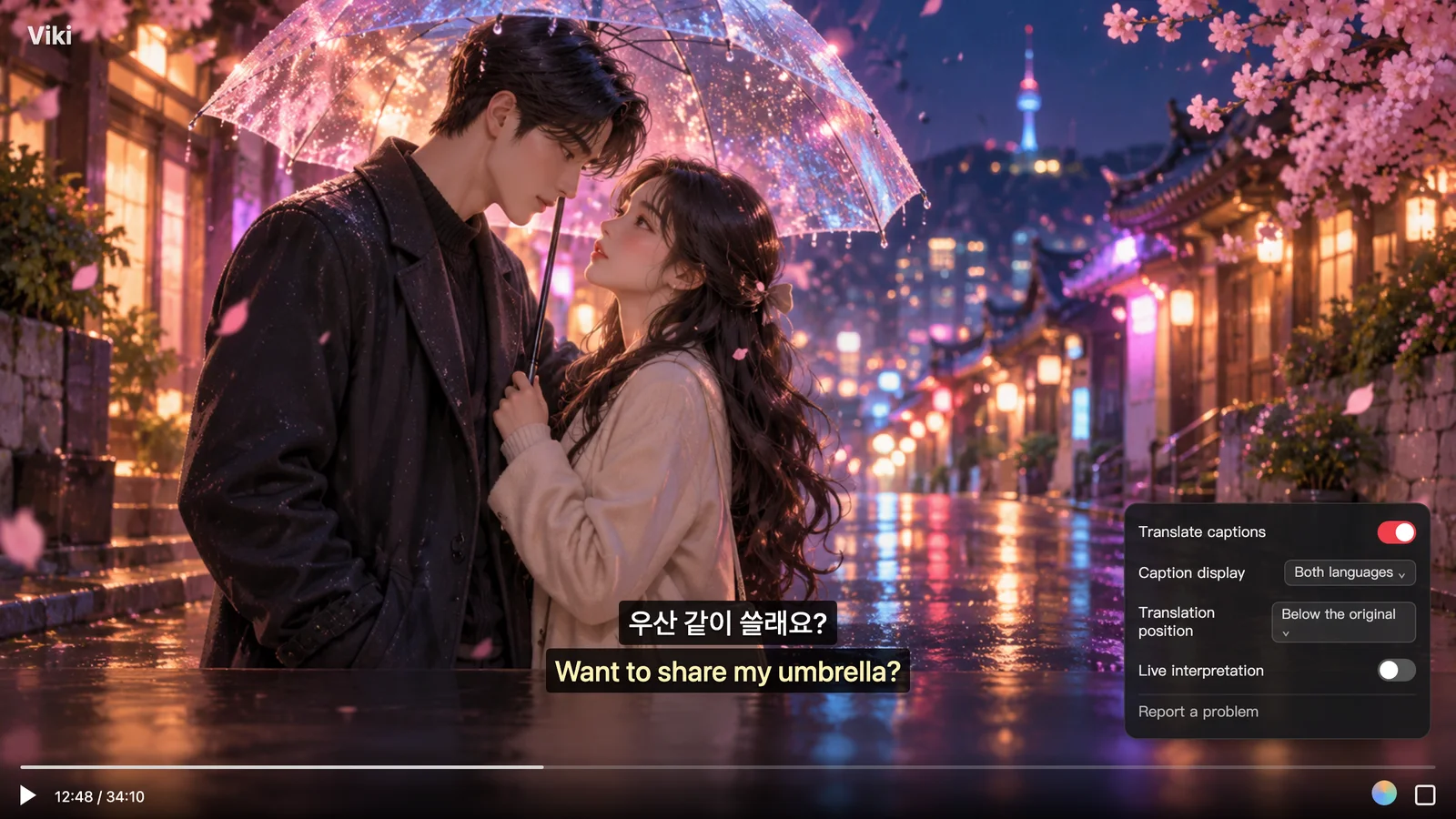
With this setup, even if community volunteers have not yet finished translating Chinese subtitles for a newly released episode, you can still watch it with Chinese translations right away as long as English or original-language subtitles are already available. Viewers who understand some Korean or Japanese can also easily compare terms of address, modal particles, and puns directly against the original dialogue.
2. Limitations to Keep in Mind Before You Start
When pairing subtitle translation with Viki, keep a few limitations in mind so you know what to expect:
- An existing on-platform subtitle track is required: Viki's video streams are protected by DRM encryption, meaning browser extensions cannot intercept audio directly from the encrypted video for speech recognition. Instead, Equalang reads and translates the subtitles displayed by Viki's player. If a video has no subtitle tracks available at all, no translation can be generated; you must first ensure at least one original or foreign-language subtitle track is enabled in the player settings.
- Word order differences between Korean/Japanese and Chinese: Korean and Japanese typically place the predicate at the end of the sentence (Subject-Object-Verb / SOV structure), whereas Chinese uses a Subject-Verb-Object (SVO) structure. If the original subtitle splits a long line of dialogue across two segments, the meaning of the first half may feel incomplete on its own; reading it together with the following subtitle line provides the full context.
- Hardcoded on-screen captions and Timed Comments: Captions baked directly into the video footage—such as stylized variety show captions or store signs—are not part of the player's subtitle tracks and will not be translated alongside regular subtitles. If you encounter unfamiliar text in Viki's signature Timed Comments, episode summaries, or user comment sections, you can enable Select-to-Translate in the extension panel, highlight the text with your cursor, and click the nearby translation icon to view the Chinese meaning in a popup window.
3. Choosing the Right Subtitle Method for Your Viewing
When watching shows on Viki, you can choose the best approach based on subtitle availability and your language proficiency:
- Viki's Native Subtitles and Learn Mode: Once human translations are finalized, quality is consistently reliable. Shows supporting Learn Mode natively display bilingual subtitles (original language + target language), making this ideal for titles that already have your language combination ready. The limitation is that Learn Mode is not supported on all titles, and Chinese subtitles often trail behind English releases when new episodes air.
- Third-Party User Scripts (e.g., Tampermonkey scripts): Some open-source user scripts attempt to merge dual subtitles directly in the webpage without relying on commercial services. However, because they directly manipulate the webpage DOM, they frequently break when Viki updates its player interface or when toggling full-screen mode. Furthermore, they generally only combine two subtitle tracks that already exist on the platform—so if the Chinese track has not yet been translated, they cannot help.
- Equalang Subtitle Translation: As long as the video has a built-in subtitle track in any language, Equalang can translate it into Chinese instantly for stacked comparison. It allows you to switch between bilingual mode and translation-only mode, and position the translation above or below the original line. The browser extension shares the same account and credit balance as the website, with no separate subscription required.
If you have a new Viki drama or variety show you want to catch up on, check the bottom-right corner of the player for an existing original or English subtitle track, turn it on, and enable Subtitle Translation to start watching right away.
Sources
- Rakuten Viki official website: https://www.viki.com/
- Equalang browser extension overview: https://equalang.com/extension