Watching TrueID Thai Streams Without Subtitles: Real-Time Translation & Chinese Subtitle Setup
 Equalang
In brief
When watching channels like Channel 3, Thairath TV, or Premier League football on TrueID, the official player does not provide foreign-language subtitles. Here is a step-by-step guide to generating real-time Thai-Chinese bilingual subtitles in your browser, along with key limitations.
Keywords: TrueID live subtitles; Thai real-time audio translation; Thai TV live stream translation; Equalang
When watching Thai TV channels such as Channel 3 (CH3), Channel 7 (ช่อง 7HD), Mono29, Thairath TV, TNN, and True4U on TrueID (tv.trueid.net), or tuning into Thai football broadcasts on True Premier Football, the biggest headache is that there are no subtitles whatsoever. The live stream only provides original Thai audio. With hosts and commentators speaking at breakneck speeds and using heavy colloquial phrasing and contractions, it is nearly impossible to keep up by ear alone. By the time volunteer fansub groups release translated clips, match results and show suspense are already long outdated.
The most direct way to solve this is to use real-time live translation in your browser—listening directly to the video's audio to generate Thai subtitles and translating them into Chinese on-screen in real time. Below is a walkthrough using the Equalang browser extension.
1. Adding Thai-Chinese Bilingual Subtitles to TrueID Live Streams
TrueID is included in Equalang's list of supported platforms. For live TV broadcasts without existing subtitle tracks, you can use the extension's real-time live translation to process the original Thai audio from the video.
Steps:
- Install the Equalang browser extension on desktop Chrome, Edge, or Firefox, and navigate to a TrueID live channel on the web.
- Once playback starts, click the Equalang icon in the video player control bar to open the settings panel.
- Turn on "Live Translation", set the target language to "Simplified Chinese", and choose bilingual or translation-only display, as well as the subtitle position on the screen as needed.
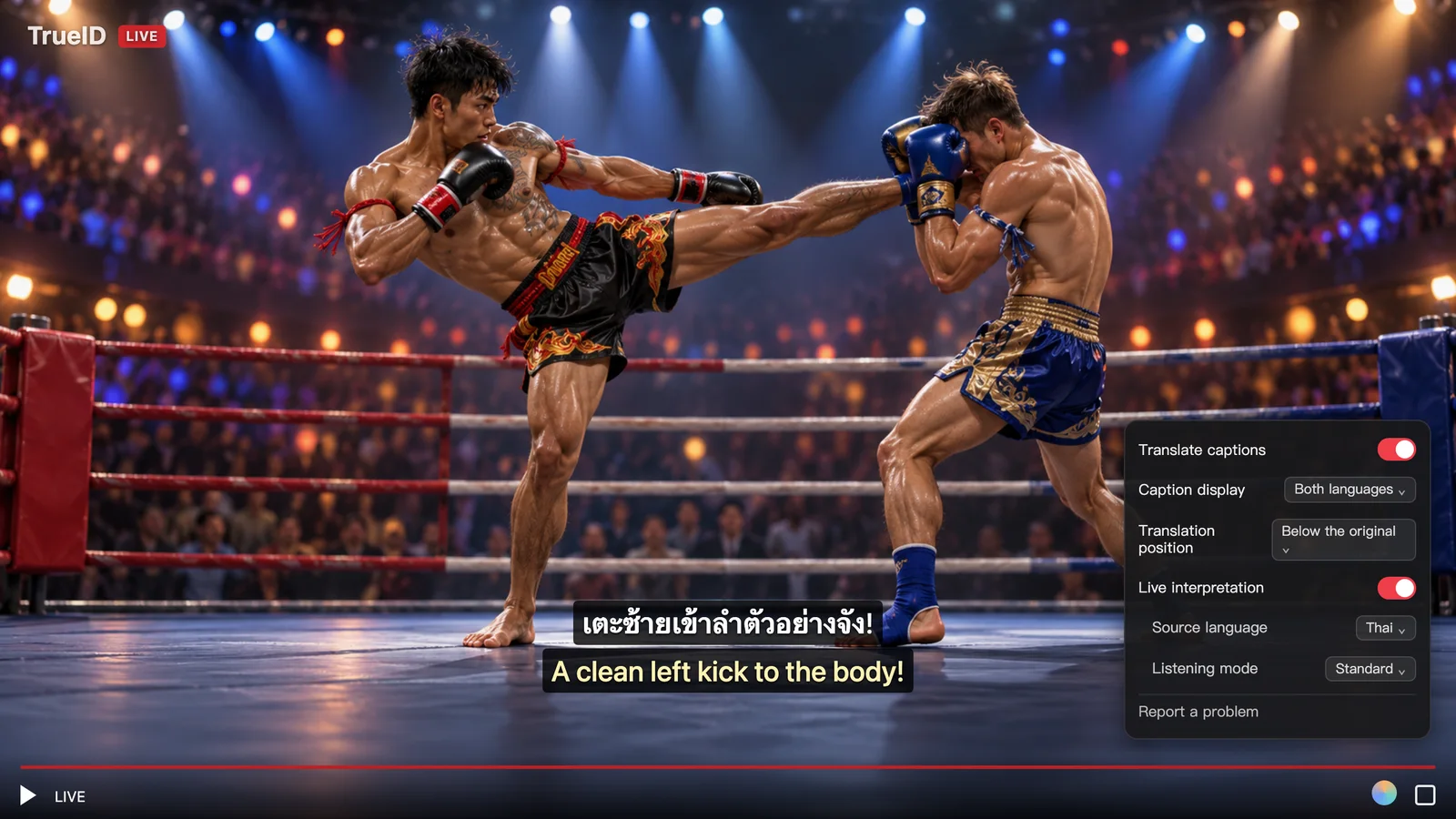
Once enabled, "Preparing subtitles..." will appear during the first minute or two after opening the stream or switching languages. The extension will then introduce a slight delay of a few seconds behind the live broadcast, using that buffer to accurately transcribe and translate upcoming speech. As a result, in most cases, both the original Thai dialogue and the Chinese subtitles appear in sync with the commentator's voice and character lines, rather than lagging sluggishly behind long after a sentence has finished.
Practical Tips for Live Streaming:
- Be mindful of the few-second delay for live scores and interactions: Because the video plays a few seconds behind real time, if you chat in live score groups while watching a match, goal notifications on your phone might arrive slightly ahead of what you see on screen.
2. Key Limitations to Know Before Watching Live
Because real-time live translation processes audio directly from the video stream, it is subject to digital copyright restrictions and on-screen audio conditions. Keep the following boundaries in mind:
- Encrypted video streams cannot be translated: Due to browser security restrictions, audio cannot be captured from streams protected by Digital Rights Management (DRM). On TrueID, real-time live translation will not work on DRM-protected premium channels or protected programs.
- Interference from background music and loud voices: Background audio interference refers specifically to music, sound effects, and overlapping voices within the video itself, not ambient noise in your room. Recognition is much more reliable when watching single-anchor news programs like TNN or Thairath TV, or Thai dramas with clear dialogue. However, during variety shows where multiple guests talk over each other amidst dense sound effects, or when stadium roars drown out commentators, occasional sentences might be missed or less accurate.
- Long sentences may occasionally lag: Most of the time, subtitles closely follow speech. However, if a speaker delivers an exceptionally long sentence without pausing, or if the live stream stutters, subtitles may lag a second or two behind the voice before catching up.
- Platform and language support depends on actual playback: Although TrueID is included in Equalang's list of supported platforms, not all listed platforms support real-time audio translation or live chat translation. Whether live translation functions properly on a specific Thai channel depends on actual playback page conditions.
3. Navigating Site Menus and Choosing the Right Tool
If you have trouble understanding the Thai channel categories and program schedules on the TrueID website, or want to compare different tools, here is how you can mix and match them based on their strengths:
- Built-in browser page translation / Equalang bilingual web page translation: Ideal for understanding TrueID's top navigation, channel guides, schedules, and drama summaries. When you enable Equalang's web page translation, Chinese translations appear directly below each block of Thai text side-by-side. However, this only translates static text on the webpage, not audio inside the video.
- External microphone recording via phone or computer: If you instead use a microphone to capture audio from your computer speakers (for instance, opening the Equalang Listen page on your mobile browser and placing it beside your computer), it can also generate bilingual subtitles. However, audio played aloud through the air is prone to distortion and picks up keyboard typing and room background noise, making recognition far less consistent than capturing audio directly from the video via the browser extension.
- Equalang browser extension: Generates bilingual subtitles directly inside the video player, unaffected by ambient room noise. It is best suited for long live-streaming sessions on desktop or watching uncaptioned replays.
If you plan to catch a Thai live TV broadcast or replay, head over to the extension page to install the add-on, then open an unencrypted channel to test out real-time live translation.
Sources
- TrueID Thailand official live TV page: https://tv.trueid.net/th-th
- Equalang browser extension overview and installation: https://equalang.com/extension
- Equalang web real-time listening: https://equalang.com/listen