Why translated PDFs lose formatting, and how to keep it
 Equalang
In brief
Unlike a Word file, most PDFs don't mark which words form a paragraph or a table. We use two papers to show what goes wrong and what to check.
A Word file records which words make up a paragraph and which belong to a table. Most PDFs don't. They just hold letters and the coordinates to draw them at; the paragraphs, tables and sentences are something the reader's eye puts together. Some PDFs carry accessibility tags (added for screen readers) that mark paragraphs and tables, but many don't (the two papers we use as examples below have none), so a translation tool can't count on them. Everything you see as structure (a two-column layout, a header spanning several columns, or a sentence continuing on the next page) has to be worked out again before any translation happens. Afterwards, the translated text, now longer or shorter, has to fit back into the original layout. Formatting gets lost in one of those two steps.
What you should do depends on what you have:
- The original .docx or .pptx: translate that instead of the PDF.
- A plain text PDF with few tables, under 10 MB: Google Translate's free document upload is the quickest option to try.
- A paper, manual, or report with tables, equations, or two columns: use a translation tool that rebuilds the layout, then check the four places listed in section 3.
- A scan (where you can't select text): it needs text recognition (OCR) before it can be translated. DeepL accepts scans and handles this step itself. Google Translate leaves scanned pages untranslated.
1. What does a translation tool actually see in a PDF?
We build a document translation tool, so we spend a lot of time looking at what comes out of PDFs. To show this plainly, we took two research papers on AI language models from arXiv, LLaMA and Mistral 7B, and extracted their text with MuPDF's mutool, a common open-source PDF tool. That text is roughly what a tool works from unless it reads the layout as well. Below, each passage is shown as it looks on the page, then as it comes out (a line with just … means we skipped some lines).
1.1 Tables turn into a column of numbers
Table 3 in the LLaMA paper compares ten models on eight tests:
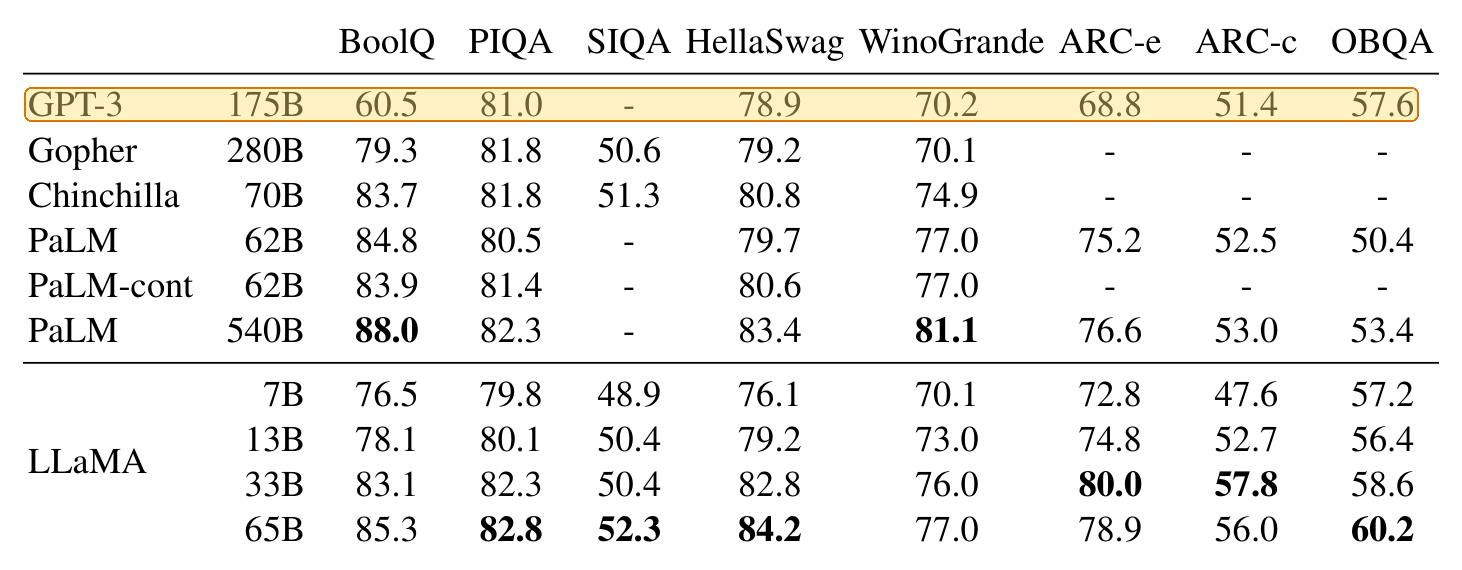
Extracted, it is 102 lines: a five-line header, then one value per line. These are the first sixteen; the ten from GPT-3 to 57.6 are the highlighted row.
BoolQ
PIQA
SIQA HellaSwag WinoGrande ARC-e
ARC-c
OBQA
GPT-3
175B
60.5
81.0
-
78.9
70.2
68.8
51.4
57.6
Gopher
Nothing tells the translation tool which number belongs to which test. If you paste that into a translation box, you get the same column back. The words are translated, but the table is gone.
1.2 One sentence, with a whole table inside it
The last sentence on page 3 of the LLaMA paper stops at "we need to":

It carries on in the left column of page 4, just below Table 3:
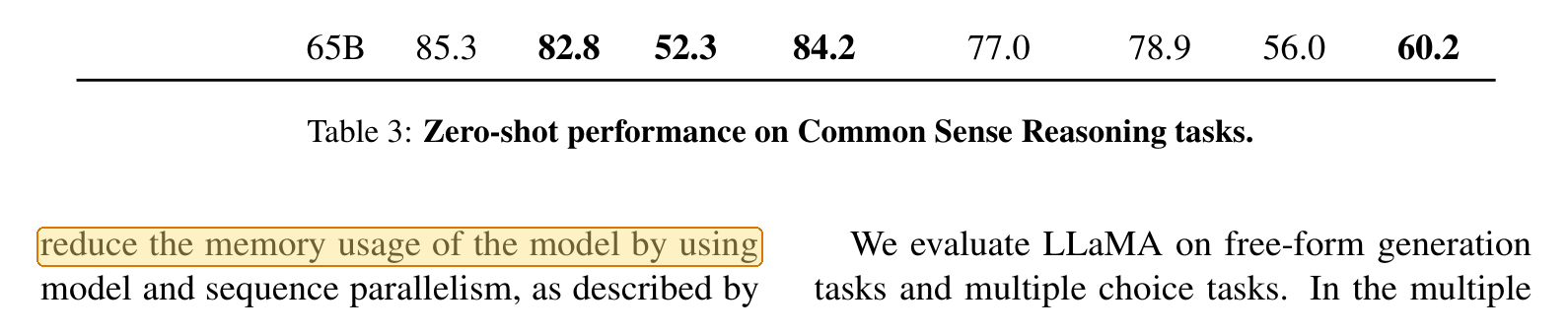
In the extracted text, a footnote, the page break, all 102 lines of the table, and its caption sit inside that one sentence:
To fully benefit from this optimization, we need to
2https://github.com/facebookresearch/xformers
BoolQ
PIQA
…
Table 3: Zero-shot performance on Common Sense Reasoning tasks.
reduce the memory usage of the model by using
It happens again two pages later. Page 5 ends on "…the textual description and tests in a", and "docstring." only comes after Table 7 on page 6, with the table's 44 lines and seven-line caption in between.
A tool that translates page by page, or follows the text in this exact order, gets two fragments it has no reason to connect. In the translated file, you see a sentence that trails off at the bottom of a page, and its other half appears somewhere below a table.
1.3 Subscripts and fractions turn into something else
In the Mistral paper, a variable is written as h with a subscript i:

When extracted, the subscript is gone and hi is left:
former to attend information beyond the window size W. The hidden
state in position i of the layer k, hi, attends to all hidden states from
A translation tool has no reason to treat that as a variable. To it, hi is just a common English word.
Fractions fare worse. LLaMA sets one value to two-thirds of 4d, written as ⅔·4d with the ⅔ set as a small 2 over a 3:

improve the performance. We use a dimension of
2
34d instead of 4d as in PaLM.
Two-thirds of 4d has become 34d. Superscripts, fractions, and symbols from math fonts are just shapes placed at particular positions. Extracted text keeps the shapes but loses the positions.
1.4 Words are broken at line ends
Two-column papers split a lot of words at line ends. In LLaMA, 242 lines break an ordinary lowercase word with a hyphen. Joining them back looks easy until you reach a hyphen that belongs to a name:
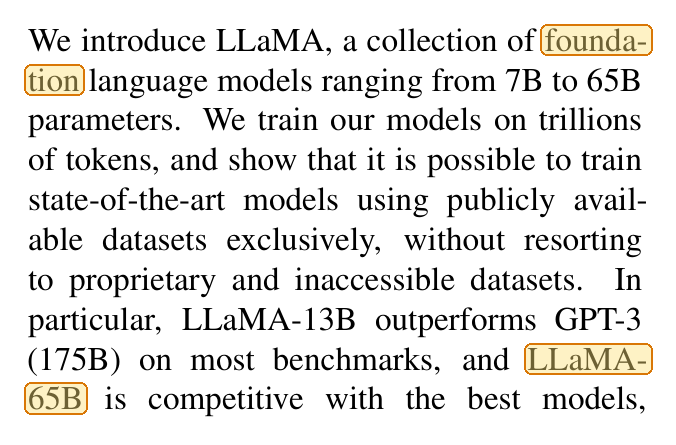
We introduce LLaMA, a collection of founda-
tion language models ranging from 7B to 65B
…
(175B) on most benchmarks, and LLaMA-
65B is competitive with the best models,
founda- and tion make one word without the hyphen. But in LLaMA- and 65B, the hyphen is part of the model's name and has to stay.
We only ran one extraction tool on two papers made with LaTeX, a typesetting tool common in academic publishing. PDFs exported from Word, scanned documents, and other extraction tools can give different output, but these four kinds of damage are the ones to look for.
2. What are your options?
The Google Translate and DeepL details come from their own help pages, checked on October 7, 2026. When a PDF translation disappoints, DeepL's advice is to upload the original document instead. That matches ours.
The last row is what Equalang's document translation is built to do, so it's the approach we know best. Before translating, Equalang rejoins sentences that a page break cut in two. It rebuilds tables with merged cells and multi-row headers in their original structure rather than flattening them. Equations aren't thrown away as garbled text, and there's a formula optimization option for difficult ones that sit inside a line of text.
What it doesn't do is reproduce the original exactly. A translation that runs longer than the original shifts line breaks and font sizes, so pages with tight layouts are still worth checking. Document translation currently covers Chinese, English, Japanese, Korean, Spanish, French and other languages.
3. What should you check once a PDF is translated?
- Tables. Are the headers still over the right columns? Are the numbers unchanged?
- Page breaks and the text below each table. Read the last line of each page and the sentence right after each table. A sentence that stops and never finishes is the most common sign that the text was translated in pieces.
- Equations and variables. Check a few that sit inside a line of text. Look for letters that have turned into words and fractions that have turned into other numbers.
- Page count and links. A very different page count means text was dropped or spilled onto extra pages. Click one or two table-of-contents entries to see if they work.
Sources
- Touvron et al., "LLaMA: Open and Efficient Foundation Language Models", arXiv:2302.13971v1, CC BY 4.0.
- Jiang et al., "Mistral 7B", arXiv:2310.06825v1, CC BY 4.0.
- Google Translate Help, Translate documents & websites, checked October 7, 2026.
- DeepL Help Center, Translate PDF files, checked October 7, 2026.
- Method: text extracted on October 7, 2026 with MuPDF 1.25.6,
mutool draw -q -F txt -o out.txt in.pdf. The figures are crops of the papers' pages; the highlights are ours.