Struggling with AWS and Stripe API Docs? Read Technical Specs in Bilingual Mode Without Breaking Code
 Equalang
In brief
A practical guide for developers reading technical documentation on AWS, Stripe, and GitHub: how paragraph-by-paragraph bilingual translation protects code tags, preserves syntax highlighting, and keeps API parameters intact.
Keywords: developer documentation translation, bilingual API documentation, preserve code syntax highlighting, AWS documentation translation, technical reading browser extension

Almost every modern software engineer, cloud architect, and full-stack developer has felt the friction of wading through hundreds of pages of official documentation from platforms like AWS, Stripe, Kubernetes, or Cloudflare.
Navigating dense technical specifications, intricate authentication flows, and exhaustive endpoint references late into the night quickly leads to cognitive fatigue. Yet reaching for a browser's built-in full-page translation tool often turns the documentation into an instant disaster:
- A standard HTTP method like
POST /v1/chargesgets clumsily translated into literal prose; - Critical query parameters and header keys like
idempotency_keyare translated into localized words, corrupting the request signature; - Sample code snippets like
const payload = ...are modified in place, syntax highlighting breaks into a flat gray block, and copying the code into an IDE throws immediate syntax errors.
Leaving translation off drains your focus; turning it on breaks the code. The fundamental challenge of technical reading lies in whether a tool can reliably distinguish between natural-language explanations and executable program code. In this guide, we break down how paragraph-by-paragraph bilingual reading via modern browser extensions preserves code syntax, keeps parameters intact, and lets you read technical documentation smoothly.
1. Why Generic Full-Page Translation Is a Nightmare for Developers
Standard web translation tools are built primarily for news articles and social media feeds. They lack semantic protection for code-related DOM nodes, resulting in three fatal flaws when applied to technical documentation:
- Corrupting
<code>and<pre>tags: Inline variable names, function signatures, and multiline code blocks are indiscriminately treated as standard prose and fed into the translation engine, breaking the original structure of the code. - Destroying syntax highlighting and layout: Modern technical documentation relies on syntax highlighting to color keywords, strings, and comments. When a translation extension directly overwrites code text nodes, these token styles are wiped out, reducing readable code into a flat, unstyled block of text.
- Introducing bugs upon copy-pasting: Developers routinely click "Copy" on code examples to test them locally. When copied snippets contain translated variables, keywords, or operators, pasting them into a local environment triggers unexpected syntax and compilation errors, wasting valuable debugging time.
2. Preserving Code and Syntax Highlighting: Bilingual API Reading in Practice
The reading experience developers actually need is straightforward: translate explanatory prose, while leaving code blocks, parameters, and function signatures completely untouched.
Here is a practical test using the Equalang browser extension, demonstrating how it handles dense technical API documentation.
1. Intelligent Code Node Detection and Syntax Protection
After installing and activating the extension in Chrome, Edge, or Firefox, navigate to any technical documentation page (such as an API reference or architecture overview) and select the "Bilingual" display mode.
Code blocks and inline code are not translated. Only descriptive paragraphs and list items are translated:
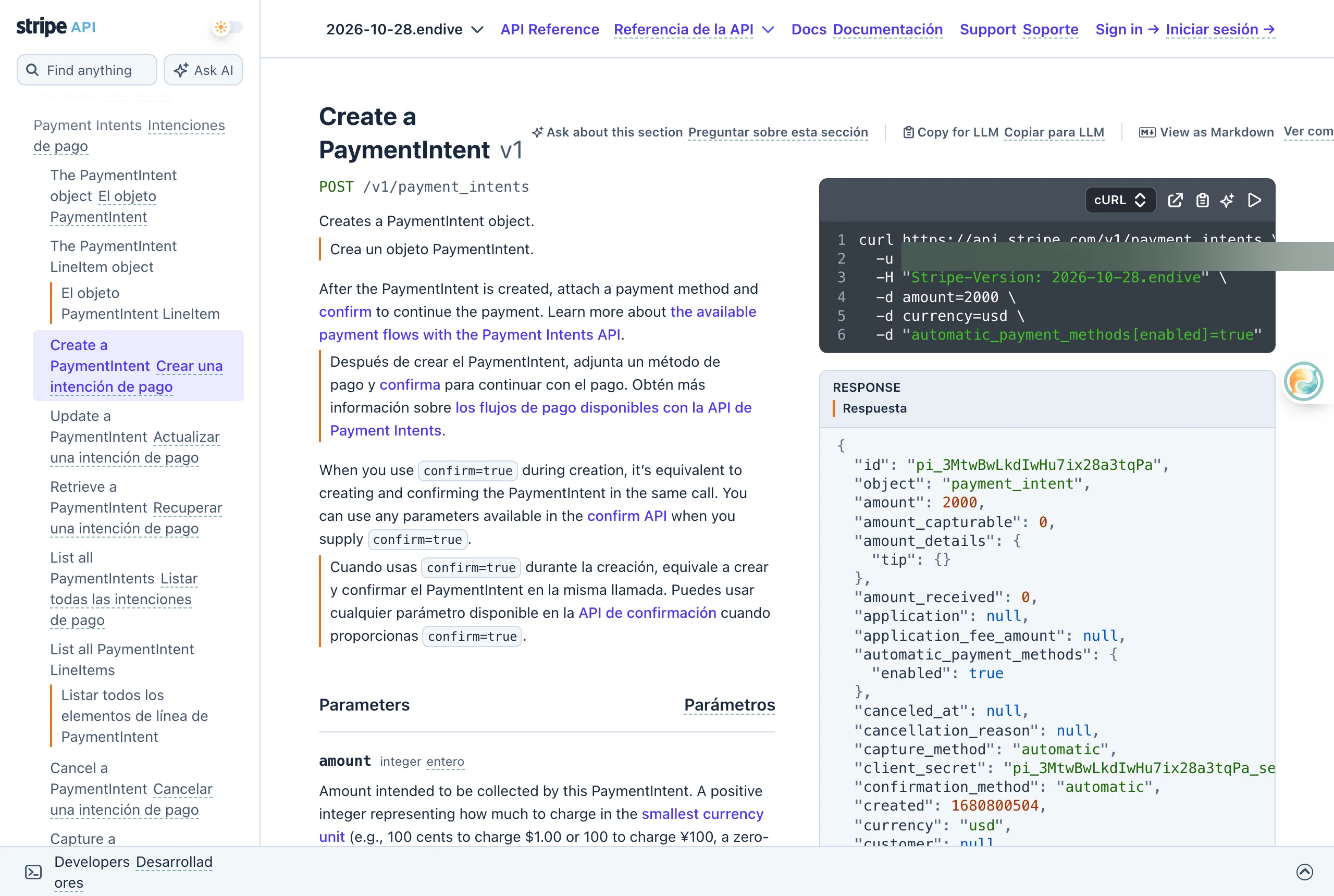
2. Key Details Observed During Testing
The screenshot above highlights several critical optimizations engineered specifically for technical reading:
- Parameters and code stay pristine: The request path POST /v1/payment_intents, curl code blocks, JSON in the RESPONSE, and inline code confirm=true all remain in their original English without being translated.
- Syntax highlighting remains intact: Keyword coloring, indentation hierarchies, and line numbers within code blocks keep their native CSS styles, making code snippets as clear and readable as in your local editor.
- Paragraph-by-paragraph bilingual alignment: The original text is presented on top with the translation below. You can quickly scan the translation to grasp complex business logic and authentication requirements, then glance at the original text to reference precise parameter names and method signatures when writing code.
3. Comparing Common Technical Documentation Reading Methods
4. Practical Tips for Reading Technical Documentation Efficiently
- Skim concepts, scrutinize code examples: When reading architectural overviews and quickstart guides, use translated paragraphs to absorb high-level workflows and concepts quickly. When moving into specific endpoint parameters, payload schemas, and code samples, focus closely on the original names and signatures.
- Follow primary source links for deep dives: Official technical documentation frequently references RFC specifications, GitHub issues, and upstream library repositories. Bilingual reading preserves all original in-text links, allowing you to trace core architectural decisions directly to primary sources.
- Build familiarity through regular immersion: Reading technical documentation with paragraph-level bilingual alignment allows you to deliver software faster while naturally reinforcing technical terminology and conventions over time.
Sources
- Equalang Browser Extension Installation Guide: https://equalang.com/extension
- Stripe Official API Reference: https://docs.stripe.com/api
- AWS Official Documentation Center: https://docs.aws.amazon.com/
- MDN Web Docs: https://developer.mozilla.org/