Translate Chinese PDF to English: Keep Layout Intact
 Equalang
In brief
Translate Chinese PDFs to English while keeping tables and formatting intact. Handle CID font encoding, word segmentation, and English text expansion.
Keywords: translate chinese pdf to english; chinese pdf translation; pdf layout preservation; chinese word segmentation pdf; document translation
To translate a Chinese PDF to English while preserving formatting, first check whether the document contains selectable digital text or scanned images. For digital text PDFs, submit the file directly to a layout-aware document translator like Equalang or Google Translate Document Translation. A layout-aware engine extracts the underlying text streams, segments unbroken Chinese character strings into words, stitches broken sentences across page and column breaks, and replaces them with English text formatted to the original column widths and table cells. For scanned PDFs, run optical character recognition (OCR) before translating. Because English phrasing takes up substantially more horizontal room than compact Chinese ideograms, use a tool that automatically adjusts font sizes to prevent text from overflowing table borders.
The Step-by-Step Translation Workflow
Translating a Chinese PDF into English involves more than swapping words: it requires parsing vector geometry, font tables, and character encodings. Here is the reliable three-step process for handling Chinese technical and academic PDFs.
Step 1: Verify Text Extractability and Encodings
Open the Chinese PDF in any standard PDF reader and attempt to select and copy a paragraph into a plain text editor:
- If copied text pastes as readable Chinese characters: The PDF is born-digital, with embedded character mapping (such as a
ToUnicodeCMap table). You can process it directly through native document translation engines. - If copied text pastes as question marks, blank boxes, or scrambled symbols: The document uses custom font subsetting or non-standard CID fonts without an accessible Unicode mapping table. Standard text extractors will misread the content.
- If you cannot select any text: The PDF is a scanned bitmap. You must use an OCR-enabled workflow to identify the Chinese glyphs before translation.
Step 2: Upload and Translate with Layout Preservation
Below, we demonstrate using Equalang (equalang.com/documents), a side-by-side AI document translator that rebuilds PDF layouts natively.
- Go to the document translation workspace at /documents.
- Upload your Chinese PDF (
.pdf). The web interface processes one file at a time; you can add subsequent files to your queue, and an account translates up to three documents concurrently while remaining jobs queue automatically. - Select Chinese (or Auto-detect) as the source language and English as the target language.
- If your document is an academic paper or technical datasheet with complex inline fractions, matrices, or formulas, enable formula optimization to prevent notation from flattening into plain text.
- Click Translate. The engine reconstructs multi-column structures, merged table cells, and header hierarchies, while reassembling sentences split across page margins before generating English output.
Step 3: Review Side-by-Side and Export
Once processing finishes, open the document in the translation workspace:
- In the Equalang translation workspace, the Chinese source and English translation display side by side. Toggle the synced-scroll icon to verify that figures, captions, and data rows correspond accurately across both languages.
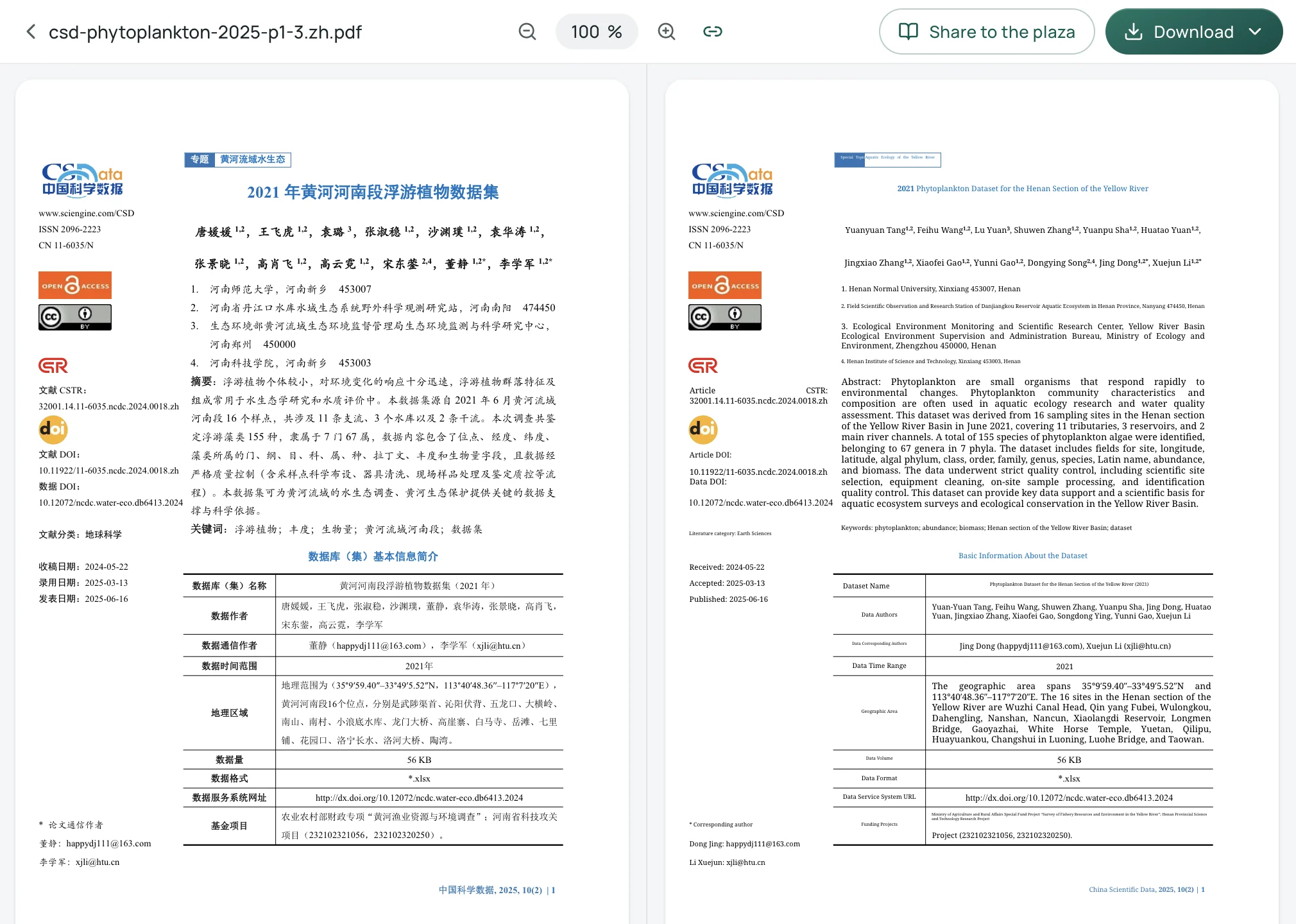
- Download the Translation-only PDF for a clean, publication-ready English document that matches the original page count.
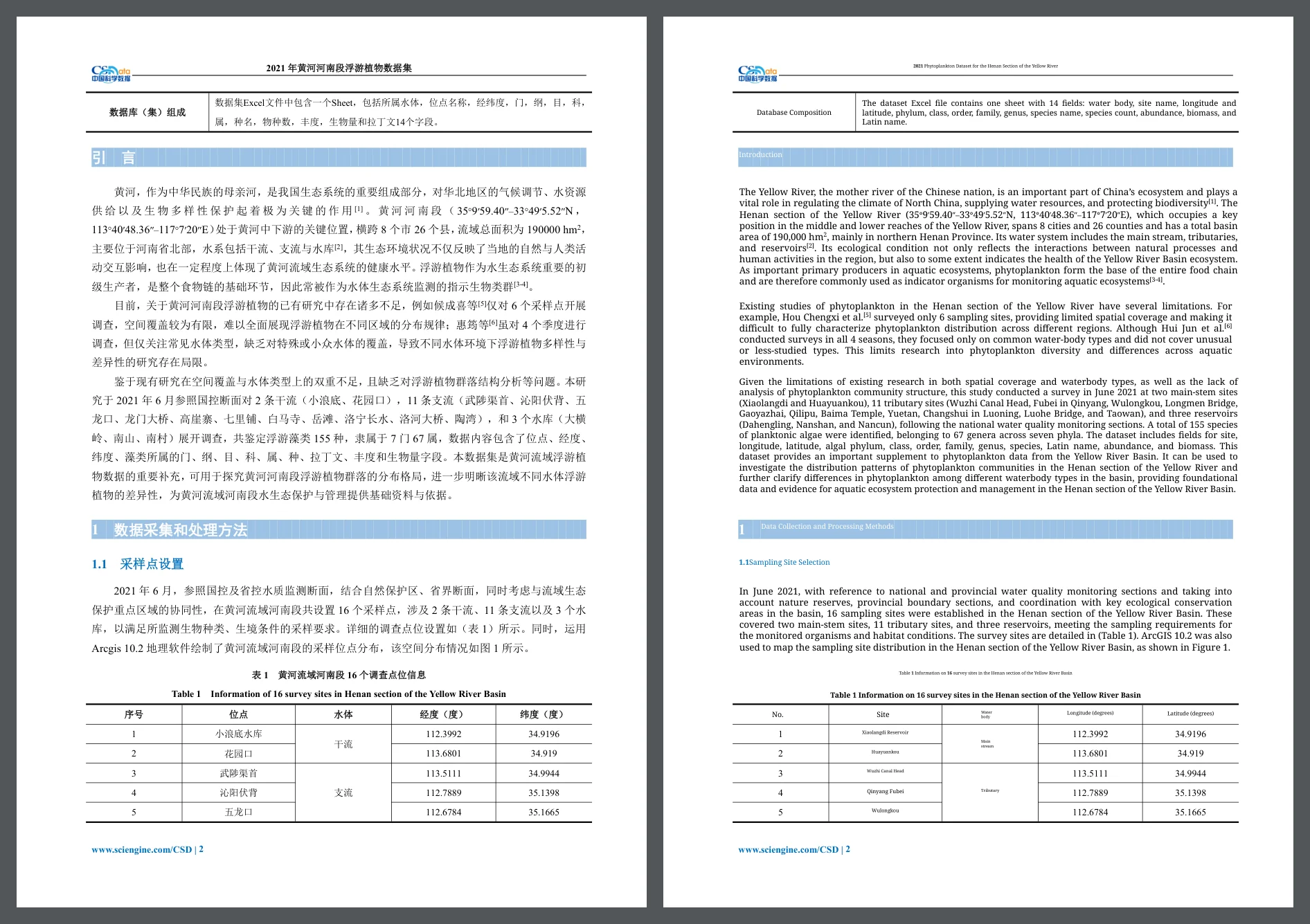
- Alternatively, download the Interleaved file (alternating original and translated pages). Open it in a local desktop PDF reader (such as Acrobat, Preview, or PDFgear) and select Two-Page View. Turn off "Show Cover Page Separately" if the spreads misalign, allowing you to read the Chinese original on the left and the English translation on the right across every spread.
Why Chinese PDFs Break During Translation
Chinese typographic rules differ fundamentally from Latin scripts. Understanding these mechanics explains why generic translation tools frequently corrupt Chinese PDF layouts.
1. No Word Spaces and Ambiguous Word Segmentation
According to the W3C Requirements for Chinese Text Layout (CLReq, Section 4.2.2), Chinese words are not separated by spaces or delimiter characters. Word boundaries must be determined programmatically using language-specific word segmentation algorithms combining dictionaries, grammatical rules, and statistical models.
Because segmentation is inherently ambiguous, naive translation scripts often split multi-character technical terms across line breaks incorrectly. When an engine translates a compound noun piece by piece rather than as a unified entity, the resulting English phrasing becomes inaccurate and grammatically disjointed.
2. Full-Width Punctuation and Line-Breaking Rules
Under Chinese national standards (GB/T 15834—2011) and W3C CLReq Section 2.1.2:
- Chinese pause and stop punctuation marks (
,、。、;、:) occupy a full character cell with the same physical dimensions as an ideographic character. - In Mainland China publications, horizontal punctuation aligns to the bottom-left of the character cell, whereas in Taiwan and Hong Kong publications, marks center horizontally and vertically.
- Strict line-start prohibition rules forbid opening punctuation marks from standing at line ends and closing marks from starting new lines.
When tools convert Chinese text to English without recalculating punctuation geometry, English quotation marks and periods inherit full-width bounding boxes, leaving awkward white gaps and irregular line breaks.
3. CID Fonts, Subset Fonts, and Garbled Text
Adobe Acrobat technical documentation notes that Asian language PDFs rely heavily on CID fonts (Character Identifier keyed fonts) to manage thousands of distinct Hanzi glyphs. To minimize file sizes, PDF generators embed only the specific subset of glyphs used in the document.
If the authoring software (such as WPS Office or older LaTeX engines) fails to embed a standardized ToUnicode translation table, the PDF viewer displays the characters correctly on screen using local glyph vectors, but the underlying text stream contains meaningless index numbers. When an external translator extracts this stream, it receives garbled gibberish rather than valid Unicode Chinese.
4. English Text Expansion Overflows Tables
W3C internationalization research highlights that Chinese text is exceptionally compact. Each Chinese character represents a complete morpheme or word within a square cell roughly equivalent to two Latin character widths.
However, translating compact Chinese into natural English generally results in longer text. A two-character Chinese table header like 点位 expands into Site (4 characters). If a translation tool forces English text into fixed-width Chinese table columns without shrinking font sizes or adjusting line wraps, words spill outside cell borders or overlap adjacent columns.
Comparison of Translation Methods
Handling Complex Chinese PDFs: Practical Recommendations
- Test Text Extraction First: Always copy a small snippet from your PDF and paste it into a text editor. If the characters paste cleanly (for instance, SimSun, SimHei, or STKaiti fonts embedded with valid mappings, as found in open datasets from China Scientific Data), you can proceed with automated document translation.
- Handle Multi-Column Layouts Correctly: Chinese academic articles routinely use compact two-column formatting. Tools lacking column awareness read across columns horizontally, merging unrelated text blocks into garbled paragraphs.
- Keep Original Files for Verification: Because Chinese technical terms can carry specialized institutional or regional meanings, maintain access to the original Chinese text. Reading through a dual-page spread ensures you can verify critical data points, units, and chemical or biological identifiers against the source material.
Sources
- W3C, Requirements for Chinese Text Layout (CLReq), W3C Group Note Draft (04 November 2026): https://www.w3.org/TR/clreq/
- W3C Internationalization, Text size in translation: https://www.w3.org/International/articles/article-text-size.en
- Adobe Help, PDF fonts: https://helpx.adobe.com/acrobat/using/pdf-fonts.html
- Google Translate Help, Translate documents & webpages: https://support.google.com/translate/answer/2534559?hl=en&co=GENIE.Platform%3DDesktop
- Tang Y., Wang F., Yuan L., et al., Dong J., Li X. "2021 年黄河河南段浮游植物数据集" (Phytoplankton dataset of the Henan section of the Yellow River, 2025), China Scientific Data (2025), 10(2), DOI: 10.11922/11-6035.ncdc.2024.0018.zh (CC BY 4.0): https://doi.org/10.11922/11-6035.ncdc.2024.0018.zh
- Equalang Document Translation: https://equalang.com/documents
- Equalang Pricing and Privacy: https://equalang.com/pricing, https://equalang.com/legal/privacy