How to Enable Bilingual Subtitles on TikTok & TikTok LIVE: Real-Time Translation Without Native Captions
 Equalang
In brief
Learn how to enable side-by-side bilingual subtitles and real-time speech translation when watching TikTok videos and TikTok LIVE streams in your desktop browser.
Keywords: TikTok bilingual subtitles; TikTok LIVE translation; TikTok real-time captions; TikTok web bilingual subtitles; Equalang
Watching TikTok in a desktop browser has become a popular way for many people to browse trending global content, follow overseas short dramas, and watch international creator livestreams. While the larger screen provides a more comfortable viewing experience than a mobile phone, cross-language browsing often presents two common frustrations:
First, native platform captions generally support only a single language at a time. Even when a video provides subtitles, the player settings usually allow you to select only one language track. Choosing a translation replaces the original lines entirely, making it impossible to reference the original text on the same screen. As a result, nuances, colloquial slang, or specialized terms in the original audio are easily missed.
Second, a vast amount of content lacks captions altogether. Whether it is a quick casual clip, a newly released mini-drama episode, or an ongoing TikTok LIVE broadcast, creators frequently do not provide subtitle tracks. When speakers talk rapidly or have unfamiliar accents, relying solely on listening makes accurate comprehension difficult.
To help you browse foreign-language videos smoothly on desktop, this article outlines common subtitle solutions and explains how to enable side-by-side bilingual subtitles and real-time speech translation on TikTok Web.
1. Comparing Popular Subtitle Solutions for TikTok
When watching TikTok in a desktop browser, several subtitle approaches are commonly used:
- TikTok Native Captions: Can be turned on directly inside the player without installing additional extensions. However, native captions typically display only one language track at a time, ruling out vertical side-by-side bilingual comparison. Furthermore, this feature requires the video to already have subtitle tracks, making it useless for uncaptioned videos and livestreams.
- Standard Web Translation Scripts & Generic Injector Plugins: Some scripts attempt to overlay translations onto the page's subtitle container. However, this method relies heavily on the web page's DOM structure; whenever the frontend code updates, broken overlays or formatting errors often occur. Moreover, they generally cannot transcribe audio for content that lacks text captions.
- Dedicated Streaming Subtitle Extensions (such as Equalang): Designed specifically for video playback, these tools can display the original text and translated captions side by side for captioned videos, while also delivering real-time speech translation for uncaptioned clips and TikTok LIVE streams.
2. Videos with Captions: Enabling Bilingual Side-by-Side Subtitles
When a creator's video includes English subtitles or platform-generated closed captions, you can directly translate the existing subtitles into bilingual captions, allowing you to understand the meaning while referencing the original wording at any time.
Open TikTok Web in a desktop browser (such as Chrome or Edge), navigate to a captioned video, and click the Equalang subtitle icon inside the player:
- Toggle "Subtitle Translation" to On;
- Set Display Type to "Bilingual Subtitles" (or "Translation Only" if preferred);
- Set Translation Position to "Below Original" or "Above Original".
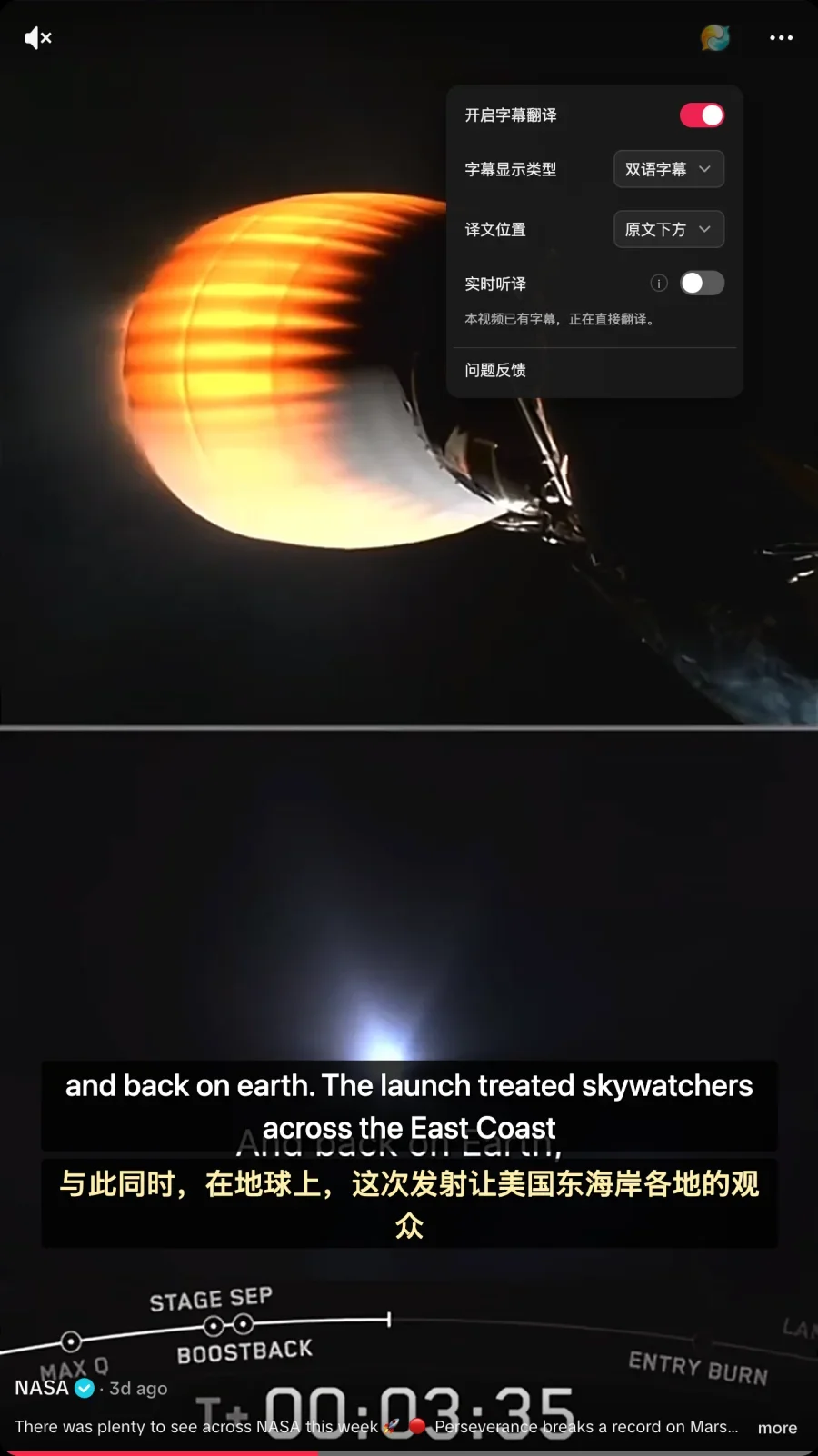
We tested this on a public video with original subtitles (such as an official NASA upload). When the extension detects existing captions, the panel displays "This video already has subtitles; translating directly." and simultaneously renders both the original text and the translation on screen.

During our test, Equalang displayed the original line "released 12 small capsules into Earth's atmosphere" alongside the translation "向地球大气层释放了12个小型舱体,". Note that if the video itself has hardcoded white English subtitles burned into the frame, the extension's subtitle box may partially overlap with them.
3. Uncaptioned Content & TikTok LIVE: Enabling Real-Time Speech Translation
For uncaptioned short video clips or ongoing TikTok LIVE broadcasts, real-time speech translation can turn the host's voice into bilingual subtitles on the fly.
After opening an uncaptioned video or entering a livestream room, open the Equalang panel:
- Turn on the "Real-Time Translation" toggle;
- Keep Source Language set to "Auto Detect";
- Keep Translation Mode set to "Standard";
- You can also configure "Bilingual Subtitles" and choose whether the translation appears above or below the original text.
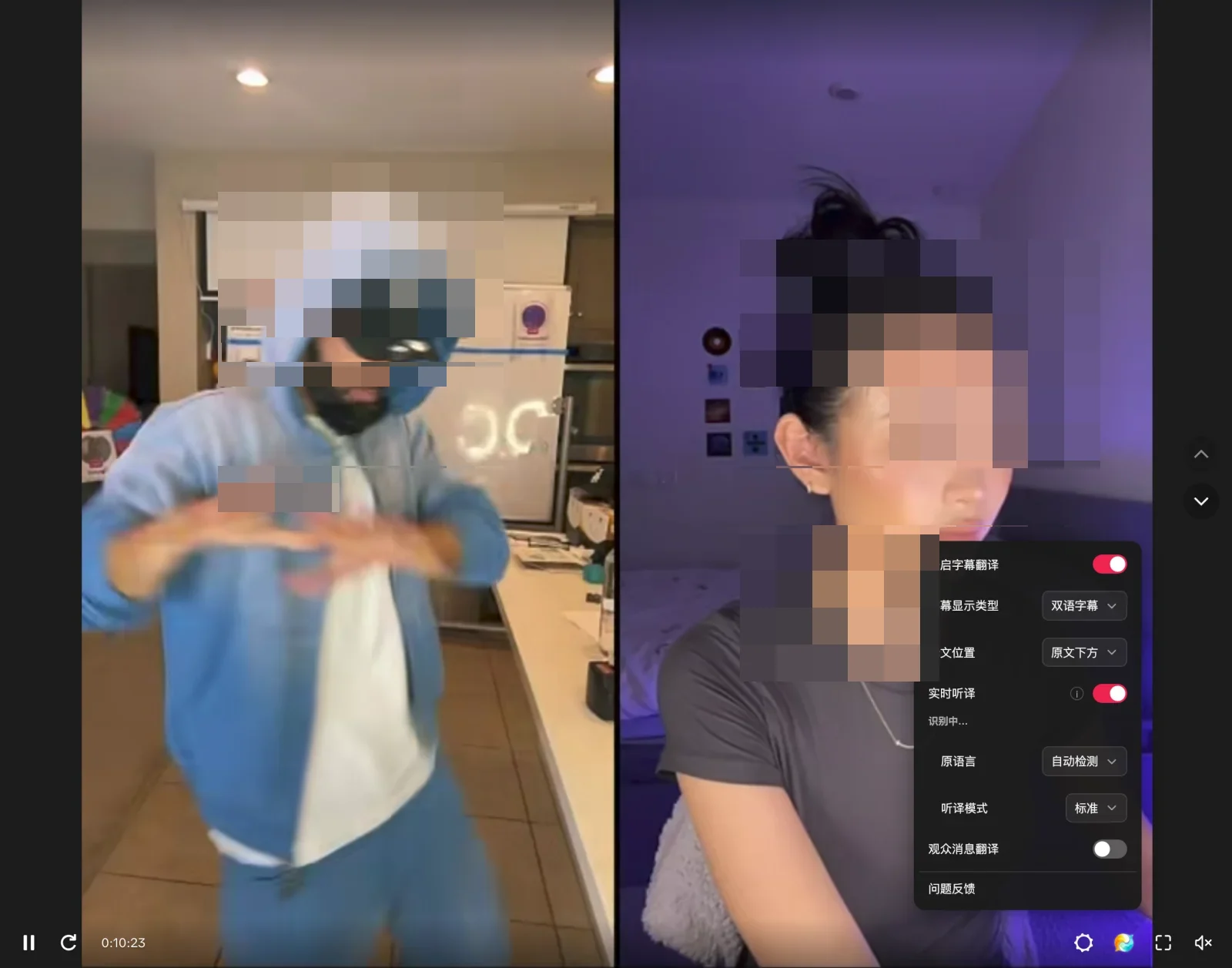
We tested real-time translation during a TikTok LIVE stream featuring creator DanRue in a split-screen PK battle with another host. Once activated, the panel status displayed "Recognizing...", and bilingual subtitles appeared beneath the split-screen stream.
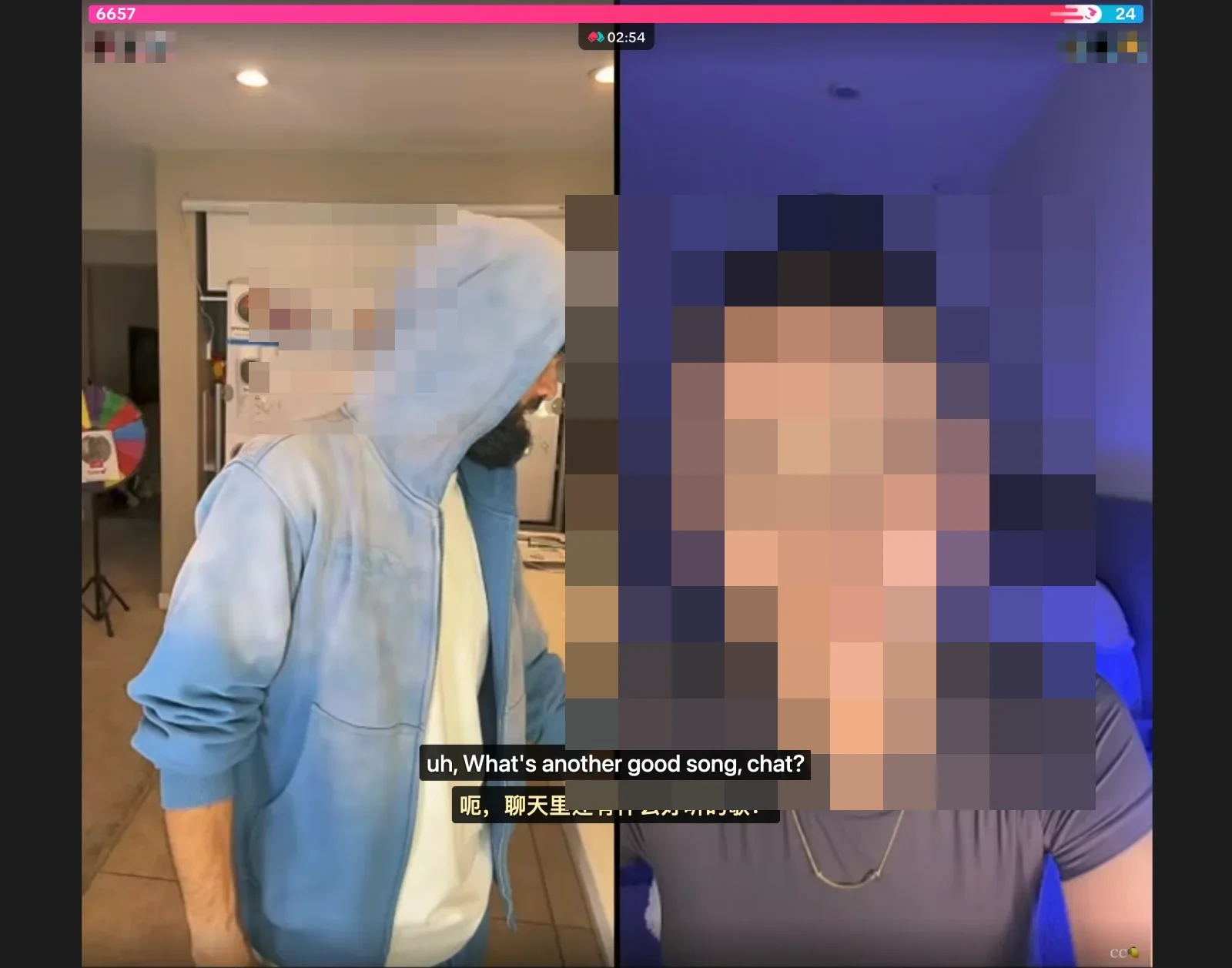
In the test footage, as the host interacted with viewers, the subtitles showed the original line "uh, What's another good song, chat?" in real time alongside the translation "呃,聊天里还有什么好听的歌?". Here, the host's use of "chat" refers to the stream's audience, rendered literally as "in chat" (聊天里)—illustrating the realistic output of streaming conversational translation.
4. Important Considerations and Limitations
When using bilingual subtitles and real-time speech translation, keep the following technical limitations and constraints in mind:
- Impact of Complex Audio Environments on Speech Recognition: Real-time speech translation depends on audio clarity. If background music (BGM) is too loud, severe ambient noise is present, or multiple speakers talk over each other at once, transcription accuracy can be compromised, leading to sentence boundary errors or missed words.
- Encrypted Video Limitations: Due to underlying browser security restrictions, encrypted streams cannot be transcribed directly; translation must rely on subtitle tracks provided by the video source.
- Latency Characteristics of Streaming Translation: Speech translation needs to buffer a sufficient segment of the audio signal to determine context and word order. Consequently, there is a natural processing buffer between spoken words and translated text, meaning zero-latency synchronization is not possible.
5. Tips and Troubleshooting Checklist
To ensure the best viewing experience on TikTok Web, refer to the following tips:
- Check for Native Captions First: When opening a video, first see if the player offers built-in captions. If captions already exist, the extension can translate them directly.
- Enable Real-Time Translation for Uncaptioned Content as Needed: For uncaptioned videos or livestreams, manually enable Real-Time Translation for automated speech-to-text assistance.
- Customize Your Subtitle Layout: Depending on your reading preferences, switch between "Bilingual Subtitles" and "Translation Only" in the settings panel, and position the translated text either above or below the original.
Sources
- TikTok Help Center (Accessibility and Caption Settings): https://support.tiktok.com/
- Equalang Official Website: https://equalang.com/