Watching SOOP Streams and Catch Clips: A Guide to Real-Time Translation and Bilingual Subtitles
 Equalang
In brief
Explore subtitle options for live streams and Catch clips on SOOP (formerly AfreecaTV). Learn how to use real-time speech translation alongside built-in AI features to get bilingual subtitles.
Keywords: SOOP; AfreecaTV; live stream subtitles; real-time speech translation; bilingual subtitles; Catch clips
As one of South Korea's longest-standing streaming platforms, AfreecaTV officially rebranded as SOOP in 2024. From StarCraft ASL and professional League of Legends player POV streams to high-stakes streamer showdowns across top titles, SOOP remains a premier hub for Korean esports and high-level gaming broadcasts. Beyond standard live streams, the platform's Catch video clip feature also makes it easy for viewers to save and replay top streamer highlights.
For viewers watching broadcasts across languages, comprehension is often a challenge: esports and gaming streams move quickly and are filled with specialized gaming terminology and streamers' personal slang. While SOOP officially rolled out native AI real-time subtitles and AI chat translation in 2026, third-party real-time speech translation tools remain a practical supplementary solution for channels without native subtitles enabled, or when viewers want to see the original audio and Chinese translation side-by-side for comparison.
When you need bilingual comparison or official subtitles are missing, how can you enable real-time speech translation on SOOP live streams and Catch clips using a browser extension? This article explains the setup process and key usage tips.
1. Setting Up Real-Time Speech Translation and Bilingual Subtitles in Live Streams
Open SOOP Global live streams (play.sooplive.com) in a desktop browser. After installing and logging into the Equalang extension, a subtitle tool icon will appear on the player interface. Click it to expand the control panel and configure your subtitle settings as needed:
- Subtitle Display Mode: Supports "Bilingual Subtitles" or "Translation Only", with the option to display translations "Below Original" or "Above Original".
- Language and Mode Settings: Supports enabling "Real-Time Speech Translation", allowing you to set the source language to a specific language (such as English or Korean) or keep auto-detection enabled, with translation modes such as "Standard".
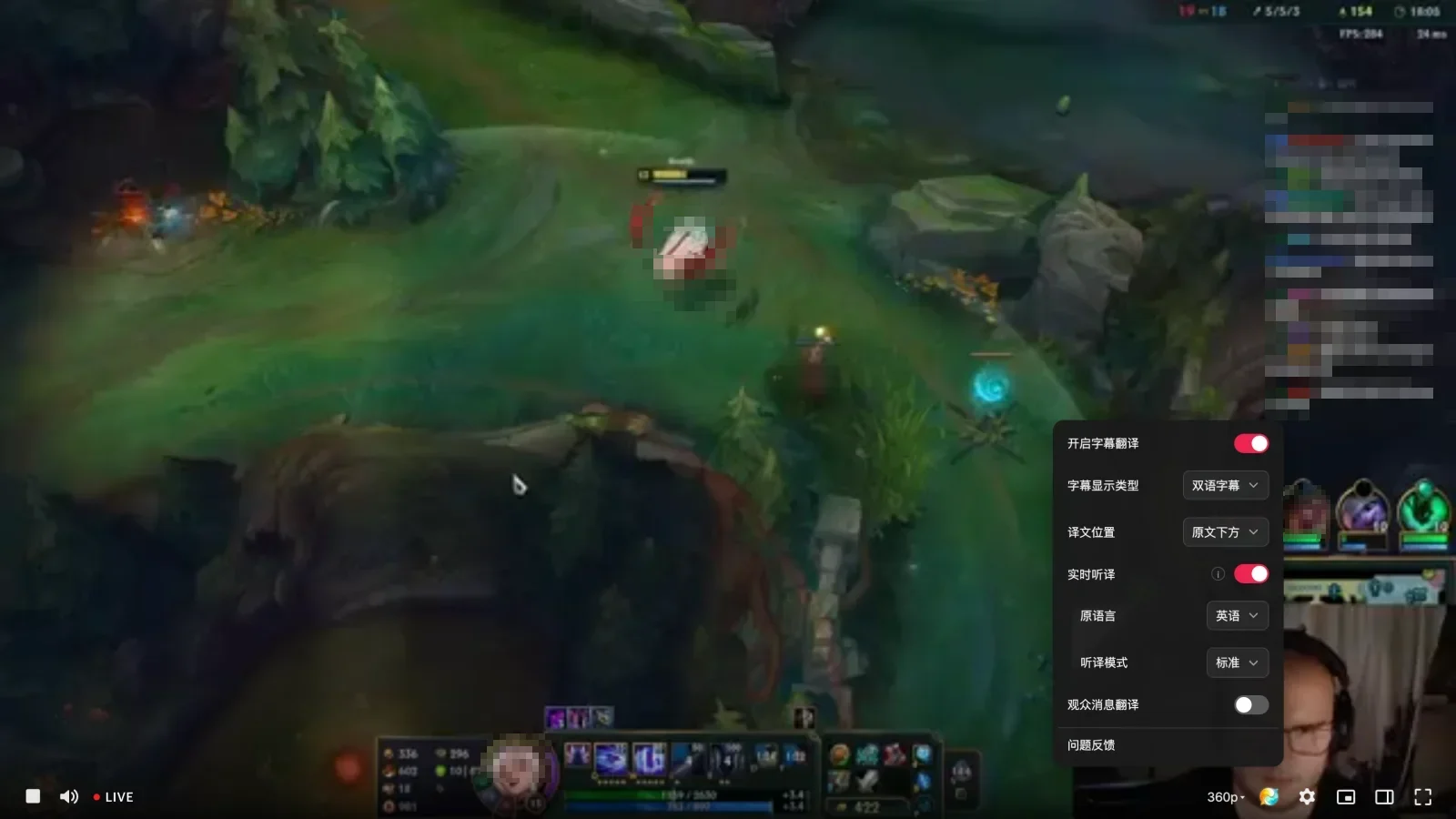
In our practical test, we opened an English League of Legends live stream on SOOP Global, selected "English" as the source language in the extension panel, set the mode to "Standard", and enabled real-time speech translation. Adaptive bilingual subtitles were immediately generated at the bottom of the player screen. For example, when the streamer discussed their equipment progress, the interface displayed the original text alongside the translation:
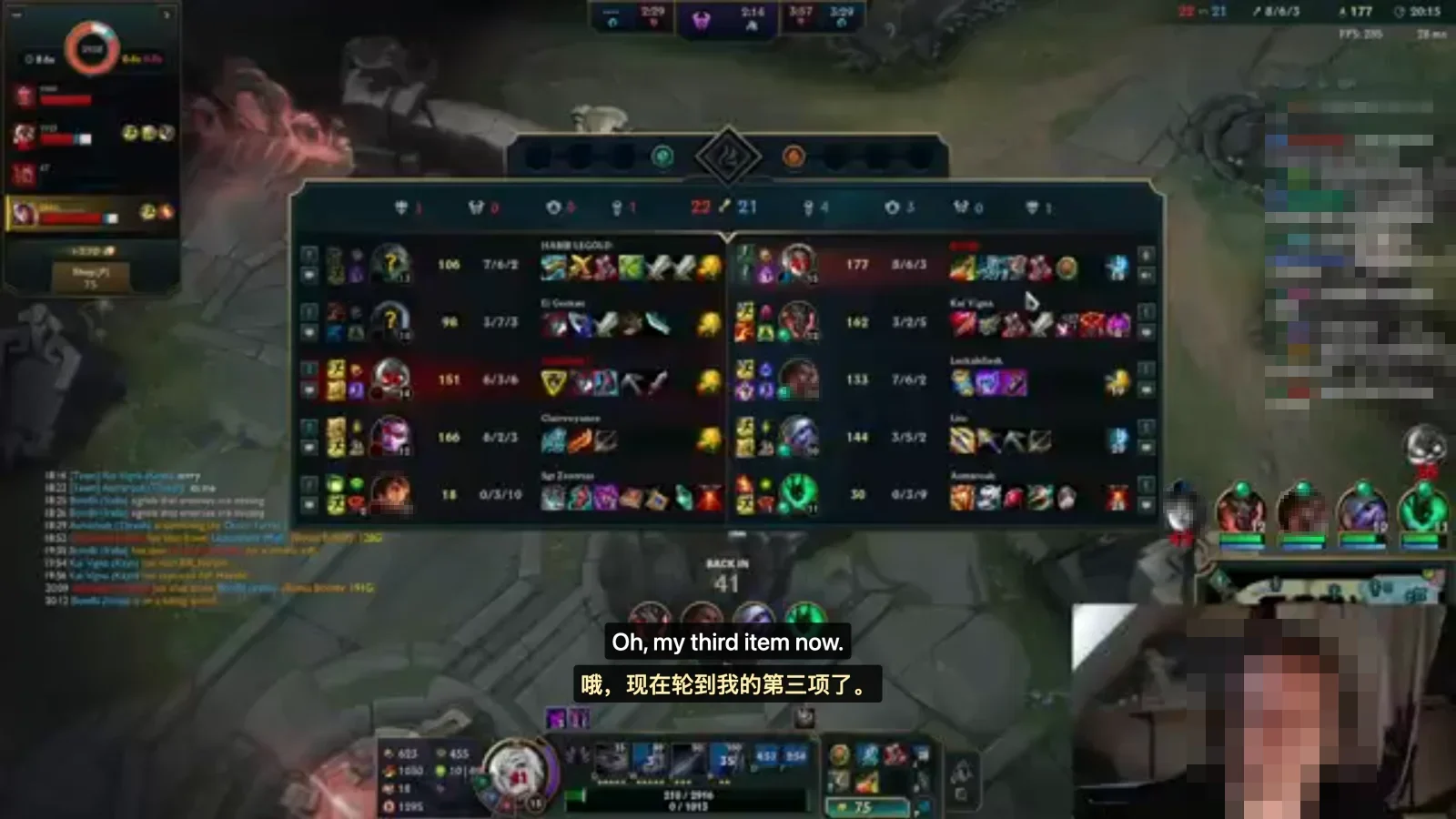
While watching live streams, keep the following usage tips in mind:
- Manually specify the source language: If a stream contains a high volume of loanword gaming terms or player IDs in English, automatic language detection may occasionally drift. If you clearly know the primary language spoken by the streamer (e.g., English or Korean), manually selecting the source language in the panel will typically provide more consistent transcription results.
- Understand contextual variations in word meaning: Real-time translations are generated using general-domain corpora, which may result in literal translations in specific game contexts. For example, in the test above, "item" referring to an in-game equipment piece was translated literally as "第三项" (third item/entry); viewers can easily deduce the intended meaning by following the on-screen gameplay.
2. Subtitle Assistance for Catch Highlight Clips
In addition to full-length live streams, Catch is SOOP's short-video clip feature that allows viewers to capture, save, and share exciting moments during a broadcast.
When browsing through various Catch highlight clips, the video window typically switches dynamically along with the playlist. The extension displays bilingual subtitles directly on the active video player, allowing viewers to quickly follow what the streamer says during clutch kills or humorous moments as they browse through consecutive clips.
3. Comparison of Common Viewing Aids and Technical Limitations
To help viewers choose the right viewing solution for their needs, here is an objective comparison of several mainstream approaches:
- SOOP Native Player: Delivers clear, smooth video quality and supports official AI live subtitles and AI chat translation. However, some streams may not have this feature turned on, and it primarily defaults to a single target language, rarely offering side-by-side bilingual subtitles.
- General Browser Webpage Translation: Well-suited for translating static text like page navigation and user profile pages, but it targets DOM text and cannot access or transcribe audio streams inside the media player.
- Traditional External Subtitle Plugins: Typically depend on pre-made local subtitle files (such as SRT or VTT) and cannot be applied directly to real-time live streams without pre-existing subtitles.
- Equalang Browser Extension: Generates bilingual subtitles for live streams without subtitles, supports both bilingual comparison and translation-only displays, and serves as an effective supplement when official subtitles are unavailable or when bilingual comparison is desired.
When using real-time speech translation to watch audiovisual content, certain technical limitations naturally apply:
- Complex Ambient Audio and Audio Mixing Interference: Real-time speech translation depends on relatively clean vocal input. During chaotic teamfights with dense skill sound effects, loud background music, or multiple commentators shouting at once, diminished vocal clarity may affect transcription accuracy. Conversely, recognition is notably more consistent during clean vocal segments such as pre-match analysis, post-match interviews, or solo commentary.
- Semantic Segmentation and Natural Buffering: To produce coherent, natural translations, the system must receive relatively complete semantic thought groups before transcribing and translating them. Consequently, there is a natural, brief delay compared to real-time speech, making zero-latency instantaneous display impossible.
- Digital Rights Management (DRM) Restrictions: Standard public live streams and Catch clips on SOOP can be captured and transcribed normally. However, on copyright-protected streams encrypted with browser DRM, browser security restrictions prevent direct extraction of the audio channel, meaning real-time speech translation will not work.
4. 1-Minute Pre-Stream Checklist
Before a match starts or your favorite streamer goes live, taking a minute to verify these settings will help ensure a smoother viewing experience:
- 1. Verify the Domain: Open SOOP Global (
play.sooplive.com) in your desktop browser and make sure the player loads properly. - 2. Set Appropriate Target and Source Languages: Set the target language to "Simplified Chinese" in the extension panel. Depending on the stream content, set the source language to "Korean" or "English", or leave auto-detection enabled.
- 3. Select Subtitle Layout: Select "Bilingual Subtitles" or "Translation Only" based on your viewing habits, and choose whether translations are placed "Below Original" or "Above Original".
- 4. Maintain Reasonable Expectations: Rely on subtitles during clear vocal segments such as tactical analysis, post-match interviews, and casual streamer chat. During intense firefights and dense sound effects, focus primarily on the gameplay action on screen.
Sources
- SOOP (AfreecaTV) Official Live Streaming Platform: https://www.sooplive.com/
- Equalang Browser Extension: https://equalang.com/extension