How to Watch RUTUBE Russian Live Streams: Bilingual Subtitles & Real-Time Audio Translation
 Equalang
In brief
Live streams on RUTUBE—such as news broadcasts, sports events, or gaming streams—rarely provide subtitles. This guide explains how to translate existing subtitles using a browser extension, or enable real-time audio translation to generate bilingual subtitles when captions are missing.
Keywords: RUTUBE live subtitles; Russian live stream translation; real-time audio translation; bilingual subtitles; Equalang
When watching live streams on the Russian video platform RUTUBE—whether news channels, sports events, or gaming broadcasts—the biggest challenge for non-native Russian speakers is the lack of subtitles. The vast majority of live streams have no captions at all. With hosts and guests speaking at a rapid pace, keeping up by ear alone is difficult, and waiting for someone to clip, translate, and re-upload the footage later is not an option for live events.
The solution is to use a bilingual subtitle tool directly in your browser. RUTUBE is included in the list of supported live streaming platforms published on the official Equalang website: you can translate existing subtitles when available, or try real-time audio translation when there are no subtitles (subject to browser and video limitations).
How to Try Enabling Bilingual Subtitles on RUTUBE Live Streams
Most live stream pages on the RUTUBE web client (with URLs like rutube.ru/live/video/...) do not have an original subtitle track. Here is how to use the Equalang browser extension to try generating bilingual subtitles while watching live:
- Install the Equalang extension on a desktop browser (Chrome, Edge, and Firefox are supported; Mac users can also install the temporary Safari version) and log in.
- Open the active RUTUBE live stream page.
- If the video includes original subtitles, you can turn on subtitle translation directly. If there are no original subtitles, open the extension panel and try enabling real-time audio translation, setting your target language to English (or Chinese and other supported languages).
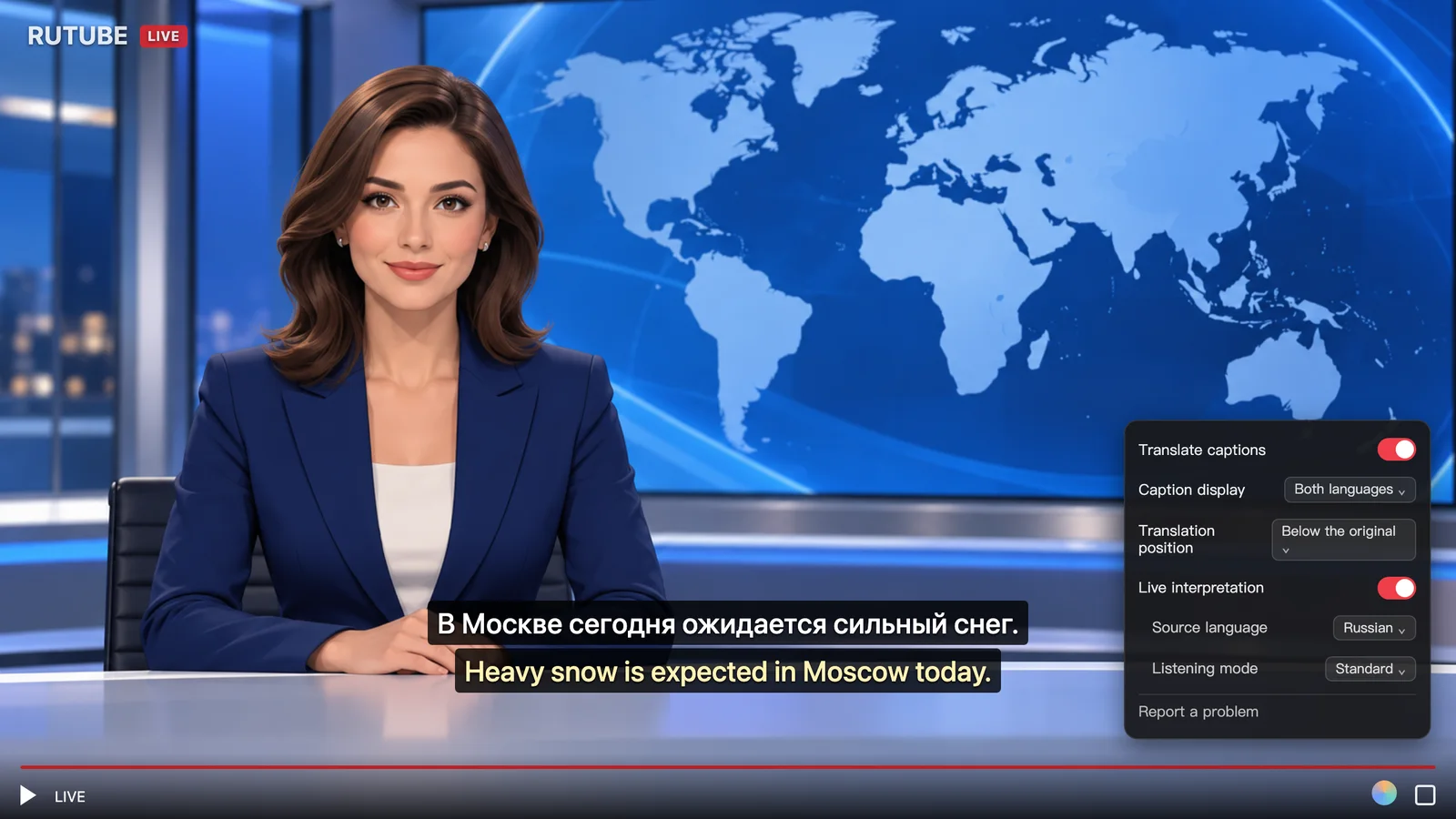
When real-time audio translation is supported, the extension listens to the speech in the video and displays both the recognized original text and the translated subtitles at the bottom of the screen (as shown in the illustration above with the Russian broadcast 'В Москве сегодня ожидается сильный снег.' and the corresponding English translation 'Heavy snow is expected in Moscow today.').
To help each subtitle line and translation appear in sync with the spoken words rather than lagging long after the speaker finishes, enabling real-time audio translation introduces a delay of a few seconds behind the live broadcast. Additionally, during the first minute or two after turning on audio translation or switching languages, the screen will temporarily display "Preparing subtitles"—after a brief wait, subtitles will appear normally.
Scope of Availability: RUTUBE is among the supported live platforms listed on Equalang's official website. If original subtitles exist, they can be translated; if no subtitles are available, you can try real-time audio translation. Availability and performance depend on your browser and the specific video stream.
Comparison with Other Common Solutions and Their Limitations
If you are also exploring other ways to watch foreign-language videos, here is how different approaches compare depending on the scenario:
- Standard Webpage Translation Extensions: Great for directly translating RUTUBE's webpage menus, channel titles, and video descriptions. However, if the live stream does not already have text subtitles, standard page translation tools cannot generate subtitles out of thin air from the video stream.
- Local Offline Speech Recognition Tools (e.g., running Whisper locally): Ideal for downloading completed, full-length VOD recordings to your computer and transcribing them into text for detailed study. However, these tools demand substantial computing power and require downloading the video before processing, making them unusable for active, ongoing live streams.
When actually using real-time audio translation to watch live streams, there are several practical limitations to keep in mind:
- Audio Interference from Background Noise: Real-time translation relies on recognizing speech in the video. Loud background music, intense in-game sound effects, or multiple people talking over one another can cause missed words or inaccurate sentence segmentation.
- Encrypted and Region-Restricted Streams Cannot Be Translated: For encrypted streams protected by Digital Rights Management (DRM) or channels that cannot be played due to licensing or network restrictions, browser extensions cannot access the audio feed and therefore cannot perform audio translation.
- Distinguishing Live Streaming Latency from Subtitle Desync: When watching RUTUBE live streams internationally, video loading and buffering inherently introduce some latency. This is a standard network transmission factor and should not be confused with audio-subtitle desynchronization.
If a news channel or creator you follow streams on RUTUBE, try turning on bilingual subtitles or real-time audio translation in the live room to save yourself the hassle of searching around for subtitled re-broadcasts.
Sources
- RUTUBE Official Website: https://rutube.ru/
- RUTUBE Live Channels: https://rutube.ru/feeds/live/
- Equalang Browser Extension Details: https://equalang.com/extension