How to Watch Vietnamese Esports on ON Live: Real-Time Commentary Translation Guide
 Equalang
In brief
Vietnamese streaming platform ON Live hosts esports tournaments and gaming streams for titles like VALORANT, League of Legends, and Arena of Valor. This guide shows how to enable real-time Vietnamese translation and bilingual subtitles using the Equalang browser extension.
Keywords: ON Live; Vietnamese esports streaming; real-time voice translation; bilingual subtitles; Vietnamese translation; Equalang
As a Vietnamese interactive live-streaming platform connecting streamers and gamers (game thủ), ON Live (onlive.vn) covers several popular categories, including Arena of Valor (Liên Quân Mobile), PUBG, League of Legends (Liên Minh Huyền Thoại), VALORANT, and football (Bóng đá).
For viewers who do not speak Vietnamese, watching live streams directly on ON Live presents a significant language barrier: tournament broadcasts and streamer co-streams are delivered via real-time live feeds with no pre-packaged subtitle tracks. Combined with Vietnamese's tonal system and fast-paced teamfight shoutcasting, relying solely on listening makes it difficult to follow the rapidly shifting state of the game.
Built-in browser full-page translation can only handle static text such as website navigation and channel bios, leaving it unable to translate live audio within audio/video streams. Meanwhile, conventional video subtitle plugins can only load local or existing subtitle files, rendering them ineffective against trackless live broadcasts.
This article explains how to use the Equalang browser extension's real-time live translation feature to turn Vietnamese commentary into live bilingual subtitles on ON Live.
1. Real-Time Speech Translation: Generating Bilingual Subtitles Over the Live Stream
During ON Live broadcasts, the platform itself does not provide multilingual simultaneous interpretation subtitles. The Equalang browser extension supports real-time speech recognition and translation for the playing video audio, overlaying a floating subtitle layer directly onto the video player.
Here is how to enable real-time Vietnamese translation in an ON Live stream:
- Install the Equalang extension in a desktop browser (such as Chrome, Edge, etc.) and open your target stream on ON Live.
- Click the extension icon embedded in the player control bar to open the settings menu.
- Set the target language to "Simplified Chinese" (or your preferred language), and keep the source recognition language on auto-detect or manually specify "Vietnamese."
- Turn on the "Live Translation" toggle, and a real-time subtitle overlay will appear on the video player.
For subtitle presentation, the extension provides essential display options:
- Bilingual vs. Translation Only: In the menu, select "Bilingual Subtitles" to view both the original Vietnamese and the translation, or switch to "Translation Only" for a cleaner viewing experience.
- Subtitle Position: Choose to display the translation "Below Original" or "Above Original," allowing you to adjust visual focus according to your viewing habits.
2. Hands-on Testing and Observations on ON Live
We tested real-time live translation during a live VALORANT tournament match on ON Live (VALORANT Challengers SEA: 2025 Split 3 | Chung Kết Tổng) and observed the following:
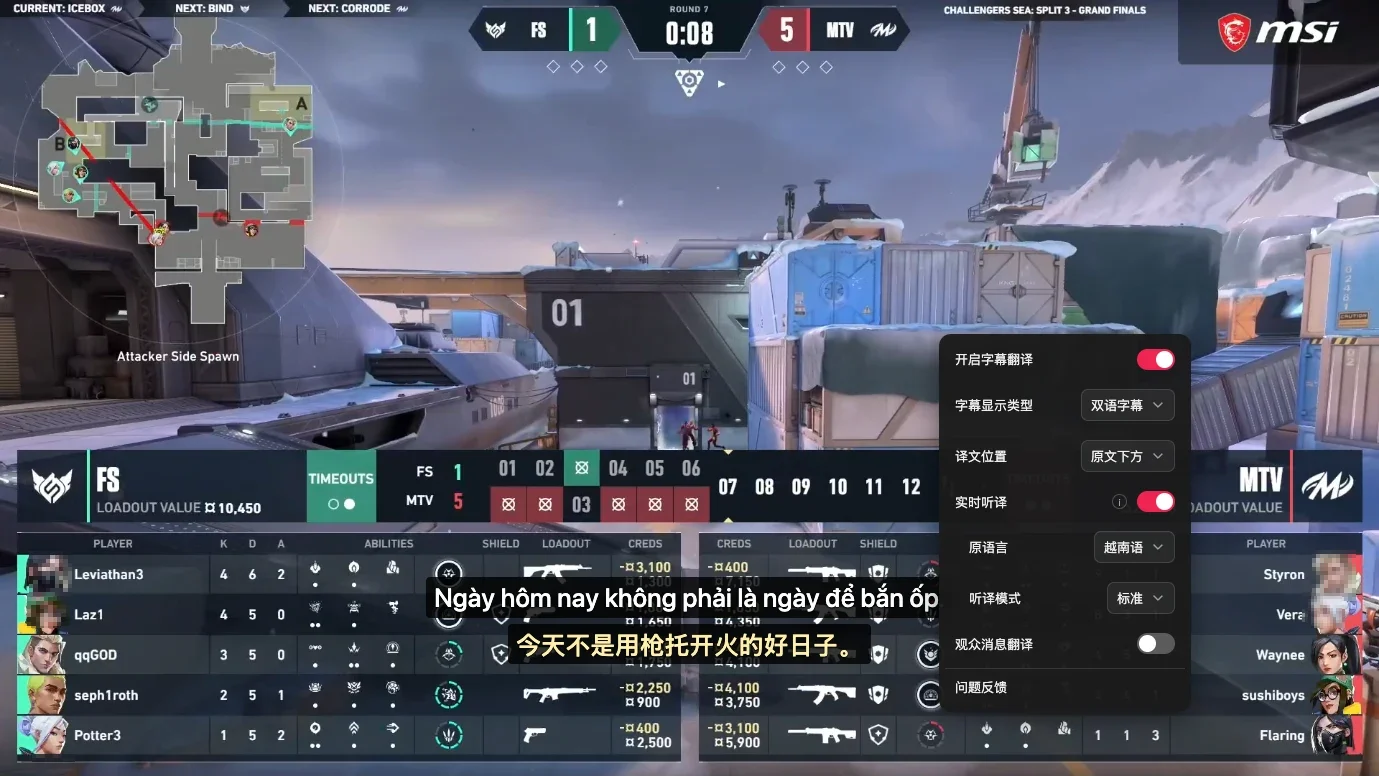
- Startup Notification and Buffering: Upon opening the stream, the extension indicated that no subtitles were detected and automatically enabled Live Translation, while noting that a brief buffer was required to synchronize subtitles. During the initial startup phase, the interface displayed "Recognizing..." for about a minute before starting to output bilingual subtitles.
- Translation Discrepancies with Gaming Terminology: As seen in the screenshot above, the caster's original line was
Ngày hôm nay không phải là ngày để bắn ốp, translated as "今天不是用枪托开火的好日子。" (Today is not a good day to fire with a rifle butt). In VALORANT, "ốp" is common slang used by players and casters for the Operator sniper rifle, which the model erroneously translated here as "rifle butt." When watching professional esports matches, translations may occasionally misunderstand localized game jargon or abbreviations. - Session Duration and Playback State: In this test, the live translation automatically shut off after about two minutes for reasons not yet confirmed; additionally, the live stream itself occasionally experienced stuttering or timeline jumps. Furthermore, if the web player initializes in a muted state, you must unmute the player audio to hear the commentary normally.
3. Comparison of Common Viewing Methods and Technical Limitations
To help viewers choose the right tool for their needs, we compared common viewing methods:
- Official ON Live Native Player: Runs stably, but the platform does not provide multilingual simultaneous interpretation subtitles, making it suitable only for viewers fluent in Vietnamese.
- General Browser Full-Page Translation: Suitable for browsing static web content like channel lists, match schedules, and text descriptions, but cannot process live audio streams within videos.
- Conventional Subtitle Extensions and Tampermonkey Scripts: Typically only intercept and translate existing closed caption (CC) tracks, leaving them ineffective against live streams without subtitle tracks.
- Equalang Browser Extension: Provides real-time speech translation for live streams, generating bilingual or monolingual subtitles over the player, though performance is subject to acoustic environments and game-specific terminology.
When relying on real-time speech translation to watch esports matches, there are several objective acoustic and processing limitations to keep in mind:
- Interference from Complex Background Audio on Speech Recognition: Real-time translation relies on clear voice signals. During intense esports teamfights, broadcasts are often accompanied by loud in-game background music, rapid ability sound effects, and multiple shoutcasters shouting over one another. In such low signal-to-noise ratio (SNR) environments, speech recognition accuracy can fluctuate. Conversely, transcription is generally much more reliable during solo commentary, pre-match analysis, or post-match recaps where the background audio is relatively clean.
- Processing Latency from Semantic Chunking: To ensure fluent word order and complete meaning, the system must capture a complete semantic phrase before generating the translation. Consequently, there is an inherent processing delay between speech and subtitle display, making instantaneous presentation impossible.
4. Pre-Match Quick Checklist
Before your match starts, take a minute to verify the following settings:
- 1. Confirm translation is enabled: In the player's embedded control panel, check that both "Enable Subtitle Translation" and "Live Translation" are turned on.
- 2. Verify the source language: Confirm in the menu that the source language is set to "Vietnamese" (or detected automatically) to ensure the model aligns with the right language.
- 3. Choose your preferred subtitle mode: Select either "Bilingual Subtitles" or "Translation Only" based on your preference, and position the translation above or below the original text.
- 4. Set reasonable expectations: Rely on subtitles for detailed information during segments with clear speech, such as tactical breakdowns and player interviews; during chaotic teamfights with layered audio effects, combine the subtitles with kill feed alerts and game state indicators for full context.
Sources
- ON Live Official Platform: https://www.onlive.vn/
- Equalang Browser Extension: https://equalang.com/extension