GoodShort Dual Subtitles Setup: Watch Short Dramas with Side-by-Side Translations
 Equalang
In brief
Learn how to use the Equalang browser extension to enable dual subtitles and real-time speech translation on GoodShort for the web. Overcome fast-paced dialogue and missing Chinese translations by viewing original lines and subtitles side-by-side on the same screen.
Keywords: GoodShort; short dramas; dual subtitles; real-time speech translation; Equalang
GoodShort features a wide variety of fast-paced, vertical micro-dramas centered on popular tropes such as billionaire conflicts and contractual romances. These series feature quick plot reversals, rapid-fire dialogue from the cast, and abundant casual spoken idioms. Many viewers accustomed to streaming on desktop web browsers face comprehension challenges: following raw English audio directly makes it easy to miss nuanced dialogue details, while the lack of accompanying Chinese translations can impair the viewing experience whenever unfamiliar vocabulary appears.
So, how can you display the original audio alongside translated subtitles on the GoodShort web player? This article demonstrates how to set up dual subtitles on the GoodShort website using the Equalang browser extension, as well as how to enable real-time speech translation when no readable subtitle track is detected.
1. Equalang Menu Settings: Enabling Dual Subtitles and Choosing Translation Placement
After navigating to the GoodShort website in a desktop browser (such as Chrome or Edge) and opening an episode playback page, you can quickly configure subtitles and speech translation via the Equalang extension menu.
Click to open the Equalang extension menu to configure these core display preferences:
- Enable Subtitle Translation and Dual-Language Display: Toggle on "Enable Subtitle Translation" in the menu, and set "Subtitle Display Type" to "Dual Subtitles" (you can also select "Translation Only" if preferred). In dual mode, the original English dialogue lines and Chinese translations are presented aligned one above the other.
- Choose Relative Translation Placement: Equalang allows you to switch the relative order between the original and translated text. Under "Translation Position," choose either "Below Original" or "Above Original."
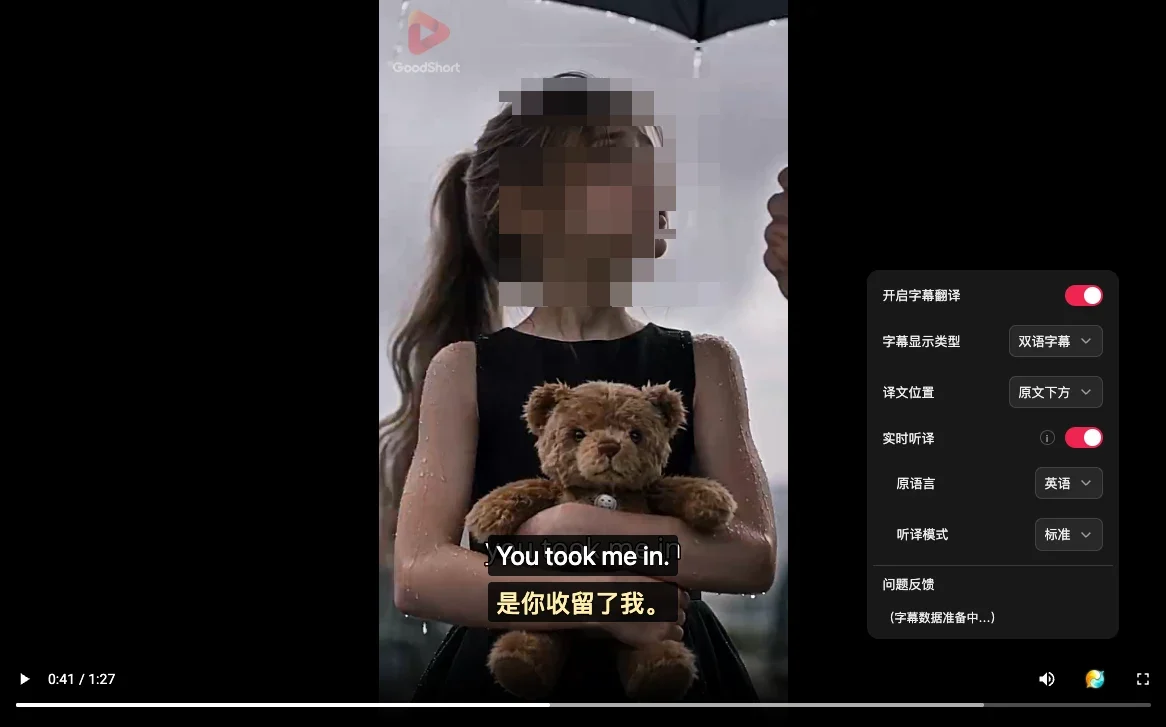
When you open the extension menu, the video player automatically pauses, allowing you to fine-tune your settings with ease.
2. When No Readable Subtitles Are Detected: Turn On Real-Time Speech Translation
On some short drama playback pages, the video source only contains hardcoded English subtitles burned directly into the picture, without an independent soft subtitle track provided by the web player.
We tested this scenario on Episode 1 (runtime: 1 minute 27 seconds) of the free GoodShort series Guardian to Groom. Upon opening the episode, the Equalang menu initially displayed the prompt: "No readable subtitles detected yet. Please enable player subtitles, or manually turn on real-time speech translation."
In this situation, simply turn on "Real-Time Speech Translation" in the menu and verify the following settings:
- Real-Time Speech Translation: On
- Source Language: English
- Translation Mode: Standard
- Subtitle Display Type: Dual Subtitles
- Translation Position: Below Original
Once enabled, play the video. Equalang will recognize spoken dialogue audio and present bilingual subtitles in sync. In our test (covering roughly 70 seconds of playback), the screen successfully displayed side-by-side bilingual subtitles:
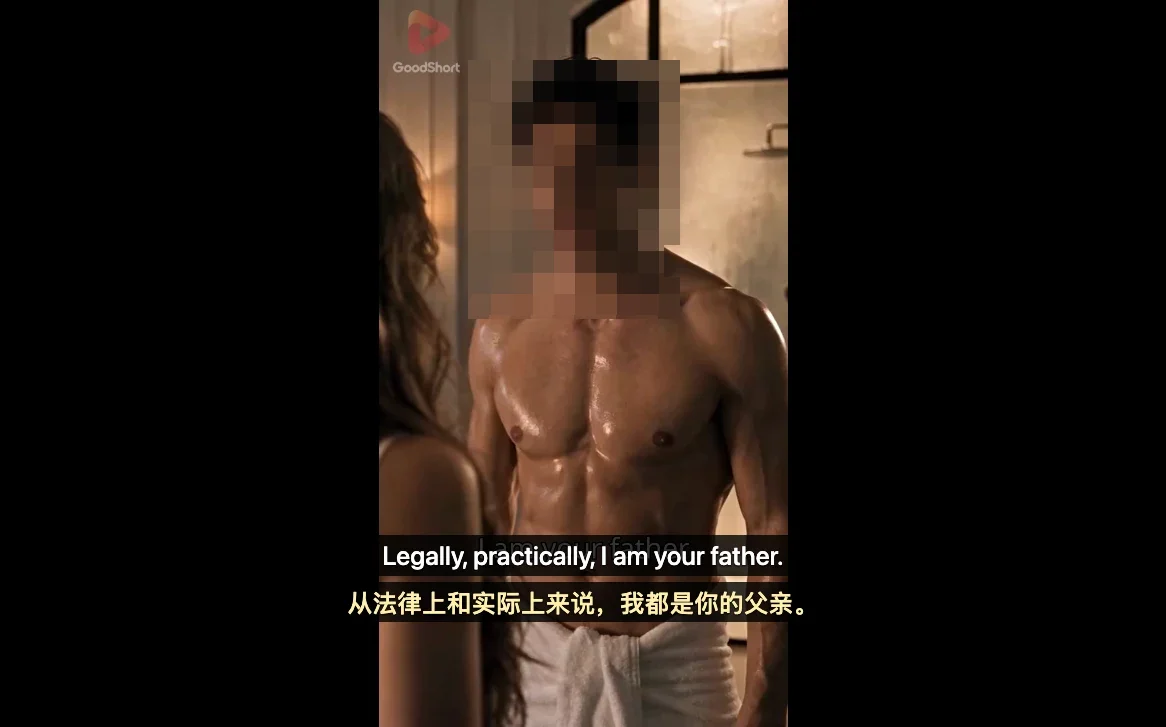
Additional bilingual dialogue lines captured during testing included: Come with me now. ("现在跟我走。"), I swore back then I'd be yours one day, ("我那时发誓,总有一天会成为你的人。"), Enough, Nora. ("够了,诺拉。"), and Who are you? ("你是谁?"). Directly behind the subtitle overlay, the burned-in English subtitles from the video source were also faintly visible.
3. Comparison of Common Subtitle Methods for Watching Dramas
To help you choose the most suitable method for your viewing habits, we have put together an objective comparison of common approaches:
- Watching Raw Video Directly: Relies entirely on the native video picture. If the source only carries hardcoded English text or lacks Chinese counterparts, unfamiliar spoken dialogue can impede comprehension.
- Standard Webpage Full-Text Translation Extensions: Designed primarily for static webpage layouts and text paragraphs; they typically cannot process video audio or player on-screen subtitles directly.
- Equalang Browser Extension: Delivers side-by-side dual subtitles on screen (offering "Dual Subtitles" and "Translation Only" display modes, along with placements above or below the original text), backed by real-time speech translation when no subtitle track is detected. Initial use requires installing the extension in a desktop browser.
4. Usage Tips and Practical Limitations
When watching short dramas with real-time speech translation, it is helpful to keep the following practical factors in mind:
- Impact of Background Sound Effects and Overlapping Voices: Micro-dramas feature frequent high-conflict scenes, often accompanied by loud background music (BGM), vigorous fight sequences, or heavy sound effects. In scenes where multiple characters speak over each other, complex audio mixing can interfere with voice recognition, resulting in phrasing deviations or occasionally missed words.
- Encrypted Video Limitations: Videos with DRM encryption (such as Netflix) cannot utilize real-time speech translation due to security restrictions; such platforms must rely on pre-existing subtitle tracks for translation.
- Processing Latency for Speech Recognition and Translation: Real-time speech translation must first receive and recognize character speech before generating the corresponding Chinese translation. Consequently, there is an inherent processing interval between audio output and subtitle rendering; absolute zero latency is not possible.
5. Practical Setup Steps for Watching Dramas
When streaming series on the GoodShort website, we recommend following these straightforward steps:
- Check Subtitle Prompts: After launching an episode, click the Equalang icon to inspect the menu. If it indicates that no subtitles are detected, toggle on "Real-Time Speech Translation" manually.
- Configure Display Mode and Position: Select "Dual Subtitles" as the subtitle display type, and position the translation "Below Original" or "Above Original" based on your natural line of sight.
Sources
- GoodShort Official Website: https://www.goodshort.com/
- Equalang Browser Extension Official Homepage: https://equalang.com/extension